
spring cloud(服务消费者(利用feign实现服务消费及负载均衡)——初学三)
Feign是一个声明式的Web Service客户端,我们只需要使用Feign来创建一个接口并用注解来配置它既可完成。
它具备可插拔的注解支持,包括Feign注解和JAX-RS注解。Feign也支持可插拔的编码器和解码器。
Spring Cloud为Feign增加了对Spring MVC注解的支持,还整合了Ribbon和Eureka来提供均衡负载的HTTP客户端实现。
一、准备工作
启动服务注册中心
启动服务提供方
将服务提供方端口修改后再次启动一个服务
访问 localhost:1111

二、创建消费者
1、创建spring boot项目(利用idea的Spring Initializr快速创建项目)
2、添加feign依赖
<?xml version="1.0" encoding="UTF-8"?>

<project xmlns="http://maven.apache.org/POM/4.0.0" xmlns:xsi="http://www.w3.org/2001/XMLSchema-instance"

    xsi:schemaLocation="http://maven.apache.org/POM/4.0.0 http://maven.apache.org/xsd/maven-4.0.0.xsd">

    <modelVersion>4.0.0</modelVersion>

    <groupId>com.daqsoft</groupId>

    <artifactId>customer_demo</artifactId>

    <version>0.0.1-SNAPSHOT</version>

    <packaging>jar</packaging>

    <name>customer_demo</name>

    <description>Demo project for Spring Boot</description>

    <parent>

        <groupId>org.springframework.boot</groupId>

        <artifactId>spring-boot-starter-parent</artifactId>

        <version>1.5.4.RELEASE</version>

        <relativePath/> <!-- lookup parent from repository -->

    </parent>

    <properties>

        <project.build.sourceEncoding>UTF-8</project.build.sourceEncoding>

        <project.reporting.outputEncoding>UTF-8</project.reporting.outputEncoding>

        <java.version>1.8</java.version>

        <spring-cloud.version>Dalston.SR1</spring-cloud.version>

    </properties>

    <dependencies>

        <dependency>

            <groupId>org.springframework.boot</groupId>

            <artifactId>spring-boot-starter-web</artifactId>

        </dependency>

        <dependency>

            <groupId>org.springframework.boot</groupId>

            <artifactId>spring-boot-starter-test</artifactId>

            <scope>test</scope>

        </dependency>

        <dependency>

            <groupId>org.springframework.cloud</groupId>

            <artifactId>spring-cloud-starter-eureka</artifactId>

        </dependency>

        <!--添加feign依赖-->

        <dependency>

            <groupId>org.springframework.cloud</groupId>

            <artifactId>spring-cloud-starter-feign</artifactId>

        </dependency>

    </dependencies>

    <dependencyManagement>

        <dependencies>

            <dependency>

                <groupId>org.springframework.cloud</groupId>

                <artifactId>spring-cloud-dependencies</artifactId>

                <version>${spring-cloud.version}</version>

                <type>pom</type>

                <scope>import</scope>

            </dependency>

        </dependencies>

    </dependencyManagement>

    <build>

        <plugins>

            <plugin>

                <groupId>org.springframework.boot</groupId>

                <artifactId>spring-boot-maven-plugin</artifactId>

            </plugin>

        </plugins>

    </build>

</project>
3、启动类中添加注解
package com.daqsoft;

import org.springframework.boot.SpringApplication;

import org.springframework.boot.autoconfigure.SpringBootApplication;

import org.springframework.boot.context.embedded.LocalServerPort;

import org.springframework.cloud.client.discovery.EnableDiscoveryClient;

import org.springframework.cloud.client.loadbalancer.LoadBalanced;

import org.springframework.cloud.netflix.feign.EnableFeignClients;

import org.springframework.context.annotation.Bean;

import org.springframework.web.client.RestTemplate;

@SpringBootApplication

//用来发现注册服务

@EnableDiscoveryClient

@EnableFeignClients

public class CustomerDemoApplication {

    public static void main(String[] args) {

        SpringApplication.run(CustomerDemoApplication.class, args);

    }

}
4、定义compute-service服务接口
package com.daqsoft;

import org.springframework.cloud.netflix.feign.FeignClient;

import org.springframework.web.bind.annotation.RequestMapping;

import org.springframework.web.bind.annotation.RequestMethod;

import org.springframework.web.bind.annotation.RequestParam;

/**

 * @Description Created by liaoxx on 2017-6-12.

 */

//服务提供方的名称

@FeignClient("compute-service")

public interface ComputerClient {

    @RequestMapping(method = RequestMethod.GET, value = "/add")

    Integer add(@RequestParam(value = "a") Integer a, @RequestParam(value = "b") Integer b);

}
5、web端调用
package com.daqsoft;

import org.springframework.beans.factory.annotation.Autowired;

import org.springframework.web.bind.annotation.RequestMapping;

import org.springframework.web.bind.annotation.RequestMethod;

import org.springframework.web.bind.annotation.RestController;

import org.springframework.web.client.RestTemplate;

/**

 * @Description Created by liaoxx on 2017-6-12.

 */

@RestController

public class CustomController {

    @Autowired

    private ComputerClient client;

    @RequestMapping(value = "/add", method = RequestMethod.GET)

    public Integer add(){

        return client.add(10,20);

    }

}
6、配置文件不变
spring.application.name=ribbon-consumer

server.port=3333

#服务注册中心地址

eureka.client.serviceUrl.defaultZone=http://localhost:1111/eureka/
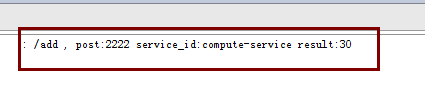
7、启动服务,多次访问 localhost:3333
在服务提供方不同端口打印的信息

spring cloud(服务消费者(利用feign实现服务消费及负载均衡)——初学三)的更多相关文章
- Spring Cloud系列之使用Feign进行服务调用
在上一章的学习中,我们知道了微服务的基本概念,知道怎么基于Ribbon+restTemplate的方式实现服务调用,接着上篇博客,我们学习怎么基于Feign实现服务调用,请先学习上篇博客,然后再学习本 ...
- Spring Cloud 入门教程(五): Ribbon实现客户端的负载均衡
接上节,假如我们的Hello world服务的访问量剧增,用一个服务已经无法承载, 我们可以把Hello World服务做成一个集群. 很简单,我们只需要复制Hello world服务,同时将原来的端 ...
- spring cloud 2.x版本 Feign服务发现教程(内含集成Hystrix熔断机制)
前言 本文采用Spring cloud本文为2.1.8RELEASE,version=Greenwich.SR3 本文基于前两篇文章eureka-server和eureka-client的实现. 参考 ...
- springcloud干活之服务消费者(feign)
springcloud系列文章的第三篇 本章将继续讲述springcloud的消费者(feign) Spring Cloud Feign是一套基于Netflix Feign实现的声明式服务调用客户端. ...
- 【SpringCloud】第三篇: 服务消费者(Feign)
前言: 必需学会SpringBoot基础知识 简介: spring cloud 为开发人员提供了快速构建分布式系统的一些工具,包括配置管理.服务发现.断路器.路由.微代理.事件总线.全局锁.决策竞选. ...
- Spring Cloud(二):Eureka 服务注册中心
前言 服务治理 随着业务的发展,微服务应用也随之增加,这些服务的管理和治理会越来越难,并且集群规模.服务位置.服务命名都会发生变化,手动维护的方式极易发生错误或是命名冲突等问题.而服务治理正是为了解决 ...
- Spring Cloud系列(三):服务消费与负载均衡
上一篇介绍了服务提供者,有了注册中心和服务提供者,我们就可以进行服务消费了.Spring Cloud可以通过RestTemplate+Ribbon和Feign这两种方式消费服务. 我们仍然在上一篇的项 ...
- Spring Cloud 入门教程 - 搭建配置中心服务
简介 Spring Cloud 提供了一个部署微服务的平台,包括了微服务中常见的组件:配置中心服务, API网关,断路器,服务注册与发现,分布式追溯,OAuth2,消费者驱动合约等.我们不必先知道每个 ...
- spring boot 2.0.3+spring cloud (Finchley)7、服务链路追踪Spring Cloud Sleuth
参考:Spring Cloud(十二):分布式链路跟踪 Sleuth 与 Zipkin[Finchley 版] Spring Cloud Sleuth 是Spring Cloud的一个组件,主要功能是 ...
- 《Spring Cloud》学习(一) 服务治理!
前言:之前网上学习过Spring Cloud,对于工作上需要是足够了,总归对于一些方面一知半解,最近难得有些闲暇时间,有幸读了崔永超先生的<Spring Cloud 微服务实战>,一方面记 ...
随机推荐
- VS打开SSAS或SSIS报错的解决办法
---------------------------Microsoft Visual Studio---------------------------无法加载类型为“Microsoft.Analy ...
- 什么是XML?
XML被设计用来传输和存储数据. HTML被设计用来显示数据. 什么是XML? XML指可扩展标记语言(EXtensible Markup Language) XML是一种标记语言,很类似HTML X ...
- Error starting ApplicationContext. To display the conditions report re-run your application with 'debug' enabled.
Error starting ApplicationContext. To display the conditions report re-run your application with 'de ...
- 【PHP面试题】通俗易懂的两个面试必问的排序算法讲解:冒泡排序和快速排序
又到了金三银四找工作的时间,相信很多开发者都在找工作或者准备着找工作了.一般应对面试,我们无可厚非的去刷下面试题.对于PHPer来说,除了要熟悉自己所做的项目,还有懂的基本的算法.下面来分享下PHP面 ...
- GUI学习之〇——PyQt5安装
GUI(Graphical User Interface)是程序和软件使用者的接口,好的GUI是一个良好的软件的前提,在这里演示一下用PyQt5做一个GUI的方法 软件需求:python3.6 用的是 ...
- sshpass 使用方法
首先下载sshpass并且安装 $ tar -zxvf sshpass-1.06.tar.gz $ cd sshpass-1.06 $ ./configure --prefix=/usr/local/ ...
- 获取input标签中file的内容
1.直接获取文件中的内容: <form id="form" method="post" enctype="multipart/form-data ...
- Alpha阶段项目复审(冲鸭队)
Alpha阶段项目复审(冲鸭队) 组名 优点 缺点 排名 天冷记得穿秋裤队 支持文件离线开源下载,没有限速 部分功能未实现 1 中午吃啥队 点餐系统用户需求较高,系统功能完善 界面可以再完善一下些 2 ...
- 利用ArcGIS-Server瓦片制作离线地图包(*.tpk)_详细流程
1.写在前面 本人是综合了好几个资料才最终制作成功,在这个过程中发现网上好多博客写的步骤不是很详细,因此就把自己的详细制作步骤全部分享出来,可以供需要的小伙伴参考. (1)本文档不讨论tpk文件的详细 ...
- .net core mvc发布项目到IIS上出现500错误
如题,我把.net core mvc项目以应用程序方式挂到IIS默认网站下,结果出现了如下错误:HTTP Error 500.0 - ANCM In-Process Handler Load Fail ...