
boostrap 模态框
<div class="modal fade" id="myModal" tabindex="-1" role="dialog"
aria-labelledby="myModalLabel">
<div class="modal-dialog" role="document">
<div class="modal-content">
<div class="modal-header">
<button type="button" class="close" data-dismiss="modal"
aria-label="Close">
<span aria-hidden="true">×</span>
</button>
<h4 class="modal-title" id="myModalLabel">Modal title</h4>
</div>
<div class="modal-body"></div>
<div class="modal-footer">
<button type="button" class="btn btn-default" data-dismiss="modal">Close</button>
<button type="button" class="btn btn-primary">Save changes</button>
</div>
</div>
</div>
</div>
<a href="页面url" data-toggle="modal" data-target="#myModal">调用模态框</a> 并且把新页面内容加载到
div.modal-content 内并弹出模态框
加载的页面需要按modal-header modal-body modal-footer书写
比如
<div class="modal-header">
<button type="button" class="close" data-dismiss="modal">
<span aria-hidden="true">×</span>
</button>
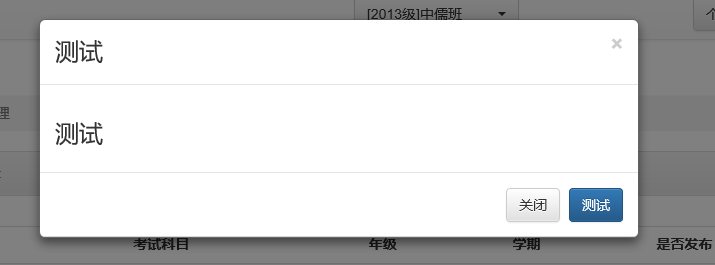
<h3 class="modal-title" id="myModalLabel">测试</h3>
</div> <div class="modal-body">
<h3>测试</h3>
</div> <div class="modal-footer">
<button type="button" class="btn btn-default" data-dismiss="modal">关闭</button>
<button type="submit" class="btn btn-primary">测试</button>
</div>
data-dismiss="modal" 控件加上该属性点击关闭模态框
下面是显示效果
boostrap 模态框的更多相关文章
- Boostrap模态框,以及通过jquery绑定td的值,使模态框回显
做页面不管是登录或是修改信息,难免会使用到模态框,在此分享一个比较漂亮的模态框 Boostrap模态框 使用之前首先导入jquery-3.2.1.min.js,和bootstrap.min.js 先添 ...
- Boostrap 模态框 水平垂直居中问题
var editorB = new UE.ui.Editor({ initialFrameHeight: 350, initialFrameWidth: 600 }); ...
- boostrap中模态框显示在阴影之下
boostrap中模态框显示在阴影之下 出现这种情况的原因我开始也搞了很久,问题出现在哪里呢? 有事问百度,在百度上查了一下资料,他们主要的解决办法:是 修改标签的z-index属性的值, 我试着改了 ...
- js控制Bootstrap 模态框(Modal)插件
js控制Bootstrap 模态框(Modal)插件 http://www.cnblogs.com/zzjeny/p/5564400.html
- Bootstrap模态框按钮
1.触发模态框弹窗的代码 这里复制了一段Bootstrap模态框的代码 <h2>创建模态框(Modal)</h2> <!-- 按钮触发模态框 --> <but ...
- 解决bootstrap模态框内输入框无法获取焦点
bootstrap 模态框中的input标签在某些情况下会无法获取焦点. 最终解决方法:去除模态框的 tabindex="-1" 属性即可
- 使用RequireJs和Bootstrap模态框实现表单提交
下面我将使用requirejs结合模态框实现三五行代码部署表单提交操作. 传统开发思路如下:
- 使用js实现显示系统当前时间并实现倒计时功能并触发模态框(遮罩)功能
常常在我们的网页中需要倒计时来触发一些函数,例如遮罩等,在本项目中,通过使用jquery,bootstrap,实现了显示系统当前时间,并且实现了倒计时的功能,倒计时实现后将会弹出模态框(遮罩层).模态 ...
- 修改bootstrap modal模态框的宽度
原文链接:http://blog.csdn.net/wuhawang/article/details/52252912 修改模态框的宽度很简单,修改width属性就可以了 但是要注意的一点是,修改的不 ...
随机推荐
- [原创]Linux-day1
原创:转发务必注明出处http://www.cnblogs.com/0zcl/p/6077298.html 一.Linux的基本原则 由目的单一的小程序组成:组合小程序完成复杂任务 一切皆文件 尽量避 ...
- MYSQL基础操作之数据约束与关联查询
一.MYSQL约束 1.默认值约束,当字段没有插入值的时候,mysql自动给该字段分配默认值. 默认值的字段允许为空. 对默认值字段也可以插入null. CREATE TABLE STUDENT( I ...
- Atitit.redis操作总结
Atitit.redis操作总结 1.1. 获取redis所有kv1 1.2. dbsize:返回当前数据库中key的数目 1 1.3. 一起吧所有key列出来1 1.4. Java连接redis ...
- 人工智能AI-机器视觉CV-数据挖掘DM-机器学习ML-神经网络-[资料集合贴]
说明:这个贴用于收集笔者能力范围内收集收藏并认为有用的资料,方便各方参考,免去到处找寻之苦,提升信息的交叉引用价值.仅供参考,不作为必然的推荐倾向.如涉及版权等问题请相关人员联系笔者,谢谢. |博客| ...
- URL_MODEL 2 不能访问 在APACHE服务器上的访问方式上去除index.php
thinkphp URL_MODEL=2,访问链接http://i.cnblogs.com/Online/index.html 报错: Not Found The requested URL /on ...
- python浅谈正则的常用方法
python浅谈正则的常用方法覆盖范围70%以上 上一次很多朋友写文字屏蔽说到要用正则表达,其实不是我不想用(我正则用得不是很多,看过我之前爬虫的都知道,我直接用BeautifulSoup的网页标签去 ...
- chpasswd命令
chpasswd命令是批量更新用户口令的工具,是把一个文件内容重新定向添加到/etc/shadow中. 语法 chpasswd(选项) 选项 -e:输入的密码是加密后的密文: -h:显示帮助信 ...
- java的会话管理:Cookie和Session
java的会话管理:Cookie和Session 1.什么是会话 此处的是指客户端(浏览器)和服务端之间的数据传输.例如用户登录,购物车等 会话管理就是管理浏览器客户端和服务端之间会话过程产生的会话数 ...
- 转: CentOS 安装 SVN1.8 客户端
from: http://blog.csdn.net/clementad/article/details/46898091 CentOS 安装SVN客户端 标签: subversionrpmcent ...
- C#中ToString()格式详解
以下内容均摘自博客园,仅供资料查询. ToString格式化 在很多对象显示为字符串的时候都会使用到ToString中的格式化,由于以前没怎么注意到这个问题,想总结一下各个基础结构对象的格式化,以便后 ...