
spring mvc controller中的参数验证机制(二)
这里我们介绍以下自定义的校验器的简单的使用示例
一、包结构和主要文件
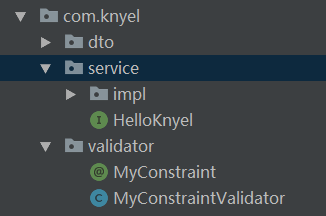
二、代码
1.自定义注解文件MyConstraint
package com.knyel.validator;

import javax.validation.Constraint;

import javax.validation.Payload;

import java.lang.annotation.ElementType;

import java.lang.annotation.Retention;

import java.lang.annotation.RetentionPolicy;

import java.lang.annotation.Target;

@Target({ElementType.METHOD,ElementType.FIELD})//注解可以标注在什么元素上

@Retention(RetentionPolicy.RUNTIME)

@Constraint(validatedBy = MyConstraintValidator.class)

public @interface MyConstraint {

    String message();

    Class<?>[] groups() default {};

    Class<? extends Payload>[] payload() default {};

}
2.自定义校验逻辑文件MyConstraintValidator
package com.knyel.validator;

import com.knyel.service.HelloKnyel;

import org.springframework.beans.factory.annotation.Autowired;

import javax.validation.ConstraintValidator;

import javax.validation.ConstraintValidatorContext;

//ConstraintValidator<A,T>

//A参数:表示要验证的注解

//T参数:表示要验证的东西是什么类型

public class MyConstraintValidator implements ConstraintValidator<MyConstraint,Object> {

    @Autowired

    HelloKnyel helloKnyel;

    @Override

    public void initialize (MyConstraint myConstraint){

        //校验器初始化的时候做的一些工作

        System.out.println("myvalidator init");

    }

    /*

    真正的校验逻辑

    Object o :传进来的校验的值

    ConstraintValidatorContext constraintValidatorContext :校验的上下文

     */

    @Override

    public boolean isValid (Object value, ConstraintValidatorContext constraintValidatorContext){

        //处理校验逻辑

        helloKnyel.welcome("knyel");

        System.out.println(value);

        //true代表校验成功,false代表校验失败

        return false;

    }

}
3.在2中isValid方法中调用的校验逻辑业务HelloKnyelImpl及接口
package com.knyel.service;

public interface HelloKnyel {

    String welcome(String name);

}
package com.knyel.service.impl;

import com.knyel.service.HelloKnyel;

import org.springframework.stereotype.Service;

@Service

public class HelloKnyelImpl implements HelloKnyel {

    @Override

    public String welcome (String name){

        System.out.println("welcome");

        return "hello knyel";

    }

}
4.待校验的实体
package com.knyel.dto;

import com.fasterxml.jackson.annotation.JsonView;

import com.knyel.validator.MyConstraint;

import org.hibernate.validator.constraints.NotBlank;

import javax.validation.constraints.Past;

import java.util.Date;

public class User {

    public interface UserSimpleView {};

    public interface UserDetailView extends UserSimpleView {};

    private String id;

    @MyConstraint(message = "测试校验器")

    private String username;

    @NotBlank(message="密码不能为空")

    private  String password;

    @Past(message = "生日必须是过去的时间")

    private Date birthday;

    @JsonView(UserSimpleView.class)

    public String getUsername (){

        return username;

    }

    public void setUsername (String username){

        this.username = username;

    }

    @JsonView(UserDetailView.class)

    public String getPassword (){

        return password;

    }

    public void setPassword (String password){

        this.password = password;

    }

    @JsonView(UserSimpleView.class)

    public String getId (){

        return id;

    }

    @JsonView(UserSimpleView.class)

    public void setId (String id){

        this.id = id;

    }

    public Date getBirthday (){

        return birthday;

    }

    public void setBirthday (Date birthday){

        this.birthday = birthday;

    }

    @Override

    public String toString (){

        return "User{" + "id='" + id + '\'' + ", username='" + username + '\'' + ", password='" + password + '\'' + ", birthday=" + birthday + '}';

    }

}
5.controller
    @PutMapping("/{id:\\d+}")

    public User update (@Valid @RequestBody User user, BindingResult errors){

        if (errors.hasErrors()) {

            errors.getAllErrors().stream().forEach((ObjectError error) ->{

//                FieldError fieldError=(FieldError) error;

//                String message=fieldError.getField()+":"+fieldError.getDefaultMessage();

                System.out.println(error.getDefaultMessage());

            });

        }

        System.out.println(user.getId());

        System.out.println(user.getUsername());

        System.out.println(user.getPassword());

        System.out.println(user.getBirthday());

        user.setId("1");

        return user;

    }
执行测试用例后
myvalidator init

welcome

knyel

测试校验器

1
spring mvc controller中的参数验证机制(二)的更多相关文章
- spring mvc controller中的参数验证机制(一)
一.验证用到的注解 @Valid 对传到后台的参数的验证 @BindingResult 配合@Valid使用,验证失败后的返回 二.示例 1.传统方式 @PostMapping public User ...
- Spring MVC Controller中解析GET方式的中文参数会乱码的问题(tomcat如何解码)
Spring MVC Controller中解析GET方式的中文参数会乱码的问题 问题描述 在工作上使用突然出现从get获取中文参数乱码(新装机器,tomcat重新下载和配置),查了半天终于找到解决办 ...
- spring mvc controller中获取request head内容
spring mvc controller中获取request head内容: @RequestMapping("/{mlid}/{ptn}/{name}") public Str ...
- Spring MVC Controller中GET方式传过来的中文参数会乱码的问题
Spring MVC controller 这样写法通常意味着访问该请求,GET和POST请求都行,可是经常会遇到,如果碰到参数是中文的,post请求可以,get请求过来就是乱码.如果强行对参数进行了 ...
- spring MVC controller中的方法跳转到另外controller中的某个method的方法
1. 需求背景 需求:spring MVC框架controller间跳转,需重定向.有几种情况:不带参数跳转,带参数拼接url形式跳转,带参数不拼接参数跳转,页面也能显示. 本来以为挺简单的一 ...
- spring mvc Controller中使用@Value无法获取属性值
在使用spring mvc时,实际上是两个spring容器: 1,dispatcher-servlet.xml 是一个,我们的controller就在这里,所以这个里面也需要注入属性文件 org.sp ...
- spring mvc controller中的异常封装
http://abc08010051.iteye.com/blog/2031992 一直以来都在用spring mvc做mvc框架,我使用的不是基于注解的,还是使用的基于xml的,在controlle ...
- 在Spring MVC Controller中注入HttpServletRequest对象会不会造成线程安全的问题
做法: 1.比如我们在Controller的方法中,通常是直接将HttpServletRequest做为参数,而为了方便节省代码,通常会定义为全局变量,然后使用@Autowire注入. 说明: 1.观 ...
- 本版本延续MVC中的统一验证机制~续的这篇文章,本篇主要是对验证基类的扩展和改善(转)
本版本延续MVC中的统一验证机制~续的这篇文章,本篇主要是对验证基类的扩展和改善 namespace Web.Mvc.Extensions { #region 验证基类 /// <summary ...
随机推荐
- Property referenced in indexed property path is neither an array nor a List nor a Map
记一次传参请求报错,没有解决 Invalid property 'distributeCars[0][ackStatus]' of bean class [com.api6.plate.prototy ...
- bvlc_reference_caffenet网络权值可视化
一.网络结构 models/bvlc_reference_caffenet/deploy.prototxt 二.显示conv1的网络权值 clear; clc; close all; addpath( ...
- VS Code 运行 TypeScript 操作指南
总结一下TypeScript开发环境用到的各种工具: Node——通过npm安装TypeScript及大量依赖包.从https://nodejs.org/下载并安装它:如果安装各种包不方便,可以将安装 ...
- Python图形开发之PIL
1.背景介绍 PIL:Python Imaging Library,已经是Python平台事实上的图像处理标准库了.PIL功能非常强大,但API却非常简单易用. 2.安装 Windows平台:PIL官 ...
- googletest--Death Test和Exception Test
Death Test验证某个状态会使进程以某个错误码和错误消息离开 #include <gtest\gtest.h> #include "MyStack.h" // D ...
- 【RestTemplete】使用RestTemplete传Json或者 {} 报错--解决
https://jira.spring.io/browse/SPR-9220?focusedCommentId=76760&page=com.atlassian.jira.plugin.sys ...
- .NET自动化测试工具:Selenium Grid
在生产环境,QA会同时跑几十个上百个的test case.如果用单机串行的话,是一件非常耗时的事情,估计比手点快不了多少.使用并行方案的话,有两种方法,一个是自己写并行框架,一个是用现成的Seleni ...
- C# 数字转换成大写
/// <summary> /// 数字转大写 /// </summary> /// <param name="Num">数字</para ...
- python大法好——网络编程
Python 网络编程 Python 提供了两个级别访问的网络服务.: 低级别的网络服务支持基本的 Socket,它提供了标准的 BSD Sockets API,可以访问底层操作系统Socket接口的 ...
- 关于游览器 cookie的操作类
var Cookie = { getCookie : function(c_name,is){ var value = this._getCookie(c_name); if(JSON &&a ...