
KTV项目之3个ListView的跳转和加载歌手图片
第一个ListView:

第二个ListView:
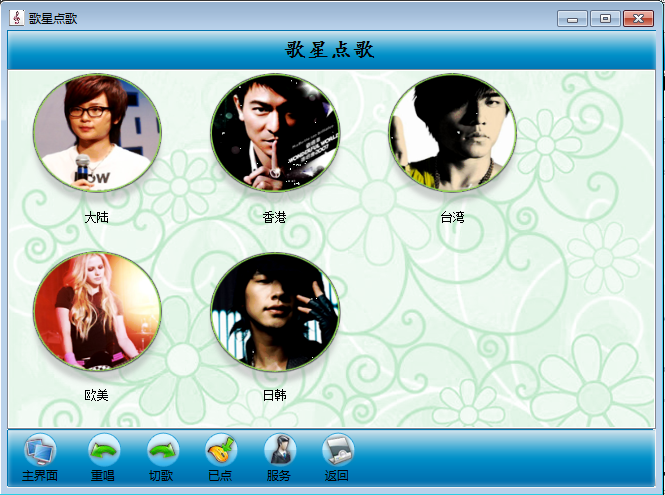
第三个ListView:

定义一个KTVUtil类,在里面定义一个静态变量保存歌手图片
         //定义一个静态变量保存歌手图片路径

         public static string imagePath = "";
在主窗体load事件拿歌手图片的前半部分路径:
  //连接字符串

             String str = "Data Source=.;Initial Catalog=MyKTV;uid=sa;";

             //创建连接对象

             SqlConnection con = new SqlConnection(str);

             con.Open();

             //准备sql语句

             string sql = "select resource_path from resource_path where resource_id=1";

             //创建命令对象

             SqlCommand cmd = new SqlCommand(sql, con);

             KTVUtil.imagePath = cmd.ExecuteScalar().ToString();

             con.Close();
在第一个ListView_Click事件:
 listView2.Items.Clear();

             if (listView1.SelectedItems[] != null)

             {

                 //隐藏歌手地区类的listView,显示歌手类的listView

                 listView1.Visible = false;

                 listView2.Location = listView1.Location;

                 listView2.Dock = DockStyle.Fill;

                 listView2.Visible = true;

                 this.singer_sex = Convert.ToString(listView1.SelectedItems[].Tag);

             }

             //连接字符串

             String str = "Data Source=.;Initial Catalog=MyKTV;uid=sa;";

             //创建连接对象

             SqlConnection con = new SqlConnection(str);

             //准备sql语句

             string sql = "select singertype_id,singertype_name from singer_type";

             //创建命令对象

             SqlCommand cmd = new SqlCommand(sql,con);

             try

             {

                 con.Open();

                 SqlDataReader dr = cmd.ExecuteReader();

                 listView3.Items.Clear();

                 if(dr.HasRows){

                     int index = ;

                     while(dr.Read()){   //每Read一次拿到一个地区

                         //从数据库中读取一个歌手分类信息,就要创建一个ListViewItem

                         ListViewItem lvitem = new ListViewItem();

                         int typeId = Convert.ToInt32(dr["singertype_id"]);

                         string typename = Convert.ToString(dr["singertype_name"]);

                         lvitem.Text = typename;

                         lvitem.Tag = typeId;

                         lvitem.ImageIndex = index;

                         listView2.Items.Add(lvitem);

                         index++;

                     }

                 }

             }

             catch

             {

                 MessageBox.Show("系统维护中");

             }

             finally {

             }
在第二个ListView_Click事件:
 listView1.Visible = false;

             listView2.Visible = false;

             listView3.Visible = true;

             listView3.Dock = DockStyle.Fill;

             listView3.Location = listView1.Location;

             this.singertype_id = Convert.ToInt32(listView2.SelectedItems[].Tag);

             string str = "Data source = .; Initial catalog=MyKTV ;Uid = sa;";

             SqlConnection con = new SqlConnection(str);

             string sql = "select singer_id , singer_name , singer_photo_url from singer_info where singer_sex='"+singer_sex+"' and singertype_id="+singertype_id+ "";

             SqlCommand com = new SqlCommand(sql, con);

             con.Open();

             SqlDataReader dr = com.ExecuteReader();

             listView3.Items.Clear();

             int Imageindex = ;   //歌手图像的索引

             if (dr.HasRows) {

                 while (dr.Read())

                 {

                   ListViewItem item = new ListViewItem();

                   string fullpath = KTVUtil.imagePath + "\\" + Convert.ToString(dr["singer_photo_url"]);

                   imageList3.Images.Add(Image.FromFile(fullpath));

                   item.Text =Convert.ToString(dr["singer_name"]);

                   item.Tag = Convert.ToString(dr["singer_id"]);

                   item.ImageIndex = Imageindex;

                   listView3.Items.Add(item);

                   Imageindex++;

               }

               dr.Close();

             }

             con.Close();
KTV项目之3个ListView的跳转和加载歌手图片的更多相关文章
- Android项目实战(三十):Fresco加载gif图片并播放
前言: 项目中图文混合使用的太多太多了,但是绝大部分都是静态图片. 然而项目开发中有这么一个需求:显示一个出一个简短的动画(一般都不超过3秒)演示 比如说:一个功能提供很多步骤来教用户做广播体操,那么 ...
- KTV项目 SQL数据库的应用 结合C#应用窗体
五道口北大青鸟校区 KTV项目 指导老师:袁玉明 歌曲播放原理 SQL数据库关系图 C#解决方案类图 第一步:创建数据库连接方法和打开方法和关闭方法! public class DBHelper { ...
- KTV项目总结
KTV项目总结 大约一个星期前吧,老湿说我们要开始做KTV项目了,说是KTV项目是贯穿整个学的内容的,会所的,要我们认真去对待,一开始,第一天搭前台界面,总是有不会的,要去问问,这个要用什么控件啊,用 ...
- json解析,异步下载(listview仅滑动时加载)Demo总结
异步加载的练习demo 主要涉及知识点: 1.解析json格式数据,主要包括图片,文本 2.使用AsynTask异步方式从网络下载图片 3.BaseAdapter的"优雅"使用 4 ...
- Flutter 开发从 0 到 1(四)ListView 下拉加载和加载更多
在<APP 开发从 0 到 1(三)布局与 ListView>我们完成了 ListView,这篇文章将做 ListView 下拉加载和加载更多. ListView 下拉加载 Flutter ...
- Tomcat 利用server.xml进行其他盘符的其他项目映射的部署以及JSP引用其他盘符的图片(虚拟目录及虚拟路径)
Tomcat 利用server.xml进行项目映射的部署 2013-07-17 15:14 12843人阅读 评论(4) 收藏 举报 分类: web 开发(5) 版权声明:本文为博主原创文章,欢迎 ...
- 【记录】VS2012新建MVC3/MVC4项目时,报:此模板尝试加载组件程序集“NuGet.VisualStudio.Interop...”
最近电脑装了 VisualStudio "14" CTP,由于把其他版本的 VS 卸掉,由高到低版本安装,当时安装完 VisualStudio "14" CTP ...
- Android ListView 图片异步加载和图片内存缓存
开发Android应用经常需要处理图片的加载问题.因为图片一般都是存放在服务器端,需要联网去加载,而这又是一个比较耗时的过程,所以Android中都是通过开启一个异步线程去加载.为了增加用户体验,给用 ...
- listview中getview异步加载网络图片
前言:本以为异步加载挺简单,因为网上代码多,但真想要做好,还真不那么简单,从看代码到弄懂再到自己写,实在是有太多的东西需要学了,用了两天的时间,终于弄出来了,因为用到回调函数,所以理解起来可能难度有点 ...
随机推荐
- Android 第二波
三面,4个技术人员面试的问题不是很难.问题如下: 1. Service两种方式的区别 首先说service分为两种,一种是绑定的一种是非绑定的非绑定的生命周期是 onCreate(),onStartC ...
- 使用asp.net MVC的 HtmlHelper 时遇到的小问题,报错:Templates can be used only with field access, property access, single-dimension array index, or single-parameter custom indexer expressions.
异常信息:Templates can be used only with field access, property access, single-dimension array index, or ...
- 改变input type="file" 文字、样式等
<div class="tac"> <input type="file" id="browsefile" class=&q ...
- ElasticSearch搜索解析
这篇介绍稍多,篇幅可能有点多,下面会针对一些重要的点做一些小测试 搜索返回文档解析 hits搜索返回的结果中最重要的一部分其中包含了 索引信息(_index,_type,_index,_source, ...
- 树递归写法ref实现
using System; using System.Collections.Generic; using System.Linq; namespace ConsoleAppTest { class ...
- Centos6.5下通过shell脚本快速安装samba服务器
使用方法如下: 上传脚本到linux服务器授权
- zprofiler三板斧解决cpu占用率过高问题(转载)
zprofiler三板斧解决cpu占用率过高问题 九居 JVM性能与调试平台 zprofiler 上周五碰到了一个线上机器cpu占用率过高的问题.问题本身比较简单,但是定位过程中动用了多个zp ...
- springmvc+ajax——第一讲(搭建)
下面是整个整合测试的代码: ajax01.html TestController web.xml springmvc.xml applicationContext.xml <!DOCTYPE h ...
- union和union all的区别(面试常考)
Union:对两个结果集进行并集操作,不包括重复行,同时进行默认规则的排序: Union All:对两个结果集进行并集操作,包括重复行,不进行排序: Union因为要进行重复值扫描,所以效率低.如果合 ...
- IDEA添加源码包
1.在项目中选中左上角的File--->Project Structure 2.选择需要添加的源码包 3.源码已经加入