
iOS SDK开发汇总
一、新建名称为JFSDKDemo的单控制器工程,设置最低系统版本号,设置目标设备。
二、新建名称为JFSDKFramework的静态库,具体为file—new—target—cocoatouch framework。设置最低系统版本号,设置目标设备
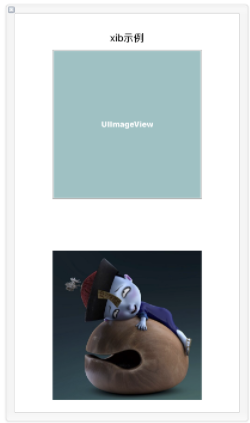
- (IBAction)pushXib:(UIButton *)sender {

    SDKVCtest01 *vc = [[SDKVCtest01 alloc]init];

    [self presentViewController:vc animated:YES completion:nil];

}

- (IBAction)pushStoryboard:(UIButton *)sender {

    SDKVCtest02 *vc = [[SDKVCtest02 alloc]init];

    [self presentViewController:vc animated:YES completion:nil];

}
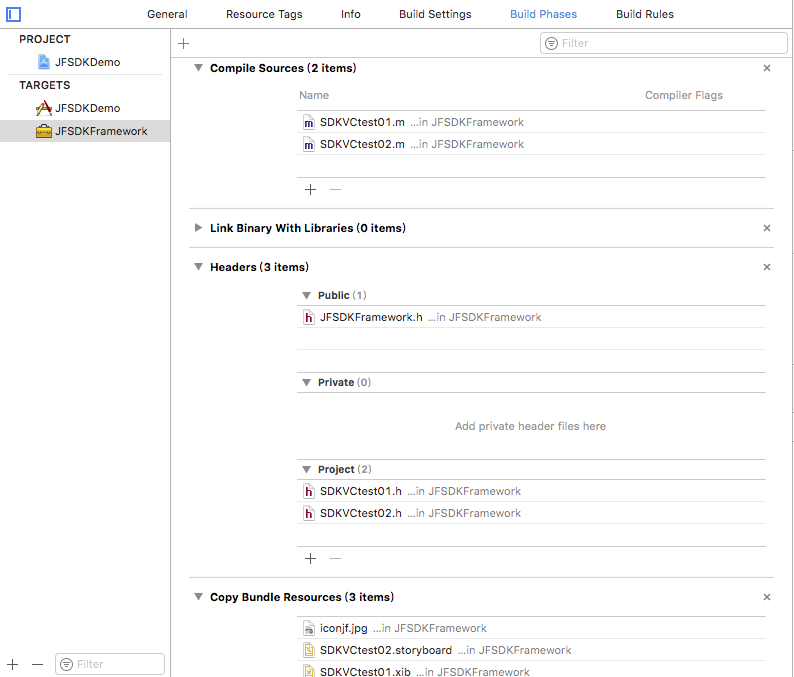
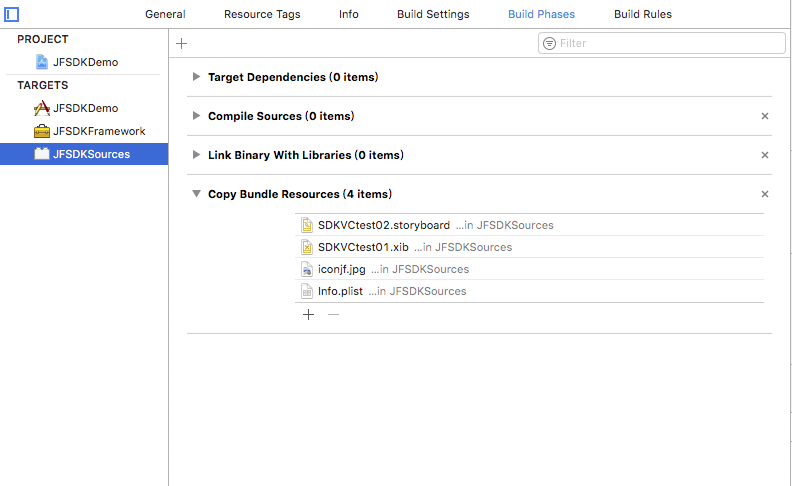
三、bundle资源包:把静态库中的资源文件封装到bundle包中。资源文件包括图片、storyboard,xib文件、plist文件以及mp3等。
- (instancetype)init{

    SDKVCtest01 *testVC =  [[SDKVCtest01 alloc]initWithNibName:@"SDKVCtest01" bundle:[NSBundle bundleWithPath:[[NSBundle mainBundle] pathForResource:@"JFSDKSources" ofType:@"bundle"]]];

    return testVC;

}

- (void)viewDidLoad {

    [super viewDidLoad];

    // Do any additional setup after loading the view from its nib.

    self.view.backgroundColor = [UIColor whiteColor];

    self.imageView1.image = [UIImage imageNamed:@"iconjf.png" inBundle:[NSBundle bundleWithPath:[[NSBundle mainBundle] pathForResource:@"JFSDKSources" ofType:@"bundle"]] compatibleWithTraitCollection:nil];

}
- (void)viewDidLoad {

    [super viewDidLoad];

    self.view.backgroundColor = [UIColor whiteColor];

    // Do any additional setup after loading the view.

    self.imageView1.image = [UIImage imageNamed:@"iconjf.png" inBundle:[NSBundle bundleWithPath:[[NSBundle mainBundle] pathForResource:@"JFSDKSources" ofType:@"bundle"]] compatibleWithTraitCollection:nil];

}

- (instancetype)init{

    SDKVCtest02 *testVC =  [[UIStoryboard storyboardWithName:@"SDKVCtest02" bundle:[NSBundle bundleWithPath:[[NSBundle mainBundle] pathForResource:@"JFSDKSources" ofType:@"bundle"]]] instantiateViewControllerWithIdentifier:@"SDKVCTest02"];

    return testVC;

}
四、新建aggregate:实现脚本合并静态库支持的设备,生成通用静态库。
FMK_NAME="JFSDKFramework"

# Install dir will be the final output to the framework.

# The following line create it in the root folder of the current project.

SDK_DIR=${SRCROOT}/Products/${FMK_NAME}

INSTALL_DIR=${SRCROOT}/Products/${FMK_NAME}/${FMK_NAME}.framework

# Working dir will be deleted after the framework creation.

WRK_DIR=build

DEVICE_DIR=${WRK_DIR}/Release-iphoneos/${FMK_NAME}.framework

SIMULATOR_DIR=${WRK_DIR}/Release-iphonesimulator/${FMK_NAME}.framework

# -configuration ${CONFIGURATION}

# Clean and Building both architectures.

xcodebuild -configuration "Release" -target "${FMK_NAME}" -sdk iphoneos

xcodebuild -configuration "Release" -target "${FMK_NAME}" -sdk iphonesimulator

# Cleaning the oldest.

if [ -d "${SDK_DIR}" ]

then

rm -rf "${SDK_DIR}"

fi

mkdir -p "${INSTALL_DIR}"

cp -R "${DEVICE_DIR}/" "${INSTALL_DIR}/"

# Uses the Lipo Tool to merge both binary files (i386 + armv6/armv7) into one Universal final product.

lipo -create "${DEVICE_DIR}/${FMK_NAME}" "${SIMULATOR_DIR}/${FMK_NAME}" -output "${INSTALL_DIR}/${FMK_NAME}"

rm -r "${WRK_DIR}"

#mv "${INSTALL_DIR}/${FMK_NAME}.bundle" "${SDK_DIR}"

open "${SDK_DIR}"
 //图片

    UIImage *image = [UIImage imageNamed:@"iconjf.png" inBundle:[NSBundle bundleWithPath:[[NSBundle mainBundle] pathForResource:@"JFSDKSources" ofType:@"bundle"]] compatibleWithTraitCollection:nil];

    //storyboard

    UIStoryboard *storyboard = [UIStoryboard storyboardWithName:@"SDKVCtest02" bundle:[NSBundle bundleWithPath:[[NSBundle mainBundle] pathForResource:@"JFSDKSources" ofType:@"bundle"]]];

    //xib

    SDKVCtest01 *testVC =  [[SDKVCtest01 alloc]initWithNibName:@"SDKVCtest01" bundle:[NSBundle bundleWithPath:[[NSBundle mainBundle] pathForResource:@"JFSDKSources" ofType:@"bundle"]]];

    NSArray *array = [[NSBundle bundleWithPath:[[NSBundle mainBundle] pathForResource:@"JFSDKSources" ofType:@"bundle"]] loadNibNamed:@"nibname" owner:nil options:nil];

    //mp3

    NSString *path = [[NSBundle bundleWithPath:[[NSBundle mainBundle] pathForResource:@"JFSDKSources" ofType:@"bundle"]] pathForResource:@"test" ofType:@"mp3"];

    NSURL *fileURL = [[NSURL alloc] initFileURLWithPath: path];

    //plist

    NSString *filePath = [[NSBundle bundleWithPath:[[NSBundle mainBundle] pathForResource:@"JFSDKSources" ofType:@"bundle"]] pathForResource: @"test" ofType: @"plist"];

    NSDictionary *plistDic = [NSDictionary dictionaryWithContentsOfFile:filePath];
5、Build Active Architecture Only,设置为NO的时候,会编译支持的所有的版本;设置为YES的时候,是为Debug的时候速度更快,它只编译当前的architecture 版本
iOS SDK开发汇总的更多相关文章
- ios项目开发汇总
UI界面 iOS和Android 界面设计尺寸规范 http://www.alibuybuy.com/posts/85486.html iPhone app界面设计尺寸规范 http://www. ...
- 转载-iOS SDK开发
最近帮兄弟公司的做支付业务sdk,积累了 sdk 封装的经验!下面我会从零开始把我的 sdk 封装和调试经历分享给大家,希望能给看到这篇文章的人有所帮助! 本文我会从以下几个方面来讲述: Framew ...
- 【转】使用Xcode中的iOS SDK给iphone开发出第一个App程序
之前已经折腾过用Xcode开发OS X的程序了,现在继续折腾,用iOS SDK开发移动设备(iphone/ipad/ipod touch)的程序. 1.从iOS Developer Library中找 ...
- XE6移动开发环境搭建之IOS篇(9):配置XE6的IOS SDK(有图有真相)
网上能找到的关于Delphi XE系列的移动开发环境的相关文章甚少,本文尽量以详细的图文内容.傻瓜式的表达来告诉你想要的答案. 原创作品,请尊重作者劳动成果,转载请注明出处!!! 1.开启PAServ ...
- 百度VS高德:LBS开发平台ios SDK对比评测
随着iPhone6手机的热销,目前的iOS应用开发市场也迎来了全盛时期.据了解,目前市面上已有的iOS应用基本覆盖了购物.上门服务.用车服务.娱乐等行业.而在这些iOS应用中,内置LBS服务的应用占大 ...
- 【视频教学】如何利用高德地图IOS SDK进行开发?
Step1:使用IOS SDK可以做什么高德地图 iOS SDK 是一套基于 iOS 5.1.1 及以上版本的地图应用程序开发接口.通过该接口,用户可使用高德地图数据和服务轻松构建功能丰富.交互性强的 ...
- iOS开发之引用百度地图SDK(一)-----------SDK开发指南
(void)viewWillAppear:(BOOL)animated { [_mapView viewWillAppear]; _mapView.delegate = self; // 此处记得不用 ...
- 浅谈iOS视频开发
浅谈iOS视频开发 这段时间对视频开发进行了一些了解,在这里和大家分享一下我自己觉得学习步骤和资料,希望对那些对视频感兴趣的朋友有些帮助. 一.iOS系统自带播放器 要了解iOS视频开发,首先我们从 ...
- iOS 学习资料汇总
(适合初学者入门) 本文资料来源于GitHub 一.视频教程(英文) Developing iOS 7 Apps for iPhone and iPad斯坦福开放教程之一, 课程主要讲解了一些 iOS ...
随机推荐
- Codeforces Round #486 (Div. 3) E. Divisibility by 25
Codeforces Round #486 (Div. 3) E. Divisibility by 25 题目连接: http://codeforces.com/group/T0ITBvoeEx/co ...
- post网络请求坑
微信小程序开发中网络请求必不可少.GET.POST请求是最常用的.GET请求 POST请求的时候有好几个坑.我已经为大家填好了.
- Html5与Css3知识点拾遗(九)
css布局 控制元素的显示类型和可见性 块级元素 dispaly:block: 行内元素(不能设置宽度) display:inline: 不接受padding设置,但padding-top和paddi ...
- android启动画面隐藏状态栏全屏显示
1.在根部局给一个id,然后直接设置就行了layout.setSystemUiVisibility(View.INVISIBLE); 状态栏就没有了. 2.如果你只是想改变状态栏颜色的也可以 //5. ...
- wpf使用FFMEPG录制屏幕
Simple function of recording screen based on ffmpeg Using WPF环境 Visual Studio 2017,dotNet Framework ...
- Java学习笔记33(集合框架七:Collections工具类)
数组有工具类,方面操作数组 集合也有工具类:Collections 常用方法示例: package demo; import java.util.ArrayList; import java.util ...
- ubuntu 16.04 下更换boost版本
如果是新机器,没装过boost,那么直接一条命令 sudo apt-get install libboost-all-dev 头文件一般安装在 /usr/include 下面有一个目录boost,里面 ...
- Ubuntu 18.0.4安装docker
第一步:如果之前安装过docker,执行下面命令删除 apt-get remove docker docker-engine docker.io 删除后执行sudo apt-get update更新软 ...
- python网络编程初级
网络编程的专利权应该属于Unix,各个平台(如windows.Linux等).各门语言(C.C++.Python.Java等)所实现的符合自身特性的语法都大同小异.在我看来,懂得了Unix的socke ...
- mongodb4.0.2 复制集主从部署
介绍 复制集(Replica Sets),是一个基于主/从复制机制的复制功能,进行同一数据的异步同步,从而使多台机器拥有同一数据的都多个副本,由于有自动故障转移和恢复特性,当主库宕机时不需要用户干预的 ...