
interface21 - web - DispatcherServlet(DispatcherServlet初始化流程)
前言
最近打算花点时间好好看看spring的源码,然而现在Spring的源码经过迭代的版本太多了,比较庞大,看起来比较累,所以准备从最初的版本(interface21)开始入手,仅用于学习,理解其设计思想,后续慢慢研究其每次版本变更的内容。。。
先从interface21的一个典型web工程例子看起,宠物诊所 - petclinic,因为该工程基本涵盖了Spring的APO、IOC、JDBC、Web MVC、事务、国际化、主题切换、参数校验等主要功能。。。
继上一篇,了解完ContextLoaderListener(加载Spring Web Application Context)的流程后,看看Spring mvc的关键控制器 - DispatcherServlet初始化流程是如何的~~~~~~~
对应的web.xml配置
    <servlet>

        <servlet-name>petclinic</servlet-name>

        <servlet-class>com.interface21.web.servlet.DispatcherServlet</servlet-class>

        <load-on-startup>1</load-on-startup>

    </servlet>

    <servlet-mapping>

        <servlet-name>petclinic</servlet-name>

        <url-pattern>*.htm</url-pattern>

    </servlet-mapping>
这里有一个地方需要注意下,load-on-startup的配置,关于该Servlet参数的含义,可以先看下web-app_2_3.dtd文件中的解释,如下,大致意思就是,如果没配置load-on-startup或该值为负数,则servlet容器可以自由选择什么时候加载该servlet(实例化并执行Servlet的init方法),如果为0或正数,则必须在容器启动时加载Servlet并执行其init方法,且数值越小的Servlet优先加载,回过头看我们的DispatcherServlet,由于load-on-startup配置成1,所以会在启动的时候,执行init方法,即本文要关注的DispatcherServlet初始化流程:
<!--

The load-on-startup element indicates that this servlet should be

loaded (instantiated and have its init() called) on the startup

of the web application. The optional contents of

these element must be an integer indicating the order in which

the servlet should be loaded. If the value is a negative integer,

or the element is not present, the container is free to load the

servlet whenever it chooses. If the value is a positive integer

or 0, the container must load and initialize the servlet as the

application is deployed. The container must guarantee that

servlets marked with lower integers are loaded before servlets

marked with higher integers. The container may choose the order

of loading of servlets with the same load-on-start-up value.

Used in: servlet

-->
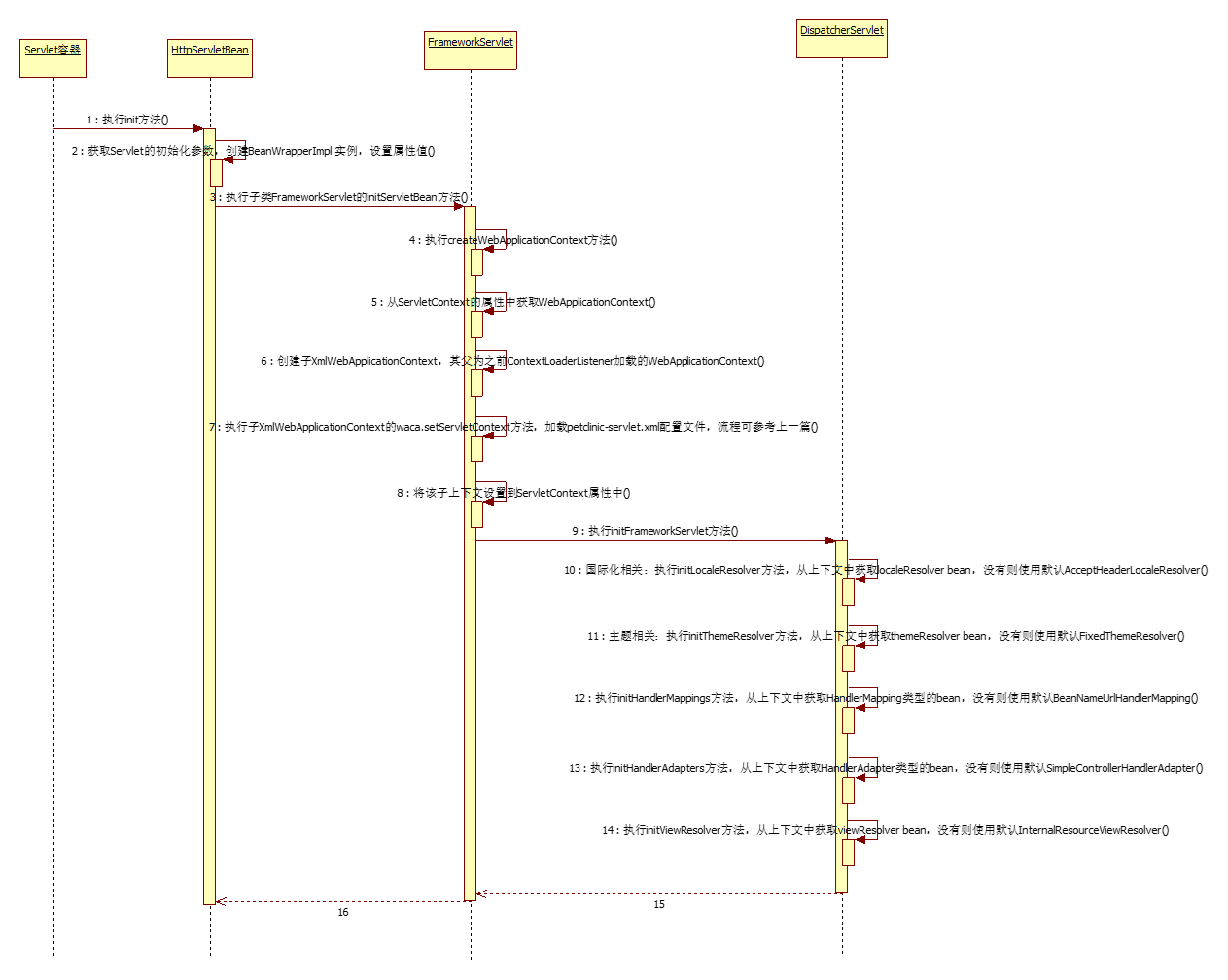
执行时序图(看不清的话可以点击查看原图)
时序图中的各个步骤简要分析
执行的入口在HttpServletBean类的init方法,由于DispatcherServlet的load-on-startup参数配置成1,所以在Servlet容器(tomcat)启动时,会自动调用该Servlet的init方法。
步骤描述:
- 首先,执行DispatcherServlet的父类HttpServletBean的init方法;
public final void init() throws ServletException {

        this.identifier = "Servlet with name '" + getServletConfig().getServletName() + "' ";

        logger.info(getIdentifier() + "entering init...");

        // Set bean properties

        try {

            PropertyValues pvs = new ServletConfigPropertyValues(getServletConfig(), requiredProperties);

            BeanWrapper bw = new BeanWrapperImpl(this);

            bw.setPropertyValues(pvs);

            logger.debug(getIdentifier() + "properties bound OK");

            // Let subclasses do whatever initialization they like

            initServletBean();

            logger.info(getIdentifier() + "configured successfully");

        } catch (BeansException ex) {

            String mesg = getIdentifier() + ": error setting properties from ServletConfig";

            logger.error(mesg, ex);

            throw new ServletException(mesg, ex);

        } catch (Throwable t) {

            // Let subclasses throw unchecked exceptions

            String mesg = getIdentifier() + ": initialization error";

            logger.error(mesg, t);

            throw new ServletException(mesg, t);

        }

} - 获取Servlet的初始化参数,创建BeanWrapperImpl 实例,设置属性值;
- 执行HttpServletBean的子类FrameworkServlet的initServletBean方法;
    protected final void initServletBean() throws ServletException {

        long startTime = System.currentTimeMillis();

        logger.info("Framework servlet '" + getServletName() + "' init");

        this.webApplicationContext = createWebApplicationContext();

        initFrameworkServlet();

        long elapsedTime = System.currentTimeMillis() - startTime;

        logger.info("Framework servlet '" + getServletName() + "' init completed in " + elapsedTime + " ms");

} - 调用FrameworkServlet的createWebApplicationContext方法。
    private WebApplicationContext createWebApplicationContext() throws ServletException {

        getServletContext().log("Loading WebApplicationContext for servlet '" + getServletName() + "'");

        ServletContext sc = getServletConfig().getServletContext();

        WebApplicationContext parent = WebApplicationContextUtils.getWebApplicationContext(sc);

        String namespace = getNamespace();

        WebApplicationContext waca = (this.contextClass != null) ?

                instantiateCustomWebApplicationContext(this.contextClass, parent, namespace) :

                new XmlWebApplicationContext(parent, namespace);

        logger.info("Loading WebApplicationContext for servlet '" + getServletName() + "': using context class '" + waca.getClass().getName() + "'");

        waca.setServletContext(sc);

        if (this.publishContext) {

            // Publish the context as a servlet context attribute

            String attName = getServletContextAttributeName();

            sc.setAttribute(attName, waca);

            logger.info("Bound context of servlet '" + getServletName() + "' in global ServletContext with name '" + attName + "'");

        }

        return waca;

} - 进入createWebApplicationContext方法,从ServletContext的属性中获取WebApplicationContext,该上下文是由ContextLoaderListener加载的
- 创建子上下文XmlWebApplicationContext,其父上下文为之前ContextLoaderListener加载的WebApplicationContext,关于这两个上下文的关系,及负责加载的内容,可参考这张图,图片来源(http://jinnianshilongnian.iteye.com/blog/1602617/)

- 执行子上下文XmlWebApplicationContext的waca.setServletContext方法,去加载petclinic-servlet.xml配置文件(国际化,主题,HandlerMapping、HandlerAdapter、视图解析等相关配置),关于WebApplicationContext上下文的加载流程,可参考上一篇(Spring Web Application Context加载流程),流程都是相同的;
- 将该子上下文设置到ServletContext属性中
- 进入DispatcherServlet类的initFrameworkServlet方法,主要执行一些初始化工作
    protected void initFrameworkServlet() throws ServletException {

        initLocaleResolver();

        initThemeResolver();

        initHandlerMappings();

        initHandlerAdapters();

        initViewResolver();

} - 国际化相关:执行initLocaleResolver方法,从上下文中获取localeResolver bean,没有则使用默认AcceptHeaderLocaleResolver
    private void initLocaleResolver() throws ServletException {

        try {

            this.localeResolver = (LocaleResolver) getWebApplicationContext().getBean(LOCALE_RESOLVER_BEAN_NAME);

            logger.info("Loaded locale resolver [" + this.localeResolver + "]");

        } catch (NoSuchBeanDefinitionException ex) {

            // We need to use the default

            this.localeResolver = new AcceptHeaderLocaleResolver();

            logger.info("Unable to locate locale resolver with name '" + LOCALE_RESOLVER_BEAN_NAME + "': using default [" + this.localeResolver + "]");

        } catch (BeansException ex) {

            // We tried and failed to load the LocaleResolver specified by a bean

            throw new ServletException("Fatal error loading locale resolver with name '" + LOCALE_RESOLVER_BEAN_NAME + "': using default", ex);

        }

} - 主题相关:执行initThemeResolver方法,从上下文中获取themeResolver bean,没有则使用默认FixedThemeResolver
    private void initThemeResolver() throws ServletException {

        try {

            this.themeResolver = (ThemeResolver) getWebApplicationContext().getBean(THEME_RESOLVER_BEAN_NAME);

            logger.info("Loaded theme resolver [" + this.themeResolver + "]");

        } catch (NoSuchBeanDefinitionException ex) {

            // We need to use the default

            this.themeResolver = new FixedThemeResolver();

            logger.info("Unable to locate theme resolver with name '" + THEME_RESOLVER_BEAN_NAME + "': using default [" + this.themeResolver + "]");

        } catch (BeansException ex) {

            // We tried and failed to load the ThemeResolver specified by a bean

            throw new ServletException("Fatal error loading theme resolver with name '" + THEME_RESOLVER_BEAN_NAME + "': using default", ex);

        }

} - 执行initHandlerMappings方法,从上下文中获取HandlerMapping类型的bean,没有则使用默认BeanNameUrlHandlerMapping
    private void initHandlerMappings() throws ServletException {

        this.handlerMappings = new ArrayList();

        // Find all HandlerMappings in the ApplicationContext

        String[] hms = getWebApplicationContext().getBeanDefinitionNames(HandlerMapping.class);

        for (int i = 0; i < hms.length; i++) {

            initHandlerMapping(hms[i]);

            logger.info("Loaded handler mapping [" + hms[i] + "]");

        }

        // Ensure we have at least one HandlerMapping, by registering

        // a default HandlerMapping if no other mappings are found.

        if (this.handlerMappings.isEmpty()) {

            initDefaultHandlerMapping();

            logger.info("No HandlerMappings found in servlet '" + getServletName() + "': using default");

        } else {

            // We keep HandlerMappings in sorted order

            Collections.sort(this.handlerMappings, new OrderComparator());

        }

    }
private void initDefaultHandlerMapping() throws ServletException {
try {
HandlerMapping hm = new BeanNameUrlHandlerMapping();
hm.setApplicationContext(getWebApplicationContext());
this.handlerMappings.add(hm);
} catch (ApplicationContextException ex) {
throw new ServletException("Error initializing default HandlerMapping: " + ex.getMessage(), ex);
}
} - 执行initHandlerAdapters方法,从上下文中获取HandlerAdapter类型的bean,没有则使用默认SimpleControllerHandlerAdapter
    private void initHandlerAdapters() throws ServletException {

        this.handlerAdapters = new ArrayList();

        String[] has = getWebApplicationContext().getBeanDefinitionNames(HandlerAdapter.class);

        for (int i = 0; i < has.length; i++) {

            initHandlerAdapter(has[i]);

            logger.info("Loaded handler adapter [" + has[i] + "]");

        }

        // Ensure we have at least one HandlerAdapter, by registering

        // a default HandlerAdapter if no other adapters are found.

        if (this.handlerAdapters.isEmpty()) {

            initDefaultHandlerAdapter();

            logger.info("No HandlerAdapters found in servlet '" + getServletName() + "': using default");

        } else {

            // We keep HandlerAdapters in sorted order

            Collections.sort(this.handlerAdapters, new OrderComparator());

        }

    }
private void initDefaultHandlerAdapter() throws ServletException {
try {
HandlerAdapter ha = new SimpleControllerHandlerAdapter();
ha.setApplicationContext(getWebApplicationContext());
this.handlerAdapters.add(ha);
} catch (ApplicationContextException ex) {
throw new ServletException("Error initializing default HandlerAdapter: " + ex.getMessage(), ex);
}
} - 执行initViewResolver方法,从上下文中获取viewResolver bean,没有则使用默认InternalResourceViewResolver
    private void initViewResolver() throws ServletException {

        try {

            this.viewResolver = (ViewResolver) getWebApplicationContext().getBean(VIEW_RESOLVER_BEAN_NAME);

            logger.info("Loaded view resolver [" + viewResolver + "]");

        } catch (NoSuchBeanDefinitionException ex) {

            // We need to use the default

            this.viewResolver = new InternalResourceViewResolver();

            try {

                this.viewResolver.setApplicationContext(getWebApplicationContext());

            } catch (ApplicationContextException ex2) {

                throw new ServletException("Fatal error initializing default ViewResolver");

            }

            logger.info("Unable to locate view resolver with name '" + VIEW_RESOLVER_BEAN_NAME + "': using default [" + this.viewResolver + "]");

        } catch (BeansException ex) {

            // We tried and failed to load the ViewResolver specified by a bean

            throw new ServletException("Fatal error loading view resolver: bean with name '" + VIEW_RESOLVER_BEAN_NAME + "' is required in servlet '" + getServletName() + "': using default", ex);

        }

} - 返回到FrameworkServlet类
- 返回到HttpServletBean类
- Servlet的init方法执行完毕
另外可以关注下该Servlet的销毁方法,类似的,也是执行一些资源销毁等操作,销毁工厂创建的单例bean对象,发布ContextClosedEvent事件等;
    public void destroy() {

        getServletContext().log("Closing WebApplicationContext for servlet '" + getServletName() + "'");

        getWebApplicationContext().close();

    }
    public void close() {

        logger.info("Closing application context [" + getDisplayName() + "]");

        // destroy all cached singletons in this context,

        // invoking DisposableBean.destroy and/or "destroy-method"

        getBeanFactory().destroySingletons();

        // publish respective event

        publishEvent(new ContextClosedEvent(this));

    }
interface21代码参考
https://github.com/peterchenhdu/interface21
interface21 - web - DispatcherServlet(DispatcherServlet初始化流程)的更多相关文章
- SpringMVC源码剖析(三)- DispatcherServlet的初始化流程
在我们第一次学Servlet编程,学Java Web的时候,还没有那么多框架.我们开发一个简单的功能要做的事情很简单,就是继承HttpServlet,根据需要重写一下doGet,doPost方法,跳转 ...
- spring自动扫描、DispatcherServlet初始化流程、spring控制器Controller 过程剖析
spring自动扫描1.自动扫描解析器ComponentScanBeanDefinitionParser,从doScan开始扫描解析指定包路径下的类注解信息并注册到工厂容器中. 2.进入后findCa ...
- SpringMVC深度探险(三) —— DispatcherServlet与初始化主线
在上一篇文章中,我们给出了构成SpringMVC应用程序的三要素以及三要素的设计过程.让我们来归纳一下整个设计过程中的一些要点: SpringMVC将Http处理流程抽象为一个又一个处理单元 Spri ...
- 2.SpringMVC源码分析:DispatcherServlet的初始化与请求转发
一.DispatcherServlet的初始化 在我们第一次学Servlet编程,学java web的时候,还没有那么多框架.我们开发一个简单的功能要做的事情很简单,就是继承HttpServlet,根 ...
- SpringMVC源码分析3:DispatcherServlet的初始化与请求转发
在我们第一次学Servlet编程,学java web的时候,还没有那么多框架.我们开发一个简单的功能要做的事情很简单,就是继承HttpServlet,根据需要重写一下doGet,doPost方法,跳转 ...
- Spring框架系列(13) - SpringMVC实现原理之DispatcherServlet的初始化过程
前文我们有了IOC的源码基础以及SpringMVC的基础,我们便可以进一步深入理解SpringMVC主要实现原理,包含DispatcherServlet的初始化过程和DispatcherServlet ...
- SpringMVC源码分析(3)DispatcherServlet的请求处理流程
<springmvc源码分析(2)dispatcherservlet的初始化>初始化DispatcherServlet的多个组件. 本文继续分析DispatcherServlet解析请求的 ...
- DispatcherServlet的初始化(二)
DispatcherServlet的初始化在springmvc的启动中有讲过,这一篇在上一篇的基础上接着讲.DispatcherServlet作为springmvc的前端控制器,还需要初始化其他的模块 ...
- DispatcherServlet的处理流程
前言 上一篇介绍了SpringMVC的启动过程,DispatcherServlet作为一个前端控制器,分发处理http请求 1.DispatcherServlet流程图 具体流程: 1. 用户发请求- ...
随机推荐
- [leetcode]35. Search Insert Position寻找插入位置
Given a sorted array and a target value, return the index if the target is found. If not, return the ...
- 微信小程序之---- 数据处理
exports 关键字 .wxs 通过该属性,可以对外共享本模块的私有变量与函数 使用步骤 1. 在 .wxs后缀文件 exports定义参数 var foo = "'hell ...
- android 自定义 Application
android系统会为每个程序运行时创建一个Application类的对象且仅创建一个,所以Application可以说是单例 (singleton)模式的一个类.且application对象的生命周 ...
- mybatis进阶--一对多查询
首先,我们还是先给出一个需求:根据订单id查询订单明细——我们知道,一个订单里面可以有多个订单的明细(需求不明确的同学,请留言或者去淘宝网上的订单处点一下就知道了).这个时候,一个订单,对应多个订单的 ...
- CSU 1684-Disastrous Downtime
题目链接:https://nanti.jisuanke.com/t/28879 思路:贪心,从最早收到请求的时刻开始,统计每个相差1000毫秒的时间段内接收的请求数量再计算该时间段内所需机器数目,答案 ...
- eclipse里maven项目An error occurred while filtering resources解决办法
在使用eclipse构建maven项目时,突然出现错误提示:An error occurred while filtering resources,在项目中到处都找不到哪里有问题,最后在国外网站找到解 ...
- php循环
while 例子: /* example 1 */ $a = 0; while (true) { $a++; echo $a.'<br>'; if($a >= 10){ break; ...
- Dockerfile 构建容器
本文是最简单的Dockerfile教程,创建tomcat容器,并跑自己的java程序 首先需要准备几个东西 1.你的java web(test.war) 程序,最好打包成一个 war:(主要是没测试 ...
- cobbler学习
note.youdao.com/share/?id=2f8383d6e9824929012b041f069da26e&type=note#/ IPADDR=192.168.86.4 TYPE= ...
- WCF双工通信单工通信
1.单工模式 单向通信,指通信只有一个方向进行,即从客户端流向服务,服务不会发送响应,而客户端也不会期望会有响应.这种情况下,客户端发送消息,然后继续执行 运行后报错: 2.双工模式 双工模式的特点是 ...