
Android_GLSurfaceView
使用open GL ES 绘制三角形
首先自定义一个GLSurfaceView
    class MyGLSurceView extends GLSurfaceView {

        public MyGLSurceView(Context context, AttributeSet attrs) {

            super(context, attrs);

        }

        public MyGLSurceView(Context context) {

            super(context);

        }

    }
再定义一个给GLSurfaceView进行渲染的渲染器Renderer,他是GLSurfaceView的内部接口类。
class MyRenderer implements GLSurfaceView.Renderer {

        @Override

        public void onDrawFrame(GL10 gl) {

            //清除缓存颜色区域

            gl.glClear(GL10.GL_COLOR_BUFFER_BIT);

            //设置模型视图

            gl.glMatrixMode(GL10.GL_MODELVIEW);

            gl.glLoadIdentity();//加载单位矩阵

            //眼睛放置的位置

            //GL10 gl, float eyeX, float eyeY, float eyeZ, 眼睛放置的位置

            //float centerX, float centerY, float centerZ, 相机放置的位置

            //float upX, float upY, float upZ 相机的朝向

            GLU.gluLookAt(gl, 0, 0, 5, 0, 0, 0, 0, 1, 0);

            //定义三角形的点x,y,z

            float[] coords = {

                    0f,0.5f,0f,

                    -0.5f,-0.5f,0f,

                    0.5f,-0.5f,0f

            };

            //存到内存缓存区

            ByteBuffer buffer = ByteBuffer.allocateDirect(coords.length *4);

            buffer.order(ByteOrder.nativeOrder());

            //放置顶点坐标

            FloatBuffer floatBuf = buffer.asFloatBuffer();

            floatBuf.put(coords);//将点存放到floatBuffer里面

            buffer.position(0);//指针指向0

            //制定绘制点的颜色

            gl.glColor4f(1f, 0f, 0f, 1f);

            //开始绘制点

            //3 三维点, type数据类型,0跨度,顶点缓冲区

            gl.glVertexPointer(3, GL10.GL_FLOAT, 0, buffer);

            //设置绘制三角形

            gl.glDrawArrays(GL10.GL_TRIANGLES, 0, 3);

        }

        @Override

        public void onSurfaceChanged(GL10 gl, int width, int height) {

            //设置视口区域

            gl.glViewport(0, 0, width, height);

            //设置绘制模式

            gl.glMatrixMode(GL10.GL_PROJECTION);

            //设置为单例矩阵

            gl.glLoadIdentity();

            float ration = (float)width/(float)height;

            //设置平截头体 左,右,下,上,近平面,远平面

            gl.glFrustumf(-1f, 1f, -ration, ration, 3, 7);

        }

        @Override

        public void onSurfaceCreated(GL10 gl, EGLConfig arg1) {

            //设置清屏颜色

            gl.glClearColor(1, 1, 1, 1);

            //启动绘制顶点数组

            gl.glEnableClientState(GL10.GL_VERTEX_ARRAY);

        }

    }
public class MainActivity extends Activity {

    @Override

    protected void onCreate(Bundle savedInstanceState) {

        super.onCreate(savedInstanceState);

        MyGLSurceView glSurceView = new MyGLSurceView(this);

        glSurceView.setRenderer(new MyRenderer());

        setContentView(glSurceView);

    }

}
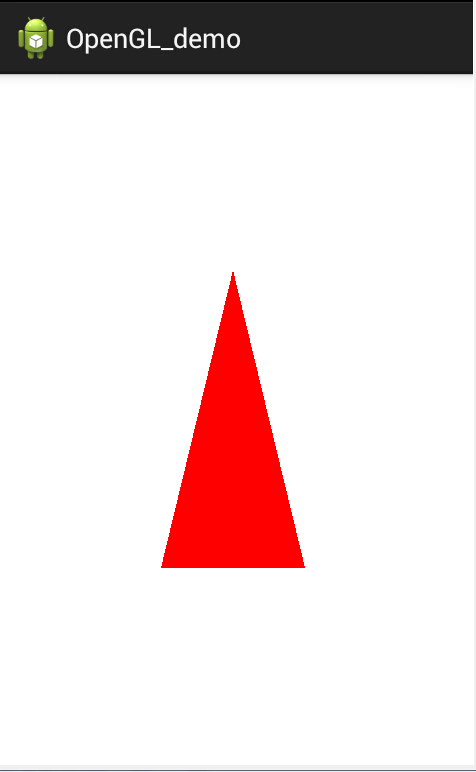
运行效果图如下:
Android_GLSurfaceView的更多相关文章
随机推荐
- thinkphp 视图(二)变量输出、赋值和替换
view下的html文件会编译成php文件 编译的文件在runtime 下的temp目录 <p>{$email}</p> 会编译成 <?php echo $email; ...
- printf 字符串格式化
在将各种类型的数据构造成字符串时,sprintf 的强大功能很少会让你失望.由于sprintf 跟printf 在用法上几乎一样,只是打印的目的地不同而已,前者打印到字符串中,后者则直接在命令行上输出 ...
- 一 分析easyswoole源码(启动服务)
分析easyswoole源码 1以启动为例 //检查是否已经安装 installCheck();//检查锁文件是否存在,不存在结束 //启动服务 serverStart showLogo();//显示 ...
- cpp 区块链模拟示例(四) 区块链工作量证明
本文主要在之前的区块链原形上添加了工作量证明,并且为后继的交易功能做好准备. 上一个章节我们已经创建了区块链的基本原形,但是区块的哈希计算和加入太过于简单,如果按照这种速度添加区块那么区块链估计一个小 ...
- ES6最新语法
ECMAScript 6(以下简称ES6)是JavaScript语言的下一代标准.因为当前版本的ES6是在2015年发布的,所以又称ECMAScript 2015. 也就是说,ES6就是ES2015. ...
- springmvc为什么是线程不安全的
1.因为springmvc默认是单例的,所以会有线程安全的问题,如果存在全局变量,因为全局变量是存在方法区的,而局部变量是放在栈中的,方法区是所有线程公用的,而每个线程都有属于自己的栈.所以如果使用单 ...
- activeMq-3 Spring整合activeMq
与jdbcTemplate相似的是,Spring也提供了JmsTemplate 生产者使用JmsTemplate生产消息,消费者实现一个监听器用于获取消息 项目用maven构建,jdk1.8, 文末提 ...
- PHP-循环结构-数组(难)
今日目标: (1)循环结构 —— do..while.. —— 掌握 (2)循环结构 —— for —— 重点 (3)数组 —— 重点 1.PHP中的循环结构 —— do..while... do: ...
- spring-boot json数据交互
SpringBoot学习之Json数据交互 最近在弄监控主机项目,对javaweb又再努力学习.实际的项目场景中,前后分离几乎是所以项目的标配,全栈的时代的逐渐远去,后端负责业务逻辑处理,前端负责数据 ...
- jq的事件对象