
Android Bundle类别
即使在今天发现自己Bundle类不明确,因此,花时间去研究了一下。
依据google官方文件(http://developer.android.com/reference/android/os/Bundle.html)
Bundle类是一个key-value对,“A mapping from String values to various Parcelable types.”
类继承关系:
java.lang.Object
android.os.Bundle
Bundle类是一个final类:
public final class
Bundle
extends Objectimplements Parcelable Cloneable
两个activity之间的通讯能够通过bundle类来实现,做法就是:
(1)新建一个bundle类
Bundle mBundle = new Bundle();
(2)bundle类中增加数据(key -value的形式,还有一个activity里面取数据的时候,就要用到key,找出相应的value)
mBundle.putString("Data", "data from TestBundle");
(3)新建一个intent对象。并将该bundle增加这个intent对象
Intent intent = new Intent();

intent.setClass(TestBundle.this, Target.class);

intent.putExtras(mBundle);
完整代码例如以下:
android mainfest.xml例如以下:
<?

xml version="1.0" encoding="utf-8"?>

<manifest xmlns:android="http://schemas.android.com/apk/res/android"

      package="com.tencent.test"

      android:versionCode="1"

      android:versionName="1.0">

    <application android:icon="@drawable/icon" android:label="@string/app_name">

        <activity android:name=".TestBundle"

                  android:label="@string/app_name">

            <intent-filter>

                <action android:name="android.intent.action.MAIN" />

                <category android:name="android.intent.category.LAUNCHER" />

            </intent-filter>

        </activity>

	<activity android:name=".Target"></activity>

    </application>

    <uses-sdk android:minSdkVersion="7" />

</manifest>
两个类例如以下:intent从TestBundle类发起,到Target类。
类1:TestBundle类:
import android.app.Activity;

import android.content.Intent;

import android.os.Bundle;

import android.view.View;

import android.view.View.OnClickListener;

import android.widget.Button;

public class TestBundle extends Activity {

	private Button button1;

	private OnClickListener cl;

    public void onCreate(Bundle savedInstanceState) {

    	super.onCreate(savedInstanceState);

    	setContentView(R.layout.main);

    	button1 = (Button) findViewById(R.id.button1);

    	cl = new OnClickListener(){

    		@Override

    		public void onClick(View arg0) {

				// TODO Auto-generated method stub

				Intent intent = new Intent();

				intent.setClass(TestBundle.this, Target.class);

				Bundle mBundle = new Bundle();

				mBundle.putString("Data", "data from TestBundle");//压入数据

				intent.putExtras(mBundle);

				startActivity(intent);

			}

        };

        button1.setOnClickListener(cl);

    }

}
类2: Target
import android.app.Activity;

import android.os.Bundle;

public class Target extends Activity{

    public void onCreate(Bundle savedInstanceState) {

        super.onCreate(savedInstanceState);

        setContentView(R.layout.target);

        Bundle bundle = getIntent().getExtras();    //得到传过来的bundle

        String data = bundle.getString("Data");//读出数据

        setTitle(data);

    }

}
布局文件:
main.xml
<?

xml version="1.0" encoding="utf-8"?>

<LinearLayout xmlns:android="http://schemas.android.com/apk/res/android"

    android:orientation="vertical"

    android:layout_width="fill_parent"

    android:layout_height="fill_parent"

    >

<TextView

    android:layout_width="fill_parent"

    android:layout_height="wrap_content"

    android:text="@string/hello"

    />

<Button

    android:layout_width="fill_parent"

    android:layout_height="wrap_content"

    android:text="@string/button"

    android:id = "@+id/button1"

    />

</LinearLayout>
target.xml
<?

xml version="1.0" encoding="utf-8"?>

<LinearLayout xmlns:android="http://schemas.android.com/apk/res/android"

    android:orientation="vertical"

    android:layout_width="fill_parent"

    android:layout_height="fill_parent"

    >

<TextView

    android:layout_width="fill_parent"

    android:layout_height="wrap_content"

    android:text="@string/target"

    />

</LinearLayout>
String.xml
<?xml version="1.0" encoding="utf-8"?>

<resources>

    <string name="hello">Hello World, TestBundle!</string>

    <string name="app_name">測试Bundle使用方法</string>

    <string name="button">点击跳转</string>

    <string name="target">来到target activity</string>

</resources>
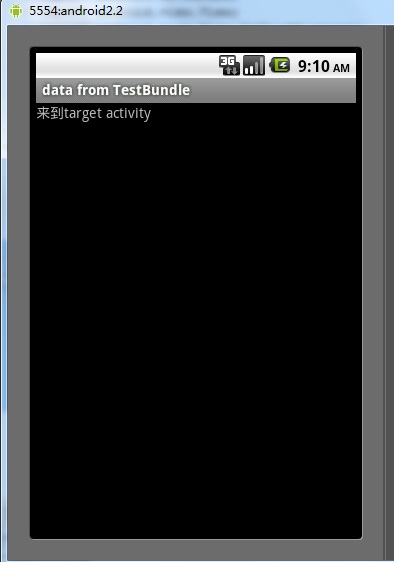
结果:
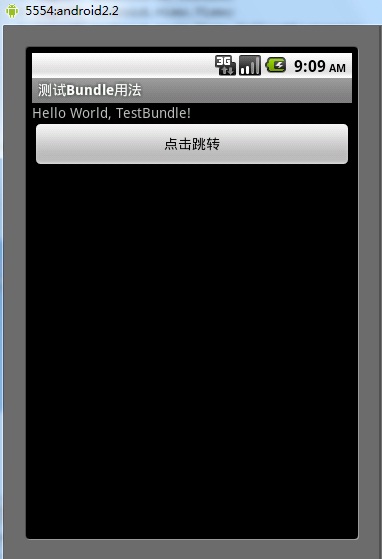
跳转结果:
Android Bundle类别的更多相关文章
- android bundle存放数据详解
转载自:android bundle存放数据详解 正如大家所知道,Activity之间传递数据,是将数据存放在Intent或者Bundle中 例如: 将数据存放倒Intent中传递: 将数据放到Bun ...
- 解决React Native unable to load script from assets index.android.bundle on windows
React Native运行的时候,经常碰到React Native unable to load script from assets index.android.bundle on windows ...
- React Native: unable to load scripts from assets 'index.android.bundle' on real device
问题:重新建了一个项目后,运行react-native run-android报: unable to load scripts from assets 'index.android.bundle' ...
- Unable to load script from assets 'index.android.bundle'.make sure you bundle is packaged correctly
解决此问题 以下方法每次都需要执行命令2才能更新 1.创建assets目录 mkdir android/app/src/main/assets 2.执行命令 react-native bundle - ...
- 项目初始化以后出现:Unable to load script from assets 'index.android.bundle
Mac中真机测试React Native project时出现Unable to load script from assets 'index.android.bundle' 2018年01月21日 ...
- react native中Unable to load script from assets 'index.android.bundle'解决方案
刚刚朋友问我,说是创建好一个项目,运行后报错:Unable to load script from assets 'index.android.bundle',以前好好的没出现这种现象,于是我找到一个 ...
- Unable to load script from assets 'index.android.bundle' 出错?
野路子太多,坑人真的!F**k 言归正传,当你运行 react native 程序的时候出现这个错误 ,如果您使用Windows,请按以下方式运行命令,或者如果出现错误“无法找到条目文件index.a ...
- React-Native 之 index.android.bundle
问题: index.android.bundle 这个bug 我相信很少同学会遇到,然而就是这个问题,困扰了我跟我的同事多天, 各种方法处理: 进入 android 目录 ./gradlew c ...
- Android——Android Bundle详解(转)
Android Bundle详解 1 Bundle介绍 Bundle主要用于传递数据:它保存的数据,是以key-value(键值对)的形式存在的. 我们经常使用Bundle在Activity之间传递数 ...
随机推荐
- VMware vSphere服务器虚拟化实验十五 vCenter vShield Manager
VMware vSphere服务器虚拟化实验十五 vCenter vShield Manager VMware vShield Manager是专为 VMware vCenter Server 集成 ...
- POJ2584 T-Shirt Gumbo【二分图多重匹配】
题目链接: id=2584">http://poj.org/problem?id=2584 题目大意: 如今有5种型号(S.M.L.X.T)的衣服要发放给N个參赛队员.给出每一个參赛者 ...
- UVALive 5791 Candy's Candy 解题报告
比赛总结 题目 题意: 有f种口味的糖果,现在要把每颗糖果分到一些packs里面去.packs分两种: flavored pack:只有一种口味. variety pack:每种口味都有. 求满足下列 ...
- Android资源文件及文件夹介绍
在Android项目文件夹里面,主要的资源文件是放在res文件夹里面的 1:assets文件夹是存放不进行编译加工的原生文件,即该文件夹里面的文件不会像xml,java文件被预编译,可以存放一些图片, ...
- linux下的开源移动图像监测程序--motion编译与配置
前几天在网上偶然看到一篇博客,是利用linxu下的开源的motion搭建嵌入式视频动态监控系统,感觉很好很强大于,是就想自己编译移植一下试试. 所谓移动图像监测,简单来说就是利用摄像头定点监测某个区域 ...
- c++ stl algorithm: std::fill, std::fill_n
std::fill 在[first, last)范围内填充值 #include <iostream> #include <vector> #include <algori ...
- Devstack: A copy of worked local.conf I'm sharing with you.
service_plugins = neutron.services.firewall.fwaas_plugin.FirewallPlugin [service_providers] service_ ...
- jquery下php与ajax的数据交换方式
参考链接:http://www.php100.com/html/webkaifa/PHP/PHPyingyong/2013/0122/11971.html 一.前台传递字符串变量,后台返回字符串变量( ...
- 再探vim经常使用命令
最開始学习过vim,见 http://blog.csdn.net/u011848617/article/details/12837873 之后以前不了了之,当再次学习后,发现经常使用命令的掌握还 ...
- 对consistencygroup的一些研究和实践
声明: 本博客欢迎转载,但请保留原作者信息! 作者:李人可 团队:华为杭州OpenStack团队 consistency group,直译是一致性组,是Juno版本号cinder新引进的一个概念.顾名 ...