
string 字符串模块操作
1. 常用方法
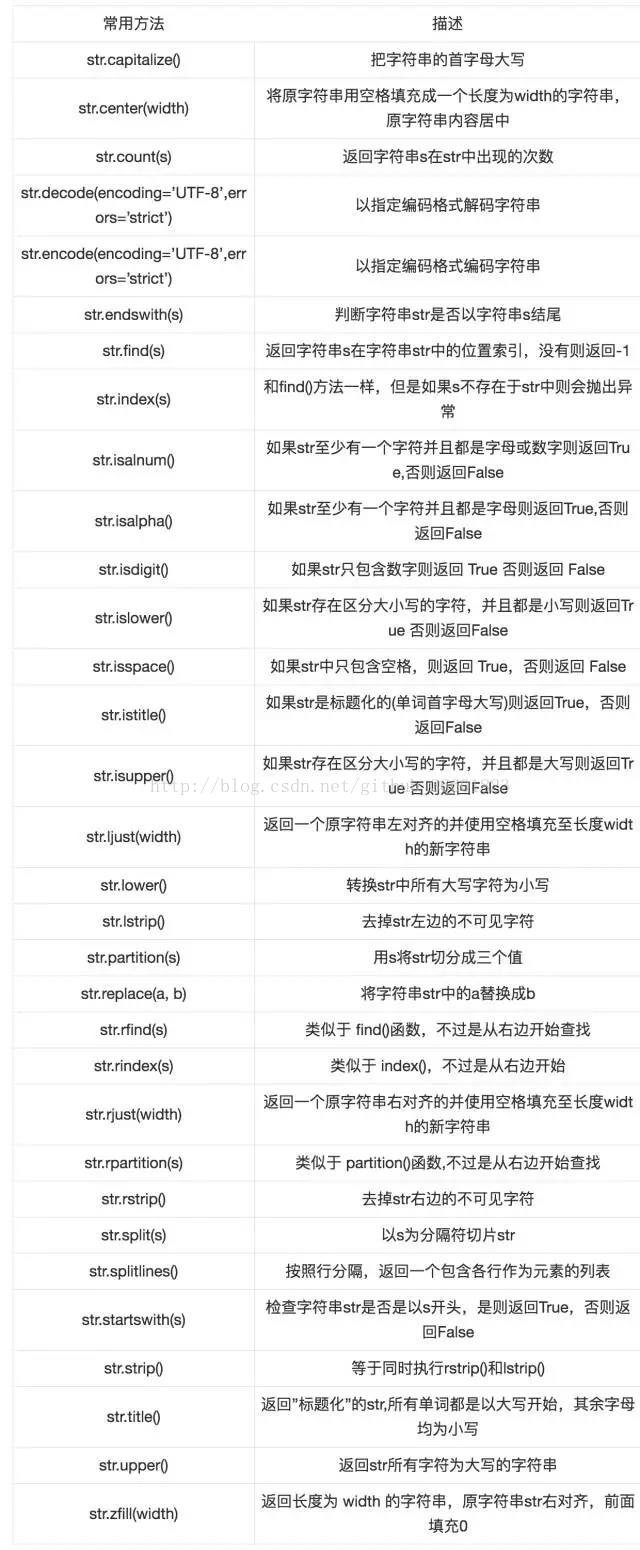
2.字符串常量

3.字符串模板Template
通过string.Template可以为Python定制字符串的替换标准,下面是具体列子:
>>>from string import Template
>>>s = Template('$who like $what')
>>>print s.substitute(who='i', what='python')
i like python
>>>print s.safe_substitute(who='i') # 缺少key时不会抛错
i like $what
>>>Template('${who}LikePython').substitute(who='I') # 在字符串内时使用{}
'ILikePython'
Template还有更加高级的用法,可以通过继承string.Template, 重写变量delimiter(定界符)和idpattern(替换格式), 定制不同形式的模板。
import string
template_text = ''' Delimiter : $de Replaced : %with_underscore Ingored : %notunderscored '''
d = {'de': 'not replaced',
'with_underscore': 'replaced',
'notunderscored': 'not replaced'}
class MyTemplate(string.Template):
# 重写模板 定界符(delimiter)为"%", 替换模式(idpattern)必须包含下划线(_)
delimiter = '%'
idpattern = '[a-z]+_[a-z]+'
print string.Template(template_text).safe_substitute(d) # 采用原来的Template渲染
print MyTemplate(template_text).safe_substitute(d) # 使用重写后的MyTemplate渲染
输出:
Delimiter : not replaced
Replaced : %with_underscore
Ingored : %notunderscored
Delimiter : $de
Replaced : replaced
Ingored : %notunderscored
原生的Template只会渲染界定符为$的情况,重写后的MyTemplate会渲染界定符为%且替换格式带有下划线的情况。
4.常用字符串技巧
1.反转字符串
>>> s = '1234567890'
>>> print s[::-1]
0987654321
2.关于字符串链接
尽量使用join()链接字符串,因为’+’号连接n个字符串需要申请n-1次内存,使用join()需要申请1次内存。
3.固定长度分割字符串
>>> import re
>>> s = '1234567890'
>>> re.findall(r'.{1,3}', s) # 已三个长度分割字符串
['123', '456', '789', '0']
4.使用()括号生成字符串
sql = ('SELECT count() FROM table '
'WHERE id = "10" '
'GROUP BY sex')
print sql
SELECT count() FROM table WHERE id = "10" GROUP BY sex
————————————————
版权声明:本文为CSDN博主「yolosliu」的原创文章,遵循CC 4.0 by-sa版权协议,转载请附上原文出处链接及本声明。
原文链接:https://blog.csdn.net/github_36601823/article/details/77815013
string 字符串模块操作的更多相关文章
- String字符串相关操作
.length 字符串长度.equals 比较字符串.equalIgnoreCase 比较字符串不区别大小写.charAt 获取字符串指定下标位置的字符.contains 判断字符串内是否包含某字符串 ...
- 4.String字符串类型操作
String类型操作 1.set key value 设置key对应的值为string类型的value 2.mset key1 value1 … keyN valueN 一次设置多个key的值 3. ...
- String字符串的操作
字符串的常用操作 # Author:nadech name = "my name is nadech" print(name.count("a")) print ...
- string字符串js操作
String 对象方法 方法 描述 anchor() 创建 HTML 锚. big() 用大号字体显示字符串. blink() 显示闪动字符串. bold() 使用粗体显示字符串. charAt() ...
- String - 字符串分割操作
如果我想将一个字符串按照每8位一组分为若干个块,然后存储在一个byte[ ]数组中,我首先需要确定这个byte数组的长度,但由于我无法确定这个字符串的长度是否可以被8整除,所以无法直接判断,因此需要对 ...
- string 字符串的操作 大全类的使用
Array.Sort(vv, string.CompareOrdinal); //ASCII排序 string[] words = { "The", "1quick&qu ...
- 【超值分享】为何写服务器程序需要自己管理内存,从改造std::string字符串操作说起。。。
服务器程序为何要进行内存管理,管中窥豹,让我们从string字符串的操作说起...... new/delete是用于c++中的动态内存管理函数,而malloc/free在c++和c中都可以使用,本质上 ...
- string字符串转数组
/** * THis_is_a_cat * This Is A Cat * * Cat A Is This * @author Administrator * */ public class Test ...
- python学习之-- redis模块操作 string
redis 模块操作之--> String String:redis中的string在内存中按照一个key 对应一个 value来存储. 使用方法如下:set(name, value, ex=N ...
- C风格字符串和C++ string 对象赋值操作的性能比较
<<C++ Primer>> 第四版 Exercise Section 4.3.1 部分Exercise 4.2.9 习题如下: 在自己本机执行如下程序,记录程序执行时间: # ...
随机推荐
- 【面试题】面试突击71:GET 和 POST 有什么区别?
携手创作,共同成长!这是我参与「掘金日新计划 · 8 月更文挑战」的第4天,点击查看活动详情 GET 和 POST 是 HTTP 请求中最常用的两种请求方法,在日常开发的 RESTful 接口中,都能 ...
- 如何使用新版bing(支持ChatGPT)
就在今天,2023年2月8日,微软正式将ChatGPT引入Bing 搜索引擎迎来新时代 如何体验支持ChatGPT的新版bing? 一.重要说明 请自备TiZi 本文以PC端为例 目前,新版 Bing ...
- 前端记录:树形插件zTree 和 表格扩展 tableX
树形插件zTree 表格扩展 tableX 项目实例 [地区联动实现_前端] <title>区域设置</title> <!--当前位置开始--> <div c ...
- 1、docker 安装
1 准备三台linux服务器 2 docker安装 三台机器全部执行docker安装操作 2.1 移除以前docker相关包 sudo yum remove docker \ docker-clien ...
- Java集合-练习巩固
练习一 public class H1_Test { public static void main(String[] args) { H1_News h1News = new H1_News(&qu ...
- OS-lab3
OS-lab3 lab2之后,我们能够通过MMU访问内存了,不过操作系统最重要的是能够让进程运行. include env.h 定义了进程控制相关的变量,如进程数量NENV.进程状态ENV_FREE等 ...
- 记录VUE项目使用 sass 版本不匹配问题
之前安装的node.js 是16 版本的导致找不到合适node sass 版本. node.js 退版本之后正常 -------------------------------------- ---- ...
- 快速排序(QuiteSort)
快速排序算法(QuiteSort)是基于分治策略的一个算法.其基本算法是,对于输入的子数组a[p,r],按以下3个步骤进行排序: (1)分解(divide):以 a[p]为基准元素将a[p:r]划分成 ...
- Robot-Framework 基础操作和常用的语法
1.打开浏览器 Open Browser 2.浏览器最大化 Maximize Browser Window 3.关闭浏览器 Test Teardown Close Browser 4.输入文本框 I ...
- 如何用premiere添加配乐?pr视频添加音乐
在pr中,怎么给视频添加音乐? 给视频添加音乐,有两种情况:1是视频音乐已存在:2是视频没有音乐,只是单纯的视频. 1.从酷狗音乐里下载一首音乐到桌面. 2.将音乐文件直接拖动到音频轨道里,把素材面板 ...