
简易的AutoPlayCarousel 轮播控件
原理是使用StackPanel 的margin属性的偏移来实现轮播的效果
废话不多说直接上代码
AutoPlayCarousel核心代码
[ContentProperty(nameof(Children))]

    [TemplatePart(Name = "PART_StackPanel", Type = typeof(StackPanel))]

    public class AutoPlayCarousel : Control

    {

        #region Identifier

        /// <summary>

        /// 视图区域

        /// </summary>

        private StackPanel _stkMain;

        /// <summary>

        ///

        /// </summary>

        private DispatcherTimer _dtAutoPlay;

        #endregion

        #region Constructor

        static AutoPlayCarousel()

        {

            DefaultStyleKeyProperty.OverrideMetadata(typeof(AutoPlayCarousel), new FrameworkPropertyMetadata(typeof(AutoPlayCarousel)));

        }

        public AutoPlayCarousel()

        {

            Loaded += AutoScrollCarousel_Loaded;

            SizeChanged += AutoScrollCarousel_SizeChanged;

        }

        #endregion

        #region RoutedEvent

        public static readonly RoutedEvent IndexChangedEvent = EventManager.RegisterRoutedEvent("IndexChanged", RoutingStrategy.Bubble, typeof(IndexChangedEventHandler), typeof(AutoPlayCarousel));

        public event IndexChangedEventHandler IndexChanged

        {

            add => AddHandler(IndexChangedEvent, value);

            remove => RemoveHandler(IndexChangedEvent, value);

        }

        void RaiseIndexChanged(int newValue)

        {

            var arg = new IndexChangedEventArgs(newValue, IndexChangedEvent);

            RaiseEvent(arg);

        }

        #endregion

        #region Property

        /// <summary>

        /// get the children collection.

        /// </summary>

        public ObservableCollection<FrameworkElement> Children

        {

            get => (ObservableCollection<FrameworkElement>)GetValue(ChildrenProperty);

            private set => SetValue(ChildrenProperty, value);

        }

        public static readonly DependencyProperty ChildrenProperty =

            DependencyProperty.Register("Children", typeof(ObservableCollection<FrameworkElement>), typeof(AutoPlayCarousel), new PropertyMetadata(new ObservableCollection<FrameworkElement>()));

        /// <summary>

        /// get or set orientation

        /// </summary>

        public Orientation Orientation

        {

            get => (Orientation)GetValue(OrientationProperty);

            set => SetValue(OrientationProperty, value);

        }

        public static readonly DependencyProperty OrientationProperty =

            DependencyProperty.Register("Orientation", typeof(Orientation), typeof(AutoPlayCarousel), new PropertyMetadata(Orientation.Horizontal));

        /// <summary>

        /// get or set index

        /// </summary>

        public int Index

        {

            get => (int)GetValue(IndexProperty);

            set => SetValue(IndexProperty, value);

        }

        public static readonly DependencyProperty IndexProperty =

            DependencyProperty.Register("Index", typeof(int), typeof(AutoPlayCarousel), new PropertyMetadata(0, OnIndexChanged));

        /// <summary>

        /// Gets or sets animation duration.

        /// </summary>

        public TimeSpan AnimateDuration

        {

            get => (TimeSpan)GetValue(AnimateDurationProperty);

            set => SetValue(AnimateDurationProperty, value);

        }

        public static readonly DependencyProperty AnimateDurationProperty =

            DependencyProperty.Register("AnimateDuration", typeof(TimeSpan), typeof(AutoPlayCarousel), new PropertyMetadata(TimeSpan.FromSeconds(0.5)));

        /// <summary>

        /// Gets or sets recyclable.

        /// </summary>

        public bool Recyclable

        {

            get => (bool)GetValue(RecyclableProperty);

            set => SetValue(RecyclableProperty, value);

        }

        public static readonly DependencyProperty RecyclableProperty =

            DependencyProperty.Register("Recyclable", typeof(bool), typeof(AutoPlayCarousel), new PropertyMetadata(false));

        public TimeSpan AutoPlayInterval

        {

            get => (TimeSpan)GetValue(AutoPlayIntervalProperty);

            set => SetValue(AutoPlayIntervalProperty, value);

        }

        public static readonly DependencyProperty AutoPlayIntervalProperty =

            DependencyProperty.Register("AutoPlayInterval", typeof(TimeSpan), typeof(AutoPlayCarousel), new PropertyMetadata(OnAutoPlayIntervalChanged));

        #endregion

        #region Event Handler

        public override void OnApplyTemplate()

        {

            base.OnApplyTemplate();

            _stkMain = GetTemplateChild("PART_StackPanel") as StackPanel;

        }

        private void AutoScrollCarousel_SizeChanged(object sender, SizeChangedEventArgs e)

        {

            foreach (FrameworkElement children in Children)

            {

                children.Width = ActualWidth;

                children.Height = ActualHeight;

            }

        }

        private void AutoScrollCarousel_Loaded(object sender, RoutedEventArgs e)

        {

            if (Children == null)

                return;

            Loaded -= AutoScrollCarousel_Loaded;

            foreach (FrameworkElement child in Children)

            {

                child.Width = ActualWidth;

                child.Height = ActualHeight;

            }

        }

        private static void OnAutoPlayIntervalChanged(DependencyObject d, DependencyPropertyChangedEventArgs e)

        {

            var autoScrollCarousel = d as AutoPlayCarousel;

            autoScrollCarousel?.RestartAutoPlayTimer();

        }

        private void DispatcherTimerAutoPlay_Tick(object sender, EventArgs e)

        {

            Index++;

        }

        private static void OnIndexChanged(DependencyObject d, DependencyPropertyChangedEventArgs e)

        {

            var autoScrollCarousel = d as AutoPlayCarousel;

            if (autoScrollCarousel == null || !autoScrollCarousel.IsLoaded)

                return;

            var targetIndex = 0;

            if (!autoScrollCarousel.Recyclable)

                targetIndex = autoScrollCarousel.Index > (autoScrollCarousel.Children.Count - 1) ? autoScrollCarousel.Children.Count - 1 : (autoScrollCarousel.Index < 0 ? 0 : autoScrollCarousel.Index);

            else

                targetIndex = autoScrollCarousel.Index > (autoScrollCarousel.Children.Count - 1) ? 0 : (autoScrollCarousel.Index < 0 ? autoScrollCarousel.Children.Count - 1 : autoScrollCarousel.Index);

            if (targetIndex != autoScrollCarousel.Index)

            {

                autoScrollCarousel.Index = targetIndex;

                return;

            }

            autoScrollCarousel.ResetAutoPlayTimer();

            if (autoScrollCarousel.Orientation == Orientation.Vertical)

            {

                autoScrollCarousel._stkMain.BeginAnimation(StackPanel.MarginProperty, new ThicknessAnimation()

                {

                    To = new Thickness(0, -1 * autoScrollCarousel.ActualHeight * autoScrollCarousel.Index, 0, 0),

                    Duration = autoScrollCarousel.AnimateDuration,

                    EasingFunction = new CubicEase() { EasingMode = EasingMode.EaseOut }

                });

            }

            else

            {

                autoScrollCarousel._stkMain.BeginAnimation(StackPanel.MarginProperty, new ThicknessAnimation()

                {

                    To = new Thickness(-1 * autoScrollCarousel.ActualWidth * autoScrollCarousel.Index, 0, 0, 0),

                    Duration = autoScrollCarousel.AnimateDuration,

                    EasingFunction = new CubicEase() { EasingMode = EasingMode.EaseOut }

                });

            }

            autoScrollCarousel.RaiseIndexChanged(targetIndex);

        }

        #endregion

        #region Function

        private void RestartAutoPlayTimer()

        {

            if (_dtAutoPlay != null)

            {

                _dtAutoPlay.Stop();

            }

            if (AutoPlayInterval.TotalSeconds != 0)

            {

                _dtAutoPlay = new DispatcherTimer()

                {

                    Interval = AutoPlayInterval,

                };

                _dtAutoPlay.Tick += DispatcherTimerAutoPlay_Tick;

                _dtAutoPlay.Start();

            }

        }

        private void ResetAutoPlayTimer()

        {

            if (_dtAutoPlay != null)

            {

                _dtAutoPlay.Stop();

                _dtAutoPlay.Start();

            }

        }

        #endregion

    }
一些辅助代码
public class IndexChangedEventArgs : RoutedEventArgs

    {

        public IndexChangedEventArgs(int currentIndex, RoutedEvent routedEvent) : base(routedEvent)

        {

            CurrentIndex = currentIndex;

        }

        public int CurrentIndex { get; set; }

    }

    public delegate void IndexChangedEventHandler(object sender, IndexChangedEventArgs e);
AutoPlayCarousel默认的样式
<sys:Double x:Key="DefaultFontSize">14</sys:Double>
<sys:Boolean x:Key="DefaultSnapsToDevicePixels">false</sys:Boolean>
<Style TargetType="{x:Type local:AutoPlayCarousel}">

        <Setter Property="SnapsToDevicePixels" Value="{StaticResource DefaultSnapsToDevicePixels}" />

        <Setter Property="FontSize" Value="{StaticResource DefaultFontSize}" />

        <Setter Property="Template">

            <Setter.Value>

                <ControlTemplate TargetType="{x:Type local:AutoPlayCarousel}">

                    <StackPanel x:Name="PART_StackPanel" Orientation="{TemplateBinding Orientation}">

                        <ItemsControl x:Name="PART_ItemsControl"   ItemsSource="{TemplateBinding Children}"

                                      VerticalAlignment="Stretch"

                                      HorizontalAlignment="Stretch">

                            <ItemsControl.ItemsPanel>

                                <ItemsPanelTemplate>

                                    <StackPanel Width="{TemplateBinding Width}" Height="{TemplateBinding Height}" Orientation="{Binding Orientation,RelativeSource={RelativeSource AncestorType=local:AutoPlayCarousel}}"/>

                                </ItemsPanelTemplate>

                            </ItemsControl.ItemsPanel>

                        </ItemsControl>

                    </StackPanel>

                </ControlTemplate>

            </Setter.Value>

        </Setter>

    </Style>
页面使用
<customControl:AutoPlayCarousel

            x:Name="Carousel"

            AutoPlayInterval="0:0:3"

            Recyclable="True"

            Height="1080">

            <Grid Background="Red" >

                <Grid HorizontalAlignment="Center" VerticalAlignment="Center" Height="500" Width="500" Background="Black">

                    <TextBlock Text="1" FontSize="20" Foreground="Wheat" HorizontalAlignment="Center" VerticalAlignment="Center"></TextBlock>

                </Grid>

            </Grid>

            <Grid Background="Green"  >

                <Grid HorizontalAlignment="Center" VerticalAlignment="Center" Height="500" Width="500" Background="Black">

                    <TextBlock Text="2" FontSize="20" Foreground="Wheat" HorizontalAlignment="Center" VerticalAlignment="Center"></TextBlock>

                </Grid>

            </Grid>

            <Grid Background="Yellow"  >

                <Grid HorizontalAlignment="Center" VerticalAlignment="Center" Height="500" Width="500" Background="Black">

                    <TextBlock Text="3" FontSize="20" Foreground="Wheat" HorizontalAlignment="Center" VerticalAlignment="Center"></TextBlock>

                </Grid>

            </Grid>

            <Grid Background="Blue"   >

                <Grid HorizontalAlignment="Center" VerticalAlignment="Center" Height="500" Width="500" Background="Black">

                    <TextBlock Text="4" FontSize="20" Foreground="Wheat" HorizontalAlignment="Center" VerticalAlignment="Center"></TextBlock>

                </Grid>

            </Grid>

        </customControl:AutoPlayCarousel>
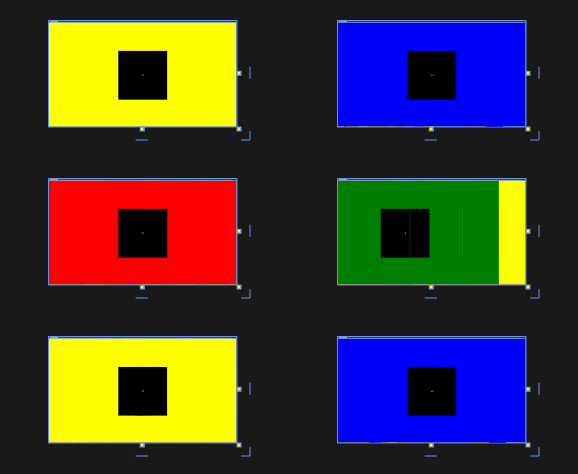
效果如下:
简易的AutoPlayCarousel 轮播控件的更多相关文章
- 简易的DragDropCarousel 拖拽轮播控件
上一篇文章有写到 自动轮播的控件 简易的AutoPlayCarousel 轮播控件 - 黄高林 - 博客园 (cnblogs.com) 本章是基于自动轮播的一种衍生,通过拖拽鼠标进切换 直接上代码 ...
- WPF 控件库——轮播控件
WPF 控件库系列博文地址: WPF 控件库——仿制Chrome的ColorPicker WPF 控件库——仿制Windows10的进度条 WPF 控件库——轮播控件 WPF 控件库——带有惯性的Sc ...
- 第四十六篇、UICollectionView广告轮播控件
这是利用人的视觉错觉来实现无限轮播,UICollectionView 有很好的重用机制,这只是部分核心代码,后期还要继续完善和代码重构. #import <UIKit/UIKit.h> # ...
- Android之仿京东淘宝的自动无限轮播控件
在App的开发中,很多的时候都需要实现类似京东淘宝一样的自动无限轮播的广告栏,所以就自己写了一个,下面是我自定义控件的思路和过程. 一.自定义控件属性 新建自定义控件SliderLayout继承于Re ...
- Android图片轮播控件
Android广告图片轮播控件,支持无限循环和多种主题,可以灵活设置轮播样式.动画.轮播和切换时间.位置.图片加载框架等! 使用步骤 Step 1.依赖banner Gradle dependenci ...
- jquery轮播控件
网上找了一个轮播控件,效果不错,而且很容易改,需要的同学去下载咯 地址是:http://download.csdn.net/detail/jine515073/7704143
- Android-----------广告图片轮播控件
Banner广告图片轮播控件,支持无限循环和多种主题,可以灵活设置轮播样式.动画.轮播和切换时间.位置.图片加载框架等! 很多Android APP中都有广告栏,我也用过很多次了,特来写一篇博文. 先 ...
- 一起写一个Android图片轮播控件
注:本文提到的Android轮播控件Demo地址: Android图片轮播控件 1. 轮播控件的组成部分 我们以知乎日报Android客户端的轮播控件为例,分析一下轮播控件的主要组成: 首先我们要有用 ...
- Android 开发最牛的图片轮播控件,基本什么都包含了。
Android图片轮播控件 源码下载地址: Android 图片轮播 现在的绝大数app都有banner界面,实现循环播放多个广告图片和手动滑动循环等功能.因为ViewPager并不支持循环翻页, ...
随机推荐
- 21.LVS负载均衡群集-DR群集
LVS负载均衡群集-DR群集 目录 LVS负载均衡群集-DR群集 数据包流向分析 DR模式的特点 LVS-DR中的ARP问题 IP地址冲突 解决办法 路由根据ARP表项,会将新来的请求报文转发给Rea ...
- python-将print内容保存到文件
通过sys.stdout得到print输出的内容,再进行保存 import sys class Logger(object): def __init__(self, file_path: str = ...
- tableSizeFor
HashMap tableSizeFor() /** Returns a power of two size for the given target capacity. 1.(不考虑大于最大容量的情 ...
- centos服务器安全技巧
系统管理员都应该烂熟于心的: 务必保证系统是 最新的 经常更换密码 - 使用数字.字母和非字母的符号组合 给予用户 最小 的权限,满足他们日常使用所需即可 只安装那些真正需要的软件包 1. 更改默认的 ...
- 一条update语句到底加了多少锁?带你深入理解底层原理
迎面走来了你的面试官,身穿格子衫,挺着啤酒肚,发际线严重后移的中年男子. 手拿泡着枸杞的保温杯,胳膊夹着MacBook,MacBook上还贴着公司标语:"我爱加班". 面试开始,直 ...
- 使用Scrcpy投屏
下载Scrcpy: https://wwt.lanzouw.com/iAzie07bz85c官网地址: https://github.com/Genymobile/scrcpy 记录当前下载位置: 手 ...
- 深入理解Apache Hudi异步索引机制
在我们之前的文章中,我们讨论了多模式索引的设计,这是一种用于Lakehouse架构的无服务器和高性能索引子系统,以提高查询和写入性能.在这篇博客中,我们讨论了构建如此强大的索引所需的机制,异步索引机制 ...
- 数论之欧几里德gcd
序:这篇博客我最开始学的时候写的,后来又学了一遍,自我感觉这篇好像有问题,扩展欧几里得建议走这边 首先先说,欧几里德一共有俩,欧几里德和扩展欧几里德,前者非常简单,后者直接变态(因为我太菜) gcd ...
- jdbc 10:jdbc事务
jdbc连接mysql,涉及到的事务问题 package com.examples.jdbc.o10_jdbc事务; import java.sql.Connection; import java.s ...
- 发明Linux的帕特里克
Slackware Linux 是目前市场存活时间最长的 Linux 发行版之一,它基于一个叫做 SLS(Soft Landing Systems)的 Linux 项目而设计,易于使用和稳定. Sla ...