
Tomcat启动报A fatal error has been detected by the Java Runtime Environment
#
# A fatal error has been detected by the Java Runtime Environment:
#
# SIGSEGV (0xb) at pc=0x00002ba9d88e02da, pid=17844, tid=1076017472
#
# JRE version: 6.0_29-b11
# Java VM: Java HotSpot(TM) 64-Bit Server VM (20.4-b02 mixed mode linux-amd64 compressed oops)
# Problematic frame:
# C [libc.so.6+0x732da] short+0x3a
#
# An error report file with more information is saved as:
# /home/iptv/bss/apache-tomcat-6.0.26/bin/hs_err_pid17844.log
#
# If you would like to submit a bug report, please visit:
# http://java.sun.com/webapps/bugreport/crash.jsp
#
问题的原因就在于 显示JIT在做编译优化的时候处理 某个方法时出错。
本利的错误是这个方法
- org.hibernate.cfg.annotations.SimpleValueBinder.setType
解决办法:让jvm跳过该方法的编译优化
在jvm启动参数中添加启动参数
- -XX:CompileCommand=exclude,org/hibernate/cfg/annotations/SimpleValueBinder,setType
如果是
eclipse下启动服务,则在eclipse-preference-java-installed jres 里面设置,
在 defalt vm arguments 填入上面的代码就可以了。
如果是
直接通过startup 启动tomcat,则需要修改以下文件
Windows下,在文件/bin/catalina.bat,Unix下,在文件/bin/catalina.sh
找到
- set JAVA_OPTS=%JAVA_OPTS% %LOGGING_CONFIG%
修改为
- set JAVA_OPTS=%JAVA_OPTS% -XX:CompileCommand=exclude,org/hibernate/cfg/annotations/SimpleValueBinder,setType %LOGGING_CONFIG%
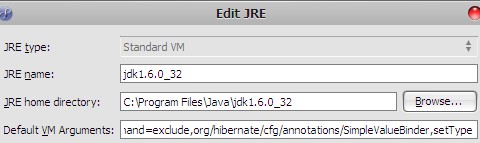
在Default VM Arguments中加入:
-XX:CompileCommand=exclude,org/hibernate/cfg/annotations/SimpleValueBinder,setType
这句就可以了,确实加入就可以了,但是怎么感觉有点莫名其妙呢,也没说出错的原因,哪位碰到过,这个问题到底是由什么原因造成的呢?
补充:
加上这句话后,启动tomcat的时候,控制台输出了这样的字样:

Tomcat启动报A fatal error has been detected by the Java Runtime Environment的更多相关文章
- A fatal error has been detected by the Java Runtime Environment(jdk 1.6的一个BUG)
几天做项目,生成一堆注解的实体,当实体数超过86个时,jvm报错: # # A fatal error has been detected by the Java Runtime Environmen ...
- Java服务突然失败:A fatal error has been detected by the Java Runtime Environment的总结
服务启动以后过段时间自动失败:A fatal error has been detected by the Java Runtime Environment 控制台中的错误信息 A fatal err ...
- eplise中运行提示 A fatal error has been detected by the java runtime environment
今天一同事出现运行项目时,提示 A fatal error has been detected by the java runtime environment,具体表现是使用我们框架,不能正常的打印日 ...
- A fatal error has been detected by the Java Runtime Environment:
在Eclipse中运行项目 遇到如下错误: ## A fatal error has been detected by the Java Runtime Environment:## EXCEPTIO ...
- centos6的kibana7.1无法启动报错 FATAL Error: /lib64/libc.so.6: version `GLIBC_2.14' not found 升级glibc的问题处理
centos6的kibana7.1无法启动报错 FATAL Error: /lib64/libc.so.6: version `GLIBC_2.14' not found 升级glibc的问题处理 ...
- 启动eclipse出现“Error opening registry key 'software\Javasoft\Java Runtime Environment'”
启动eclipse出现“Error opening registry key 'software\Javasoft\Java Runtime Environment'”,“java was start ...
- Error: opening registry key 'Software\JavaSoft\Java Runtime Environment' Error: could not find java.dll
java -jar yxCollector-1.1.0.jarError: opening registry key 'Software\JavaSoft\Java Runtime Environme ...
- java command line error opening registry key 'Software\JavaSoft\Java Runtime Environment' java.dll
C:\Users\huxxxxchan>javaError: opening registry key 'Software\JavaSoft\Java Runtime Environment'E ...
- 安装JDK出现问题 Error opening registry key'software\Javasoft\Java Runtime Environment'
第一次安装JDK测试是否安装成功,打开cmd输入java -version 回车的时候出现如下错误: Error opening registry key'software\Javasoft\Java ...
- Error: opening registry key 'Software\JavaSoft\Java Runtime Environment' could not find java.dll
Error: opening registry key 'Software\JavaSoft\Java Runtime Environment'Error: could not find java.d ...
随机推荐
- Django-Django基本使用、app、三板斧
1.纯手撸web框架 1.web框架的本质 理解1:连接前端与数据库的中间介质 理解2:socket服务端 2.手写web框架 1.编写socket服务端代码 2.浏览器访问响应无效>>& ...
- 使用Navicat操作MySQL数据库
一.Navicat连接数据库 ①进入Navicat,由于要使用的是MySQL数据库,选择MySQL ②输入连接名(这个是随便起的) 由上图可知连接数据库的四个要素 host:确定要操作的数据库在哪台电 ...
- Redis 源码解读之 expire 的时机
Redis 源码解读之 expire 的时机 背景和问题 本文想解决的问题: redis 如何感知并触发 key 过期的? 如何防止大规模的 key 同时过期,导致 redis 主循环阻塞在清理过期 ...
- ctf命令执行刷题
web29 error_reporting(0); if(isset($_GET['c'])){ $c = $_GET['c']; if(!preg_match("/flag/i" ...
- 流量加密之:MSF流量加密
流量加密之:MSF流量加密 目录 流量加密之:MSF流量加密 1 背景 2 生成SSL证书 3 使用MSF生成带证书的后门 4 验证流量 1 背景 在MSF中生成shell,并上线运行时.都是通过ht ...
- 袋鼠云出品!数栈UI 5.0全新体验升级,设计背后的故事
我们是袋鼠云数栈 UED 团队,致力于打造优秀的一站式数据中台产品.我们始终保持工匠精神,探索前端道路,为社区积累并传播经验价值. 前言 数栈作为云原⽣⼀站式⼤数据开发平台,从2016年发布第⼀个版本 ...
- 基于C++的OpenGL 01 之Hello Triangle
1. 引言 本文基于C++语言,描述OpenGL的绘制流程,这里描述的是OpenGL的核心模式(Core-profile) 本文基于Ubuntu 20.04.3 LTS系统,使用CMake构建程序,O ...
- PostgreSQL lag,lead获取记录前后的数据
场景:获取当前行的下一行某一字段数据,获取当前行的上一行某一字段数据 1.测试数据: postgres=# select * from tb1; id | name ----+------ 1 | a ...
- Docker 安装mysql8
1.获取镜像 docker pull mysql:8 2.创建数据卷 必须创建数据卷,不然容器挂了数据就丢了 docker volume create mysql-data #创建docker vol ...
- Intellij IDEA 通过数据库表生成带注解的实体类Generate MyPOJOs.groovy脚本的编写
//两段代码第一个是mybatis-plus的 第二个spring-jpa的,jpa的是我复制别人的,是本体,mybatis的是我改的//idea连接数据方法见 https://www.cnblogs ...