
nodejs(6)express学习
1.简单认识express
express::一个快速的网站开发框架,封装了原生的http模块,用起来更方便;API更人性化
特点
基于Node.js平台之上,进一步封装了
http模块,从而提供了更好用,更友好的 API使用Express创建网站,比使用原生的http模块更加方便;
Express 并没有覆盖 原生 http 模块中的方法,而是基于 原生方法之上,做了更友好的封装,让用户体验更好
创建服务器
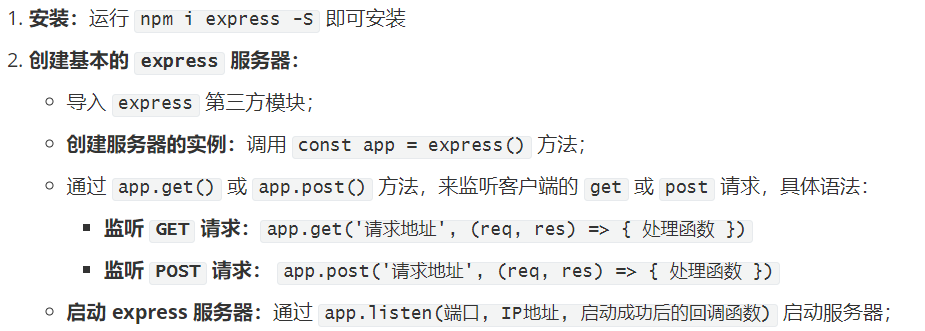
// npm install express -S
const express = require('express')

// 创建服务器
const app = express()

// 监听客户端的请求
// 只有客户端的请求类型是 get,并且 请求地址是 / 根路径的时候,
// 才会调用 后面指定的处理函数
app.get('/', (req, res) => {
  // express 中,封装了更好用的 res.send 方法
  res.send('你好,express 服务器!')
})

// 监听客户端的post请求,并且请求的地址是 /adduser 的时候,
// 才会调用后面指定的处理函数
app.post('/adduser', (req, res) => {
  res.send('服务器处理成功!')
})

// 启动服务器
app.listen(4444, () => {
  console.log('express server running at http://127.0.0.1:4444')
})
express 中的快捷方法
res.send()
支持 发送 字符串
Content-Type: text/html;支持 发送 对象 或 数组
Content-Type: application/json支持 发送 Buffer 此时会当作文件下载;
const fs = require('fs')
const path = require('path')
// 导入 express 模块
const express = require('express')
// 创建 express 的服务器实例
const app = express()

app.get('/', (req, res) => {
  // 1.发送普通文本
  // res.send('你好')
  // 2.发送对象或数组
  // res.send({ name: 'zs', age: 30 })
  // res.send(['zs', 'ls', 'zl'])
  // 3.发送Buffer二进制   1. 得到二进制  2. 使用send发送二进制
  fs.readFile(path.join(__dirname, './小明.mp3'), (err, buf) => {
    if (err) return res.send('发送文件失败!')
    // 发送 Buffer 二进制
    res.send(buf)
  })
})

// 调用 app.listen 方法,指定端口号并启动web服务器
app.listen(3001, function() {
  console.log('Express server running at http://127.0.0.1:3001')
})
res.sendFile()
用法1:
res.sendFile(path.join(__dirname, './view/index.html'))用法2:
res.sendFile('./view/movie.html', { root: __dirname })注意:
res.sendFile()可以向浏览器发送 静态页面;
使用res.sendFile发送文件
// 导入 express 模块
const express = require('express')
const path = require('path')
// 创建 express 的服务器实例
const app = express()

app.get('/', (req, res) => {
  // 向客户端发送文件
  // sendFile 必须发送绝对路径,或提供 root 选项
  // res.sendFile(path.join(__dirname, './views/movie.html'))
  // 或者
  // res.sendFile('./views/movie.html', { root: __dirname })

  // 实现下载功能,使用sendFIle
  // res.sendFile(path.join(__dirname, './New Divide - J2 Feat_ Avery _ Alita- Battle Angel.mp3'))
  const filename = encodeURI('歌曲.mp3')
  res.sendFile('./New Divide - J2 Feat_ Avery _ Alita- Battle Angel.mp3', { root: __dirname, headers: { 'Content-Disposition': 'attachment; filename=' + filename } })

  // res.download('./New Divide - J2 Feat_ Avery _ Alita- Battle Angel.mp3', 'aaa.mp3', err => {
  //   if (err) return console.log('文件下载失败')
  //   console.log('文件下载成功')
  // })
})

// 调用 app.listen 方法,指定端口号并启动web服务器
app.listen(3001, function() {
  console.log('Express server running at http://127.0.0.1:3001')
})
向客户端发送文件
const express = require('express')
const path = require('path')

const app = express()

app.get('/', (req, res) => {
  // res.sendFile('直接传递一个绝对路径')
  // res.sendFile(path.join(__dirname, './views/movie.html'))

  /* const name = encodeURI('一首歌曲.flac')

  res.sendFile('./苏醒 - Stand Up Again.flac', {
    root: __dirname,
    headers: {
      'Content-Disposition': 'attachment; filename=' + name
    }
  }) */

  res.download('./New Divide - J2 Feat_ Avery _ Alita- Battle Angel.mp3', 'Battle.mp3', err => {
    if (err) return console.log('文件下载失败!')
    console.log('下载完成!')
  })
})

app.listen(3001, () => {
  console.log('server running at http://127.0.0.1:3001')
})
点击下载歌曲
const express = require('express')

const app = express()

app.get('/', (req, res) => {
  res.sendFile('./music.html', { root: __dirname })
})

// 监听客户端的下载请求,返回一个具体的文件
app.get('/dowload/music', (req, res) => {
  res.download('./New Divide - J2 Feat_ Avery _ Alita- Battle Angel.mp3', 'Battle Angel.mp3', err => {
    if (err) return console.log('失败了!')
    console.log('ok')
  })
})

app.listen(3001, () => {
  console.log('server running at http://127.0.0.1:3001')
})
music.html
<a href="/dowload/music">下载音乐</a>
使用express.static快速托管静态资源
const express = require('express')

const app = express()

//#region 注释
/* app.get('/', (req, res) => {
  res.sendFile('./views/home.html', { root: __dirname })
})

app.get('/movie.html', (req, res) => {
  res.sendFile('./views/movie.html', { root: __dirname })
})

app.get('/about.html', (req, res) => {
  res.sendFile('./views/about.html', { root: __dirname })
}) */
//#endregion

// 使用 app.use 来进行相关的配置
// app.use(express.static('./views'))

// 步骤的拆解
const result = express.static('./views')
app.use(result)
// 再次托管一下样式表的资源目录
app.use('/css', express.static('./css'))
// 托管JS文件目录
app.use('/js', express.static('./js'))

// vue 打好的包,直接放在一个文件夹下
// 然后app.use(express.static('./views'))使用就可以了

app.listen(3001, () => {
  console.log('server running at http://127.0.0.1:3001')
})
nodejs(6)express学习的更多相关文章
- [转] NodeJS框架express的途径映射(路由)功能及控制
NodeJS框架express的路径映射(路由)功能及控制 我们知道Express是一个基于NodeJS的非常优秀的服务端开发框架,本篇CSSer将提供express框架的route和route co ...
- NodeJS 框架 Express 从 3.0升级至4.0的新特性
NodeJS 框架 Express 从 3.0升级至4.0的新特性 [原文地址:√https://scotch.io/bar-talk/expressjs-4-0-new-features-and-u ...
- npm install Error:EPROTO: protocol error, symlink '../mime/cli.js' -> '/vagrant/src/nodejs/node_modules/express/node_modules/send/node_modules/.bin/mime'
我在ubuntu上使用npm安装依赖是出现下面错误: npm ERR! Linux 3.13.0-101-genericnpm ERR! argv "/usr/bin/nodejs" ...
- express学习(三)—— cookie和session
express学习(三)-- cookie和session cookie存在浏览器中,最大只能保存4K数据,不安全 session存在服务器中,不能独立(先读取cookie再读取session),较安 ...
- 阿里云主机Nginx下配置NodeJS、Express和Forever
https://cnodejs.org/topic/5059ce39fd37ea6b2f07e1a3 AngularJS中文社区即运行在阿里云主机上,本站使用Nginx引擎,为了AngularJS,我 ...
- nodejs的Express框架源码分析、工作流程分析
nodejs的Express框架源码分析.工作流程分析 1.Express的编写流程 2.Express关键api的使用及其作用分析 app.use(middleware); connect pack ...
- 知名nodeJS框架Express作者宣布弃nodeJS投Go
知名 nodeJS 框架 Express 的作者 TJ Holowaychuk 在 Twitter 发推并链接了自己的一篇文章,宣布弃 nodeJS 投 Go. 他给出的理由是:Go 语言和 Rust ...
- nodejs下express+ejs环境搭建
nodejs下express+ejs环境搭建 分类: Nodejs 1.进入需要创建项目的目录 cd F:\nodeCode 2.创建一个带ejs模板工程,工程名为haha e ...
- NodeJS 第一天学习
NodeJS 第一天学习 严格模式 ECMAScript 5的严格模式是采用具有限制性JavaScript变体的一种方式,从而使代码显示地 脱离"马虎模式/稀松模式/懒散模式"(s ...
- nodejs库express是如何接收inbound json请求的
这样几行简单的代码创建一个web服务器: var express = require('express'); var app = express(); var server = require('ht ...
随机推荐
- 浅谈arduino的bootloader
在arduino的板子上,作为核心的avr单片机往往都会烧录一个bootloader,这个叫做bootloader的东东其实是arduino研发团队针对arduino板子开发的一小段代码,借助于这段代 ...
- iphone 面试题(转)
转]iPhone 面试题解答 2011-07-20 0:51 转载自 492437598 最终编辑 492437598 1.main() { int a[5]={1,2,3,4,5}; ...
- cf 506 A. Mr. Kitayuta, the Treasure Hunter
不知道这个sb题怎么做错了.. /*#include <bits/stdc++.h> #define LL long long using namespace std; inline in ...
- 【转载】Android Gradle Build Error:Some file crunching failed, see logs for details解决办法
Android Gradle Build Error:Some file crunching failed, see logs for details解决办法 转载请标明出处: http://www. ...
- 六、JavaScript之调用外部JavaScript文件
一.外部JavaScript文件,不需要写<SCRIPT>标签,myScript.js代码如下: 二.index.php代码如下 三.运行效果如下 四.点击之后 myScript.php如 ...
- PowerDesigner创建索引
防止以后忘记怎么设置索引,记录下来方便查翻 1:选中Table 2:找到Table对应的Indexes 3:选中一条记录,点击红框中的小手(Properties)或双击该记录,进入到详细里面 4:找到 ...
- 第二阶段scrum-6
1.整个团队的任务量: 2.任务看板: 会议照片: 产品状态: 消息收发功能正在制作
- [转]Spark SQL2.X 在100TB上的Adaptive execution(自适应执行)实践
Spark SQL是Apache Spark最广泛使用的一个组件,它提供了非常友好的接口来分布式处理结构化数据,在很多应用领域都有成功的生产实践,但是在超大规模集群和数据集上,Spark SQL仍然遇 ...
- Android Studio真机调试安装以后打开闪退,打包APK再安装正常打开没有问题
一直真机调试都没有问题, 但是有一次开始,真机调试正常安装没有问题,但是一打开就崩溃了一眨眼间就像被光闪了一下的那种. oppoR11调试会这样,但是用魅族试过没有问题, 报错出现过Android S ...
- poj 3262 Protecting the Flowers 贪心 牛吃花
Protecting the Flowers Time Limit: 2000MS Memory Limit: 65536K Total Submissions: 11402 Accepted ...