
netty实现群聊功能
【概述】
实现一个网络群聊工具。参与聊天的客户端消息是通过服务端进行广播的。
主要由两块组成:聊天服务器端(ChatServer)和聊天客户端(ChatClient)。
聊天服务器(ChatServer)功能概述 :
1.监听所有客户端的接入、断线
2.有客户端A接入聊天室时,将接入消息发给除了客户端A的其他客户端
3.当客户端A退出聊天室时,将退出消息发给除了客户端A的其他客户端
4.当客户端A发送消息到聊天室时,将消息转发给除了客户端A的其他客户端
聊天客户端(ChatClient)功能概述 :
1.发送消息至聊天服务器
2.接收聊天服务器发送过来的所有消息
【pom依赖】
        <!--netty-->

        <dependency>

            <groupId>io.netty</groupId>

            <artifactId>netty-all</artifactId>

            <version>4.1.36.Final</version>

        </dependency>

        <!--lombok依赖-->

        <dependency>

            <groupId>org.projectlombok</groupId>

            <artifactId>lombok</artifactId>

            <version>1.18.6</version>

            <scope>provided</scope>

        </dependency>
【服务端启动器 ChatServer 】
package com.test.server;

import io.netty.bootstrap.ServerBootstrap;

import io.netty.channel.*;

import io.netty.channel.nio.NioEventLoopGroup;

import io.netty.channel.socket.SocketChannel;

import io.netty.channel.socket.nio.NioServerSocketChannel;

import io.netty.handler.codec.LineBasedFrameDecoder;

import io.netty.handler.codec.string.StringDecoder;

import io.netty.handler.codec.string.StringEncoder;

/**

 * 群聊服务端

 *

 */

public class ChatServer {

    private final int port;

    public ChatServer(int port) {

        this.port = port;

    }

    public void start() throws InterruptedException {

        EventLoopGroup parentGroup = new NioEventLoopGroup();

        EventLoopGroup childGroup = new NioEventLoopGroup();

        try {

            ServerBootstrap serverBootstrap = new ServerBootstrap();

            serverBootstrap.group(parentGroup, childGroup).channel(NioServerSocketChannel.class).childHandler(new ChannelInitializer<SocketChannel>() {

                protected void initChannel(SocketChannel sc) throws Exception {

                    ChannelPipeline pipeline = sc.pipeline();

                    //添加一个基于行的解码器

                    pipeline.addLast(new LineBasedFrameDecoder(2048));

                    pipeline.addLast(new StringDecoder());

                    pipeline.addLast(new StringEncoder());

                    pipeline.addLast(new ChatServerHandler());

                }

            }).option(ChannelOption.SO_BACKLOG, 128).option(ChannelOption.SO_KEEPALIVE, true);

            ChannelFuture future = serverBootstrap.bind(port).sync();

            System.out.println("服务器已启动");

            future.channel().closeFuture().sync();

        } finally {

            parentGroup.shutdownGracefully();

            childGroup.shutdownGracefully();

        }

    }

    public static void main(String[] args) throws InterruptedException {

        new ChatServer(8888).start();

    }

}
【ChatServerHandler】
package com.test.server;

import io.netty.channel.Channel;

import io.netty.channel.ChannelHandlerContext;

import io.netty.channel.ChannelInboundHandlerAdapter;

import io.netty.channel.group.ChannelGroup;

import io.netty.channel.group.DefaultChannelGroup;

import io.netty.util.concurrent.GlobalEventExecutor;

/**

 * 处理聊天服务器的各种情况

 *

 */

public class ChatServerHandler extends ChannelInboundHandlerAdapter {

    // 创建一个ChannelGroup,其是一个线程安全的集合,其中存放着与当前服务器相连接的所有Active状态的Channel

    // GlobalEventExecutor是一个单例、单线程的EventExecutor,是为了保证对当前group中的所有Channel的处理

    // 线程是同一个线程

    private static ChannelGroup group = new DefaultChannelGroup(GlobalEventExecutor.INSTANCE);

    // 只要有客户端Channel给当前的服务端发送了消息,那么就会触发该方法的执行

    @Override

    public void channelRead(ChannelHandlerContext ctx, Object msg) throws Exception {

        // 获取到向服务器发送消息的channel

        Channel channel = ctx.channel();

        // 这里要实现将消息广播给所有group中的客户端Channel

        // 发送给自己的消息与发送给大家的消息是不一样的

        group.forEach(ch -> {

            if (ch != channel) {

                ch.writeAndFlush(channel.remoteAddress() + ":" + msg + "\n");

            } else {

                channel.writeAndFlush("me:" + msg + "\n");

            }

        });

    }

    // 只要有客户端Channel与服务端连接成功就会执行这个方法

    @Override

    public void channelActive(ChannelHandlerContext ctx) throws Exception {

        // 获取到当前与服务器连接成功的channel

        Channel channel = ctx.channel();

        System.out.println(channel.remoteAddress() + "---上线");

        group.writeAndFlush(channel.remoteAddress() + "---上线\n");

        // 将当前channel添加到group中

        group.add(channel);

    }

    // 只要有客户端Channel断开与服务端的连接就会执行这个方法

    @Override

    public void channelInactive(ChannelHandlerContext ctx) throws Exception {

        // 获取到当前要断开连接的Channel

        Channel channel = ctx.channel();

        System.out.println(channel.remoteAddress() + "------下线");

        group.writeAndFlush(channel.remoteAddress() + "下线,当前在线人数:" + group.size() + "\n");

        // group中存放的都是Active状态的Channel,一旦某Channel的状态不再是Active,

        // group会自动将其从集合中踢出,所以,下面的语句不用写

        // remove()方法的应用场景是,将一个Active状态的channel移出group时使用

        // group.remove(channel);

    }

    /**

     * 当Channel中的数据在处理过程中出现异常时会触发该方法的执行

     *

     * @param ctx   上下文

     * @param cause 发生的异常对象

     * @throws Exception

     */

    @Override

    public void exceptionCaught(ChannelHandlerContext ctx, Throwable cause) throws Exception {

        cause.printStackTrace();

        ctx.close();

    }

}
【客户端启动类ChatClient】
package com.test.client;

import io.netty.bootstrap.Bootstrap;

import io.netty.channel.ChannelFuture;

import io.netty.channel.ChannelInitializer;

import io.netty.channel.ChannelPipeline;

import io.netty.channel.nio.NioEventLoopGroup;

import io.netty.channel.socket.SocketChannel;

import io.netty.channel.socket.nio.NioSocketChannel;

import io.netty.handler.codec.LineBasedFrameDecoder;

import io.netty.handler.codec.string.StringDecoder;

import io.netty.handler.codec.string.StringEncoder;

import java.io.BufferedReader;

import java.io.IOException;

import java.io.InputStreamReader;

/**

 * 群聊客户端

 *

 */

public class ChatClient {

    private final String host;

    private final int port;

    public ChatClient(String host, int port) {

        this.host = host;

        this.port = port;

    }

    public void start() {

        NioEventLoopGroup group = new NioEventLoopGroup();

        Bootstrap bootstrap = new Bootstrap();

        try {

            bootstrap.group(group).channel(NioSocketChannel.class).handler(new ChannelInitializer<SocketChannel>() {

                @Override

                protected void initChannel(SocketChannel ch) throws Exception {

                    ChannelPipeline pipeline = ch.pipeline();

                    pipeline.addLast(new LineBasedFrameDecoder(2048));

                    pipeline.addLast(new StringDecoder());

                    pipeline.addLast(new StringEncoder());

                    pipeline.addLast(new ChatClientHandler());

                }

            });

            ChannelFuture future = bootstrap.connect(host, port).sync();

            // 获取键盘输入

            InputStreamReader is = new InputStreamReader(System.in, "UTF-8");

            BufferedReader br = new BufferedReader(is);

            // 将输入的内容写入到Channel

            while (true) {

                //br.readLine()中执行fill()方法获取输入数据,获取不到时会发生阻塞,直到获取到数据为止

                future.channel().writeAndFlush(br.readLine() + "\r\n");

            }

        } catch (InterruptedException e) {

            e.printStackTrace();

        } catch (IOException e) {

            e.printStackTrace();

        } finally {

            group.shutdownGracefully();

        }

    }

    public static void main(String[] args) {

        new ChatClient("127.0.0.1", 8888).start();

    }

}
【ChatClientHandler】
package com.test.client;

import io.netty.channel.ChannelHandlerContext;

import io.netty.channel.SimpleChannelInboundHandler;

/**

 * 客户端处理

 *

 */

public class ChatClientHandler extends SimpleChannelInboundHandler<String> {

    @Override

    protected void channelRead0(ChannelHandlerContext channelHandlerContext, String s) throws Exception {

        System.out.println(s);

    }

    @Override

    public void exceptionCaught(ChannelHandlerContext ctx, Throwable cause) throws Exception {

        ctx.close();

    }

}
【运行结果】
[1.启动群聊服务端]

[2.启动群聊客户端01]


[2.启动群聊客户端02]

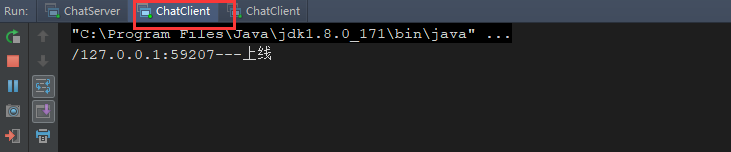

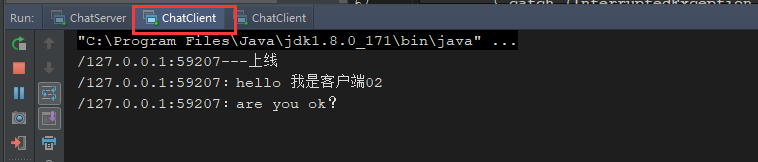
[3.发送消息测试]

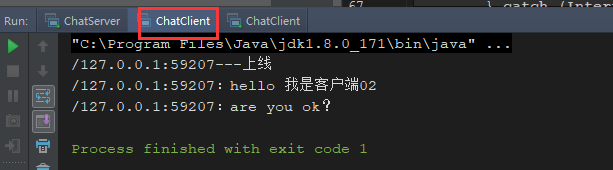
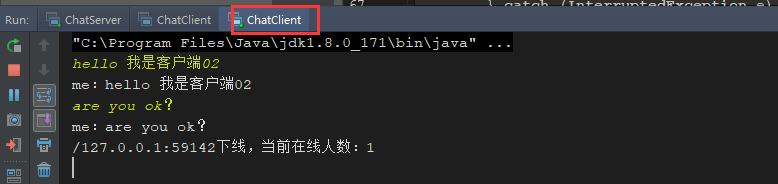
[4.下线测试]
netty实现群聊功能的更多相关文章
- Java-->实现群聊功能(C/S模式--TCP协议)
--> Java 对TCP协议的支持: --> java.net包中定义了两个类ServerSocket 和Socket ,分别用来实现双向连接的server 端和client 端. -- ...
- day04-1群聊功能
多用户即时通讯系统04 4.编码实现03 4.5功能实现-群聊功能实现 4.5.1思路分析 群聊的实现思路和私聊的实现非常类似. 不同的是:私聊时,服务端接收到消息后,只需要找出接收方的socket并 ...
- netty无缝切换rabbitmq、activemq、rocketmq实现聊天室单聊、群聊功能
netty的pipeline处理链上的handler:需要IdleStateHandler心跳检测channel是否有效,以及处理登录认证的UserAuthHandler和消息处理MessageHan ...
- Asp.net SignalR 应用并实现群聊功能 开源代码
ASP.NET SignalR 是为 ASP.NET 开发人员提供的一个库,可以简化开发人员将实时 Web 功能添加到应用程序的过程.实时 Web 功能是指这样一种功能:当所连接的客户端变得可用时服务 ...
- ASP.NET SignalR 与LayIM配合,轻松实现网站客服聊天室(四) 添加表情、群聊功能
休息了两天,还是决定把这个尾巴给收了.本篇是最后一篇,也算是草草收尾吧.今天要加上表情功能和群聊.基本上就差不多了,其他功能,读者可以自行扩展或者优化.至于我写的代码方面,自己也没去重构.好的,我们开 ...
- java项目-----客户端与客户端通信--实现群聊功能的代码
这是这个网络聊天室项目的原理图: 很简单,首先ABCD是4个客户端,当A发送信息给服务器,服务器实现以广播的形式把信息全发给每个人---群发群聊 客户端代码: package com.aa; impo ...
- Websocket 群聊功能
websocket 群聊 前提关闭防火墙 写入代码 from flask import Flask,request,render_template from geventwebsocket.handl ...
- 基于koa模块和socket.io模块搭建的node服务器实现通过jwt 验证来渲染列表、私聊、群聊功能
1. 具体代码在需要的下载 https://gitee.com/zyqwasd/socket 效果: 2. package.json文件 1. 下载基本的模块 修改了start 脚本 nodemo ...
- 基于netty实现单聊、群聊功能
学习资料 https://juejin.im/book/5b4bc28bf265da0f60130116/section/5b6a1a9cf265da0f87595521 收获: 转载 1. Nett ...
随机推荐
- 【阿里云IoT+YF3300】16.云端一体化,天猫精灵操控YF3300
“你好天猫精灵”,“主人有什么吩咐”,“打开灯”,“好的,灯已打开”.对于这样的对话应该大多数人都很熟悉,这就是智能家居的缩影.对于现在市面上层出不穷的智能家居系统,功能越来越繁杂,可是因为开发难度高 ...
- 说一说 HTML 中的 script 标签
我们在 <Javascript简史>这遍文章中说过,「Javascript」这门语言是由 Netscape开发而来,当初开发的时候为了能让 「Javascript」这门语言能与 HTML ...
- LeetCode 153.Find Minimum in Rotated Sorted Array(M)(P)
题目: Suppose an array sorted in ascending order is rotated at some pivot unknown to you beforehand. ( ...
- 关于Spring和SpringMVC的总结
1.Spring中AOP的应用场景.AOP原理.好处? 答:AOP:Aspect Oriented Programming面向切面编程:用来封装横切关注点,具体可以在下面场景中使用: Authenti ...
- IntelliJ IDEA神器使用技巧
说明:详情请参考慕课网课程:IntelliJ IDEA神器使用技巧:http://www.imooc.com/learn/924(感谢课程作者:闪电侠) 推荐: 1. 课程老师(闪电侠)IDEA快捷键 ...
- 2020Ubuntu server1804最新安装后的配置
一.Putty进行ssh连接. 完成最基本配置之后,就远程连接服务器了.在windows是我习惯putty 在我以前的老电脑里面找一个putty是0.6版本的,连上Ip ,还是原来的配方,还是原来的味 ...
- ffmpeg 编程常用 pcm 转 aac aac 转 pcm mp4 h264解码
ffmpeg 是现在开源的全能编解码器,基本上全格式都支持,纯 c 语言作成,相对比其它的 VLC ,GStreamer glib2 写的,开发更简单些,文档很棒,就是 examples 比较少. 常 ...
- SpringBoot框架——从SpringBoot看IoC容器初始化流程之方法分析
目录 一.概观Spring Boot 二.Spring Boot应用初始化 2.1 初始化入口 2.2 SpringApplication的run方法 2.3 方法分析 三.容器创建与初始化 3.1 ...
- div隐藏滚动条,仍可滚动
<!DOCTYPE html><html><head lang="en"> <meta charset="UTF-8" ...
- 幕布,workflowy的使用技巧
Q: 幕布免费用户导出文档为纯文本或opml: - 将文档Ctrl+C 复制到workflowy: - workflowy可以导出plain-text或opml: 注:已知这样的方法,注释的格式不会被 ...