
jgroup 概述--官方文档
原文地址:http://www.jgroups.org/manual/html/ch01.html#
Chapter 1. Overview
Group communication uses the terms group and member. Members are part of a group. In the more common terminology, a member is a node and a group is a cluster. We use these terms interchangeably.
A node is a process, residing on some host. A cluster can have one or more nodes belonging to it. There can be multiple nodes on the same host, and all may or may not be part of the same cluster. Nodes can of course also run on different hosts.
JGroups is toolkit for reliable group communication. Processes can join a group, send messages to all members or single members and receive messages from members in the group. The system keeps track of the members in every group, and notifies group members when a new member joins, or an existing member leaves or crashes. A group is identified by its name. Groups do not have to be created explicitly; when a process joins a non-existing group, that group will be created automatically. Processes of a group can be located on the same host, within the same LAN, or across a WAN. A member can be part of multiple groups.
The architecture of JGroups is shown in Figure 1.1, “The architecture of JGroups”.
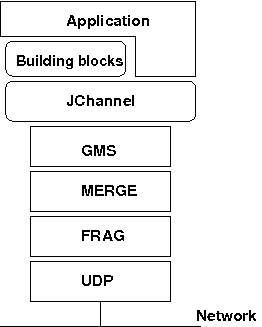 |
Figure 1.1. The architecture of JGroups
It consists of 3 parts: (1) the Channel used by application programmers to build reliable group communication applications, (2) the building blocks, which are layered on top of the channel and provide a higher abstraction level and (3) the protocol stack, which implements the properties specified for a given channel.
This document describes how to install and use JGroups, ie. the Channel API and the building blocks. The targeted audience is application programmers who want to use JGroups to build reliable distributed programs that need group communication.
A channel is connected to a protocol stack. Whenever the application sends a message, the channel passes it on to the protocol stack, which passes it to the topmost protocol. The protocol processes the message and the passes it down to the protocol below it. Thus the message is handed from protocol to protocol until the bottom (transport) protocol puts it on the network. The same happens in the reverse direction: the transport protocol listens for messages on the network. When a message is received it will be handed up the protocol stack until it reaches the channel. The channel then invokes the receive() callback in the application to deliver the message.
When an application connects to the channel, the protocol stack will be started, and when it disconnects the stack will be stopped. When the channel is closed, the stack will be destroyed, releasing its resources.
The following three sections give an overview of channels, building blocks and the protocol stack.
1.1. Channel
To join a group and send messages, a process has to create a channel and connect to it using the group name (all channels with the same name form a group). The channel is the handle to the group. While connected, a member may send and receive messages to/from all other group members. The client leaves a group by disconnecting from the channel. A channel can be reused: clients can connect to it again after having disconnected. However, a channel allows only 1 client to be connected at a time. If multiple groups are to be joined, multiple channels can be created and connected to. A client signals that it no longer wants to use a channel by closing it. After this operation, the channel cannot be used any longer.
Each channel has a unique address. Channels always know who the other members are in the same group: a list of member addresses can be retrieved from any channel. This list is called a view. A process can select an address from this list and send a unicast message to it (also to itself), or it may send a multicast message to all members of the current view (also including itself). Whenever a process joins or leaves a group, or when a crashed process has been detected, a new view is sent to all remaining group members. When a member process is suspected of having crashed, a suspicion message is received by all non-faulty members. Thus, channels receive regular messages, and view and suspicion notifications.
The properties of a channel are typically defined in an XML file, but JGroups also allows for configuration through simple strings, URIs, DOM trees or even programmatically.
The Channel API and its related classes is described in Chapter 3, API.
1.2. Building Blocks
Channels are simple and primitive. They offer the bare functionality of group communication, and have been designed after the simple model of sockets, which are widely used and well understood. The reason is that an application can make use of just this small subset of JGroups, without having to include a whole set of sophisticated classes, that it may not even need. Also, a somewhat minimalistic interface is simple to understand: a client needs to know about 5 methods to be able to create and use a channel.
Channels provide asynchronous message sending/reception, somewhat similar to UDP. A message sent is essentially put on the network and the send() method will return immediately. Conceptual requests, orresponses to previous requests, are received in undefined order, and the application has to take care of matching responses with requests.
JGroups offers building blocks that provide more sophisticated APIs on top of a Channel. Building blocks either create and use channels internally, or require an existing channel to be specified when creating a building block. Applications communicate directly with the building block, rather than the channel. Building blocks are intended to save the application programmer from having to write tedious and recurring code, e.g. request-response correlation, and thus offer a higher level of abstraction to group communication.
Building blocks are described in Chapter 4, Building Blocks.
1.3. The Protocol Stack
The protocol stack containins a number of protocol layers in a bidirectional list. All messages sent and received over the channel have to pass through all protocols. Every layer may modify, reorder, pass or drop a message, or add a header to a message. A fragmentation layer might break up a message into several smaller messages, adding a header with an id to each fragment, and re-assemble the fragments on the receiver's side.
The composition of the protocol stack, i.e. its protocols, is determined by the creator of the channel: an XML file defines the protocols to be used (and the parameters for each protocol). The configuration is then used to create the stack.
Knowledge about the protocol stack is not necessary when only using channels in an application. However, when an application wishes to ignore the default properties for a protocol stack, and configure their own stack, then knowledge about what the individual layers are supposed to do is needed.
jgroup 概述--官方文档的更多相关文章
- 转:ArcGIS API For JavaScript官方文档(二十)之图形和要素图层——①Graphics概述
原文地址:ArcGIS API For JavaScript官方文档(二十)之图形和要素图层——①Graphics概述 ArcGIS JavaScript API允许在地图上绘制graphic(图形) ...
- 【苦读官方文档】2.Android应用程序基本原理概述
官方文档原文地址 应用程序原理 Android应用程序是通过Java编程语言来写.Android软件开发工具把你的代码和其它数据.资源文件一起编译.打包成一个APK文件,这个文档以.apk为后缀,保存 ...
- Orleans 框架3.0 官方文档中文版系列一 —— 概述
关于这个翻译文档的一些说明: 之前逛博客园的时候,看见有个园友在自己的博客上介绍Orleans. 觉得Orleans 是个好东西. 当时心想:如果后面有业务需要的时候可以用用Orleans框架. 当真 ...
- 【AutoMapper官方文档】DTO与Domin Model相互转换(上)
写在前面 AutoMapper目录: [AutoMapper官方文档]DTO与Domin Model相互转换(上) [AutoMapper官方文档]DTO与Domin Model相互转换(中) [Au ...
- Spark官方文档 - 中文翻译
Spark官方文档 - 中文翻译 Spark版本:1.6.0 转载请注明出处:http://www.cnblogs.com/BYRans/ 1 概述(Overview) 2 引入Spark(Linki ...
- Spark SQL 官方文档-中文翻译
Spark SQL 官方文档-中文翻译 Spark版本:Spark 1.5.2 转载请注明出处:http://www.cnblogs.com/BYRans/ 1 概述(Overview) 2 Data ...
- spring官方文档中文版
转 http://blog.csdn.net/tangtong1/article/details/51326887 spring官方文档:http://docs.spring.io/spring/do ...
- .NET Framework 版本和依赖关系[微软官方文档]
.NET Framework 版本和依赖关系 微软官方文档: https://docs.microsoft.com/zh-cn/dotnet/framework/migration-guide/ver ...
- 《KAFKA官方文档》入门指南(转)
1.入门指南 1.1简介 Apache的Kafka™是一个分布式流平台(a distributed streaming platform).这到底意味着什么? 我们认为,一个流处理平台应该具有三个关键 ...
随机推荐
- Polymer——Template
Polymer Template 一.Ta的简介 template是polymer element中一个重要的组成部分,主要有两种使用目的,一是构建Shadow Dom,二是用于数据绑定和视图渲染. ...
- cxf 动态创建客户端,局域网能正常调用服务端,外网不能访问
- python学习之dict的items(),values(),keys()
Python的字典的items(), keys(), values()都返回一个list >>> dict = { 1 : 2, 'a' : 'b', 'hello' : 'worl ...
- vbox磁盘空间扩容
前提:将虚拟机真正关机,不能在仅状态保存的场合做磁盘扩容. 步骤1.获取需要增加容量的映像的uuid 在vbox的安装目录下使用命令行:VBoxManage list hdds 得到结果如下: UUI ...
- mongodb 新建用户 -摘自网络
随着版本的更新,对在使用mongodb的业务也进行了版本升级,但是在drop掉一个数据库时,问题来了,原来的用户随着删除库也被删除掉,但是再想通过原来的语法db.addUser()添加,一直报错,提示 ...
- 【现代程序设计】【homework-07】
C++11 中值得关注的几大变化 1.Lambda 表达式 Lambda表达式来源于函数式编程,说白就了就是在使用的地方定义函数,有的语言叫“闭包”,如果 lambda 函数没有传回值(例如 void ...
- 【转】Objective-C代码注释和文档输出的工具和方法
http://blog.xcodev.com/blog/2013/11/01/code-comment-and-doc-gen-tools-for-objc/ 代码注释可以让代码更容易接受和使用,特别 ...
- keil中编译时出现*** ERROR L107: ADDRESS SPACE OVERFLOW
解决方法: http://zhidao.baidu.com/link?url=DWTVVdALVqPtUt0sWPURD6c1eEppyu9CXocLTeRZlZlhwHOA1P1xdesqmUQNw ...
- Activex WindowsMediaPlayer控件主要方法属性
属性/方法名: 说明:[基本属性] URL:String; 指定媒体位置,本机或网络地址 uiMode:String; 播放器界面模式,可为Full, Mini, None, Invisible pl ...
- internet访问局域网内部方法之----------路由器端口映射
很多人每天都问为什么要端口映射?例如:通过路由器上网的,网站自己可以访问,但是别人就不能:输入127.0.0.1可以访问,别人还是看不到:输入localhost可以看到,但是别人就是看不到,气人啊-没 ...