
springMVC实现 MultipartFile 多文件上传
1、Maven引入所需的 jar 包(或自行下载)
     <dependency>

            <groupId>commons-io</groupId>

            <artifactId>commons-io</artifactId>

            <version>2.4</version>

        </dependency>

        <dependency>

            <groupId>commons-fileupload</groupId>

            <artifactId>commons-fileupload</artifactId>

            <version>1.3.1</version>

        </dependency>
2、配置 spring 文件
  <!-- 多部分文件上传 -->

    <bean id="multipartResolver" class="org.springframework.web.multipart.commons.CommonsMultipartResolver">

        <property name="defaultEncoding" value="utf-8"></property>

        <property name="maxUploadSize" value="10485760000"></property>

        <property name="maxInMemorySize" value="40960"></property>

   </bean>
3、form 添加 enctype="multipart/form-data"
<html>

<head>

<meta http-equiv="Content-Type" content="text/html; charset=UTF-8">

<title>Insert title here</title>

</head>

<body>

    <h2>上传多个文件 实例</h2>

    <form action="/upload/filesUpload" method="post"  enctype="multipart/form-data">

        <p>选择文件:<input type="file" name="files"></p>

        <p>选择文件:<input type="file" name="files"></p>

        <p><input type="submit" value="提交"></p>

    </form>

</body>

</html>
5、controller 部分
import java.io.File;

import org.springframework.stereotype.Controller;

import org.springframework.web.bind.annotation.RequestMapping;

import org.springframework.web.bind.annotation.RequestParam;

import org.springframework.web.multipart.MultipartFile;

@Controller

@RequestMapping("/upload")

public class UploadController {

    //通过Spring的autowired注解获取spring默认配置的request

    /***

     * 保存文件

     * @param file

     * @return

     */

    private boolean saveFile(MultipartFile file, String path) {

        // 判断文件是否为空

        if (!file.isEmpty()) {

            try {

                File filepath = new File(path);

                if (!filepath.exists())

                    filepath.mkdirs();

                // 文件保存路径

                String savePath = path + file.getOriginalFilename();

                // 转存文件

                file.transferTo(new File(savePath));

                return true;

            } catch (Exception e) {

                e.printStackTrace();

            }

        }

        return false;

    }

    @RequestMapping("/filesUpload")

    public String filesUpload(@RequestParam("files") MultipartFile[] files) {

        String path = "E:/upload/";

        //判断file数组不能为空并且长度大于0

        if(files!=null&&files.length>0){

            //循环获取file数组中得文件

            for(int i = 0;i<files.length;i++){

                MultipartFile file = files[i];

                //保存文件

                saveFile(file, path);

            }

        }

        // 重定向

        return "redirect:/list.html";

    }

}
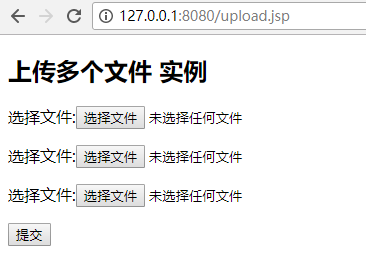
运行如下:
springMVC实现 MultipartFile 多文件上传的更多相关文章
- SpringMVC 使用MultipartFile实现文件上传(转)
http://blog.csdn.net/kouwoo/article/details/40507565 一.配置文件:SpringMVC 用的是 的MultipartFile来进行文件上传 所以我们 ...
- SpringMVC 使用 MultipartFile 实现文件上传
该代码实现了文件上传和文本字段同时传递到后台进行处理的功能. 直接贴代码,中间涉及到的实体类就不贴了,和功能没啥关系的. Controller /** * 添加活动 * * @param req * ...
- SpringMVC:学习笔记(8)——文件上传
SpringMVC--文件上传 说明: 文件上传的途径 文件上传主要有两种方式: 1.使用Apache Commons FileUpload元件. 2.利用Servlet3.0及其更高版本的内置支持. ...
- SpringMVC注解方式与文件上传
目录: springmvc的注解方式 文件上传(上传图片,并显示) 一.注解 在类前面加上@Controller 表示该类是一个控制器在方法handleRequest 前面加上 @RequestMap ...
- SSM框架之SpringMVC(5)文件上传
SpringMVC(5)文件上传 1.实现文件上传的前期准备 1.1.文件上传的必要前提 A form 表单的 enctype 取值必须是: multipart/form-data(默认值是:appl ...
- 利用spring的MultipartFile实现文件上传【原】
利用spring的MultipartFile实现文件上传 主要依赖jar包 spring-web-3.0.6.RELEASE.jar 用到 (org.springframework.web.multi ...
- SpringMVC 通过commons-fileupload实现文件上传
目录 配置 web.xml SpringMVC配置文件 applicationContext.xml 文件上传 Controller 上传实现一 上传实现二 测试 依赖 配置 web.xml < ...
- SpringMvc MultipartFile 图片文件上传
spring-servlet.xml <!-- SpringMVC上传文件时,需要配置MultipartResolver处理器 --> <bean id="multipar ...
- SpringMVC中使用 MultipartFile 进行文件上传下载及删除
一:引入必要的包 <!--文件上传--> <!-- https://mvnrepository.com/artifact/commons-fileupload/commons-fil ...
随机推荐
- expect 安装使用
expect 命令相当于crt远程连接,可用于脚本化实现多服务器巡检功能. 一.expect 命令安装: 1.rpm 文件下载:百度云链接:http://pan.baidu.com/s/1sl1wSU ...
- gunicorn运行显示connection in use解决办法
运行gunicorn后显示如下错误: root@iZ2ze2gihbn4ot85zlcdxdZ:~/myproject# gunicorn -w 4 -b 0.0.0.0:5000 myapp:app ...
- vue.js - 2
最近开发公司vue前端项目,做一下笔记,偶尔上来查漏补缺 组件操作: 使用flag标识符结合v-if和v-else切换组件 页面结构: <div id="app"> & ...
- 下拉框select中option居中样式
下拉框select中option居中样式 text-align:center;text-align-last:center;
- 06_python_小数据池/ is == /编码
一.小数据池 1.代码块 python程序是由代码块构成的.一个代码块的文本作为python程序执行的单元.代码块: 一个模块, 一个函数, 一个类, 甚至每一个command命令都是一个代码块. 一 ...
- Class和普通js构造函数的区别
Class 在语法上更加贴合面向对象的写法 Class 实现继承更加易读.易理解 更易于写 java 等后端语言的使用 本质还是语法糖,使用 prototype Class语法 typeof Math ...
- Mac下IDE无法读取环境变量问题
今天遇到一个问题,Idea无法读取~/.bash_profile下的配置文件. 上网查了好久,都说是launchctl的问题. 但是其实我这边是因为安装了zsh,导致环境标量失效. 在~/.zshrc ...
- 改变您的HTTP服务器的缺省banner
(以下方法仅针对 IIS Asp.net) 服务器扫描发现漏洞,其中一个是: 可通过HTTP获取远端WWW服务信息 [Microsoft-IIS/8.5] 漏洞描述 本插件检测远端HTTP Serve ...
- python--使用pickle序列化对象
pickle序列化对象 如果希望透明地存储 Python 对象,而不丢失其身份和类型等信息,则需要某种形式的对象序列化:它是一个将任意复杂的对象转成对象的文本或二进制表示的过程. 同样,必须能够将对象 ...
- 几种int类型的范围
我们在编程的过程经常会遇到数据溢出的情况,于是这个时候我们必须定义能表示更大的数的数据类型来表示这个数. 下面列出了int型的范围: unsigned int 0-4294967295 ...