
Django xadmin后台添加富文本编辑器UEditor的用法
效果图:
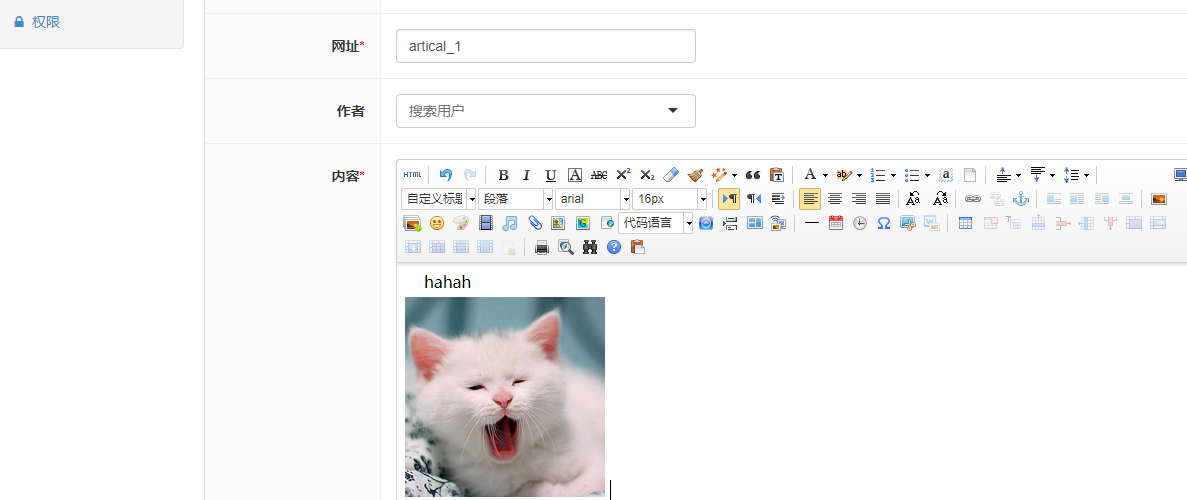
步骤:
1.利用命令:pip install DjangoUeditor,安装DjangoUeditor,但由于DjangoUeditor没有python3版本的,从的Github上把修改好的UEditor Down下来,然后放在自己的extra_apps文件夹中

并在setting.py文件中去添加路径配置
import os

import sys

# Build paths inside the project like this: os.path.join(BASE_DIR, ...)

# 设置 extra_apps 目录

# 项目文件夹下的setting文件

BASE_DIR = os.path.dirname(os.path.dirname(os.path.abspath(__file__)))

sys.path.insert(0, os.path.join(BASE_DIR, 'extra_apps'))
2.将DjangoUeditor 添加到settings.py文件的APP 里边
INSTALLED_APPS = [

    ....

    # 配置富文本编辑器

    'DjangoUeditor',

]
3.在urls.py文件中配置路由信息
#添加富文本路径信息

url(r'^ueditor/', include('DjangoUeditor.urls')),
4.修改models对应的字段
from DjangoUeditor.models import UEditorField
class Article(models.Model):

    ....

    content = UEditorField(verbose_name='内容', height=400, width=800,

                           default=u'', imagePath="Article_img/%%Y/%%m/",

                           toolbars='full', filePath='Article_file/%%Y/%%m/',

                           upload_settings={"imageMaxSize": 1204000},

                           settings={}, command=None, )
5.在settings.py 设置 static 和 media
# 公共的 static 文件,比如 jquery.js 可以放这里,这里面的文件夹不能包含 STATIC_ROOT

STATICFILES_DIRS = (

    os.path.join(BASE_DIR, "common_static"),

)

# upload folder

MEDIA_URL = '/media/'

MEDIA_ROOT = os.path.join(BASE_DIR, 'media')
6.在urls.py 文件添加:
from django.conf import settings

...

if settings.DEBUG:

    from django.conf.urls.static import static

    urlpatterns += static(

        settings.MEDIA_URL, document_root=settings.MEDIA_ROOT)
6.在xadmin中添加Ueditor文件
在xadmin下的plugin中新建ueditor.py文件(我的是在extra_apps/xadmin,也可以在site_packages中找到对应的文件夹)添加如下代码:
#!/usr/bin/python3

# -*-coding:utf-8-*-

import xadmin

from xadmin.views import BaseAdminPlugin, CreateAdminView, ModelFormAdminView, UpdateAdminView

from DjangoUeditor.models import UEditorField

from DjangoUeditor.widgets import UEditorWidget

from django.conf import settings

class XadminUEditorWidget(UEditorWidget):

    def __init__(self, **kwargs):

        self.ueditor_options = kwargs

        self.Media.js = None

        super(XadminUEditorWidget, self).__init__(kwargs)

class UeditorPlugin(BaseAdminPlugin):

    def get_field_style(self, attrs, db_field, style, **kwargs):

        if style == 'ueditor':

            if isinstance(db_field, UEditorField):

                widget = db_field.formfield().widget

                param = {}

                param.update(widget.ueditor_settings)

                param.update(widget.attrs)

                return {'widget': XadminUEditorWidget(**param)}

        return attrs

    def block_extrahead(self, context, nodes):

        js = '<script type="text/javascript" src="%s"></script>' % (

            settings.STATIC_URL + "ueditor/ueditor.config.js")  # 自己的静态目录

        js += '<script type="text/javascript" src="%s"></script>' % (

            settings.STATIC_URL + "ueditor/ueditor.all.js")  # 自己的静态目录

        nodes.append(js)

xadmin.site.register_plugin(UeditorPlugin, UpdateAdminView)

xadmin.site.register_plugin(UeditorPlugin, CreateAdminView)
7.将ueditor添加到plugin下的init中
PLUGINS = (

    .....

    'ueditor',

)
8.将ueditor添加到项目app里面的adminx.py中(!!!之前由于没有添加一直无法显示)
class ArticleAdmin(object):

    style_fields = {'content': 'ueditor'}

    ......
7.在前端显示的话,需要对html页面修改如下
{% autoescape off %}

{{ course.detail }}

{% endautoescape %}
本博客参考:https://blog.csdn.net/wgpython/article/details/79585205
Django xadmin后台添加富文本编辑器UEditor的用法的更多相关文章
- django—xadmin中集成富文本编辑器ueditor
一.安装 pip命令安装,由于ueditor为百度开发的一款富文本编辑框,现已停止维护,如果解释器为python2,则直接pip install djangoueditor 解压包安装,python3 ...
- Django项目中添加富文本编辑器django-ckeditor
django-ckeditor库的使用步骤: 1.在命令行下安装django-ckeditor这个库: 命令:pip install django-ckeditor 2.安装成功后,配置Django项 ...
- django xadmin 集成DjangoUeditor富文本编辑器
本文档记录自己的学习历程! 介绍 Ueditor HTML编辑器是百度开源的在线HTML编辑器,功能非常强大 额外功能 解决图片视频等无法上传显示问题 Ueditor下载地址 https://gith ...
- 百度富文本编辑器UEditor安装配置全过程
网站开发时富文本编辑器是必不可少的,他可以让用户自行编辑内容的样式然后上传到后台!下面我们来介绍如何安装使用百度富文本编辑器 一.下载并且设置百度富文本编辑器的样式 你可以去百度UEditor ...
- 富文本编辑器UEditor自定义工具栏(二、插入图片、音频、视频个性化功能按钮和弹层及自定义分页符)
导读:本篇将简单探讨插入图片.音频.视频的功能按钮实现方式 传送门:富文本编辑器UEditor自定义工具栏(一.基础配置与字体.背景色.行间距.超链接实现) 一.效果图 1.UEditor自定义工具栏 ...
- springboot+layui 整合百度富文本编辑器ueditor入门使用教程(踩过的坑)
springboot+layui 整合百度富文本编辑器ueditor入门使用教程(踩过的坑) 写在前面: 富文本编辑器,Multi-function Text Editor, 简称 MTE, 是一 ...
- 百度Web富文本编辑器ueditor在ASP.NET MVC3项目中的使用说明
====================================================================== [百度Web富文本编辑器ueditor在ASP.NET M ...
- 百度富文本编辑器ueditor使用总结
最近做的项目用到了ueditor这个东东,但是他的一些配置文档对初次使用者来说很难以理解,故作此总结 相关详细操作链接地址: http://blog.csdn.net/wusuopubupt/arti ...
- 富文本编辑器UEditor自定义工具栏(三、自定义工具栏功能按钮图标及工具栏样式简单修改)
导读 富文本编辑器UEditor提供丰富了定制配置项,如果想设置个性化的工具栏按钮图标有无办法呢?答案是肯定的!前两篇博文简要介绍了通过将原工具栏隐藏,在自定义的外部按钮上,调用UEditor各命令实 ...
随机推荐
- SecureCRT使用本地公钥 SSH 免密码登录Linux
其原理与Linux系统之间的SSH通道原理是一样的 下文中如果创建公钥的格式是:标准公钥和VanDyke私钥格式,需要用ssh-keygen -i -f 转换.如果是OpenSSH密钥格式可直接修改文 ...
- openwrt手工配置pptpd
官方wiki:http://wiki.openwrt.org/doc/howto/vpn.server.pptpd#prerequisites 20190220更新:PPTP VPN协议已经被 IOS ...
- tomcat 简单安装配置说明
1.下载安装文件[apache-tomcat-6.0.41.tar.gz]到指定目录[/usr/local]2.解压文件[tar -zxvf apache-tomcat-6.0.41.tar.gz], ...
- python 拷贝 深拷贝 浅拷贝 赋值
t = [1,["a","b"]] t_bak = t t_cop = copy.copy(t) t_deep = copy.deepcopy(t) print ...
- UNION 与 UNION ALL的区别
UNION 操作符用于合并两个或多个 SELECT 语句的结果集. 请注意,列的数量.数据类型.顺序要保持一致!!! 结果集中的列名总是等于 UNION 中第一个 SELECT 语句中的列名. 例子: ...
- spark LBFGS 设置参数
http://blog.csdn.net/bon_mot/article/details/72461318
- springBoot入门文章
https://www.javaworld.com/article/2078034/spring-framework/spring-framework-mastering-spring-mvc.htm ...
- 2017秋季面向对象程序设计(Java)教材、教学纲要、考核要求
教材简况 凯 S.霍斯特曼 (Cay S. Horstmann)(作者), 周立新(译者), Java核心技术(卷1):基础知识(原书第10版) , 2016年9月1出版 本书包括两卷,选做教材的是卷 ...
- 大型运输行业实战_day01_2_需求文档
1.文档格式 (见模板文件) 2.Axure简单使用 2.1安装Axure傻瓜式安装 2.2简单使用axure 3.总结 需求文件完成后应该包括三种文件: 1.axure文件 2.axure生成的ht ...
- Linux系统缓冲区溢出
Linux系统下穿越火线-缓冲区溢出 原理:crossfire 1.9.0 版本接受入站 socket 连接时存在缓冲区溢出漏洞. 工具: 调试工具:edb: ###python在漏洞溢出方面的渗透测 ...