
Python: Tkinter、ttk编程之计算器
起源:
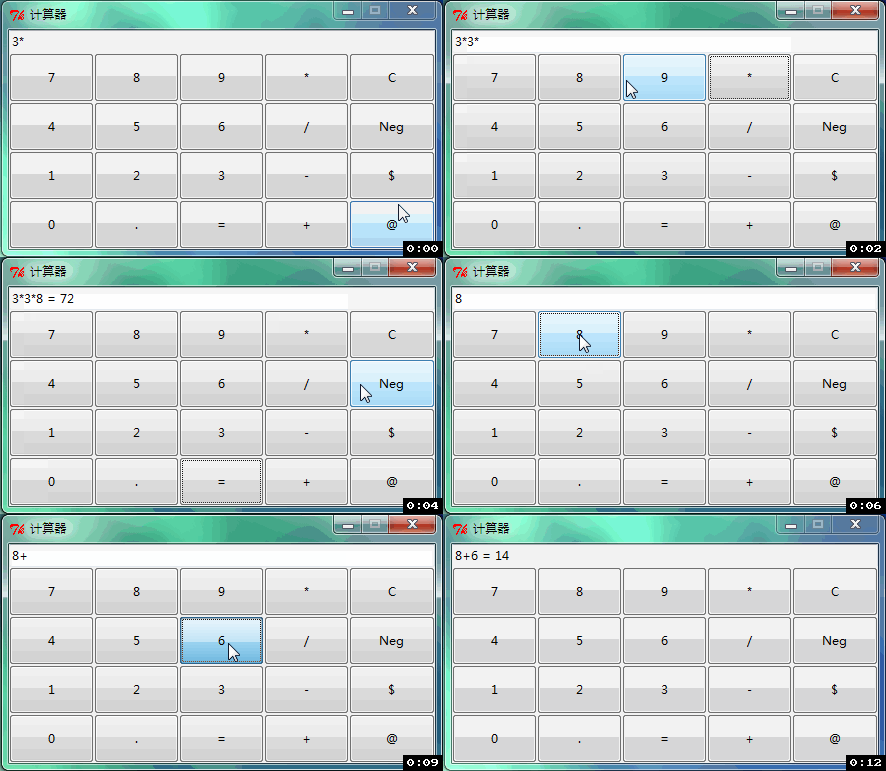
研究Python UI编程,我偏喜欢其原生组件,于是学习Tkinter、ttk组件用法。找一计算器开源代码,略加修整,以为备忘。
其界面如图所示:
1、源代码(Python 2.7):
# encoding: UTF-8

from Tkinter import *

from ttk import *

calc = Tk()

calc.title('计算器')

calc.resizable(False, False)

buttons = [

    '', '', '', '*', 'C',

    '', '', '', '/', 'Neg',

    '', '', '', '-', '$',

    '', '.', '=', '+', '@']

# set up GUI

row = 1

col = 0

style = Style()

style.configure('BW.TButton', padding=12)

for i in buttons:

    action = lambda x=i: click_event(x)

    Button(calc, text=i, width=7, command=action, style='BW.TButton') \

        .grid(row=row, column=col, sticky='nesw', )

    col += 1

    if col > 4:

        col = 0

        row += 1

display = Entry(calc, width=60)

display.grid(row=0, column=0, columnspan=5)

calc.update()

w = calc.winfo_reqwidth()

h = calc.winfo_reqheight()

s_w = calc.winfo_screenwidth()

s_h = calc.winfo_screenheight()

calc.geometry('%dx%d+%d+%d' % (w, h, (s_w - w) / 2, (s_h - h) / 2))

display.focus_set()

def click_event(key):

    # = -> calculate results

    if key == '=':

        # safeguard against integer division

        if '/' in display.get() and '.' not in display.get():

            display.insert(END, '.0')

        # attempt to evaluate results

        try:

            result = eval(display.get())

            display.insert(END, ' = ' + str(result))

        except:

            display.insert(END, '   Error, use only valid chars')

            # C -> clear display

    elif key == 'C':

        display.delete(0, END)

    # $ -> clear display

    elif key == '$':

        display.delete(0, END)

        display.insert(END, '$$$$C.$R.$E.$A.$M.$$$$')

    # @ -> clear display

    elif key == '@':

        display.delete(0, END)

        display.insert(END, 'website')

    # neg -> negate term

    elif key == 'Neg':

        if '=' in display.get():

            display.delete(0, END)

        try:

            if display.get()[0] == '-':

                display.delete(0)

            else:

                display.insert(0, '-')

        except IndexError:

            pass

            # clear display and start new input

    else:

        if '=' in display.get():

            display.delete(0, END)

        display.insert(END, key)

# RUNTIME

calc.mainloop()
2、生成exe
反复对比py2exe及PyInstaller,发现py2exe在x64位下不能支持生成一个exe文件,而其在x32下,对Tkinter,也不能生成一个文件。
费尽工夫,也只是少生成几个文件 ,甚为不爽:
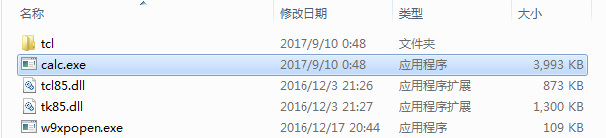
而用PyInstaller,可生成单一文件 。但验证其启动速度,甚为耗时:

综合对比,Python做UI,实非方便之物,用其胶水语言之长处,足矣!
Python: Tkinter、ttk编程之计算器的更多相关文章
- python -Tkinter 实现一个小计算器功能
文章来源:http://www.cnblogs.com/Skyyj/p/6618739.html 本代码是基于python 2.7的 如果是对于python3.X 则需要将 tkinter 改为Tk ...
- Python GUI编程(TKinter)(简易计算器)
搞课设搞得心累,现在看到人脸这两个字就烦躁,无聊搞搞tkinter,实现一个计算器的功能,能够简单的加减乘除. 简单的页面如下: 简单的代码如下: # encoding:utf-8 import tk ...
- Python GUI——tkinter菜鸟编程(中)
8. Radiobutton 选项按钮:可以用鼠标单击方式选取,一次只能有一个选项被选取. Radiobutton(父对象,options,-) 常用options参数: anchor,bg,bitm ...
- Python的GUI编程(TK)
TK在大多数 Unix平台.Windows平台和Macintosh系统都是预装好的,TKinter 模块是 Tk GUI 套件的标准Python接口.可实现Python的GUI编程. Tkinter模 ...
- Python Tkinter 学习成果:点歌软件music
笔者工作业余时间也没什么爱好,社交圈子也小,主要娱乐就是背着自己带电瓶的卖唱音响到住地附近找个人多的位置唱唱KtV. 硬件上点歌就用笔记本电脑,歌曲都是网上下载的mkv格式的含有两个音轨的视频.因此点 ...
- Python 黑帽编程大纲(变化中)
Python 黑帽编程大纲(预览版) 教程说明: 本系列教程,采用的大纲母本为<Understanding Network Hacks Attack and Defense with Pytho ...
- Python黑帽编程 3.4 跨越VLAN
Python黑帽编程 3.4 跨域VLAN VLAN(Virtual Local Area Network),是基于以太网交互技术构建的虚拟网络,既可以将同一物理网络划分成多个VALN,也可以跨越物理 ...
- Python黑帽编程1.1虚拟机安装和配置 Kali Linux 2016
Python黑帽编程1.1虚拟机安装和配置 Kali Linux 2016 0.1 本系列教程说明 本系列教程,采用的大纲母本为<Understanding Network Hacks Att ...
- Python黑帽编程1.2 基于VS Code构建Python开发环境
Python黑帽编程1.2 基于VS Code构建Python开发环境 0.1 本系列教程说明 本系列教程,采用的大纲母本为<Understanding Network Hacks Atta ...
随机推荐
- 关于webstorm链接不上SVN的解决办法
使用WEBSTROM上传代码是很方便的,但是通过它调用SVN时,经常会出现问题,我在使用它调用TortoiseSVN时就出现了一些问题,好在问题已经解决,现在把解决办法分享给大家: 首先,看看,安装时 ...
- MVC模式的原理
说说MVC模式的原理,Android SDK 中有哪些组件使用到了MVC模式,其基本原理是什么?[国内某著名软件外包公司 2010 年面试题] 答案:MVC 的基本原理就是通过Controller 连 ...
- webstorm设置自定义代码快捷键
1.file——>setting——>Editor——>live Templates出现如下界面 2.点击左上角绿色+选择template group创建分组(图中React Vue ...
- linux shell 杂
1. 字符串截取 var=http://www.baidu.com/index.html echo ${var} var=http://www.baidu.com/index.html /*从左到右第 ...
- jquery接触初级----jquery 选择器
css 选择器主要有:元素选择器,ID选择器,类选择器,群组选择器,后代选择器,普通配符选择器等,通过css选择,我们可以很方便的给元素添加样式,使网页看起来更加好看 jquery 选择器也有相似的功 ...
- ReactiveX 学习笔记(10)可连接的数据流
Connectable Observable Operators 本文的主题为处理 Connectable Observable 的操作符. 这里的 Observable 实质上是可观察的数据流. R ...
- 如何安装和配置RabbitMQ(转载)
如何安装和配置RabbitMQ 今天开始一个小小的练习,学习一下安装和配置RabbitMQ,为什么要学它,因为WCF可以完全兼容和使用RabbitMQ了.我们新的大数据系统需要使用消息队列,所以就开始 ...
- ASP.NET 身份验证机制
ASP.NET提供了3种认证方式:windows身份验证:IIS根据应用程序的设置执行身份验证.要使用这种验证方式,在IIS中必须禁用匿名访问.Forms验证 :用Cookie来保存 ...
- 闹钟AlarmAndMusic 和支持播放音乐效果《IT蓝豹》
闹钟AlarmAndMusic 和支持播放音乐效果的,上下滑动调整时间和页面旋转风车效果,由于制作的gif有些问题,效果不明显,欢迎下载使用看看真实的效果.本例子主要由AlertActivity和Al ...
- Nginx入门安装升级
1).Nginx ("engine x") 是一个高性能HTTP 和 反向代理 服务器.IMAP.POP3.SMTP 服务器. Nginx特点是占有内存少,并发能力强,事实上Ngi ...