
fedora 开启 apache 并 开启目录浏览模式
在内网中 暂时需要一台 文件 服务器,所以准备安装一台 http服务器并开启目录访问权限。这次使用 apache 在 fedora 28 机器上:
因为 fedora 28 已经包含 httpd 软件,使用
systemctl start httpd 就能进行启动。
启动时 默认开启 目录访问权限,但是首次访问网站根目录的时候,会显示test page.
进入如下文件夹:
[root@dhcp-- conf.d]# pwd

/etc/httpd/conf.d
[root@dhcp-- conf.d]# cat welcome.conf

#

# This configuration file enables the default "Welcome" page if there

# is no default index page present for the root URL.  To disable the

# Welcome page, comment out all the lines below.

#

# NOTE: if this file is removed, it will be restored on upgrades.

#

<LocationMatch "^/+$">

    Options -Indexes

    ErrorDocument  /.noindex.html

</LocationMatch>

<Directory /usr/share/httpd/noindex>

    AllowOverride None

    Require all granted

</Directory>
进行注释上述文件:
[root@dhcp-- conf.d]# cat welcome.conf

#

# This configuration file enables the default "Welcome" page if there

# is no default index page present for the root URL.  To disable the

# Welcome page, comment out all the lines below.

#

# NOTE: if this file is removed, it will be restored on upgrades.

#

#<LocationMatch "^/+$">

#    Options -Indexes

#    ErrorDocument  /.noindex.html

#</LocationMatch>

#<Directory /usr/share/httpd/noindex>

#    AllowOverride None

#    Require all granted

#</Directory>

#Alias /.noindex.html /usr/share/httpd/noindex/index.html
httpd 文件配置如下所示:
<Directory "/var/www/html">

    #

    # Possible values for the Options directive are "None", "All",

    # or any combination of:

    #   Indexes Includes FollowSymLinks SymLinksifOwnerMatch ExecCGI MultiViews

    #

    # Note that "MultiViews" must be named *explicitly* --- "Options All"

    # doesn't give it to you.

    #

    # The Options directive is both complicated and important.  Please see

    # http://httpd.apache.org/docs/2.4/mod/core.html#options

    # for more information.

    #

    Options  indexes FollowSymLinks

    #

    # AllowOverride controls what directives may be placed in .htaccess files.

    # It can be "All", "None", or any combination of the keywords:

    #   Options FileInfo AuthConfig Limit

    #

    AllowOverride None

    #

    # Controls who can get stuff from this server.

    #

    Require all granted

</Directory>
Options  indexes FollowSymLinks
这个配置表明为 开启目录权限
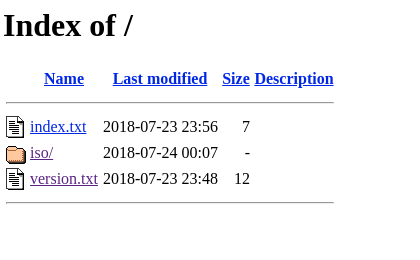
结束后,你会看到如下所示画面:
完成!
祝您使用愉快,小技术方便您的生活。
保持更新,转载请注明出处。
fedora 开启 apache 并 开启目录浏览模式的更多相关文章
- 开启 Android WebView 的安全浏览模式
Hybrid App(混合式开发)已经是每一个商业应用都会使用的开发手段.其最大的优势就是将一些可动态更新的内容页面使用 H5 开发,然后借用移动端原生系统提供的 WebView 控件加载进来.这种方 ...
- Apache配置支持目录浏览
主配置文件 httpd.conf 中修改: 1)添加支持模块 LoadModule autoindex_module modules/mod_autoindex.so LoadModule dir ...
- IIS目录浏览模式打开文件还是无法下载
写在前面的话 IIS已经设置目录浏览启用,且可以正常访问到文件,说明这些设置没问题,但是点击文件进行下载时,却提示无法下载,文件不存在等等,有的又可以,一顿操作后发现,原来是文件类型没有包含在MIME ...
- Nginx 和 Apache 开启目录浏览功能
1.Nginx 在相应项目的 Server 段中的 location 段中,添加 autoindex on.例如: server { listen ; server_name www.dee.prac ...
- 关闭或者开启apache的目录浏览
为了安全或者方便需要关闭或者开启apache的目录浏览 关闭目录浏览 修改http.conf 文件 Options Indexes FollowSymLinks 改为 ...
- IIS7开启目录浏览功能
IIS7开启目录浏览功能: 在右侧操作中点击启用,并在左侧面板中勾选显示字段.
- nginx开启网站目录浏览功能
一.开启全站目录浏览功能 编辑nginx.conf, 在http下面添加以下内容: autoindex on; # 开启目录文件列表 autoindex_exact_size on; # 显示出文件的 ...
- PHP开启目录引索+fancyindex漂亮目录浏览带搜索功能
PHP开启目录引索 一. 前言 不知为何对nginx情有独钟, 最近练习php, 为了方便写代码, 便想要开启nginx的目录索引功能, 显然不如Apache开启的方便, 几次尝试都崩了... 我这个 ...
- nginx开启目录浏览,解决中文乱码问题
nginx开启目录浏览,解决中文乱码问题 方法如下: server { listen 80; #listen [::]:80; server_name gongzi.liwenhui.xin gz.l ...
随机推荐
- IDA动态调试so文件出现SIGILL
用ida6.6 调试android的so文件时经常会报SIGILL的错误,意思是指令非法.而且这种错误基本都是发生在系统函数内部,像我遇到过的mmap,fopen,fgets等等.在这些函数内部如果用 ...
- shell命令——if
if中[ ]实际上调用的是test的一种快捷方法.bash的数值和字符串比较运算符: 注意=两边的空格 字符串 数值 为真,如果 x = y x -eq y x != y x -ne y x ...
- Netty 接受请求过程源码分析 (基于4.1.23)
前言 在前文中,我们分析了服务器是如何启动的.而服务器启动后肯定是要接受客户端请求并返回客户端想要的信息的,否则要你服务器干啥子呢?所以,我们今天就分析分析 Netty 在启动之后是如何接受客户端请求 ...
- [转]SQL Server 中WITH (NOLOCK)浅析
本文转自:https://www.cnblogs.com/kerrycode/p/3946268.html 概念介绍 开发人员喜欢在SQL脚本中使用WITH(NOLOCK), WITH(NOLOCK) ...
- [转]C# NPOI 导入与导出Excel文档 兼容xlsx, xls
本文转自:https://www.cnblogs.com/lazyneal/p/6148912.html 参考:http://www.cnblogs.com/restran/p/3889479.htm ...
- 转 C#反编译后的一些错误改正
Xenocode反编译及代码整理记录1.Xenocode中设置输出数字为十进制 2.输出后中文文本为\uXXXX,可采用编码工具转成中文 3.new ()改成null; 4.反编译后代码中嵌套数组ne ...
- windows下mongodb集群搭建
本文介绍在windows环境下如何搭建一个高可用性的mongodb集群.系统环境为win7,mongodb版本为3.6.3. 本文采用的是分片+副本集的方式搭建集群,将分别介绍如何使用副本集和分片来提 ...
- [日常] Go语言圣经--浮点数习题
练习 3.1: 如果f函数返回的是无限制的float64值,那么SVG文件可能输出无效的多边形元素(虽然许多SVG渲染器会妥善处理这类问题).修改程序跳过无效的多边形. 练习 3.2: 试验math包 ...
- 记录怎样把安全证书导入到java中的cacerts证书库
这次项目上需要去证书中解析公钥所以这里分享下方法: 首先准备一个证书文件比如叫:test.crt(一般是cer结尾) 下一步准备把证书导入到导入java中的cacerts证书库里 方法如下: 比如本地 ...
- Elasticsearch Query DSL 整理总结(二)—— 要搞懂 Match Query,看这篇就够了
目录 引言 构建示例 match operator 参数 analyzer lenient 参数 Fuzziness fuzzniess 参数 什么是模糊搜索? Levenshtein Edit Di ...