
学习devexpresschartControl控件
devexpress官网chart:https://documentation.devexpress.com/WindowsForms/8117/Controls-and-Libraries/Chart-Control

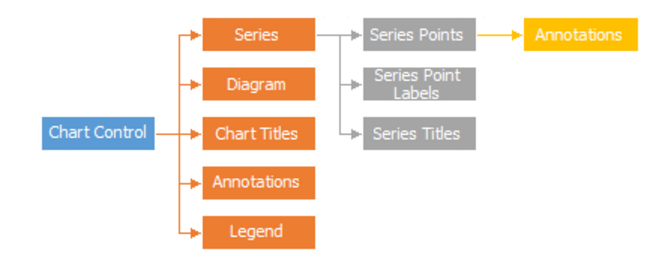
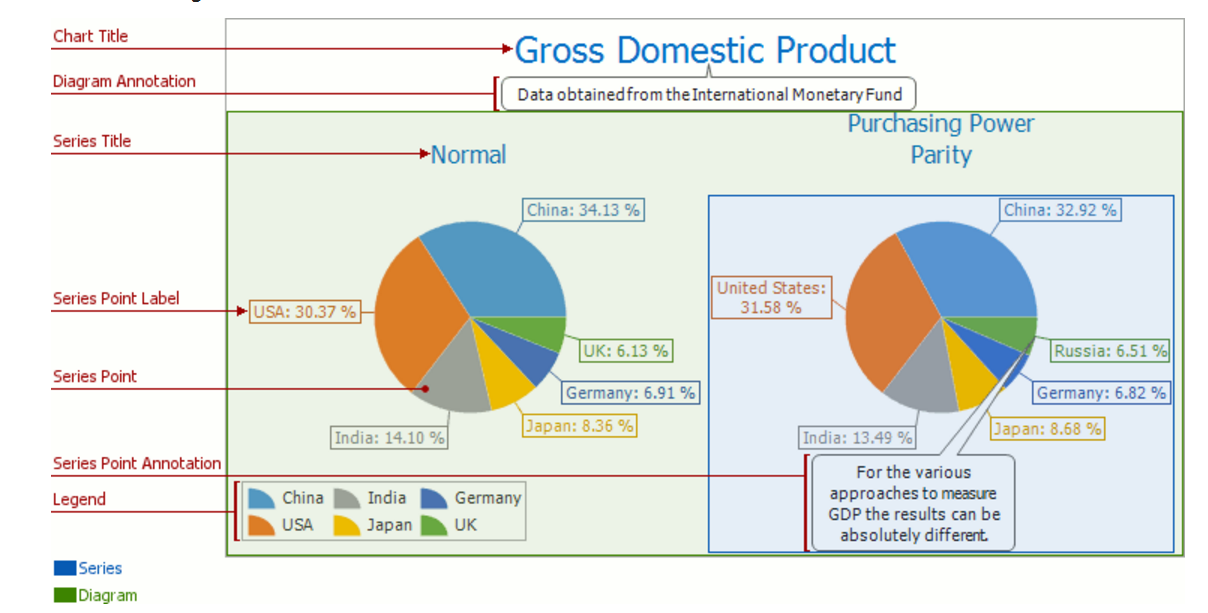


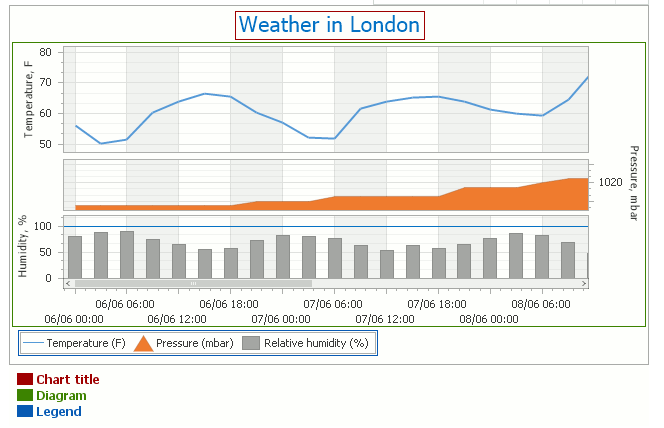
 XYDiagram diagram = chart.Diagram as XYDiagram;

 if (diagram != null) {

     // Access diagram properties, for example, rotate the diagram.

     diagram.Rotated = true;

     // Access properties of objects that belong to the diagram,

     // for example, axes and panes.

     diagram.AxisY.Title.Text = "Population mid-year, millions";

     diagram.DefaultPane.Weight = ;

 }
给坐标轴加标题
 using System;

 using System.Drawing;

 using System.Windows.Forms;

 using DevExpress.XtraCharts;

 // ...

 private void Form1_Load(object sender, EventArgs e) {

     // Create a new chart.

     ChartControl chartControl1 = new ChartControl();

     // Create two series.

     Series series1 = new Series("Series 1", ViewType.Bar);

     Series series2 = new Series("Series 2", ViewType.Line);

     // Add points to them, with their arguments different.

     series1.Points.Add(new SeriesPoint("A", ));

     series1.Points.Add(new SeriesPoint("B", ));

     series1.Points.Add(new SeriesPoint("C", ));

     series1.Points.Add(new SeriesPoint("D", ));

     series2.Points.Add(new SeriesPoint("I", ));

     series2.Points.Add(new SeriesPoint("II", ));

     series2.Points.Add(new SeriesPoint("III", ));

     series2.Points.Add(new SeriesPoint("IV", ));

     // Add both series to the chart.

     chartControl1.Series.AddRange(new Series[] { series1, series2 });

     // Hide the legend (optional).

     chartControl1.Legend.Visible = false;

     // Cast the chart's diagram to the XYDiagram type,

     // to access its axes and panes.

     XYDiagram diagram = (XYDiagram)chartControl1.Diagram;

     // Add secondary axes to the diagram, and adjust their options.

     diagram.SecondaryAxesX.Add(new SecondaryAxisX("My Axis X"));

     diagram.SecondaryAxesY.Add(new SecondaryAxisY("My Axis Y"));

     diagram.SecondaryAxesX[].Alignment = AxisAlignment.Near;

     diagram.SecondaryAxesY[].Alignment = AxisAlignment.Near;

     // Add a new additional pane to the diagram.

     diagram.Panes.Add(new XYDiagramPane("My Pane"));

     // Assign both the additional pane and, if required,

     // the secondary axes to the second series.

     LineSeriesView myView = (LineSeriesView)series2.View;

     myView.AxisX = diagram.SecondaryAxesX[];

     myView.AxisY = diagram.SecondaryAxesY[];

     // Note that the created pane has the zero index in the collection,

     // because the existing Default pane is a separate entity.

     myView.Pane = diagram.Panes[];

     // Customize the layout of the diagram's panes.

     diagram.PaneDistance = ;

     diagram.PaneLayoutDirection = PaneLayoutDirection.Horizontal;

     diagram.DefaultPane.SizeMode = PaneSizeMode.UseWeight;

     diagram.DefaultPane.Weight = 1.2;

     // Add the chart to the form.

     chartControl1.Dock = DockStyle.Fill;

     this.Controls.Add(chartControl1);

 }
add pans
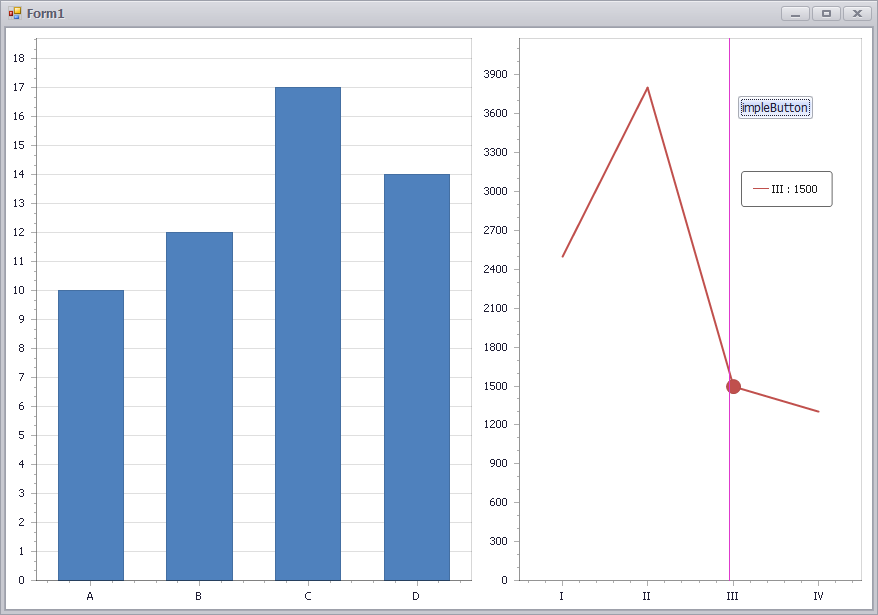
Adding Panes:https://documentation.devexpress.com/WindowsForms/5880/Controls-and-Libraries/Chart-Control/Fundamentals/Chart-Elements/Diagram/Panes/Adding-Panes#Examples
 using System;

 using System.Drawing;

 using System.Windows.Forms;

 using DevExpress.XtraCharts;

 // ...

 private void Form1_Load(object sender, EventArgs e) {

     // Create a new chart.

     ChartControl chartControl1 = new ChartControl();

     // Create two series.

     Series series1 = new Series("Series 1", ViewType.Bar);

     Series series2 = new Series("Series 2", ViewType.Line);

     // Add points to them, with their arguments different.

     series1.Points.Add(new SeriesPoint("A", ));

     series1.Points.Add(new SeriesPoint("B", ));

     series1.Points.Add(new SeriesPoint("C", ));

     series1.Points.Add(new SeriesPoint("D", ));

     series2.Points.Add(new SeriesPoint("I", ));

     series2.Points.Add(new SeriesPoint("II", ));

     series2.Points.Add(new SeriesPoint("III", ));

     series2.Points.Add(new SeriesPoint("IV", ));

     // Add both series to the chart.

     chartControl1.Series.AddRange(new Series[] { series1, series2 });

     // Hide the legend (optional).

     chartControl1.Legend.Visible = false;

     // Cast the chart's diagram to the XYDiagram type,

     // to access its axes and panes.

     XYDiagram diagram = (XYDiagram)chartControl1.Diagram;

     // Add secondary axes to the diagram, and adjust their options.

     diagram.SecondaryAxesX.Add(new SecondaryAxisX("My Axis X"));

     diagram.SecondaryAxesY.Add(new SecondaryAxisY("My Axis Y"));

     diagram.SecondaryAxesX[].Alignment = AxisAlignment.Near;

     diagram.SecondaryAxesY[].Alignment = AxisAlignment.Near;

     // Add a new additional pane to the diagram.

     diagram.Panes.Add(new XYDiagramPane("My Pane"));

     // Assign both the additional pane and, if required,

     // the secondary axes to the second series.

     LineSeriesView myView = (LineSeriesView)series2.View;

     myView.AxisX = diagram.SecondaryAxesX[];

     myView.AxisY = diagram.SecondaryAxesY[];

     // Note that the created pane has the zero index in the collection,

     // because the existing Default pane is a separate entity.

     myView.Pane = diagram.Panes[];

     // Customize the layout of the diagram's panes.

     diagram.PaneDistance = ;

     diagram.PaneLayoutDirection = PaneLayoutDirection.Horizontal;

     diagram.DefaultPane.SizeMode = PaneSizeMode.UseWeight;

     diagram.DefaultPane.Weight = 1.2;

     // Add the chart to the form.

     chartControl1.Dock = DockStyle.Fill;

     this.Controls.Add(chartControl1);

 }
How to: Display a Series in an Additional Pane (Runtime Sample)

学习devexpresschartControl控件的更多相关文章
- Delphi 7学习开发控件
我们知道使用Delphi快速开发,很大的一方面就是其强大的VCL控件,另外丰富的第三方控件也使得Delphi程序员更加快速的开发出所需要的程序.在此不特别介绍一些概念,只记录自己学习开发控件的步骤.假 ...
- 过实现鹰眼图这个功能来进一步学习MapControl控件
我们通过实现鹰眼图这个功能来进一步学习MapControl控件.在实现鹰眼图之前,我们需 要接口有更深入的了解. 变主动为被动-出接口(OutBound interface) COM编程类似客户端和服 ...
- Expression Blend学习四控件
原文:Expression Blend学习四控件 Expression Blend制作自定义按钮 1.从Blend工具箱中添加一个Button,按住shift,将尺寸调整为125*125; 2.右键点 ...
- Expression Blend学习5控件
原文:Expression Blend学习5控件 Expression Blend ButtonStyle- TextButton 本章以TextButton为例,讲解如何最简单,最快速的制作一个专业 ...
- Delphi 7学习开发控件(继承TGraphicControl只画一条线)
我们知道使用Delphi快速开发,很大的一方面就是其强大的VCL控件,另外丰富的第三方控件也使得Delphi程序员更加快速的开发出所需要的程序.在此不特别介绍一些概念,只记录自己学习开发控件的步骤.假 ...
- 安卓开发_深入学习ViewPager控件
一.概述 ViewPager是android扩展包v4包(android.support.v4.view.ViewPager)中的类,这个类可以让用户左右切换当前的view. ViewPager特点: ...
- Android Studio 学习 - 基本控件的使用;Intent初学
Android Studio学习第三天. 今天主要学习 1. RadioButton.CheckBox.RatingBar.SeekBar等基础控件的使用. 结合Delphi中相类似的控件,在这些基本 ...
- 学习webView控件使用
WebView 对象用于网页显示使用,简单的学习并使用了一下. 1.首先在 layout 中摆一个全屏的 webview 控件 (main.xml ) <?xml version="1 ...
- android 学习 Spinner控件的使用
今晚看了下spinner控件的使用,结合博客大神的教程,一个小demo 一,SpinnerActivity private Spinner spinner; private ArrayAdapter& ...
随机推荐
- Python: subprocess.Popen()不支持unicode问题解决
起源: 所下载视频,有音视频分离者,需要合并起来,采用python之subprocess.Popen()调用ffmpeg实现.python版本为2.7.13,而音视频文件路径,有unicode字符者, ...
- 处理后台向前台传递的json数据
在pom文件中添加下面三种依赖jar包 <dependency> <groupId>com.fasterxml.jackson.core</groupId> < ...
- redis集群的ruby环境
redis-4.0.3.gem 下载 https://rubygems.org/gems/redis/ 按照视频在这个地方出错: [root@lx opt]# gem install redis- E ...
- Couchbase学习和使用
Couchbase介绍 couchbase的关键有两点:延后写入和松散存储.延后写入,顾名思义,couchbase在对数据进行增删时会先体现在内存中,而不会立刻体现在硬盘上,从内存的修改到硬盘的修改这 ...
- centos7下的glusterfs的安装与使用
环境说明: 两台虚拟主机,IP分别为192.168.1.222和192.168.1.233,分别装上glusterfs. 一.下载glusterfs源码包 https://download.glust ...
- netcore sqlserver linq contains生成的sql语句不是使用like而是charIndex
在ef中使用linq调用了contains,结果怎么都查不到值,打开sqlserver profiler 发现生成的sql语句不是使用like...而是CharIndex 参考文档:https://s ...
- jQuery Dom对象操作 增、删、改、复制、包裹
1. 增(插入) 内部插入 //向每个匹配的元素内部追加内容,为最后一个子元素$('.violet').append('<div></div>'); //把所有匹配的元素追加到 ...
- prometheus 通过企业微信接收告警
准备工作 step 1: 访问网站 注册企业微信账号(不需要企业认证). step 2: 访问apps 创建第三方应用,点击创建应用按钮 -> 填写应用信息: prometheus 配置: # ...
- (转)Eclipse中需要查看某个类的源码,直接按住Ctrl 然后点击想要查看的类或则方法
文章转自:http://blog.sina.com.cn/s/blog_52f623240102vpcr.html 在Eclipse中需要查看某个类的源码,直接按住Ctrl 然后点击想要查看的 ...
- hadoop 启动的时候datanode报错 Problem connecting to server
刚配置好的hadoop,namenode可以正常开启,但是datanode却不停的报错,并且不能正常启动: 2014-05-04 10:43:33,970 WARNorg.apache.hadoop. ...