
gj13 asyncio并发编程
13.1 事件循环
asyncio
包含各种特定系统实现的模块化事件循环
传输和协议抽象
对TCP、UDP、SSL、子进程、延时调用以及其他的具体支持
模仿futures模块但适用于事件循环使用的Future类
基于 yield from 的协议和任务,可以让你用顺序的方式编写并发代码
必须使用一个将产生阻塞IO的调用时,有接口可以把这个事件转移到线程池
模仿threading模块中的同步原语、可以用在单线程内的协程之间
事件循环+回调(驱动生成器)+epoll(IO多路复用)
asyncio是python用于解决异步io编程的一整套解决方案
tornado、gevent、twisted(scrapy, django channels)
torando(实现web服务器), django+flask(uwsgi, gunicorn+nginx)
tornado可以直接部署, nginx+tornado
import asyncio

import time  # 不再这使用同步阻塞的time

async def get_html(url):

    print("start get url")

    await asyncio.sleep(2)

    # time.sleep(2) 不要这样写

    print("end get url")

if __name__ == "__main__":

    start_time = time.time()

    loop = asyncio.get_event_loop()

    tasks = [get_html("http://www.imooc.com") for i in range(10)]

    loop.run_until_complete(asyncio.wait(tasks))

    print(time.time() - start_time)

"""

start get url

start get url

start get url

start get url

start get url

start get url

start get url

start get url

start get url

start get url

end get url

end get url

end get url

end get url

end get url

end get url

end get url

end get url

end get url

end get url

2.001918077468872

"""
# 使用asyncio
import asyncio

import time

from functools import partial  # 偏函数

async def get_html(url):

    print("start get url")

    await asyncio.sleep(2)

    return "lewen"

def callback(url, future):

    print(url)

    print("send callback email to lewen")

if __name__ == "__main__":

    start_time = time.time()

    loop = asyncio.get_event_loop()  # 事件循环

    # task = asyncio.ensure_future(get_html("http://www.imooc.com")) # 任务的两种不同写法

    task = loop.create_task(get_html("http://www.imooc.com"))

    task.add_done_callback(partial(callback, "http://www.imooc.com"))

    loop.run_until_complete(task)

    print(task.result())

"""

start get url

http://www.imooc.com

send callback email to lewen

lewen

"""
# 获取协程的返回值
import asyncio

import time

async def get_html(url):

    print("start get url")

    await asyncio.sleep(2)

    print("end get url")

if __name__ == "__main__":

    start_time = time.time()

    loop = asyncio.get_event_loop()

    tasks = [get_html("http://www.imooc.com") for i in range(10)]

    # loop.run_until_complete(asyncio.gather(*tasks))

    loop.run_until_complete(asyncio.wait(tasks))

    # print(time.time()-start_time)

    # gather和wait的区别

    # gather更加高层 high-level    分组

    group1 = [get_html("http://projectsedu.com") for i in range(2)]

    group2 = [get_html("http://www.imooc.com") for i in range(2)]

    group1 = asyncio.gather(*group1)

    group2 = asyncio.gather(*group2)

    # group2.cancel()   #取消

    loop.run_until_complete(asyncio.gather(group1, group2))

    print(time.time() - start_time)
# wait 和 gather
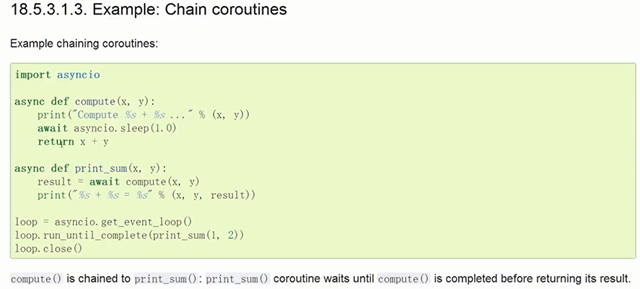
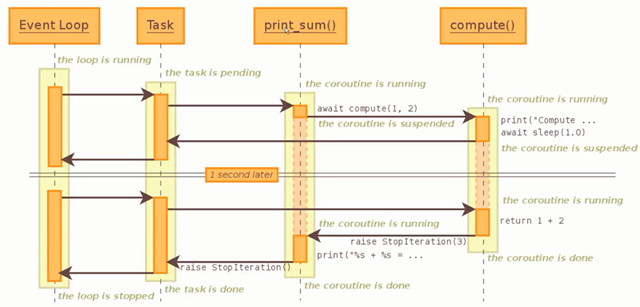
13.2 协程嵌套
13.3 call_soon、call_later、call_at、call_soon_threadsafe
import asyncio

def callback(sleep_times, loop):

    print("success time {}".format(loop.time()))

def stoploop(loop):

    loop.stop()

# call_later, call_at

if __name__ == "__main__":

    loop = asyncio.get_event_loop()

    # 马上执行队列里面的task

    # loop.call_soon(callback, 4, loop)

    # loop.call_soon(stoploop, loop)

    # call_later() 等待多少秒后执行

    # loop.call_later(2, callback, 2, loop)

    # loop.call_later(1, callback, 1, loop)

    # loop.call_later(3, callback, 3, loop)

    # call_at()  在某一时刻执行

    now = loop.time()

    loop.call_at(now+2, callback, 2, loop)

    loop.call_at(now+1, callback, 1, loop)

    loop.call_at(now+3, callback, 3, loop)

    loop.run_forever()

    # loop.call_soon_threadsafe()
view
13.4 ThreadPoolExecutor+asyncio
# 使用多线程:在协程中集成阻塞io

# 数据库等阻塞式IO

import asyncio

from concurrent.futures import ThreadPoolExecutor

import socket

from urllib.parse import urlparse

def get_url(url):

    # 通过socket请求html

    url = urlparse(url)

    host = url.netloc

    path = url.path

    if path == "":

        path = "/"

    # 建立socket连接

    client = socket.socket(socket.AF_INET, socket.SOCK_STREAM)

    # client.setblocking(False)

    client.connect((host, 80))  # 阻塞不会消耗cpu

    # 不停的询问连接是否建立好, 需要while循环不停的去检查状态

    # 做计算任务或者再次发起其他的连接请求

    client.send("GET {} HTTP/1.1\r\nHost:{}\r\nConnection:close\r\n\r\n".format(path, host).encode("utf8"))

    data = b""

    while True:

        d = client.recv(1024)

        if d:

            data += d

        else:

            break

    data = data.decode("utf8")

    html_data = data.split("\r\n\r\n")[1]

    print(html_data)

    client.close()

if __name__ == "__main__":

    import time

    start_time = time.time()

    loop = asyncio.get_event_loop()

    executor = ThreadPoolExecutor(3)  # 线程池

    tasks = []

    for url in range(20):

        url = "http://www.baidu.com/s?wd={}/".format(url)

        task = loop.run_in_executor(executor, get_url, url)  # 将阻塞的放到执行器里面

        tasks.append(task)

    loop.run_until_complete(asyncio.wait(tasks))

    print("last time:{}".format(time.time() - start_time))

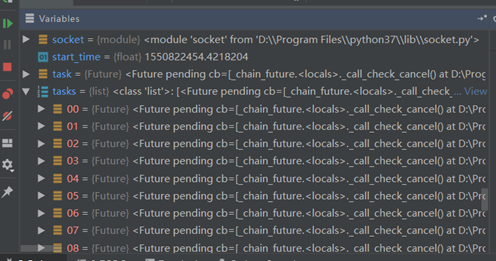
# 将线程池直接应用到协程里面
13.5 asyncio模拟http请求
# coding=utf-8

# asyncio 没有提供http协议的接口 aiohttp

import asyncio

from urllib.parse import urlparse

async def get_url(url):

    # 通过socket请求html

    url = urlparse(url)

    host = url.netloc

    path = url.path

    if path == "":

        path = "/"

    # 建立socket连接

    reader, writer = await asyncio.open_connection(host, 80)

    writer.write("GET {} HTTP/1.1\r\nHost:{}\r\nConnection:close\r\n\r\n".format(path, host).encode("utf8"))

    all_lines = []

    async for raw_line in reader:

        data = raw_line.decode("utf8")

        all_lines.append(data)

    html = "\n".join(all_lines)

    return html

async def main():

    tasks = []

    for url in range(20):

        url = "http://www.baidu.com/s?wd={}/".format(url)

        tasks.append(asyncio.ensure_future(get_url(url)))

    for task in asyncio.as_completed(tasks):

        result = await task

        print(result)

if __name__ == "__main__":

    import time

    start_time = time.time()

    loop = asyncio.get_event_loop()

    loop.run_until_complete(main())

    print('last time:{}'.format(time.time() - start_time))
13.6 future和task
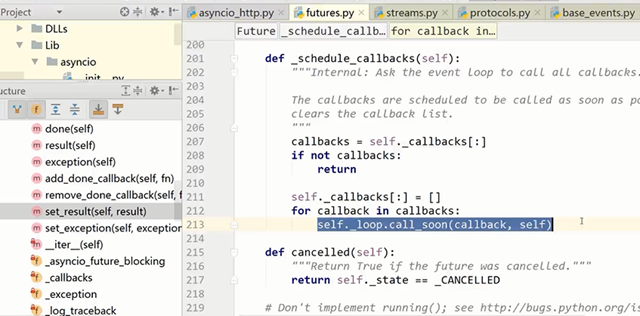
future 结果容器
task 是 future 的子类,协程和future之间的桥梁,启动协程
13.7 asyncio同步和通信
total = 0

async def add():

    # 1,dosomething1

    # 2.io操作

    # 1.dosomething3

    global total

    for i in range(100000):

        total += 1

async def desc():

    global total

    for i in range(100000):

        total -= 1

if __name__ == "__main__":

    import asyncio

    tasks = [add(), desc()]

    loop = asyncio.get_event_loop()

    loop.run_until_complete(asyncio.wait(tasks))

    print(total)
# 不需要锁的情况
13.8 aiohttp实现高并发爬虫
gj13 asyncio并发编程的更多相关文章
- asyncio并发编程
一. 事件循环 1.注: 实现搭配:事件循环+回调(驱动生成器[协程])+epoll(IO多路复用),asyncio是Python用于解决异步编程的一整套解决方案: 基于asynico:tornado ...
- Python进阶:多线程、多进程和线程池编程/协程和异步io/asyncio并发编程
gil: gil使得同一个时刻只有一个线程在一个CPU上执行字节码,无法将多个线程映射到多个CPU上执行 gil会根据执行的字节码行数以及时间片释放gil,gil在遇到io的操作时候主动释放 thre ...
- Python高级编程和异步IO并发编程
第1章 课程简介介绍如何配置系统的开发环境以及如何加入github私人仓库获取最新源码. 1-1 导学 试看 1-2 开发环境配置 1-3 资源获取方式第2章 python中一切皆对象本章节首先对比静 ...
- Python并发编程之初识异步IO框架:asyncio 上篇(九)
大家好,并发编程 进入第九篇. 通过前两节的铺垫(关于协程的使用),今天我们终于可以来介绍我们整个系列的重点 -- asyncio. asyncio是Python 3.4版本引入的标准库,直接内置了对 ...
- Python并发编程之实战异步IO框架:asyncio 下篇(十一)
大家好,并发编程 进入第十一章. 前面两节,我们讲了协程中的单任务和多任务 这节我们将通过一个小实战,来对这些内容进行巩固. 在实战中,将会用到以下知识点: 多线程的基本使用 Queue消息队列的使用 ...
- Python并发编程之学习异步IO框架:asyncio 中篇(十)
大家好,并发编程 进入第十章.好了,今天的内容其实还挺多的,我准备了三天,到今天才整理完毕.希望大家看完,有所收获的,能给小明一个赞.这就是对小明最大的鼓励了.为了更好地衔接这一节,我们先来回顾一下上 ...
- asyncio:python3未来并发编程主流、充满野心的模块
介绍 asyncio是Python在3.5中正式引入的标准库,这是Python未来的并发编程的主流,非常重要的一个模块.有一个web框架叫sanic,就是基于asyncio,语法和flask类似,使用 ...
- Python3 与 C# 并发编程之~ 协程篇
3.协程篇¶ 去年微信公众号就陆陆续续发布了,我一直以为博客也汇总同步了,这几天有朋友说一直没找到,遂发现,的确是漏了,所以补上一篇 在线预览:https://github.lesschina.c ...
- python 闯关之路四(上)(并发编程与数据库理论)
并发编程重点: 并发编程:线程.进程.队列.IO多路模型 操作系统工作原理介绍.线程.进程演化史.特点.区别.互斥锁.信号. 事件.join.GIL.进程间通信.管道.队列. 生产者消息者模型.异步模 ...
随机推荐
- 项目总结15:JavaScript模拟表单提交(实现window.location.href-POST提交数据效果)
JavaScript模拟表单提交(实现window.location.href-POST提交数据效果) 前沿 1-在具体项目开发中,用window.location.href方法下载文件,因windo ...
- Server2003+IIS6+TP-Link+花生壳配置
Server2003+IIS6+TP-Link+花生壳配置外网一共分四步: 固定Server2003电脑的局域网IP地址. 设置IIS网站中的TCP端口. 在TP-Link中设置转发规则. 申请花生壳 ...
- Js学习(1)基本语法
变量: 用var声明变量,如果只是声明变量而不赋值,则变量的值是undefined,表示无定义 不写·var也有效,但不建议 变量声明两次无效,但第二次声明时赋值会覆盖掉前面的值 变量提升: Js引擎 ...
- 34-ssm 最简洁的模板
见 csdn :https://download.csdn.net/download/qq_39451578/10931448
- 将之前的Power idea公司的数据按照下图所示的格式在屏幕上显示出来。
之前的文章 示例代码如下 assume cs:codesg ;将整个data段看作是一个数组,长度一共为 ;21*4+21*4+2*21=168+42=210字节 data segment db ' ...
- springmvc中的拦截器interceptor用法
1.配置拦截器 在springMVC.xml配置文件增加: 1 <mvc:interceptors> 2 <!-- 日志拦截器 --> 3 <mvc:intercepto ...
- VS2013中Nuget程序包管理器控制台使用入门(一)-准备环境(原创)
准备环境: 1.打开VS2013IDE集成开发环境. 2.新建一个Asp.net Mvc的项目,比如命名为:MvcApplication1 3.打开 菜单"工具"->&quo ...
- Microsoft Visual C++ 14.0 is required. Get it with "Microsoft Visual C++ Build Tools"
https://blog.csdn.net/saucyj/article/details/79043443
- ie6 PNG图片透明
_background:none; _filter:progid:DXImageTransform.Microsoft.AlphaImageLoader(src=images/videoTips.pn ...
- this指针 new 和delete
指针类型的函数:函数的返回值是指针. 不要将非静态局部地址用作函数的返回值,离开函数后就失效了 在子函数中定义局部变量后将其地址返回给函数就是非法地址 在子函数中用new操作取得的内存地址返回给主函数 ...