
一个进程间同步和通讯的 C# 框架
转自原文 一个进程间同步和通讯的 C# 框架
threadmsg_demo.zip ~ 41KB 下载
threadmsg_src.zip ~ 65KB 下载
0.背景简介
微软在 .NET 框架中提供了多种实用的线程同步手段,其中包括 monitor 类及 reader-writer锁。但跨进程的同步方法还是非常欠缺。另外,目前也没有方便的线程间及进程间传递消息的方法。例如C/S和SOA,又或者生产者/消费者模式中就常常需要传递消息。为此我编写了一个独立完整的框架,实现了跨线程和跨进程的同步和通讯。这框架内包含了信号量,信箱,内存映射文件,阻塞通道,及简单消息流控制器等组件。这篇文章里提到的类同属于一个开源的库项目(BSD许可),你可以从这里下载到 www.cdrnet.net/projects/threadmsg/.
这个框架的目的是:
- 封装性:通过MSMQ消息队列发送消息的线程无需关心消息是发送到另一个线程还是另一台机器。
- 简单性:向其他进程发送消息只需调用一个方法。
注意:我删除了本文中全部代码的XML注释以节省空间。如果你想知道这些方法和参数的详细信息,请参考附件中的代码。
1.先看一个简单例子
使用了这个库后,跨进程的消息传递将变得非常简单。我将用一个小例子来作示范:一个控制台程序,根据参数可以作为发送方也可以作为接收方运行。在发送程序里,你可以输入一定的文本并发送到信箱内(返回key),接收程序将显示所有从信箱内收到的消息。你可以运行无数个发送程序和接收程序,但是每个消息只会被具体的某一个接收程序所收到。
[Serializable]

struct Message

{

  public string Text;

}

class Test

{

  IMailBox mail;

  public Test()

  {

    mail = new ProcessMailBox("TMProcessTest",1024);

  }

  public void RunWriter()

  {

    Console.WriteLine("Writer started");

    Message msg;

    while(true)

    {

      msg.Text = Console.ReadLine();

      if(msg.Text.Equals("exit"))

        break;

      mail.Content = msg;

    }

  }

  public void RunReader()

  {

    Console.WriteLine("Reader started");

    while(true)

    {

      Message msg = (Message)mail.Content;

      Console.WriteLine(msg.Text);

    }

  }

  [STAThread]

  static void Main(string[] args)

  {

    Test test = new Test();

    if(args.Length > 0)

      test.RunWriter();

    else

      test.RunReader();

  }

}
信箱一旦创建之后(这上面代码里是 ProcessMailBox ),接收消息只需要读取 Content 属性,发送消息只需要给这个属性赋值。当没有数据时,获取消息将会阻塞当前线程;发送消息时如果信箱里已经有数据,则会阻塞当前线程。正是有了这个阻塞,整个程序是完全基于中断的,并且不会过度占用CPU(不需要进行轮询)。发送和接收的消息可以是任意支持序列化(Serializable)的类型。
然而,实际上暗地里发生的事情有点复杂:消息通过内存映射文件来传递,这是目前唯一的跨进程共享内存的方法,这个例子里我们只会在 pagefile 里面产生虚拟文件。对这个虚拟文件的访问是通过 win32 信号量来确保同步的。消息首先序列化成二进制,然后再写进该文件,这就是为什么需要声明Serializable属性。内存映射文件和 win32 信号量都需要调用 NT内核的方法。多得了 .NET 框架中的 Marshal 类,我们可以避免编写不安全的代码。我们将在下面讨论更多的细节。
2. .NET里面的跨线程/进程同步
线程/进程间的通讯需要共享内存或者其他内建机制来发送/接收数据。即使是采用共享内存的方式,也还需要一组同步方法来允许并发访问。
同一个进程内的所有线程都共享公共的逻辑地址空间(堆)。对于不同进程,从 win2000 开始就已经无法共享内存。然而,不同的进程可以读写同一个文件。WinAPI提供了多种系统调用方法来映射文件到进程的逻辑空间,及访问系统内核对象(会话)指向的 pagefile 里面的虚拟文件。无论是共享堆,还是共享文件,并发访问都有可能导致数据不一致。我们就这个问题简单讨论一下,该怎样确保线程/进程调用的有序性及数据的一致性。
2.1 线程同步
.NET 框架和 C# 提供了方便直观的线程同步方法,即 monitor 类和 lock 语句(本文将不会讨论 .NET 框架的互斥量)。对于线程同步,虽然本文提供了其他方法,我们还是推荐使用 lock 语句。
void Work1()

{

  NonCriticalSection1();

  Monitor.Enter(this);

  try

  {

    CriticalSection();

  }

  finally

  {

    Monitor.Exit(this);

  }

  NonCriticalSection2();

}
void Work2()

{

  NonCriticalSection1();

  lock(this)

  {

    CriticalSection();

  }

  NonCriticalSection2();

}
Work1 和 Work2 是等价的。在C#里面,很多人喜欢第二个方法,因为它更短,且不容易出错。
2.2 跨线程信号量
信号量是经典的同步基本概念之一(由 Edsger Dijkstra 引入)。信号量是指一个有计数器及两个操作的对象。它的两个操作是:获取(也叫P或者等待),释放(也叫V或者收到信号)。信号量在获取操作时如果计数器为0则阻塞,否则将计数器减一;在释放时将计数器加一,且不会阻塞。虽然信号量的原理很简单,但是实现起来有点麻烦。好在,内建的 monitor 类有阻塞特性,可以用来实现信号量。
public sealed class ThreadSemaphore : ISemaphore

{

  private int counter;

  private readonly int max;

  public ThreadSemaphore() : this(0, int.Max) {}

  public ThreadSemaphore(int initial) : this(initial, int.Max) {}

  public ThreadSemaphore(int initial, int max)

  {

    this.counter = Math.Min(initial,max);

    this.max = max;

  }

  public void Acquire()

  {

    lock(this)

    {

      counter--;

      if(counter < 0 && !Monitor.Wait(this))

        throw new SemaphoreFailedException();

    }

  }

  public void Acquire(TimeSpan timeout)

  {

    lock(this)

    {

      counter--;

      if(counter < 0 && !Monitor.Wait(this,timeout))

        throw new SemaphoreFailedException();

    }

  }

  public void Release()

  {

    lock(this)

    {

      if(counter >= max)

        throw new SemaphoreFailedException();

      if(counter < 0)

        Monitor.Pulse(this);

      counter++;

    }

  }

}
信号量在复杂的阻塞情景下更加有用,例如我们后面将要讨论的通道(channel)。你也可以使用信号量来实现临界区的排他性(如下面的 Work3),但是我还是推荐使用内建的 lock 语句,像上面的 Work2 那样。
请注意:如果使用不当,信号量也是有潜在危险的。正确的做法是:当获取信号量失败时,千万不要再调用释放操作;当获取成功时,无论发生了什么错误,都要记得释放信号量。遵循这样的原则,你的同步才是正确的。Work3 中的 finally 语句就是为了保证正确释放信号量。注意:获取信号量( s.Acquire() )的操作必须放到 try 语句的外面,只有这样,当获取失败时才不会调用释放操作。
ThreadSemaphore s = new ThreadSemaphore(1);

void Work3()

{

  NonCriticalSection1();

  s.Acquire();

  try

  {

    CriticalSection();

  }

  finally

  {

    s.Release();

  }

  NonCriticalSection2();

}
2.3 跨进程信号量
为了协调不同进程访问同一资源,我们需要用到上面讨论过的概念。很不幸,.NET 中的 monitor 类不可以跨进程使用。但是,win32 API提供的内核信号量对象可以用来实现跨进程同步。 Robin Galloway-Lunn 介绍了怎样将 win32 的信号量映射到 .NET 中(见 Using Win32 Semaphores in C# )。我们的实现也类似:
[DllImport("kernel32",EntryPoint="CreateSemaphore",

     SetLastError=true,CharSet=CharSet.Unicode)]

internal static extern uint CreateSemaphore(

  SecurityAttributes auth, int initialCount,

    int maximumCount, string name);

[DllImport("kernel32",EntryPoint="WaitForSingleObject",

 SetLastError=true,CharSet=CharSet.Unicode)]

internal static extern uint WaitForSingleObject(

 uint hHandle, uint dwMilliseconds);

[DllImport("kernel32",EntryPoint="ReleaseSemaphore",

 SetLastError=true,CharSet=CharSet.Unicode)]

[return : MarshalAs( UnmanagedType.VariantBool )]

internal static extern bool ReleaseSemaphore(

  uint hHandle, int lReleaseCount, out int lpPreviousCount);

[DllImport("kernel32",EntryPoint="CloseHandle",SetLastError=true,

  CharSet=CharSet.Unicode)]

[return : MarshalAs( UnmanagedType.VariantBool )]

internal static extern bool CloseHandle(uint hHandle);
public class ProcessSemaphore : ISemaphore, IDisposable

{

  private uint handle;

  private readonly uint interruptReactionTime;

  public ProcessSemaphore(string name) : this(

   name,0,int.MaxValue,500) {}

  public ProcessSemaphore(string name, int initial) : this(

   name,initial,int.MaxValue,500) {}

  public ProcessSemaphore(string name, int initial,

   int max, int interruptReactionTime)

  {

    this.interruptReactionTime = (uint)interruptReactionTime;

    this.handle = NTKernel.CreateSemaphore(null, initial, max, name);

    if(handle == 0)

      throw new SemaphoreFailedException();

  }

  public void Acquire()

  {

    while(true)

    { //looped 0.5s timeout to make NT-blocked threads interruptable.

      uint res = NTKernel.WaitForSingleObject(handle,

       interruptReactionTime);

      try {System.Threading.Thread.Sleep(0);}

      catch(System.Threading.ThreadInterruptedException e)

      {

        if(res == 0)

        { //Rollback

          int previousCount;

          NTKernel.ReleaseSemaphore(handle,1,out previousCount);

        }

        throw e;

      }

      if(res == 0)

        return;

      if(res != 258)

        throw new SemaphoreFailedException();

    }

  }

  public void Acquire(TimeSpan timeout)

  {

    uint milliseconds = (uint)timeout.TotalMilliseconds;

    if(NTKernel.WaitForSingleObject(handle, milliseconds) != 0)

      throw new SemaphoreFailedException();

  }

  public void Release()

  {

    int previousCount;

    if(!NTKernel.ReleaseSemaphore(handle, 1, out previousCount))

      throw new SemaphoreFailedException();

  }

  #region IDisposable Member

  public void Dispose()

  {

    if(handle != 0)

    {

      if(NTKernel.CloseHandle(handle))

        handle = 0;

    }

  }

  #endregion

}
有一点很重要:win32中的信号量是可以命名的。这允许其他进程通过名字来创建相应信号量的句柄。为了让阻塞线程可以中断,我们使用了一个(不好)的替代方法:使用超时和 Sleep(0)。我们需要中断来安全关闭线程。更好的做法是:确定没有线程阻塞之后才释放信号量,这样程序才可以完全释放资源并正确退出。
你可能也注意到了:跨线程和跨进程的信号量都使用了相同的接口。所有相关的类都使用了这种模式,以实现上面背景介绍中提到的封闭性。需要注意:出于性能考虑,你不应该将跨进程的信号量用到跨线程的场景,也不应该将跨线程的实现用到单线程的场景。
3. 跨进程共享内存:内存映射文件
我们已经实现了跨线程和跨进程的共享资源访问同步。但是传递/接收消息还需要共享资源。对于线程来说,只需要声明一个类成员变量就可以了。但是对于跨进程来说,我们需要使用到 win32 API 提供的内存映射文件(Memory Mapped Files,简称MMF)。使用 MMF和使用 win32 信号量差不多。我们需要先调用 CreateFileMapping 方法来创建一个内存映射文件的句柄:
[DllImport("Kernel32.dll",EntryPoint="CreateFileMapping",

     SetLastError=true,CharSet=CharSet.Unicode)]

internal static extern IntPtr CreateFileMapping(uint hFile,

 SecurityAttributes lpAttributes, uint flProtect,

  uint dwMaximumSizeHigh, uint dwMaximumSizeLow, string lpName);

[DllImport("Kernel32.dll",EntryPoint="MapViewOfFile",

 SetLastError=true,CharSet=CharSet.Unicode)]

internal static extern IntPtr MapViewOfFile(IntPtr hFileMappingObject,

  uint dwDesiredAccess, uint dwFileOffsetHigh,

  uint dwFileOffsetLow, uint dwNumberOfBytesToMap);

[DllImport("Kernel32.dll",EntryPoint="UnmapViewOfFile",

 SetLastError=true,CharSet=CharSet.Unicode)]

[return : MarshalAs( UnmanagedType.VariantBool )]

internal static extern bool UnmapViewOfFile(IntPtr lpBaseAddress);
public static MemoryMappedFile CreateFile(string name,

     FileAccess access, int size)

{

  if(size < 0)

    throw new ArgumentException("Size must not be negative","size");

  IntPtr fileMapping = NTKernel.CreateFileMapping(0xFFFFFFFFu,null,

   (uint)access,0,(uint)size,name);

  if(fileMapping == IntPtr.Zero)

    throw new MemoryMappingFailedException();

  return new MemoryMappedFile(fileMapping,size,access);

}
我们希望直接使用 pagefile 中的虚拟文件,所以我们用 -1(0xFFFFFFFF) 来作为文件句柄来创建我们的内存映射文件句柄。我们也指定了必填的文件大小,以及相应的名称。这样其他进程就可以通过这个名称来同时访问该映射文件。创建了内存映射文件后,我们就可以映射这个文件不同的部分(通过偏移量和字节大小来指定)到我们的进程地址空间。我们通过 MapViewOfFile 系统方法来指定:
public MemoryMappedFileView CreateView(int offset, int size,

      MemoryMappedFileView.ViewAccess access)

{

  if(this.access == FileAccess.ReadOnly && access ==

    MemoryMappedFileView.ViewAccess.ReadWrite)

    throw new ArgumentException(

     "Only read access to views allowed on files without write access",

     "access");

  if(offset < 0)

    throw new ArgumentException("Offset must not be negative","size");

  if(size < 0)

    throw new ArgumentException("Size must not be negative","size");

  IntPtr mappedView = NTKernel.MapViewOfFile(fileMapping,

   (uint)access,0,(uint)offset,(uint)size);

  return new MemoryMappedFileView(mappedView,size,access);

}
在不安全的代码中,我们可以将返回的指针强制转换成我们指定的类型。尽管如此,我们不希望有不安全的代码存在,所以我们使用 Marshal 类来从中读写我们的数据。偏移量参数是用来从哪里开始读写数据,相对于指定的映射视图的地址。
public byte ReadByte(int offset)

{

  return Marshal.ReadByte(mappedView,offset);

}

public void WriteByte(byte data, int offset)

{

  Marshal.WriteByte(mappedView,offset,data);

}

public int ReadInt32(int offset)

{

  return Marshal.ReadInt32(mappedView,offset);

}

public void WriteInt32(int data, int offset)

{

  Marshal.WriteInt32(mappedView,offset,data);

}

public void ReadBytes(byte[] data, int offset)

{

  for(int i=0;i<data.Length;i++)

    data[i] = Marshal.ReadByte(mappedView,offset+i);

}

public void WriteBytes(byte[] data, int offset)

{

  for(int i=0;i<data.Length;i++)

    Marshal.WriteByte(mappedView,offset+i,data[i]);

}
但是,我们希望读写整个对象树到文件中,所以我们需要支持自动进行序列化和反序列化的方法。
public object ReadDeserialize(int offset, int length)

{

  byte[] binaryData = new byte[length];

  ReadBytes(binaryData,offset);

  System.Runtime.Serialization.Formatters.Binary.BinaryFormatter formatter

    = new System.Runtime.Serialization.Formatters.Binary.BinaryFormatter();

  System.IO.MemoryStream ms = new System.IO.MemoryStream(

   binaryData,0,length,true,true);

  object data = formatter.Deserialize(ms);

  ms.Close();

  return data;

}

public void WriteSerialize(object data, int offset, int length)

{

  System.Runtime.Serialization.Formatters.Binary.BinaryFormatter formatter

    = new System.Runtime.Serialization.Formatters.Binary.BinaryFormatter();

  byte[] binaryData = new byte[length];

  System.IO.MemoryStream ms = new System.IO.MemoryStream(

   binaryData,0,length,true,true);

  formatter.Serialize(ms,data);

  ms.Flush();

  ms.Close();

  WriteBytes(binaryData,offset);

}
请注意:对象序列化之后的大小不应该超过映射视图的大小。序列化之后的大小总是比对象本身占用的内存要大的。我没有试过直接将对象内存流绑定到映射视图,那样做应该也可以,甚至可能带来少量的性能提升。
4. 信箱:在线程/进程间传递消息
这里的信箱与 Email 及 NT 中的邮件槽(Mailslots)无关。它是一个只能保留一个对象的安全共享内存结构。信箱的内容通过一个属性来读写。如果信箱内容为空,试图读取该信箱的线程将会阻塞,直到另一个线程往其中写内容。如果信箱已经有了内容,当一个线程试图往其中写内容时将被阻塞,直到另一个线程将信箱内容读取出去。信箱的内容只能被读取一次,它的引用在读取后自动被删除。基于上面的代码,我们已经可以实现信箱了。
4.1 跨线程的信箱
我们可以使用两个信号量来实现一个信箱:一个信号量在信箱内容为空时触发,另一个在信箱有内容时触发。在读取内容之前,线程先等待信箱已经填充了内容,读取之后触发空信号量。在写入内容之前,线程先等待信箱内容清空,写入之后触发满信号量。注意:空信号量在一开始时就被触发了。
public sealed class ThreadMailBox : IMailBox

{

  private object content;

  private ThreadSemaphore empty, full;

  public ThreadMailBox()

  {

    empty = new ThreadSemaphore(1,1);

    full = new ThreadSemaphore(0,1);

  }

  public object Content

  {

    get

    {

      full.Acquire();

      object item = content;

      empty.Release();

      return item;

    }

    set

    {

      empty.Acquire();

      content = value;

      full.Release();

    }

  }

}
4.2 跨进程信箱
跨进程信箱与跨线程信箱的实现基本上一样简单。不同的是我们使用两个跨进程的信号量,并且我们使用内存映射文件来代替类成员变量。由于序列化可能会失败,我们使用了一小段异常处理来回滚信箱的状态。失败的原因有很多(无效句柄,拒绝访问,文件大小问题,Serializable属性缺失等等)。
public sealed class ProcessMailBox : IMailBox, IDisposable

{

  private MemoryMappedFile file;

  private MemoryMappedFileView view;

  private ProcessSemaphore empty, full;

  public ProcessMailBox(string name,int size)

  {

    empty = new ProcessSemaphore(name+".EmptySemaphore.MailBox",1,1);

    full = new ProcessSemaphore(name+".FullSemaphore.MailBox",0,1);

    file = MemoryMappedFile.CreateFile(name+".MemoryMappedFile.MailBox",

      MemoryMappedFile.FileAccess.ReadWrite,size);

    view = file.CreateView(0,size,

     MemoryMappedFileView.ViewAccess.ReadWrite);

  }

  public object Content

  {

    get

    {

      full.Acquire();

      object item;

      try {item = view.ReadDeserialize();}

      catch(Exception e)

      {  //Rollback

        full.Release();

        throw e;

      }

      empty.Release();

      return item;

    }

    set

    {

      empty.Acquire();

      try {view.WriteSerialize(value);}

      catch(Exception e)

      {  //Rollback

        empty.Release();

        throw e;

      }

      full.Release();

    }

  }

  #region IDisposable Member

  public void Dispose()

  {

    view.Dispose();

    file.Dispose();

    empty.Dispose();

    full.Dispose();

  }

  #endregion

}
到这里我们已经实现了跨进程消息传递(IPC)所需要的组件。你可能需要再回头本文开头的那个例子,看看 ProcessMailBox 应该如何使用。
5.通道:基于队列的消息传递
信箱最大的限制是它们每次只能保存一个对象。如果一系列线程(使用同一个信箱)中的一个线程需要比较长的时间来处理特定的命令,那么整个系列都会阻塞。通常我们会使用缓冲的消息通道来处理,这样你可以在方便的时候从中读取消息,而不会阻塞消息发送者。这种缓冲通过通道来实现,这里的通道比信箱要复杂一些。同样,我们将分别从线程和进程级别来讨论通道的实现。
5.1 可靠性
信箱和通道的另一个重要的不同是:通道拥有可靠性。例如:自动将发送失败(可能由于线程等待锁的过程中被中断)的消息转存到一个内置的容器中。这意味着处理通道的线程可以安全地停止,同时不会丢失队列中的消息。这通过两个抽象类来实现, ThreadReliability 和 ProcessReliability。每个通道的实现类都继承其中的一个类。
5.2 跨线程的通道
跨线程的通道基于信箱来实现,但是使用一个同步的队列来作为消息缓冲而不是一个变量。得益于信号量,通道在空队列时阻塞接收线程,在队列满时阻塞发送线程。这样你就不会碰到由入队/出队引发的错误。为了实现这个效果,我们用队列大小来初始化空信号量,用0来初始化满信号量。如果某个发送线程在等待入队的时候被中断,我们将消息复制到内置容器中,并将异常往外面抛。在接收操作中,我们不需要做异常处理,因为即使线程被中断你也不会丢失任何消息。注意:线程只有在阻塞状态才能被中断,就像调用信号量的获取操作(Aquire)方法时。
public sealed class ThreadChannel : ThreadReliability, IChannel

{

  private Queue queue;

  private ThreadSemaphore empty, full;

  public ThreadChannel(int size)

  {

    queue = Queue.Synchronized(new Queue(size));

    empty = new ThreadSemaphore(size,size);

    full = new ThreadSemaphore(0,size);

  }

  public void Send(object item)

  {

    try {empty.Acquire();}

    catch(System.Threading.ThreadInterruptedException e)

    {

      DumpItem(item);

      throw e;

    }

    queue.Enqueue(item);

    full.Release();

  }

  public void Send(object item, TimeSpan timeout)

  {

    try {empty.Acquire(timeout);}

    ...

  }

  public object Receive()

  {

    full.Acquire();

    object item = queue.Dequeue();

    empty.Release();

    return item;

  }

  public object Receive(TimeSpan timeout)

  {

    full.Acquire(timeout);

    ...

  }

  protected override void DumpStructure()

  {

    lock(queue.SyncRoot)

    {

      foreach(object item in queue)

        DumpItem(item);

      queue.Clear();

    }

  }

}
5.3 跨进程通道
实现跨进程通道有点麻烦,因为你需要首先提供一个跨进程的缓冲区。一个可能的解决方法是使用跨进程信箱并根据需要将接收/发送方法加入队列。为了避免这种方案的几个缺点,我们将直接使用内存映射文件来实现一个队列。MemoryMappedArray 类将内存映射文件分成几部分,可以直接使用数组索引来访问。 MemoryMappedQueue 类,为这个数组提供了一个经典的环(更多细节请查看附件中的代码)。为了支持直接以 byte/integer 类型访问数据并同时支持二进制序列化,调用方需要先调用入队(Enqueue)/出队(Dequeue)操作,然后根据需要使用读写方法(队列会自动将数据放到正确的位置)。这两个类都不是线程和进程安全的,所以我们需要使用跨进程的信号量来模拟互斥量(也可以使用 win32 互斥量),以此实现相互间的互斥访问。除了这两个类,跨进程的通道基本上和跨线程信箱一样。同样,我们也需要在 Send() 中处理线程中断及序列化可能失败的问题。
public sealed class ProcessChannel : ProcessReliability, IChannel, IDisposable

{

  private MemoryMappedFile file;

  private MemoryMappedFileView view;

  private MemoryMappedQueue queue;

  private ProcessSemaphore empty, full, mutex;

  public ProcessChannel( int size, string name, int maxBytesPerEntry)

  {

    int fileSize = 64+size*maxBytesPerEntry;

    empty = new ProcessSemaphore(name+".EmptySemaphore.Channel",size,size);

    full = new ProcessSemaphore(name+".FullSemaphore.Channel",0,size);

    mutex = new ProcessSemaphore(name+".MutexSemaphore.Channel",1,1);

    file = MemoryMappedFile.CreateFile(name+".MemoryMappedFile.Channel",

      MemoryMappedFile.FileAccess.ReadWrite,fileSize);

    view = file.CreateView(0,fileSize,

     MemoryMappedFileView.ViewAccess.ReadWrite);

    queue = new MemoryMappedQueue(view,size,maxBytesPerEntry,true,0);

    if(queue.Length < size || queue.BytesPerEntry < maxBytesPerEntry)

      throw new MemoryMappedArrayFailedException();

  }

  public void Send(object item)

  {

    try {empty.Acquire();}

    catch(System.Threading.ThreadInterruptedException e)

    {

      DumpItemSynchronized(item);

      throw e;

    }

    try {mutex.Acquire();}

    catch(System.Threading.ThreadInterruptedException e)

    {

      DumpItemSynchronized(item);

      empty.Release();

      throw e;

    }

    queue.Enqueue();

    try {queue.WriteSerialize(item,0);}

    catch(Exception e)

    {

      queue.RollbackEnqueue();

      mutex.Release();

      empty.Release();

      throw e;

    }

    mutex.Release();

    full.Release();

  }

  public void Send(object item, TimeSpan timeout)

  {

    try {empty.Acquire(timeout);}

    ...

  }

  public object Receive()

  {

    full.Acquire();

    mutex.Acquire();

    object item;

    queue.Dequeue();

    try {item = queue.ReadDeserialize(0);}

    catch(Exception e)

    {

      queue.RollbackDequeue();

      mutex.Release();

      full.Release();

      throw e;

    }

    mutex.Release();

    empty.Release();

    return item;

  }

  public object Receive(TimeSpan timeout)

  {

    full.Acquire(timeout);

    ...

  }

  protected override void DumpStructure()

  {

    mutex.Acquire();

    byte[][] dmp = queue.DumpClearAll();

    for(int i=0;i<dmp.Length;i++)

      DumpItemSynchronized(dmp[i]);

    mutex.Release();

  }

  #region IDisposable Member

  public void Dispose()

  {

    view.Dispose();

    file.Dispose();

    empty.Dispose();

    full.Dispose();

    mutex.Dispose();

  }

  #endregion

}
6. 消息路由
我们目前已经实现了线程和进程同步及消息传递机制(使用信箱和通道)。当你使用阻塞队列的时候,有可能会遇到这样的问题:你需要在一个线程中同时监听多个队列。为了解决这样的问题,我们提供了一些小型的类:通道转发器,多用复用器,多路复用解码器和通道事件网关。你也可以通过简单的 IRunnable 模式来实现类似的通道处理器。IRunnable模式由两个抽象类SingleRunnable和 MultiRunnable 来提供(具体细节请参考附件中的代码)。
6.1 通道转发器
通道转发器仅仅监听一个通道,然后将收到的消息转发到另一个通道。如果有必要,转发器可以将每个收到的消息放到一个信封中,并加上一个数字标记,然后再转发出去(下面的多路利用器使用了这个特性)。
public class ChannelForwarder : SingleRunnable

{

  private IChannel source, target;

  private readonly int envelope;

  public ChannelForwarder(IChannel source,

   IChannel target, bool autoStart, bool waitOnStop)

    : base(true,autoStart,waitOnStop)

  {

    this.source = source;

    this.target = target;

    this.envelope = -1;

  }

  public ChannelForwarder(IChannel source, IChannel target,

   int envelope, bool autoStart, bool waitOnStop)

    : base(true,autoStart,waitOnStop)

  {

    this.source = source;

    this.target = target;

    this.envelope = envelope;

  }

  protected override void Run()

  {  //NOTE: IChannel.Send is interrupt save and

     //automatically dumps the argument.

    if(envelope == -1)

      while(running)

        target.Send(source.Receive());

    else

    {

      MessageEnvelope env;

      env.ID = envelope;

      while(running)

      {

        env.Message = source.Receive();

        target.Send(env);

      }

    }

  }

}
6.2 通道多路复用器和通道复用解码器
通道多路复用器监听多个来源的通道并将接收到的消息(消息使用信封来标记来源消息)转发到一个公共的输出通道。这样就可以一次性地监听多个通道。复用解码器则是监听一个公共的输出通道,然后根据信封将消息转发到某个指定的输出通道。
public class ChannelMultiplexer : MultiRunnable

{

  private ChannelForwarder[] forwarders;

  public ChannelMultiplexer(IChannel[] channels, int[] ids,

    IChannel output, bool autoStart, bool waitOnStop)

  {

    int count = channels.Length;

    if(count != ids.Length)

      throw new ArgumentException("Channel and ID count mismatch.","ids");

    forwarders = new ChannelForwarder[count];

    for(int i=0;i<count;i++)

      forwarders[i] = new ChannelForwarder(channels[i],

       output,ids[i],autoStart,waitOnStop);

    SetRunnables((SingleRunnable[])forwarders);

  }

}

public class ChannelDemultiplexer : SingleRunnable

{

  private HybridDictionary dictionary;

  private IChannel input;

  public ChannelDemultiplexer(IChannel[] channels, int[] ids,

    IChannel input, bool autoStart, bool waitOnStop)

    : base(true,autoStart,waitOnStop)

  {

    this.input = input;

    int count = channels.Length;

    if(count != ids.Length)

      throw new ArgumentException("Channel and ID count mismatch.","ids");

    dictionary = new HybridDictionary(count,true);

    for(int i=0;i<count;i++)

      dictionary.add(ids[i],channels[i]);

  }

  protected override void Run()

  {  //NOTE: IChannel.Send is interrupt save and

     //automatically dumps the argument.

    while(running)

    {

      MessageEnvelope env = (MessageEnvelope)input.Receive();

      IChannel channel = (IChannel)dictionary[env.ID];

      channel.send(env.Message);

    }

  }

}
6.3 通道事件网关
通道事件网关监听指定的通道,在接收到消息时触发一个事件。这个类对于基于事件的程序(例如GUI程序)很有用,或者在使用系统线程池(ThreadPool)来初始化轻量的线程。需要注意的是:使用 WinForms 的程序中你不能在事件处理方法中直接访问UI控件,只能调用Invoke 方法。因为事件处理方法是由事件网关线程调用的,而不是UI线程。
public class ChannelEventGateway : SingleRunnable

{

  private IChannel source;

  public event MessageReceivedEventHandler MessageReceived;

  public ChannelEventGateway(IChannel source, bool autoStart,

   bool waitOnStop) : base(true,autoStart,waitOnStop)

  {

    this.source = source;

  }

  protected override void Run()

  {

    while(running)

    {

      object c = source.Receive();

      MessageReceivedEventHandler handler = MessageReceived;

      if(handler != null)

        handler(this,new MessageReceivedEventArgs(c));

    }

  }

}
7. 比萨外卖店的例子
万事俱备,只欠东风。我们已经讨论了这个同步及消息传递框架中的大部分重要的结构和技术(本文没有讨论框架中的其他类如Rendezvous及Barrier)。就像开头一样,我们用一个例子来结束这篇文章。这次我们用一个小型比萨外卖店来做演示。下图展示了这个例子:四个并行进程相互之间进行通讯。图中展示了消息(数据)是如何使用跨进程通道在四个进程中流动的,且在每个进程中使用了性能更佳的跨线程通道和信箱。
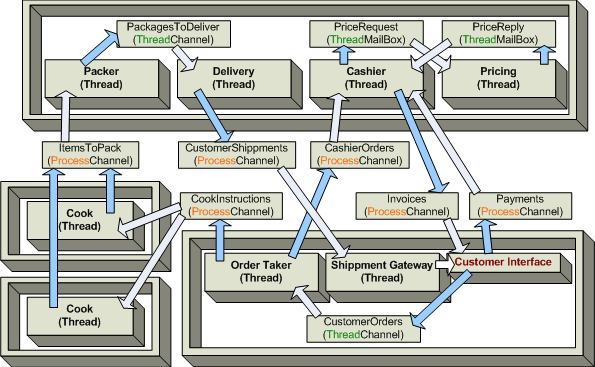
一开始,一个顾客点了一个比萨和一些饮料。他调用了顾客(customer)接口的方法,向顾客订单(CustomerOrders)通道发送了一个下单(Order)消息。接单员,在顾客下单后,发送了两条配餐指令(分别对应比萨和饮料)到厨师指令(CookInstruction)通道。同时他通过收银(CashierOrder)通道将订单转发给收银台。收银台从价格中心获取总价并将票据发给顾客,希望能提高收银的速度 。与此同时,厨师将根据配餐指令将餐配好之后交给打包员工。打包员工处理好之后,等待顾客付款,然后将外卖递给顾客。
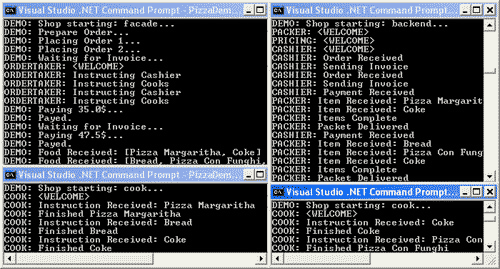
为了运行这个例子,打开4个终端(cmd.exe),用 "PizzaDemo.exe cook" 启动多个厨师进程(多少个都可以),用 "PizzaDemo.exe backend" 启动后端进程,用 "PizzaDemo.exe facade" 启动顾客接口门面(用你的程序名称来代替 PizzaDemo )。注意:为了模拟真实情景,某些线程(例如厨师线程)会随机休眠几秒。按下回车键就会停止和退出进程。如果你在进程正在处理数据的时候退出,你将可以在内存转存报告的结尾看到几个未处理的消息。在真实世界的程序里面,消息一般都会被转存到磁盘中,以便下次可以使用。
这个例子使用了上文中讨论过的几个机制。比如说,收银台使用一个通道复用器(ChannelMultiplexer)来监听顾客的订单和支付通道,用了两个信箱来实现价格服务。分发时使用了一个通道事件网关(ChannelEventGateway),顾客在食物打包完成之后马上会收到通知。你也可以将这些程序注册成 Windows NT 服务运行,也可以远程登录后运行。
8. 总结
本文已经讨论了C#中如何基于服务的架构及实现跨进程同步和通讯。然后,这个不是唯一的解决方案。例如:在大项目中使用那么多的线程会引来严重的问题。这个框架中缺失的是事务支持及其他的通道/信箱实现(例如命名管道和TCP sockets)。这个框架中可能也有许多不足之处,请告诉我。
9. 参考资料
- 操作系统概念(Operating System Concepts), 6th Edition, Silberschatz, Galvin, Gagne, ISBN 0-471-48905-0
- CodeProject: Using Win32 Semaphores in C#
- ThreadMessaging.NET ( 一个开源库,包含了本文讨论过的类)
一个进程间同步和通讯的 C# 框架的更多相关文章
- v76.01 鸿蒙内核源码分析(共享内存) | 进程间最快通讯方式 | 百篇博客分析OpenHarmony源码
百篇博客分析|本篇为:(共享内存篇) | 进程间最快通讯方式 进程通讯相关篇为: v26.08 鸿蒙内核源码分析(自旋锁) | 当立贞节牌坊的好同志 v27.05 鸿蒙内核源码分析(互斥锁) | 同样 ...
- linux信号量之进程间同步
概念 linux信号量: 允许多个线程同时进入临界区,可以用于进程间的同步. 和互斥锁(mutex)的区别: 互斥锁只允许一个线程进入临界区. 所在头文件: semaphore.h 主要函数 初始化函 ...
- 使用 Mutex 实现进程间同步
我们知道 Mutex 互斥量是可以用在线程间同步的,线程之间共享进程的数据,mutex 就可以直接引用.而进程有自己独立的内存空间,要怎样将它应用在进程间同步呢?为了达到这一目的,可以在 pthrea ...
- linux应用编程之进程间同步
一.描述 在操作系统中,异步并发执行环境下的一组进程,因为相互制约关系,进而互相发送消息.互相合作.互相等待,使得各进程按一定的顺序和速度执行,称为进程间的同步.具有同步关系的一组并发进程,称为合作进 ...
- 一起talk C栗子吧(第一百回:C语言实例--使用信号量进行进程间同步与相互排斥一)
各位看官们.大家好,上一回中咱们说的是进程间同步与相互排斥的样例,这一回咱们说的样例是:使用信号量进行进程间同步与相互排斥. 闲话休提,言归正转.让我们一起talk C栗子吧! 看官们,信号量是由著名 ...
- NET多线程之进程间同步锁Mutex
Mutex类似于lock.Monitor,都是为了解决多线程环境下,资源竞争导致的访问顺序问题.常见资源竞争有以下情况: 1.单例,如何确保单例: 2.IO文件操作,如果同时又多个线程访问同一个文件会 ...
- python并发——进程间同步和通信
一.进程间同步 对于一些临界资源,不能使用并发无限消耗,就需要设置专门的临界标示,比如锁或者信号量等 from multiprocessing import Process, Lock import ...
- Linux系统编程—进程间同步
我们知道,线程间同步有多种方式,比如:信号量.互斥量.读写锁,等等.那进程间如何实现同步呢?本文介绍两种方式:互斥量和文件锁. 互斥量mutex 我们已经知道了互斥量可以用于在线程间同步,但实际上,互 ...
- linux 进程间同步互斥
参考链接: https://www.oschina.net/code/snippet_237505_8646 http://www.cnblogs.com/xilentz/archive/2012/1 ...
随机推荐
- [javascript][转载]jQuery获取Select选择的Text和 Value
原文地址: http://www.cnblogs.com/yaoshiyou/archive/2010/08/24/1806939.html http://www.cnblogs.com/SAL292 ...
- BZOJ5125: [Lydsy1712月赛]小Q的书架(DP决策单调性)
题意:N个数,按顺序划分为K组,使得逆序对之和最小. 思路:之前能用四边形不等式写的,一般网上都还有DP单调性分治的做法,今天也尝试用后者写(抄)了一遍.即: 分成K组,我们进行K-1次分治,get( ...
- object references an unsaved transient instance【异常】
[异常提示] TransientObjectException: object references an unsaved transient instance -save the transient ...
- CA数字加密解密Demo
package aisin.text; import com.google.common.collect.Maps; import sun.misc.BASE64Decoder; impor ...
- BZOJ1113 Poi2008 海报PLA【单调栈】【水】
BZOJ1113 Poi2008 海报PLA Description N个矩形,排成一排. 现在希望用尽量少的矩形海报Cover住它们. Input 第一行给出数字N,代表有N个矩形.N在[1,250 ...
- 《DSP using MATLAB》示例 Example6.7
代码: M = 32; alpha = (M-1)/2; magHk = [1, 1, 1, 0.5, zeros(1, 25), 0.5, 1, 1]; k1 = 0:15; k2 = 16:M-1 ...
- 修改selinux出现setsebool: SELinux is disabled.的解决方法
1.vi /etc/vsftpd/vsftpd.conf # You may specify an explicit list of local users to chroot() to their ...
- ballerina 学习八 Parallel( 并行处理)
实际上就是并行进行任务的处理 简单例子 代码 import ballerina/io; function main (string… args) { worker first { io:println ...
- php基础语法(数据类型、运算符)
数据类型 标量类型: int, float, string, bool 复合类型: array, object 特殊类型: null, resouce 整数类型int, integer 字符串类型st ...
- Spring RESTful之@ModelAttribute
@ModelAttribute有俩个位置,一个是在方法体中,下面这个demo的用意就是每次controller@RequestMapping方法被调用之前都会走这个方法,并向Model中(@Reque ...