
iOS:CoreData数据库的使用三(数据库和tableView表格一起使用)
CoreData数据库是用来持久性存储数据的,那么,我们再从该数据库中取出数据干什么呢?明显的是为了对数据做操作,这个过程中可以将它们直观的显示出来,即通过表格的形式显示出来。CoreData配合tableView一起使用,是很常用的一种方式,直观、清晰明了。
下面就来具体的举个例子:
要求:将数据库中的数据显示在表格中,并且可以进行删除、插入等一些操作。
前期的具体步骤:
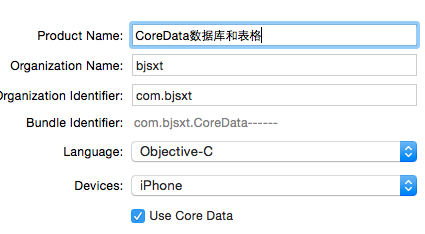
1、创建项目时,勾选Use Core Data,生成CoreData_____.xcdatamodel文件;
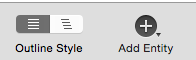
2、点击CoreData_____.xcdatamodel文件,进入项目面板,点击左下角的Add Entity创建实体对象;
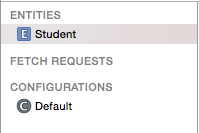
3、在Attributes处点击'+'号,添加实体对象的属性

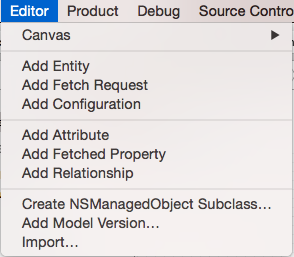
4、选中实体对象,点击模拟器菜单栏上的Editor下的create NSManagedObjectSubclass..,自动创建该实体对象的类


5、点击项目面板右下角的style查看所创建的表

6、在故事板Storyboard中拖入一个表格UITableView,并将tableView和控制类进行IBOutlet关联
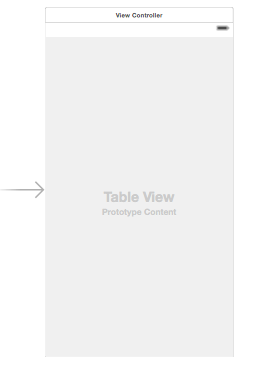
好了,在AppDelegate和Student类编译器自动帮助声明和定义了需要的方法和属性,前期的工作已经完成,最后就是代码来操作数据库了:
在AppDelegate类中准备测试数据并将它们存储到数据库中:
 #import "AppDelegate.h"

 #import "Student.h"

 @interface AppDelegate ()

 @property (assign,nonatomic)BOOL isInserted;

 @end

 @implementation AppDelegate

 //准备测试数据

 -(void)addStudentWithName:(NSString *)name andAge:(NSNumber*)age andGender:(NSNumber*)gender

 {

     //取数据库中实体对象

     Student *student = [NSEntityDescription insertNewObjectForEntityForName:NSStringFromClass([Student class]) inManagedObjectContext:self.managedObjectContext];

     student.name = name;

     student.age = age;

     student.gender = gender;

 }

 - (BOOL)application:(UIApplication *)application didFinishLaunchingWithOptions:(NSDictionary *)launchOptions {

     //在偏好设置中设置标识符,用来防止数据被重复插入

     NSUserDefaults *userDefaults = [NSUserDefaults standardUserDefaults];

     self.isInserted = [userDefaults boolForKey:@"isInserted"];

     //设置实体对象的属性

     if(!self.isInserted)

     {

         [self addStudentWithName:@"张三" andAge:@ andGender:@'M'];

         [self addStudentWithName:@"李四" andAge:@ andGender:@'F'];

         [self addStudentWithName:@"王五" andAge:@ andGender:@'M'];

         [self addStudentWithName:@"赵六" andAge:@ andGender:@'F'];

         [self addStudentWithName:@"陈七" andAge:@ andGender:@'F'];

         [self addStudentWithName:@"郑八" andAge:@ andGender:@'M'];

         [self addStudentWithName:@"戴九" andAge:@ andGender:@'M'];

         [self addStudentWithName:@"刘十" andAge:@ andGender:@'F'];

     }

     //设置偏好设置,并强制写到文件中

     [userDefaults setBool:YES forKey:@"isInserted"];

     [userDefaults synchronize];

     //保存数据到持久层

     [self saveContext];

     return YES;

 }
在控制器类ViewController中取出数据库中的数据,并将它们显示在表格中,然后进行删除和插入操作:
 #import "ViewController.h"

 #import "AppDelegate.h"

 #import "Student.h"

 @interface ViewController ()<UITableViewDataSource,UITableViewDelegate>

 @property (weak, nonatomic) IBOutlet UITableView *tableView;

 @property (strong,nonatomic)NSMutableArray *stus;

 @end

 @implementation ViewController

 - (void)viewDidLoad {

     [super viewDidLoad];

     //设置应用程序代理

     AppDelegate *appDelegate = [[UIApplication sharedApplication]delegate];

     //设置数据源和代理

     self.tableView.dataSource = self;

     self.tableView.delegate = self;

     //从CoreData数据库中取出实体对象信息

     //创建请求对象

     NSFetchRequest *fetchRequest = [NSFetchRequest fetchRequestWithEntityName:NSStringFromClass([Student class])];

     //批处理

     fetchRequest.fetchBatchSize = 10;

     //创建排序对象

     NSSortDescriptor *ageSort = [NSSortDescriptor sortDescriptorWithKey:@"age" ascending:YES];

     [fetchRequest setSortDescriptors:@[ageSort]];

     //上下文发送查询请求

     NSError *error = nil;

     NSArray *array = [appDelegate.managedObjectContext executeFetchRequest:fetchRequest error:&error];

     if(error)

     {

         return; //获取数据失败

     }

     self.stus = [NSMutableArray arrayWithArray:array];

 }

 //设置行

 -(NSInteger)tableView:(UITableView *)tableView numberOfRowsInSection:(NSInteger)section

 {

     return self.stus.count;

 }

 //设置每一个单元格的内容

 -(UITableViewCell *)tableView:(UITableView *)tableView cellForRowAtIndexPath:(NSIndexPath *)indexPath

 {

     //1.根据reuseIdentifier,先到对象池中去找重用的单元格对象

     static NSString *reuseIdentifier = @"stuCell";

     UITableViewCell *cell = [self.tableView dequeueReusableCellWithIdentifier:reuseIdentifier];

     //2.如果没有找到,自己创建单元格对象

     if(cell == nil)

     {

         cell = [[UITableViewCell alloc]initWithStyle:UITableViewCellStyleSubtitle reuseIdentifier:reuseIdentifier];

     }

     //3.设置单元格对象的内容

     Student *student = [self.stus objectAtIndex:indexPath.row];

     cell.textLabel.text = student.name;

     cell.detailTextLabel.text = [NSString stringWithFormat:@"%@  %c",student.age,(char)[student.gender integerValue]];

     return cell;

 }

 //编辑单元格

 -(BOOL)tableView:(UITableView *)tableView canEditRowAtIndexPath:(NSIndexPath *)indexPath

 {

     return YES;

 }

 //编辑类型

 -(UITableViewCellEditingStyle)tableView:(UITableView *)tableView editingStyleForRowAtIndexPath:(NSIndexPath *)indexPath

 {

     //删除

     return UITableViewCellEditingStyleDelete;

 }

 //对编辑类型的处理

 -(void)tableView:(UITableView *)tableView commitEditingStyle:(UITableViewCellEditingStyle)editingStyle forRowAtIndexPath:(NSIndexPath *)indexPath

 {

     AppDelegate *appDelegate = [[UIApplication sharedApplication]delegate];

     //删除CoreData数据库中数据

     Student *student = [self.stus objectAtIndex:indexPath.row];

     [appDelegate.managedObjectContext deleteObject:student];

     NSError *error = nil;

     [appDelegate.managedObjectContext save:&error];

     if(error)

     {

           NSLog(@"删除失败");

     }

     //删除数据源数据

     [self.stus removeObjectAtIndex:indexPath.row];

     //删除一条记录的同时,往CoreData数据库插入两条数据

     [appDelegate addStudentWithName:@"小明" andAge:@ andGender:@'M'];

     [appDelegate addStudentWithName:@"小李" andAge:@ andGender:@'M'];

     [appDelegate.managedObjectContext save:&error];

     if(error)

     {

         NSLog(@"删除失败");

     }
//局部刷新表格
//[self.tableView deleteRowsAtIndexPaths:@[indexPath] withRowAnimation:UITableViewRowAnimationLeft];
     //整体刷新表格

     [self.tableView reloadData];

 }

 @end
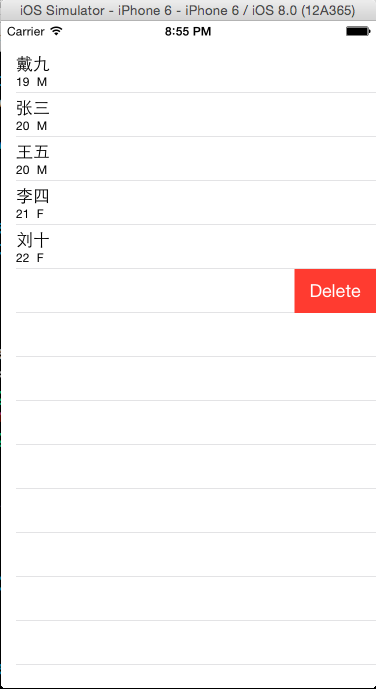
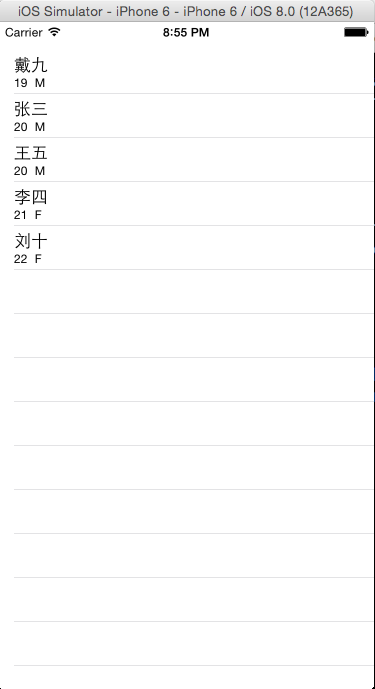
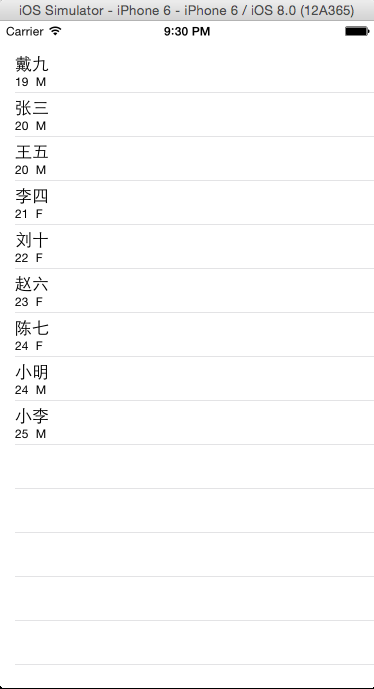
演示结果如下:
从数据库取出数据显示在表格上 在单元格上从左向右滑动删除数据

删除几个数据后显示结果 删除一次时,(重新取数据仅仅删除了郑八时)同时插入两个指定的数据后结果
iOS:CoreData数据库的使用三(数据库和tableView表格一起使用)的更多相关文章
- QF——iOS中的数据库操作:SQLite数据库,第三方封装库FMDB,CoreData
SQLite数据库: SQLite是轻量级的数据库,适合应用在移动设备和小型设备上,它的优点是轻量,可移植性强.但它的缺点是它的API是用C写的,不是面向对象的.整体来说,操作起来比较麻烦.所以,一般 ...
- iOS CoreData (二) 版本升级和数据库迁移
前言:最近ChinaDaily项目需要迭代一个新版本,在这个版本中CoreData数据库模型上有新增表.实体字段的增加,那么在用户覆盖安装程序时就必须要进行CoreData数据库的版本升级和旧数据迁移 ...
- 使用iOS原生sqlite3框架对sqlite数据库进行操作
摘要: iOS中sqlite3框架可以很好的对sqlite数据库进行支持,通过面向对象的封装,可以更易于开发者使用. 使用iOS原生sqlite3框架对sqlite数据库进行操作 一.引言 sqlit ...
- iOS学习36数据处理之SQLite数据库
1. 数据库管理系统 1> SQL语言概述 SQL: SQL是Structured Query Language(结构化查询语言)的缩写.SQL是专为数据库而建立的操作命令集, 是一种功能齐全的 ...
- GZFramwork数据库层《三》普通主从表增删改查
运行结果: 使用代码生成器(GZCodeGenerate)生成tb_Cusomer和tb_CusomerDetail的Model 生成器源代码下载地址: https://github.com/Gars ...
- SQL数据库基础(三)
认识数据库备份和事务日志备份 数据库备份与日志备份是数据库维护的日常工作,备份的目的是在于当数据库出现故障或者遭到破坏时可以根据备份的数据库及事务日志文件还原到最近的时间点将损失降到最低点. 数据库备 ...
- [置顶] VB6基本数据库应用(三):连接数据库与SQL语句的Select语句初步
同系列的第三篇,上一篇在:http://blog.csdn.net/jiluoxingren/article/details/9455721 连接数据库与SQL语句的Select语句初步 ”前文再续, ...
- python对mysql数据库操作的三种不同方式
首先要说一下,在这个暑期如果没有什么特殊情况,我打算用python尝试写一个考试系统,希望能在下学期的python课程实际使用,并且尽量在此之前把用到的相关技术都以分篇博客的方式分享出来,有想要交流的 ...
- mysql数据库连接池使用(三)数据库元数据信息反射数据库获取数据库信息
1.1. mysql数据库连接池使用(三)数据库元数据信息反射数据库获取数据库信息 有时候我们想要获取到数据库的基本信息,当前程序连接的那个数据库,数据库的版本信息,数据库中有哪些表,表中都有什么字段 ...
随机推荐
- fastdfs5.x Java客户端简单例子
下载源码, 使用maven编译并安装 https://github.com/happyfish100/fastdfs-client-java.git 新建maven工程,引入fastdfs-clien ...
- 【58沈剑架构系列】细聊分布式ID生成方法
一.需求缘起 几乎所有的业务系统,都有生成一个记录标识的需求,例如: (1)消息标识:message-id (2)订单标识:order-id (3)帖子标识:tiezi-id 这个记录标识往往就是数据 ...
- loadrunner测试ajax框架
loadrunner测试ajax框架的系统时,录制回放都没有报错,但是回放后系统中没有产生数据,解决方法 loadrunnerajax框架测试脚本headerajax [问题描述]用loadrunne ...
- HashMap在Java1.7与1.8中的区别
基于JDK1.7.0_80与JDK1.8.0_66做的分析 JDK1.7中 使用一个Entry数组来存储数据,用key的hashcode取模来决定key会被放到数组里的位置,如果hashcode相同, ...
- bzoj 1452 二维树状数组
#include<bits/stdc++.h> #define LL long long #define fi first #define se second #define mk mak ...
- git使用点滴:如何查看commit的内容
在push之前有时候会不放心是不是忘记加某些文件,或者是不是多删了个什么东西,这时候希望能够看看上次commit都做了些什么. 一开始想到的是用Git diff,但是git diff用于当前修改尚未c ...
- DDL DML DCL DQL的区别
原文章出处:http://blog.csdn.net/tomatofly/article/details/5949070 SQL(Structure Query Language)语言是数据库的核心语 ...
- 禁止viewpager不可滚动
import android.content.Context; import android.support.v4.view.ViewPager; import android.util.Attrib ...
- 洛谷P1345 [USACO5.4]奶牛的电信 [最小割]
题目传送门 奶牛的电信 题目描述 农夫约翰的奶牛们喜欢通过电邮保持联系,于是她们建立了一个奶牛电脑网络,以便互相交流.这些机器用如下的方式发送电邮:如果存在一个由c台电脑组成的序列a1,a2,..., ...
- Oracle意外赢官司,程序员或过苦日子
关于“Google在Android平台使用Java侵犯知识产权”一案,2014年5月,联邦法院判定Oracle获胜,这个结果完全出人意料,因为这样一来无异于打开了软件开发领域中API使用方式的潘多拉之 ...