
[RSpec] LEVEL 2 CONFIGURATION & MATCHERS
Installing RSpec
In this level we'll start by getting you setup on a regular Ruby project, then move onto using RSpec within Rails. Let's start by installing the rspec gem from the console.
gem install rspec

Command Line
With the RSpec gem installed, you will have access to the command line tool, rspec.
RSpec has a few settings you can configure, so to help us get started, let's initialize this as an RSpec project. This will generate a placeholder for our RSpec configuration.
rspec --init
Rails Configuration
Using rspec --init will setup RSpec within a ruby project, but for the rest of this course we'll be using RSpec within a Rails project. Run the rails generator to install RSpec into the current Rails project.
rails generate rspec:install
Running specs from the command line
We now have a Rails project all setup and we've created spec/models/zombie_spec.rb for you. Run this spec from the command line with color on, and specify documentation format.
rspec --color --format documentation spec/models/zombie_spec.rb
Predicate Matchers
Refactor the following spec to use an include matcher.
class Zombie < ActiveRecord::Base

  validates :name, presence: true

  def genius?

    iq >= 3

  end

end
Answer:
describe Zombie do

  it 'includes a tweet' do

    tweet = Tweet.new

    zombie = Zombie.new(tweets: [tweet])

    zombie.tweets.should include tweet

  end

end
Change Matcher
In the following example, we're checking to see that a method changes the state of a zombie. We need to make sure the zombie was in a specific state before and after the method is called.
Refactor the following example to use the expect and change syntax.
class Zombie < ActiveRecord::Base

  validates :name, presence: true

  validates :iq, numericality: true

  def eat_brains

    self.iq += 3

  end

end
Answer:
describe Zombie do

  it 'gains 3 IQ points by eating brains' do

    zombie = Zombie.new

    #zombie.iq.should == 0

    #zombie.eat_brains

    #zombie.iq.should == 3

    expect {zombie.eat_brains}.to change {zombie.iq}.from(0).to(3)

  end

end

#what expect {zombie.eat_brains}.to change {zombie.iq}.from(0).to(3)

#is saying that:

#zombie eat_brains

#then change zombie.iq

#from 0 to 3

# format:

#expect {action}.to change {value}.by(num) #or form(num1).to(num2)

Have Matcher
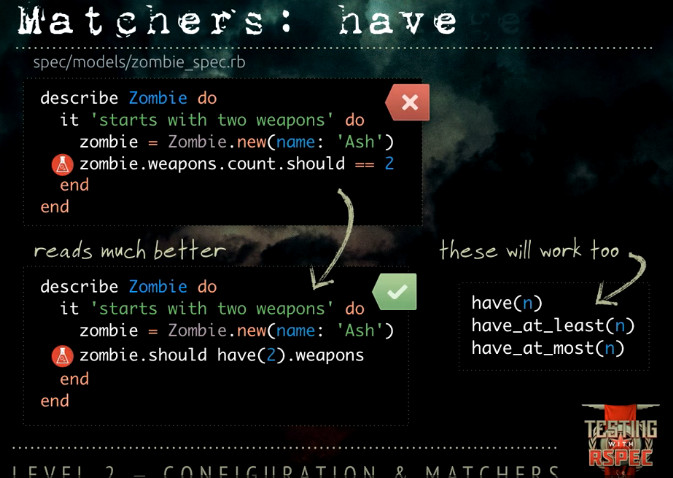
We're verifying the count to be greater than 0, but we really could be using a have matcher here to verify that the zombie has exactly one tweet. Refactor the spec to use the have matcher.
describe Zombie do

  it 'increases the number of tweets' do

    zombie = Zombie.new(name: 'Ash')

    zombie.tweets.new(message: "Arrrgggggggghhhhh")

    #zombie.tweets.count.should > 0

    zombie.should have(1).tweets

  end

end
Raises an Error
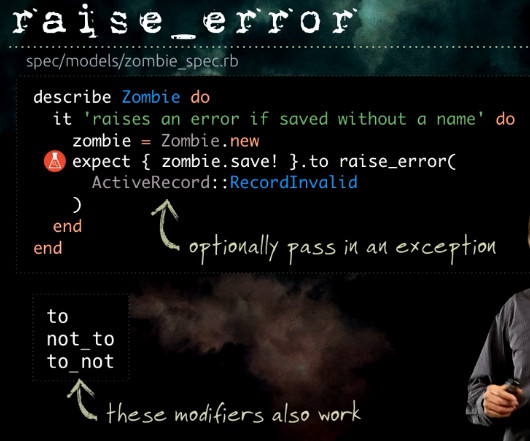
Testing for exceptions is tricky business. Refactor the spec below to use the raise_error matcher with an expect block.
class Tweet < ActiveRecord::Base

  attr_accessible :message

  belongs_to :zombie

  validates :message, presence: true

end
class Zombie < ActiveRecord::Base

  validates :name, presence: true

  class NotSmartEnoughError < StandardError; end

  def genius?

    iq >= 3

  end

  def make_decision!

    raise NotSmartEnoughError unless genius?

    return true

  end

end
Answer:
describe Zombie do

  it 'raises a Zombie::NotSmartEnoughError if not able to make a decision' do

    zombie = Zombie.new

    #begin

     # zombie.make_decision!

    # rescue Zombie::NotSmartEnoughError => e

      # e.should be_an_instance_of(Zombie::NotSmartEnoughError)

    # end

    expect {zombie.make_decision!}.to raise_error(

      Zombie::NotSmartEnoughError

      )

  end

end
More matchers:
[RSpec] LEVEL 2 CONFIGURATION & MATCHERS的更多相关文章
- [RSpec] LEVEL 1: INTRODUCTION
Install RSpec: Describe Lets start writing a specification for the Tweet class. Write a describe blo ...
- Understanding JDBC Internals & Timeout Configuration
原版:http://www.cubrid.org/blog/dev-platform/understanding-jdbc-internals-and-timeout-configuration 中文 ...
- Spring boot参考指南
介绍 转载自:https://www.gitbook.com/book/qbgbook/spring-boot-reference-guide-zh/details 带目录浏览地址:http://ww ...
- @Async in Spring--转
原文地址:http://www.baeldung.com/spring-async 1. Overview In this article we’ll explore the asynchronous ...
- 日志框架只打印出Mybatis SQL的配置
项目比较大,各种乱七八糟的框架.Log4j配置的是INFO级别. 然而今天开发的时候我需要log4j打印出SQL的执行情况. 先改log4j的rootLogger级别到DEBUG......后果就是各 ...
- 一键式Spring集成工具 Spring Boot
最近公司使用Spring boot进行开发,稍微了解一下,不过自我感觉把集中式配置applicate.properties搞明白,注解用过Spring MVC的boot绝对没问题的 比如拦截器:@As ...
- Logback常用配置详解
logback是一套日志框架,由log4j的优化版,由同一个作者开发,在速度和性能上都超过其他日志框架,再结合slf4j,已成为当前最流行的日志框架. Logback最常用就是在classpath定义 ...
- java_log_02
配置 在第一部分,我们将介绍配置 logback 的各种方法,给出了很多配置脚本例子.在第二部分,我们将介绍 Joran,它是一个通用配置框架,你可以在自己的项目里使用 Joran 一.Logback ...
- Spring Boot Logback应用日志
e Spring Boot Logback应用日志 2015-09-08 19:57 7673人阅读 评论(0) 收藏 举报 . 分类: Spring Boot(51) . 目录(?)[+] 日志对于 ...
随机推荐
- list容器详解
首先说说STL ( STL的目的是标准化组件,这样就不用重新开发,可以使用现成的组件.STL现在是C++的一部分,因此不用额外安装什么.它被内建在你的编译器之内.因为STL的list是一个简单的容器, ...
- 前端使用express mock数据
项目中使用的是RESTFUL接口规范,项目框架用的是vue,项目开始时,调研了几个比较有名的mock数据的插件:比如webpack的中间件api-mock,json-server,mockjs,还有e ...
- luoguP3317 [SDOI2014]重建 变元矩阵树定理 + 概率
首先,我们需要求的是 $$\sum\limits_{Tree} \prod\limits_{E \in Tree} E(u, v) \prod\limits_{E \notin Tree} (1 - ...
- Android 应用内多进程实现
android平台支持多进程通信,也支持应用内实现多进程那么多进程应该能为我们带来什么呢我们都知道,android平台对应用都有内存限制,其实这个理解有点问题,应该是说android平台对每个进程有内 ...
- 树形DP+(分组背包||二叉树,一般树,森林之间的转换)codevs 1378 选课
codevs 1378 选课 时间限制: 1 s 空间限制: 128000 KB 题目等级 : 钻石 Diamond 题目描述 Description 学校实行学分制.每门的必修课都有固定的学分 ...
- 新手必须掌握的Linux命令(上)
1.1强大好用的Shell 通常来讲,计算机硬件是有运算器,控制器,存储器,输入/ 输出设备等共同组成的,而让各种硬件设备各司其职且又能协同运行的东西就是系统内核.Linux系统的内核负责完成对 ...
- python开发_copy(浅拷贝|深拷贝)_博主推荐
在python中,有着深拷贝和浅拷贝,即copy模块 下面我们就来聊一下: 运行效果: ================================================== 代码部分: ...
- hdu 2147 kiki's game, 入门基础博弈
博弈的一些概念: 必败点(P点) : 前一个选手(Previous player)将取胜的位置称为必败点. 必胜点(N点) : 下一个选手(Next player)将取胜的位置称为必胜点. 必败(必胜 ...
- iOS可持续化集成: Jenkins + bundler + cocoapods + shenzhen + fastlane + pgyer
工具介绍 1. bundler bundler用于管理ruby gem的工具,我们用来管理cocoapods以及fastlane的版本.直接sudo gem install bundler就可以.然后 ...
- SourceInsight中文字体
转载自: http://blog.chinaunix.net/uid-29094179-id-3889999.html 1.正确显示中文注释 1)Options->Style Propertie ...