
java使用freemarker导出复杂的excel表格
正常导出excel表格使用的poi,但是导出复杂的excel有点困难,但是可以使用freemaker模板来导出复杂的excel。
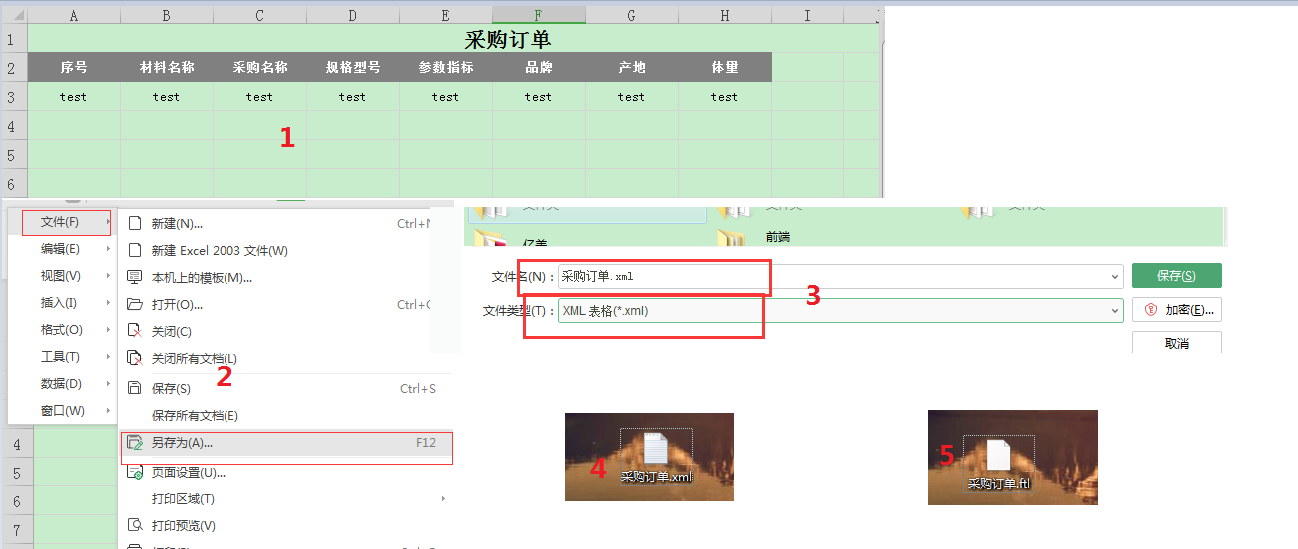
1、都是先生成一个Excel表格的模板,最好是增加一行数据。具体看图里面的步骤。
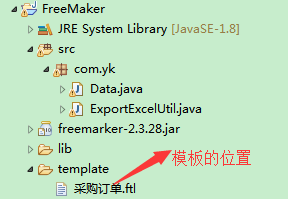
2、项目整体结构
3、下面就直接看代码
public class Data {
//代码复制之后直接就可以运行了
    public static void main(String[] args) {
        demo();
    }

    public static void demo() {
        // 项目下的template路径
        String path = new File("").getAbsolutePath() + "\\template";
        Map<String, Object> map = new HashMap<String, Object>();
        // 模板所在的路径
        map.put("tempFoldPath", path);
        // 生成的路径
        map.put("file", path + "/采购订单.xls");
        // 模板名称
        map.put("tampPath", "采购订单.ftl");
        // 最后生成的表格的名称
        map.put("excelName", "采购订单-" + "Demo" + ".xls");
        // 封装数据
        Map<String, Object> exlParam = new HashMap<>();
        exlParam.put("findList", new Data().list());
        // 调用方法,返回浏览器访问的地址
        String downloadUrl = ExportExcelUtil.exportExcel(map, exlParam);
    }

    // 自己造假数据,正常来说都是从数据库查询出来拼装数据的
    public List<Purbill> list() {
        List<Purbill> purbillList = new ArrayList<>();
        purbillList.add(new Purbill("1", "2", "名称", "采购名称", "规格参数", "参数指标", "场地", "10吨", 10, 20.2, 220.2, "品牌"));
        return purbillList;
    }

}

class Purbill {
    private String bidId;
    private String billno;
    private String categoryName;
    private String purname;
    private String specparams;
    private String paramnorm;
    private String productAddress;
    private String unit;
    private Integer nums;
    private Double price;
    private Double totalprice;
    private String brand;

    public Purbill(String bidId, String billno, String categoryName, String purname, String specparams,
            String paramnorm, String productAddress, String unit, Integer nums, Double price, Double totalprice,
            String brand) {
        super();
        this.bidId = bidId;
        this.billno = billno;
        this.categoryName = categoryName;
        this.purname = purname;
        this.specparams = specparams;
        this.paramnorm = paramnorm;
        this.productAddress = productAddress;
        this.unit = unit;
        this.nums = nums;
        this.price = price;
        this.totalprice = totalprice;
        this.brand = brand;
    }

    public String getBidId() {
        return bidId;
    }

    public void setBidId(String bidId) {
        this.bidId = bidId;
    }

    public String getBillno() {
        return billno;
    }

    public void setBillno(String billno) {
        this.billno = billno;
    }

    public String getCategoryName() {
        return categoryName;
    }

    public void setCategoryName(String categoryName) {
        this.categoryName = categoryName;
    }

    public String getPurname() {
        return purname;
    }

    public void setPurname(String purname) {
        this.purname = purname;
    }

    public String getSpecparams() {
        return specparams;
    }

    public void setSpecparams(String specparams) {
        this.specparams = specparams;
    }

    public String getParamnorm() {
        return paramnorm;
    }

    public void setParamnorm(String paramnorm) {
        this.paramnorm = paramnorm;
    }

    public String getProductAddress() {
        return productAddress;
    }

    public void setProductAddress(String productAddress) {
        this.productAddress = productAddress;
    }

    public String getUnit() {
        return unit;
    }

    public void setUnit(String unit) {
        this.unit = unit;
    }

    public Integer getNums() {
        return nums;
    }

    public void setNums(Integer nums) {
        this.nums = nums;
    }

    public Double getPrice() {
        return price;
    }

    public void setPrice(Double price) {
        this.price = price;
    }

    public Double getTotalprice() {
        return totalprice;
    }

    public void setTotalprice(Double totalprice) {
        this.totalprice = totalprice;
    }

    public String getBrand() {
        return brand;
    }

    public void setBrand(String brand) {
        this.brand = brand;
    }

}
主要是两个map,一个map是封装模板的位置和生成表格的位置,第二个map是封装的数据。正常来说导出表格之后都是返回url请求的地址,这样在真实项目中根据地址就可以下载出来了。
4、下面是一个excel导出的一个工具类
public class ExportExcelUtil {

    public static String exportExcel(Map<String, Object> map, Map<String, Object> exlParam) {
        Template dateTmp = null;
        Writer fw = null;
        InputStream in = null;
        OutputStream out = null;
        try {
            // 此处需要给你个版本信息,Configuration cfg = new Configuration();这个方法已经过时了
            Configuration cfg = new Configuration(Configuration.VERSION_2_3_28);
            String tempFoldPath = (String) map.get("tempFoldPath"); // 模板所在的路径
            String file = (String) map.get("file");// 生成表格模板的路径
            String tampPath = (String) map.get("tampPath");// 模板名称
            String excelName = (String) map.get("excelName");// 最后生成表格的名称

            // **********初始化参数**********
            File tempFoldFile = new File(tempFoldPath);
            if (!tempFoldFile.exists()) {
                tempFoldFile.mkdirs();
            }
            cfg.setDirectoryForTemplateLoading(tempFoldFile);
            cfg.setDefaultEncoding("UTF-8");
            cfg.setTemplateUpdateDelay(0);
            cfg.setTemplateExceptionHandler(TemplateExceptionHandler.RETHROW_HANDLER);
            // **********获取freemaker模板**********
            dateTmp = cfg.getTemplate(tampPath);

            // **********将数据写入freemaker模板**********
            fw = new BufferedWriter(new OutputStreamWriter(new FileOutputStream(new File(file)), "UTF-8"));
            dateTmp.process(exlParam, fw);

            // **********从freemaker模板读出数据写到Excel表格并生成出来**********
            String fileDir = "excel";
            // 文件保存目录  项目目录下面
            String filePath =  new File("").getAbsolutePath();
            // 生成保存文件路径
            String createPath = filePath + "/" + fileDir + "/";
            // 构建源文件
            File files = new File(file);
            // 文件夹不存在就创建
            createFolder(createPath);
            // 删除原来的文件
            deleteFile(createPath + excelName);
            // 构建目标文件
            File fileCopy = new File(createPath + excelName);
            // 目标文件不存在就创建
            if (!(fileCopy.exists())) {
                fileCopy.createNewFile();
            }
            // 源文件创建输入流
            in = new FileInputStream(files);
            // 目标文件创建输出流
            out = new FileOutputStream(fileCopy, true);
            // 创建字节数组
            byte[] temp = new byte[1024];
            int length = 0;
            // 源文件读取一部分内容
            while ((length = in.read(temp)) != -1) {
                // 目标文件写入一部分内容
                out.write(temp, 0, length);
            }
            // 资源服务器访问目录 这边需要配置tomcat的虚拟路径,就可以直接在url上面下载表格了
            String serverPath = "resourceServer";
            String savePath = "/" + serverPath + "/" + fileDir + "/" + excelName;
            // 服务器图片访问目录
            return savePath;
        } catch (Exception e) {
            e.printStackTrace();
            return null;
        } finally {
            try {
                fw.close();
                // 关闭文件输入输出流
                in.close();
                out.close();
            } catch (IOException e) {
                // TODO Auto-generated catch block
                e.printStackTrace();
            }

        }

    }

    // 创建文件
    public static boolean createFolder(String path) {
        File file = new File(path);
        if (!file.exists()) {
            return file.mkdir();
        } else {
            return true;
        }
    }

    public static boolean deleteFile(String filePath) {// 删除单个文件
        boolean flag = false;
        File file = new File(filePath);
        if (file.exists() && file.isFile()) {
            file.delete();// 文件删除
            flag = true;
        }
        return true;
    }

}
这个也不用多说,里面注释基本上已经解释清楚了,
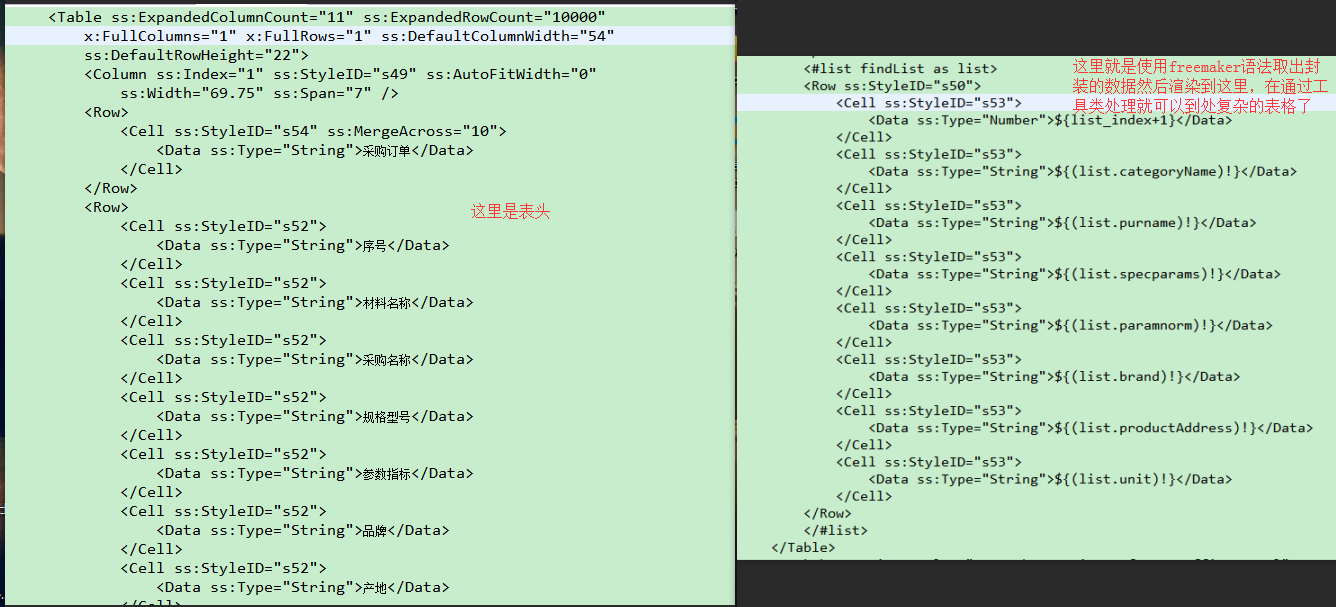
4、因为数据放到freemaker模板里面了所以只需要使用freemaker模板的语法取出数据存放在模板里面就可以了
4、Excel导出打开出现问题的原因
当office2010之前的版本打开会出现格式不正确的提示,然后点击确定之后还是报格式错误或者可以打开但是没有数据,这种解决方法只需要将ss:ExpandedRowCount这个值设置和行数相等或者设置大一点就不会出现这种问题了。

错误提示

Demo地址:https://files.cnblogs.com/files/yangk1996/FreeMaker.zip
java使用freemarker导出复杂的excel表格的更多相关文章
- Java使用freemarker导出word和excel
www.linxiaosheng.com/post/2013-12-05/40060346181 https://github.com/upyun/java-sdk
- Java操作Jxl实现导出数据生成Excel表格数据文件
实现:前台用的框架是Easyui+Bootstrap结合使用,需要引入相应的Js.Css文件.页面:Jsp.拦截请求:Servlet.逻辑处理:ClassBean.数据库:SQLserver. 注意: ...
- java用freemarker导出数据到word(含多图片)
一.制作word模版 新建word文档,按照需要设置好字体等各种格式:这里为了显得整齐使用了无边框的表格. 将word文档另存为xml文件(注意不是word xml文档,我吃了这家伙的大亏了) 然后用 ...
- 在ASP.NET Web Forms中使用页面导出伪xls Excel表格
将数据导出为Excel表格是比较常见的需求,也有很多组件支持导出真正的Excel表格.由于Excel能打开HTML文件,并支持其中的table元素以及p之类的文本元素的显示,所以把.html扩展名改为 ...
- 导出数据到Excel表格
开发工具与关键技术:Visual Studio 和 ASP.NET.MVC,作者:陈鸿鹏撰写时间:2019年5月25日123下面是我们来学习的导出数据到Excel表格的总结首先在视图层写导出数据的点击 ...
- spring boot 使用POI导出数据到Excel表格
在spring boot 的项目经常碰到将数据导出到Excel表格的需求,而POI技术则对于java操作Excel表格提供了API,POI中对于多种类型的文档都提供了操作的接口,但是其对于Excel表 ...
- PHP批量导出数据为excel表格
之前用插件phoexcel写过批量导入数据,现在用到了批量导出,就记录一下,这次批量导出没用插件,是写出一个表格,直接输出 //$teacherList 是从数据库查出来的二维数组 $execlnam ...
- php动态导出数据成Excel表格
一.封装 Excel 导出类 include/components/ExecExcel.php <?php /*** * @Excel 导入导出类. */ class ExecExcel { / ...
- Python导出数据到Excel表格-NotImplementedError: formatting_info=True not yet implemented
在使用Python写入数据到Excel表格中时出现报错信息记录:“NotImplementedError: formatting_info=True not yet implemented” 报错分析 ...
随机推荐
- vmware centos7 静态ip设置
最近在学习linux环境部署~~~~ 首先,将网络适配设置成为桥接模式 查看本机IP地址,ipconfig,记住ipv4地址和默认网关地址,等会配置的时候要用 启动Centos,进入终端模式,设置IP ...
- "分辨率"到底是个什么概念?它和DPI之间是什么关系?
"分辨率"到底是个什么概念?它和DPI之间是什么关系? 分辨率:显示分辨率(屏幕分辨率)是屏幕图像的精密度,是指显示器所能显示的像素有多少.由于屏幕上的点.线和面都是由像素组成的, ...
- [C++] STACK_Principle
STACK_Principle
- code4511 信息传递
寻找最小环 #include <cstdio> #include <cstring> #include <iostream> using namespace std ...
- easyui-tabs扩展根据自定义属性打开页签
.增加扩展 <script type="text/javascript" > /** * @author {kexb} easyui-tab扩展根据id切换页面 */ ...
- HBase预分区方法
(what)什么是预分区? HBase表在刚刚被创建时,只有1个分区(region),当一个region过大(达到hbase.hregion.max.filesize属性中定义的阈值,默认10GB)时 ...
- Lucene.Net(转)
出处:http://www.cnblogs.com/piziyimao/archive/2013/01/31/2887072.html 做过站内搜索的朋友应该对Lucene.Net不陌生,没做过的也许 ...
- kcp源码走读
kcp协议与tcp协议类似,是一种ARQ协议.他的优点在于比tcp的延迟更小30%-40%,但相应的会牺牲一部分的带宽,大该比tcp多浪费10%~20%.tcp的设计目标是增大网络利用率,而kcp的设 ...
- [转]ubuntu linux下DNS重启后丢失(不是Network-manager造成的情况)
从网上得知 /etc/resolv.conf中的DNS配置是从/etc/resolvconf/resolv.conf.d/head中加载而来,所以每回改resolv.conf都会失效,在此文件里面已经 ...
- Promise实现简易AMD加载器
在最新的Chrome和FF中已经 实现了Promise.有了Promise我们用数行代码即可实现一个简易AMD模式的加载器 var registry = { promises: { }, resolv ...