
FreeRTOS-05任务相关API函数
根据正点原子FreeRTOS视频整理
单片机:STM32F207VC
FreeRTOS源码版本:v10.0.1
任务相关API函数:
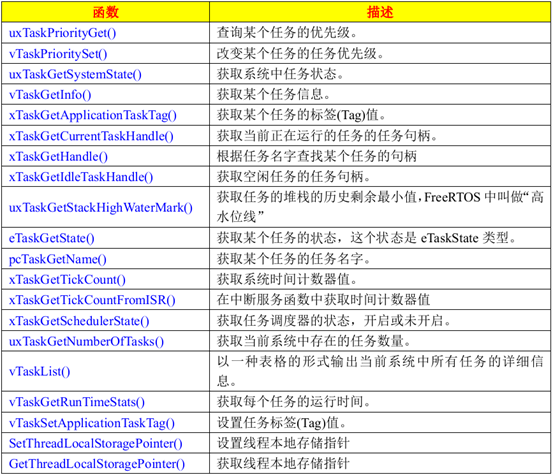
1. main.c
 /*

  *

  */

 #include "main.h"

 #include "delay.h"

 #include "sys.h"

 #include "usart.h"

 #include "stm32f2xx_gpio.h"

 #include "FreeRTOS.h"

 #include "task.h"

 #define START_TASK_PRIO             1     /*任务优先级*/

 #define START_STK_SIZE              128   /*任务堆栈大小*/

 TaskHandle_t StartTask_Handle;            /*任务句柄*/

 void StartTask(void *pvParameters);       /*任务函数*/

 #define LED_TASK_PRIO               2

 #define LED_STK_SIZE                128

 TaskHandle_t LedTask_Handle;

 void LedTask(void *pvParameters);

 #define QUERY_TASK_PRIO             3

 #define QUERY_STK_SIZE              256

 TaskHandle_t QueryTask_Handle;

 void QueryTask(void *pvParameters);

 char InfoBuffer[];    /*保存信息的数组*/

 /***** 声明 *****/

 static void SystemInitial(void);

 static void GPIO_LED_Configuration(void);

 static void GPIO_LED_Configuration(void)

 {

   GPIO_InitTypeDef    GPIO_InitStructure;

   RCC_AHB1PeriphClockCmd(RCC_AHB1Periph_GPIOE, ENABLE);

   GPIO_InitStructure.GPIO_Pin     = LED_POWER | LED_RUN;

   GPIO_InitStructure.GPIO_Mode    = GPIO_Mode_OUT;

   GPIO_InitStructure.GPIO_Speed   = GPIO_Speed_100MHz;

   GPIO_InitStructure.GPIO_OType   = GPIO_OType_PP;

   GPIO_InitStructure.GPIO_PuPd    = GPIO_PuPd_NOPULL;

   GPIO_Init(GPIOE, &GPIO_InitStructure);

   LED_Power_On();

   GPIO_SetBits(GPIOE, LED_RUN);

 }

 void StartTask(void *pvParameters)

 {

   taskENTER_CRITICAL();           /*进入临界区*/

   xTaskCreate((TaskFunction_t )LedTask,                   /*任务函数*/

               (const char *   )"LedTask",                 /*任务名称*/

               (uint16_t       )LED_STK_SIZE,              /*任务堆栈大小*/

               (void *         )NULL,                      /*传递给任务函数的参数*/

               (UBaseType_t    )LED_TASK_PRIO,             /*任务优先级*/

               (TaskHandle_t   )&LedTask_Handle);          /*任务句柄*/

   xTaskCreate((TaskFunction_t )QueryTask,                 /*任务函数*/

                             (const char *   )"QueryTask",                  /*任务名称*/

                             (uint16_t       )QUERY_STK_SIZE,            /*任务堆栈大小*/

                             (void *         )NULL,                      /*传递给任务函数的参数*/

                             (UBaseType_t    )QUERY_TASK_PRIO,           /*任务优先级*/

                             (TaskHandle_t   )&QueryTask_Handle);        /*任务句柄*/

   vTaskDelete(StartTask_Handle);    /*删除开始任务*/

   taskEXIT_CRITICAL();              /*退出临界区*/

 }

 void LedTask(void *pvParameters)

 {

   while ()

   {

     GPIOE->ODR ^= LED_RUN;

     vTaskDelay();

   }

 }

 void QueryTask(void * pvParameters)

 {

   UBaseType_t x;

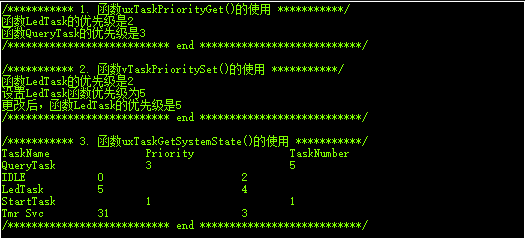
   /*1. 函数uxTaskPriorityGet()的使用*/

   printf("/*********** 1. 函数uxTaskPriorityGet()的使用 ***********/\r\n");

   x = uxTaskPriorityGet(LedTask_Handle);

   printf("函数LedTask的优先级是%ld\r\n", x);

   x = uxTaskPriorityGet(QueryTask_Handle);

   printf("函数QueryTask的优先级是%ld\r\n", x);

   printf("/*************************** end ***************************/\r\n");

   printf("\r\n");

   /*2. 函数vTaskPrioritySet()的使用*/

   printf("/*********** 2. 函数vTaskPrioritySet()的使用 ***********/\r\n");

   x = uxTaskPriorityGet(LedTask_Handle);

   printf("函数LedTask的优先级是%ld\r\n", x);

   printf("设置LedTask函数优先级为5\r\n");

   vTaskPrioritySet(LedTask_Handle, (UBaseType_t));

   x = uxTaskPriorityGet(LedTask_Handle);

   printf("更改后,函数LedTask的优先级是%ld\r\n", x);

   printf("/*************************** end ***************************/\r\n");

   printf("\r\n");

   /*3. 函数uxTaskGetSystemState()的使用*/

   uint32_t TotalRunTime;

   UBaseType_t ArraySize;

   TaskStatus_t *StatusArray;

   printf("/*********** 3. 函数uxTaskGetSystemState()的使用 ***********/\r\n");

   ArraySize = uxTaskGetNumberOfTasks();       /*获取系统任务数量*/

   StatusArray = pvPortMalloc(ArraySize * sizeof(TaskStatus_t));   /*申请内存*/

   if (StatusArray != NULL)

   {

     ArraySize = uxTaskGetSystemState( (TaskStatus_t * )StatusArray,

                                       (UBaseType_t    )ArraySize,

                                       (uint32_t *     )&TotalRunTime );

     printf("TaskName\t\tPriority\t\tTaskNumber\t\t\r\n");

     for (x=;x<ArraySize;++x)

     {

       printf("%s\t\t%d\t\t\t%d\t\t\t\r\n",

               StatusArray[x].pcTaskName,

               (int)StatusArray[x].uxCurrentPriority,

               (int)StatusArray[x].xTaskNumber );

     }

   }

   vPortFree(StatusArray);   /*释放内存*/

   printf("/*************************** end ***************************/\r\n");

   printf("\r\n");

   /*4. 函数vTaskGetInfo()的使用*/

   TaskHandle_t LedTaskHandle;

   TaskStatus_t LedTaskStatus;

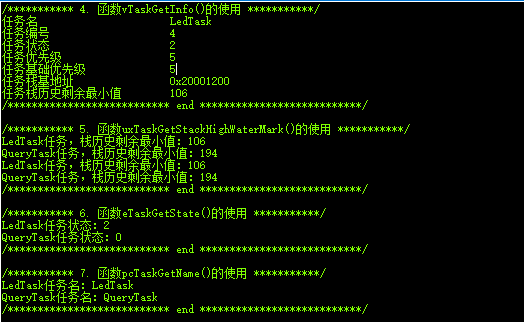
   printf("/*********** 4. 函数vTaskGetInfo()的使用 ***********/\r\n");

   LedTaskHandle = xTaskGetHandle("LedTask");    /*函数xTaskGetHandle()的使用*/

   vTaskGetInfo(LedTaskHandle,

                (TaskStatus_t *)&LedTaskStatus,

                pdTRUE,

                eInvalid);

   printf("任务名                      %s\r\n", LedTaskStatus.pcTaskName);

   printf("任务编号                    %ld\r\n", LedTaskStatus.xTaskNumber);

   printf("任务状态                    %d\r\n", LedTaskStatus.eCurrentState);

   printf("任务优先级                  %ld\r\n", LedTaskStatus.uxCurrentPriority);

   printf("任务基础优先级              %ld\r\n", LedTaskStatus.uxBasePriority);

   printf("任务栈基地址                %#x\r\n", (int)LedTaskStatus.pxStackBase);

   printf("任务栈历史剩余最小值        %d\r\n", LedTaskStatus.usStackHighWaterMark);

   printf("/*************************** end ***************************/\r\n");

   printf("\r\n");

   /*

    * 栈历史剩余最小值是针对定义的“QUERY_STK_SIZE              256”来说的,

    * 假如QueryTask函数用了62字节,那么查询到的最小值就应该是256-62=194了。

    */

   /*5. 函数uxTaskGetStackHighWaterMark()的使用*/

   printf("/*********** 5. 函数uxTaskGetStackHighWaterMark()的使用 ***********/\r\n");

   x = uxTaskGetStackHighWaterMark(LedTask_Handle);

   printf("LedTask任务,栈历史剩余最小值:%ld\r\n", x);

   x = uxTaskGetStackHighWaterMark(QueryTask_Handle);

   printf("QueryTask任务,栈历史剩余最小值:%ld\r\n", x);

   x = uxTaskGetStackHighWaterMark(LedTask_Handle);

   printf("LedTask任务,栈历史剩余最小值:%ld\r\n", x);

   x = uxTaskGetStackHighWaterMark(QueryTask_Handle);

   printf("QueryTask任务,栈历史剩余最小值:%ld\r\n", x);

   printf("/*************************** end ***************************/\r\n");

   printf("\r\n");

   /*6. 函数eTaskGetState()的使用*/

   eTaskState LedTaskState;

   eTaskState QueryTaskState;

   printf("/*********** 6. 函数eTaskGetState()的使用 ***********/\r\n");

   LedTaskState = eTaskGetState(LedTask_Handle);

   printf("LedTask任务状态:%d\r\n", LedTaskState);

   QueryTaskState = eTaskGetState(QueryTask_Handle);

   printf("QueryTask任务状态:%d\r\n", QueryTaskState);

   printf("/*************************** end ***************************/\r\n");

   printf("\r\n");

   /*7. 函数pcTaskGetName()的使用,根据任务句柄查询任务名*/

   char *TaskName;

   printf("/*********** 7. 函数pcTaskGetName()的使用 ***********/\r\n");

   TaskName = pcTaskGetName(LedTask_Handle);

   printf("LedTask任务名:%s\r\n", TaskName);

   TaskName = pcTaskGetName(QueryTask_Handle);

   printf("QueryTask任务名:%s\r\n", TaskName);

   printf("/*************************** end ***************************/\r\n");

   printf("\r\n");

   /*8. 函数uxTaskGetNumberOfTasks()的使用,查询系统当前存在的任务数量*/

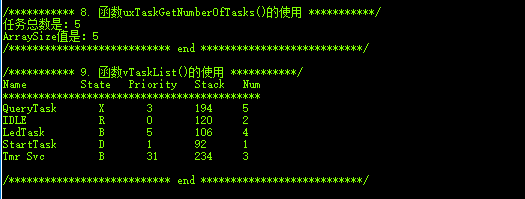
   printf("/*********** 8. 函数uxTaskGetNumberOfTasks()的使用 ***********/\r\n");

   x = uxTaskGetNumberOfTasks();

   printf("任务总数是:%ld\r\n", x);

   printf("ArraySize值是:%ld\r\n", ArraySize);

   printf("/*************************** end ***************************/\r\n");

   printf("\r\n");

   /*

    * Name:      创建任务的时候给任务分配的名字

    * State:     任务的状态信息。B阻塞态,R就绪态,S挂起态,D删除态

    * Priority:  任务优先级

    * Stack:     栈历史最小剩余大小

    * Num:       任务编号

    */

   /*9. 函数vTaskList()的使用*/

   printf("/*********** 9. 函数vTaskList()的使用 ***********/\r\n");

   vTaskList(InfoBuffer);

   printf("Name         State   Priority\tStack\tNum\t\r\n");

   printf("*******************************************\r\n");

   printf("%s\r\n", InfoBuffer);

   printf("/*************************** end ***************************/\r\n");

   printf("\r\n");

   while ()

   {

     vTaskDelay();

   }

 }

 static void SystemInitial(void)

 {

   /*组4,16级抢占优先级,无响应优先级*/

   NVIC_PriorityGroupConfig(NVIC_PriorityGroup_4);

   DelayInitial();

   USART1_Initialization();

   GPIO_LED_Configuration();

 }

 int main(void)

 {

   SystemInitial();

   /*创建开始任务*/

   xTaskCreate((TaskFunction_t )StartTask,           /*任务函数*/

                             (const char *   )"StartTask",            /*任务名称*/

                             (uint16_t       )START_STK_SIZE,      /*任务堆栈大小*/

                             (void *         )NULL,                /*传递给任务函数的参数*/

                             (UBaseType_t    )START_TASK_PRIO,     /*任务优先级*/

                             (TaskHandle_t * )&StartTask_Handle);  /*任务句柄*/

   /*开启任务调度*/

   vTaskStartScheduler();

 }

 /***************************END OF FILE***************************/
2. main.h
 /**/

 #ifndef __MAIN_H__

 #define __MAIN_H__

 #define LED_POWER         GPIO_Pin_2    /*PE2*/

 #define LED_RUN           GPIO_Pin_3    /*PE3*/

 #define LED_Power_On()    GPIO_ResetBits(GPIOE, LED_POWER)

 #endif    /*__MAIN_H__*/

 /***************************END OF FILE***************************/
3. sys.c
 /**/

 #include "sys.h"

 #include "stdio.h"

 #pragma import(__use_no_semihosting)

 //标准库需要的支持函数

 struct __FILE

 {

     int handle;

 };

 FILE __stdout;

 //定义_sys_exit()以避免使用半主机模式

 void _sys_exit(int x)

 {

     x = x;

 }

 /* //重定义fputc函数

 int fputc(int ch, FILE *f)

 {

      while((USART1->SR&0X40)==0)  //循环发送,直到发送完毕

     USART1->DR = (u8) ch;

     return ch;

 } */

 /***************************END OF FILE***************************/
4. sys.h
 /**/

 #ifndef __SYS_H__

 #define __SYS_H__

 /*0不支持OS,1支持OS*/

 #define SYSTEM_SUPPORT_OS        1        /*定义系统文件夹是否支持OS*/

 #endif    /*__SYS_H__*/

 /***************************END OF FILE***************************/
5. delay.c
 /**/

 #include "delay.h"

 #include "sys.h"

 /*如果需要使用OS,则包括下面的头文件即可*/

 #if SYSTEM_SUPPORT_OS

 #include "FreeRTOS.h"

 #include "task.h"

 #endif

 __IO uint32_t TimingDelay;

 //////////////////////////

 //static uint8_t  fac_us = 0;

 //////////////////////////

 /***** 声明 *****/

 extern void xPortSysTickHandler(void);

 /*systick中断服务函数,使用FreeRTOS时用到*/

 void SysTick_Handler(void)

 {

     TimingDelayDecrement();

     if(xTaskGetSchedulerState()!=taskSCHEDULER_NOT_STARTED)   /*系统已运行*/

     {

       xPortSysTickHandler();

     }

 }

 void DelayInitial(void)

 {

   /*

      * SystemCoreClock / 1000      1ms中断一次

      * SystemCoreClock / 100000    10us中断一次

      * SystemCoreClock / 1000000   1us中断一次

      */

   if (SysTick_Config(SystemCoreClock / ))

   {

     while ();

   }

   /*关闭systick timer定时器*/

   /*    SysTick->CTRL &= ~SysTick_CTRL_ENABLE_Msk;*/

   /*使能滴答定时器*/

   SysTick->CTRL |=   SysTick_CTRL_ENABLE_Msk;

 }

 //void DelayNus(uint32_t nus)

 //{

 //  uint32_t ticks;

 //  uint32_t told, tnow, tcnt = 0;

 //  uint32_t reload = SysTick->LOAD;

 //

 //  fac_us = SystemCoreClock / 1000000;

 //  ticks = nus * fac_us;

 //  told  = SysTick->VAL;

 //

 //  while (1)

 //  {

 //    tnow = SysTick->VAL;

 //    if (tnow != told)

 //    {

 //      if (tnow < told)

 //      {

 //        tcnt += told - tnow;

 //      }

 //      else

 //      {

 //        tcnt += reload - tnow + told;

 //      }

 //      told = tnow;

 //      if (tcnt >= ticks)  break;

 //    }

 //  }

 //}

 ///*不会引起调度*/

 //void DelayXms(uint32_t nms)

 //{

 //  uint32_t i;

 //

 //  for (i=0;i<nms;++i)

 //  {

 //    DelayNus(1000);

 //  }

 //}

 /*

  * 本函数在中断函数中调用,滴答定时器中断一次调用一次。

  */

 void TimingDelayDecrement(void)

 {

     if (TimingDelay != 0x00)

     {

         TimingDelay--;

     }

 }

 /*

  * TimingDelay值在TimingDelayDecrement函数中递减

  */

 void DelayNms(uint32_t nTimes)

 {

     TimingDelay = nTimes;

     while (TimingDelay!=);   //等待计数停止

 }

 /***************************END OF FILE***************************/
6. delay.h
 /**/

 #ifndef __DELAY_H__

 #define __DELAY_H__

 #include "stm32f2xx.h"

 #include <stdint.h>

 extern void DelayInitial(void);

 extern void TimingDelayDecrement(void);

 extern void DelayNms(uint32_t nTimes);

 /////////////////////////

 extern void DelayXms(uint32_t nms);

 /////////////////////////

 #endif    /*__DELAY_H__*/

 /***************************END OF FILE***************************/
7. usart.c
 /*

  * USART1: 中断优先级选择第4组, 3级抢占优先级  无响应优先级

  */

 #include "usart.h"

 #include "stdio.h"      /*printf*/

 #include "stm32f2xx.h"

 #include "stm32f2xx_gpio.h"

 #include "stm32f2xx_rcc.h"

 #include "stm32f2xx_usart.h"

 uint8_t  USART1_RxBuffer[USART1_RECEIVE_SIZE];

 uint8_t  Flag_USART1Receive = ;

 uint8_t  USART1_ReceiveCount = ;

 uint8_t  USART1_ReceiveIndex = ;

 void USART1_Initialization(void)

 {

     USART1_GPIO_Configuration();

     USART1_NVIC_Configuration();

     /*USART1使能接收中断*/

 //    USART_ITConfig(USART1, USART_IT_RXNE, ENABLE);

     /*USART1使能发送中断*/

 /*    USART_ITConfig(USART1, USART_IT_TXE, ENABLE);      */

 }

 /*

  */

 void USART1_GPIO_Configuration(void)

 {

     GPIO_InitTypeDef   GPIO_InitStructure;

     USART_InitTypeDef  USART_InitStructure;

     RCC_APB2PeriphClockCmd(RCC_APB2Periph_USART1, ENABLE);

   RCC_AHB1PeriphClockCmd(RCC_AHB1Periph_GPIOA,  ENABLE);

   GPIO_PinAFConfig(GPIOA, , GPIO_AF_USART1);     /*GPIO连接到串口1上,PA9-TXD*/

     GPIO_PinAFConfig(GPIOA, , GPIO_AF_USART1);        /*GPIO连接到串口1上,PA10-RXD*/

     /*tx, PA9*/

   GPIO_InitStructure.GPIO_Pin   = GPIO_Pin_9;

     GPIO_InitStructure.GPIO_Mode  = GPIO_Mode_AF;

     GPIO_InitStructure.GPIO_Speed = GPIO_Speed_50MHz;

   GPIO_InitStructure.GPIO_OType = GPIO_OType_PP;

   GPIO_InitStructure.GPIO_PuPd  = GPIO_PuPd_NOPULL;

     GPIO_Init(GPIOA, &GPIO_InitStructure);

     /*rx, PA10*/

     GPIO_InitStructure.GPIO_Mode  = GPIO_Mode_AF;

     GPIO_InitStructure.GPIO_Pin   = GPIO_Pin_10;

   GPIO_InitStructure.GPIO_OType = GPIO_OType_PP;

   GPIO_InitStructure.GPIO_PuPd  = GPIO_PuPd_NOPULL;

     GPIO_Init(GPIOA, &GPIO_InitStructure);

     /*配置波特率9600*/

     USART_InitStructure.USART_BaudRate   = ;

     /*配置串口的模式。为了配置双线全双工通讯,需要把Rx和Tx模式都开启. Tx发送使能和Rx接收使能*/

     USART_InitStructure.USART_Mode       = USART_Mode_Rx | USART_Mode_Tx;

     /*无奇偶校验*/

     USART_InitStructure.USART_Parity     = USART_Parity_No;

     /*1停止位*/

     USART_InitStructure.USART_StopBits   = USART_StopBits_1;

     /*配置串口传输字长8位*/

     USART_InitStructure.USART_WordLength = USART_WordLength_8b;

     /*不采用硬件流控制*/

     USART_InitStructure.USART_HardwareFlowControl = USART_HardwareFlowControl_None;

     /*向寄存器写入配置参数*/

     USART_Init(USART1, &USART_InitStructure);

     /*使能USART1外设。在使用外设时,不仅要使能其时钟,还要调用此函数使能外设才可以正常使用*/

     USART_Cmd(USART1, ENABLE);

 }

 //void USART1_SendNChar(uint8_t *str, uint8_t n)

 //{

 //    /*发送区是否为空*/

 //    while (USART_GetFlagStatus(USART1, USART_FLAG_TXE) == RESET);

 //

 //    while (n--)

 //    {

 //        USART_SendData(USART1, (uint8_t)(*str++));

 //        /*是否发送完成*/

 //        while (USART_GetFlagStatus(USART1, USART_FLAG_TC) == RESET);

 //    }

 //}

 /*

  * 如果一次发送多个字节数据,可能会多次进入此函数

  * 调用时,应先延时几十毫秒,确保把数据都接收完

  */

 //void USART1_ReceiveIRQ(void)

 //{

 //    /*如果寄存器中有数据*/

 //    while (USART_GetFlagStatus(USART1, USART_FLAG_RXNE) == SET)

 //    {

 //        USART1_RxBuffer[USART1_ReceiveIndex++] = USART_ReceiveData(USART1);

 //        USART1_ReceiveCount++;

 //    }

 //

 //    Flag_USART1Receive = 1;

 //}

 void USART1_NVIC_Configuration(void)

 {

     NVIC_InitTypeDef NVIC_InitStructure;

     /*中断优先级选择第1组*/

 //    NVIC_PriorityGroupConfig(NVIC_PriorityGroup_4);

     /*3级抢占优先级  0级响应优先级*/

     NVIC_InitStructure.NVIC_IRQChannel                    = USART1_IRQn;

     NVIC_InitStructure.NVIC_IRQChannelPreemptionPriority  = ;

     NVIC_InitStructure.NVIC_IRQChannelSubPriority         = ;

     NVIC_InitStructure.NVIC_IRQChannelCmd                 = ENABLE;

     NVIC_Init(&NVIC_InitStructure);

 }

 /*重定义fputc函数 2种方法都可以*/

 /*

 int fputc(int ch,FILE *f)

 {

  while(USART_GetFlagStatus(USART1,USART_FLAG_TC) != SET);

  USART_SendData(USART1,(uint8_t)ch);

  while(USART_GetFlagStatus(USART1,USART_FLAG_TC) != SET);

  return (ch);

 }

 */

 int fputc(int ch, FILE *f)

 {

   while((USART1->SR&0X40)==)   /*循环发送,直到发送完毕*/

   {}

   USART1->DR = (uint8_t)ch;

   return ch;

 }

 /***************************END OF FILE***************************/
8. usart.h
 /*

  *

  */

 #ifndef __USART_H__

 #define __USART_H__

 #include <stdint.h>        /* uint8_t */

 #define USART1_RECEIVE_SIZE            20

 void USART1_Initialization(void);

 void USART1_GPIO_Configuration(void);

 void USART1_SendNChar(uint8_t *str, uint8_t n);

 void USART1_ReceiveIRQ(void);

 void USART1_NVIC_Configuration(void);

 #endif  /*__USART_H__*/

 /***************************END OF FILE***************************/
打印结果:
FreeRTOS-05任务相关API函数的更多相关文章
- 2、FreeRTOS任务相关API函数
1.任务相关的API函数 函数存在于task.c中,主要的函数有: xTaskCreate():使用动态的方法创建一个任务: xTaskCreatStatic():使用静态的方法创建一个任务(用的非常 ...
- 串口编程的相关API函数
用户使用函数CreateFile()创建与指定串口相关联的文件,然后可以使用该函数返回的文件句柄进行串口参数设置.• 01 HANDLE hModem; //定义串口句柄02 hModem=Creat ...
- FreeRTOS系列第20篇---FreeRTOS信号量API函数
FreeRTOS的信号量包括二进制信号量.计数信号量.相互排斥信号量(以后简称相互排斥量)和递归相互排斥信号量(以后简称递归相互排斥量).我们能够把相互排斥量和递归相互排斥量看成特殊的信号量. 信号量 ...
- [转]SQLITE3 C语言接口 API 函数简介
SQLITE3 C语言接口 API 函数简介 说明:本说明文档属作者从接触 SQLite 开始认识的 API 函数的使用方法, 由本人翻译, 不断更新. /* 2012-05-25 */ int sq ...
- Windows API 函数列表 附帮助手册
所有Windows API函数列表,为了方便查询,也为了大家查找,所以整理一下贡献出来了. 帮助手册:700多个Windows API的函数手册 免费下载 API之网络函数 API之消息函数 API之 ...
- C#中可直接调用WIN32的API函数--USER32.DLL
Win32的API函数可以直接在C#中直接调用,在做WinForm时还是很有帮助的.有时候直接调用Win32的API,可以很高效的实现想要的效果. using System; using System ...
- Appium常用的API函数
在学习应用一个框架之前,应该了解一下这个框架的整体结构或是相应的API函数.这篇文章还不错:http://blog.sina.com.cn/s/blog_68f262210102vzf9.html,就 ...
- mfc 调用Windows的API函数实现同步异步串口通信(源码)
在工业控制中,工控机(一般都基于Windows平台)经常需要与智能仪表通过串口进行通信.串口通信方便易行,应用广泛. 一般情况下,工控机和各智能仪表通过RS485总线进行通信.RS485的通信方式是半 ...
- QQ音乐的各种相关API
QQ音乐的各种相关API 分类: oc2014-01-29 15:34 2676人阅读 评论(2) 收藏 举报 基本上论坛里做在线音乐的都在用百度的API,进来发现百度的API不仅歌曲的质量不可以保证 ...
随机推荐
- MapReduce的初次尝试
====前提: 搭建好集群环境(zookeeper.hadoop.hbase). 搭建方法这里就不进行介绍了,网上有很多博客在介绍这些. ====简单需求: WordCount单词计数,号称Hadoo ...
- hdu 折线分割平面(递推)
题解: 首先我们考虑直线的情况: 当n=1时原来的1个平面被分割成了2个: 当n=2时原来的2个平面被分割成了4个: 当n=3时原来的4个平面被分割成了7个: 也就是说F(n)=F(n-1)+n且n= ...
- Web测试实践-任务进度-Day03
小组成员 华同学.郭同学.覃同学.刘同学.穆同学.沈同学 任务进度 在经过任务分配阶段后,大家都投入到了各自的任务中,以下是大家今天任务的进度情况汇总. 华同学 & 刘同学(任务1) 1.再对 ...
- 使用word文档直接发表博客 8 )
目前大部分的博客作者在用Word写博客这件事情上都会遇到以下3个痛点: 1.所有博客平台关闭了文档发布接口,用户无法使用Word,Windows Live Writer等工具来发布博客.使用Word写 ...
- 将std::string当字节流使
string是C++标准定义的字符串类,它不但支持文本,而且支持二进制字节流.给一个string变量赋值有多种方法: 1) 拷贝构造函数 2) 等号赋值函数 3) append成员函数 4) push ...
- 说说javap命令
javap定义 javap是 Java class文件分解器,可以反编译(即对javac编译的文件进行反编译),也可以查看java编译器生成的字节码.用于分解class文件. 测试类 public c ...
- 编写高质量代码改善C#程序的157个建议——建议115:通过HASH来验证文件是否被篡改
建议115:通过HASH来验证文件是否被篡改 MD5算法作为一种最通用的HASH算法,也被广泛用于文件完整性的验证上.文件通过MD5-HASH算法求值,总能得到一个固定长度的MD5值.虽说MD5是一种 ...
- ArcGIS API for Javascript 图层切换渐变效果实现
在一个WebGIS系统中往往要实现图形的切换,比如业务图层的切换,以及底图的切换等等,可以通过控制图层的可见性来实现.比如通过设置图层的opacity .visible来控制,前几天有网友聊天的时候提 ...
- C#基础入门 二
C#基础入门 二 循环语句 与C语言中用法相同. continue:结束本次循环(continue)后面的代码不再执行,进入下次循环(通常与if连用). 数组 一维数组定义:int[] intArra ...
- Reporting Service服务SharePoint集成模式安装配置(7、配置SharePoint2010产品)
在第3步安装完成SharePoint2010产品后,没有选择[立即安装产品配置向导],这一小节将单独配置SharePoint2010产品数据库(管理中心). 1)启动SharePoint 2010 产 ...