
hadoop2.2使用手册2:如何运行自带wordcount
问题导读:
1.hadoop2.x自带wordcount在什么位置?
2.运行wordcount程序,需要做哪些准备?

hadoop2.X使用手册1:通过web端口查看主节点、slave1节点及集群运行状态
基础上对hadoop2.2的进一步认识。这里交给大家如何运行hadoop2.2自带例子
1.找到examples例子
我们需要找打这个例子的位置:首先需要找到你的hadoop文件夹,然后依照下面路径:
/hadoop/share/hadoop/mapreduce会看到如下图:
- hadoop-mapreduce-examples-2.2.0.jar
复制代码
<ignore_js_op>
第二步:
我们需要需要做一下运行需要的工作,比如输入输出路径,上传什么文件等。
1.先在HDFS创建几个数据目录:
- hadoop fs -mkdir -p /data/wordcount
- hadoop fs -mkdir -p /output/
复制代码
<ignore_js_op>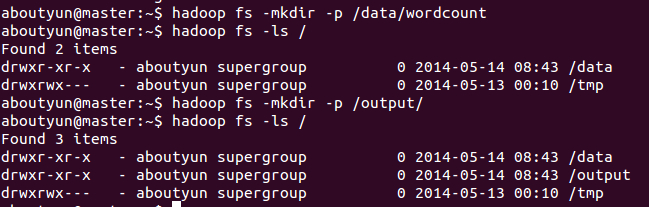
2.目录/data/wordcount用来存放Hadoop自带的WordCount例子的数据文件,运行这个MapReduce任务的结果输出到/output/wordcount目录中。
首先新建文件inputWord:
- vi /usr/inputWord
复制代码
新建完毕,查看内容:
- cat /usr/inputWord
复制代码
<ignore_js_op>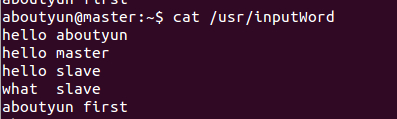
将本地文件上传到HDFS中:
- hadoop fs -put /usr/inputWord /data/wordcount/
复制代码
可以查看上传后的文件情况,执行如下命令:
- hadoop fs -ls /data/wordcount
复制代码
可以看到上传到HDFS中的文件。
<ignore_js_op>
通过命令
- hadoop fs -text /data/wordcount/inputWord
复制代码
看到如下内容:
<ignore_js_op>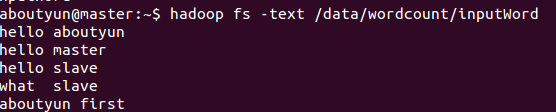
下面,运行WordCount例子,执行如下命令:
- hadoop jar /usr/hadoop/share/hadoop/mapreduce/hadoop-mapreduce-examples-2.2.0.jar wordcount /data/wordcount /output/wordcount
复制代码
<ignore_js_op>
可以看到控制台输出程序运行的信息:
aboutyun@master:~$ hadoop jar /usr/hadoop/share/hadoop/mapreduce/hadoop-mapreduce-examples-2.2.0.jar wordcount /data/wordcount /output/wordcount
14/05/14 10:33:33 INFO client.RMProxy: Connecting to ResourceManager at master/172.16.77.15:8032
14/05/14 10:33:34 INFO input.FileInputFormat: Total input paths to process : 1
14/05/14 10:33:34 INFO mapreduce.JobSubmitter: number of splits:1
14/05/14 10:33:34 INFO Configuration.deprecation: user.name is deprecated. Instead, use mapreduce.job.user.name
14/05/14 10:33:34 INFO Configuration.deprecation: mapred.jar is deprecated. Instead, use mapreduce.job.jar
14/05/14 10:33:34 INFO Configuration.deprecation: mapred.output.value.class is deprecated. Instead, use mapreduce.job.output.value.class
14/05/14 10:33:34 INFO Configuration.deprecation: mapreduce.combine.class is deprecated. Instead, use mapreduce.job.combine.class
14/05/14 10:33:34 INFO Configuration.deprecation: mapreduce.map.class is deprecated. Instead, use mapreduce.job.map.class
14/05/14 10:33:34 INFO Configuration.deprecation: mapred.job.name is deprecated. Instead, use mapreduce.job.name
14/05/14 10:33:34 INFO Configuration.deprecation: mapreduce.reduce.class is deprecated. Instead, use mapreduce.job.reduce.class
14/05/14 10:33:34 INFO Configuration.deprecation: mapred.input.dir is deprecated. Instead, use mapreduce.input.fileinputformat.inputdir
14/05/14 10:33:34 INFO Configuration.deprecation: mapred.output.dir is deprecated. Instead, use mapreduce.output.fileoutputformat.outputdir
14/05/14 10:33:34 INFO Configuration.deprecation: mapred.map.tasks is deprecated. Instead, use mapreduce.job.maps
14/05/14 10:33:34 INFO Configuration.deprecation: mapred.output.key.class is deprecated. Instead, use mapreduce.job.output.key.class
14/05/14 10:33:34 INFO Configuration.deprecation: mapred.working.dir is deprecated. Instead, use mapreduce.job.working.dir
14/05/14 10:33:35 INFO mapreduce.JobSubmitter: Submitting tokens for job: job_1400084979891_0004
14/05/14 10:33:36 INFO impl.YarnClientImpl: Submitted application application_1400084979891_0004 to ResourceManager at master/172.16.77.15:8032
14/05/14 10:33:36 INFO mapreduce.Job: The url to track the job: http://master:8088/proxy/application_1400084979891_0004/
14/05/14 10:33:36 INFO mapreduce.Job: Running job: job_1400084979891_0004
14/05/14 10:33:45 INFO mapreduce.Job: Job job_1400084979891_0004 running in uber mode : false
14/05/14 10:33:45 INFO mapreduce.Job: map 0% reduce 0%
14/05/14 10:34:10 INFO mapreduce.Job: map 100% reduce 0%
14/05/14 10:34:19 INFO mapreduce.Job: map 100% reduce 100%
14/05/14 10:34:19 INFO mapreduce.Job: Job job_1400084979891_0004 completed successfully
14/05/14 10:34:20 INFO mapreduce.Job: Counters: 43
File System Counters
FILE: Number of bytes read=81
FILE: Number of bytes written=158693
FILE: Number of read operations=0
FILE: Number of large read operations=0
FILE: Number of write operations=0
HDFS: Number of bytes read=175
HDFS: Number of bytes written=51
HDFS: Number of read operations=6
HDFS: Number of large read operations=0
HDFS: Number of write operations=2
Job Counters
Launched map tasks=1
Launched reduce tasks=1
Data-local map tasks=1
Total time spent by all maps in occupied slots (ms)=23099
Total time spent by all reduces in occupied slots (ms)=6768
Map-Reduce Framework
Map input records=5
Map output records=10
Map output bytes=106
Map output materialized bytes=81
Input split bytes=108
Combine input records=10
Combine output records=6
Reduce input groups=6
Reduce shuffle bytes=81
Reduce input records=6
Reduce output records=6
Spilled Records=12
Shuffled Maps =1
Failed Shuffles=0
Merged Map outputs=1
GC time elapsed (ms)=377
CPU time spent (ms)=11190
Physical memory (bytes) snapshot=284524544
Virtual memory (bytes) snapshot=2000748544
Total committed heap usage (bytes)=136450048
Shuffle Errors
BAD_ID=0
CONNECTION=0
IO_ERROR=0
WRONG_LENGTH=0
WRONG_MAP=0
WRONG_REDUCE=0
File Input Format Counters
Bytes Read=67
File Output Format Counters
Bytes Written=51
查看结果,执行如下命令:
- hadoop fs -text /output/wordcount/part-r-00000
复制代码
结果数据示例如下:
- aboutyun@master:~$ hadoop fs -text /output/wordcount/part-r-00000
- aboutyun 2
- first 1
- hello 3
- master 1
- slave 2
- what 1
复制代码
<ignore_js_op>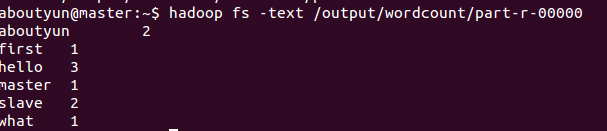
登录到Web控制台,访问链接http://master:8088/可以看到任务记录情况。
下一篇:hadoop2.2运行mapreduce(wordcount)问题总结
hadoop2.2使用手册2:如何运行自带wordcount的更多相关文章
- Hadoop 2.6.3运行自带WordCount程序笔记
运行平台:Hadoop 2.6.3 模式:完全分布模式 1.准备统计文本,以一段文字为例:eg.txt The Project Gutenberg EBook of War and Peace, by ...
- hadoop:如何运行自带wordcount
1.在linux系统创建文件 vi aa.txt --------i 进行编辑 输入 内容(多个单词例如:aa bb cc aa) 2.在HDFS上面创建文件夹 hdfs dfs -mkdir ...
- 指导手册04:运行MapReduce
指导手册04:运行MapReduce Part 1:运行单个MapReduce任务 情景描述: 本次任务要求对HDFS目录中的数据文件/user/root/email_log.txt进行计算处理, ...
- 伪分布式环境下命令行正确运行hadoop示例wordcount
首先确保hadoop已经正确安装.配置以及运行. 1. 首先将wordcount源代码从hadoop目录中拷贝出来. [root@cluster2 logs]# cp /usr/local/h ...
- VSCode 使用 Code Runner 插件无法编译运行文件名带空格的文件
本文同时在我的博客发布:VSCode 使用 Code Runner 插件无法编译运行文件名带空格的文件 - Skykguj 's Blog (sky390.cn) 使用 Visual Studio C ...
- 【hadoop2.6.0】安装+例子运行
由于下载的是hadoop的最新版,网上各种杂七杂八的东西都不适用.好在官网上说的也够清楚了.如果有人看这篇文章的话,最大的忠告就是看官网. 官网2.6.0的安装教程:http://hadoop.apa ...
- 【hadoop2.6.0】通过代码运行程序流程
之前跑了一下hadoop里面自带的例子,现在顺一下如何通过源代码来运行程序. 我懒得装eclipse,就全部用命令行了. 整体参考官网上的:http://hadoop.apache.org/docs/ ...
- hadoop2.X使用手册1:通过web端口查看主节点、slave1节点及集群运行状态
导读内容:1.如何通过web查看hdfs集群状态2.如何通过web查看运行在在主节点master上ResourceManager状态3.如何通过web查看运行在在slave节点NodeManager资 ...
- Ubuntu 12.04.5 LTS 上安装hadoop 2.6.0后运行自带的例程wordcount
注:我所有的操作均通过Xshell 5远程连接Ubuntu进行实施 第一步:启动hadoop,利用jps查看hadoop是否已经启动,如果没有启动用start-dfs.sh脚本启动(hadoop2.X ...
随机推荐
- ThinkPHP开发笔记-前后端数据交互
此处就是 Controller 和 View 相互传数据. 1.Controller 向 View 的页面传数据.在控制器中把变量传递给模板,使用 assign 方法对模板变量赋值.例如: 在Cont ...
- [Vue]实例化Vue时的两种挂载方式el与$mount
Vue 的$mount()为手动挂载,在项目中可用于延时挂载(例如在挂载之前要进行一些其他操作.判断等),之后要手动挂载上.new Vue时,el和$mount并没有本质上的不同. 1.el Vue实 ...
- SpringSecurity——基于Spring、SpringMVC和MyBatis自定义SpringSecurity权限认证规则
本文转自:https://www.cnblogs.com/weilu2/p/springsecurity_custom_decision_metadata.html 本文在SpringMVC和MyBa ...
- atom的初次尝试,activate-power-mode 插件和做gif
编辑器是github 和sublime 的综合,作为一个经常逛github的人,还很喜欢sublime的开发,还有什么好不尝试的理由呢. 好吧,我承认,编辑器有很多,但是像它那样炫酷的很少,作为喜欢一 ...
- asp.net mvc Route路由映射.html后缀 404错误
[HttpGet] [Route("item/{id:long:min(1)}.html")] 首先RouteConfig配置文件RegisterRoutes方法添加以下代码: r ...
- 常用git命令(一)
git add 命令. 这是个多功能命令:可以用它开始跟踪新文件,或者把已跟踪的文件放到暂存区,还能用于合并时把有冲突的文件标记为已解决状态等. 将这个命令理解为“添加内容到下一次提交中”而不是“将一 ...
- sqlserver数据库标注为可疑的解决办法
前几天客户那边的服务器死机了,然后客户强制关机,重新启动服务器后,系统就没法正常使用,连接不上服务器,我远程操作后,看到数据库标注为可疑,由于客户之前没备份数据库,看来只能是修复了: 1:停止数据库服 ...
- Testing shell commands from Python
如何测试shell命令?最近,我遇到了一些情况,我想运行shell命令进行测试,Python称为万能胶水语言,一些自动化测试都可以完成,目前手头的工作都是用python完成的.但是无法从Python中 ...
- 使用XMLHttpRequest对象完成原生的AJAX请求
1.大家眼中的Ajax 说到Ajax,只要有过前端开发经验的童鞋一定都不陌生,大都知道它就是一种与后端之间的通信技术,通过这个神奇的家伙,我们不用像传统表单那样填完信息一点提交就呼啦呼啦跳转了.Aja ...
- js中的执行环境及作用域
最近在面试时被问到了对作用域链的理解,感觉当时回答的不是很好,今天就来说说js中的作用域链吧. 首先来说说js中的执行环境,所谓执行环境(有时也称环境)它是JavaScript中最为重要的一个概念.执 ...