
hadoop2.2使用手册2:如何运行自带wordcount
问题导读:
1.hadoop2.x自带wordcount在什么位置?
2.运行wordcount程序,需要做哪些准备?

hadoop2.X使用手册1:通过web端口查看主节点、slave1节点及集群运行状态
基础上对hadoop2.2的进一步认识。这里交给大家如何运行hadoop2.2自带例子
1.找到examples例子
我们需要找打这个例子的位置:首先需要找到你的hadoop文件夹,然后依照下面路径:
/hadoop/share/hadoop/mapreduce会看到如下图:
- hadoop-mapreduce-examples-2.2.0.jar
复制代码
<ignore_js_op>
第二步:
我们需要需要做一下运行需要的工作,比如输入输出路径,上传什么文件等。
1.先在HDFS创建几个数据目录:
- hadoop fs -mkdir -p /data/wordcount
- hadoop fs -mkdir -p /output/
复制代码
<ignore_js_op>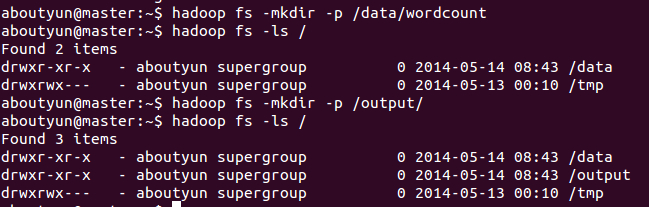
2.目录/data/wordcount用来存放Hadoop自带的WordCount例子的数据文件,运行这个MapReduce任务的结果输出到/output/wordcount目录中。
首先新建文件inputWord:
- vi /usr/inputWord
复制代码
新建完毕,查看内容:
- cat /usr/inputWord
复制代码
<ignore_js_op>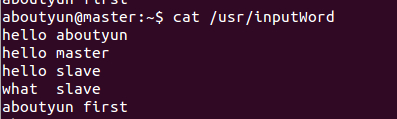
将本地文件上传到HDFS中:
- hadoop fs -put /usr/inputWord /data/wordcount/
复制代码
可以查看上传后的文件情况,执行如下命令:
- hadoop fs -ls /data/wordcount
复制代码
可以看到上传到HDFS中的文件。
<ignore_js_op>
通过命令
- hadoop fs -text /data/wordcount/inputWord
复制代码
看到如下内容:
<ignore_js_op>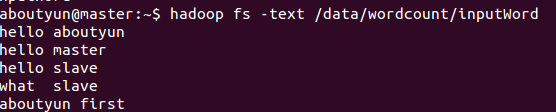
下面,运行WordCount例子,执行如下命令:
- hadoop jar /usr/hadoop/share/hadoop/mapreduce/hadoop-mapreduce-examples-2.2.0.jar wordcount /data/wordcount /output/wordcount
复制代码
<ignore_js_op>
可以看到控制台输出程序运行的信息:
aboutyun@master:~$ hadoop jar /usr/hadoop/share/hadoop/mapreduce/hadoop-mapreduce-examples-2.2.0.jar wordcount /data/wordcount /output/wordcount
14/05/14 10:33:33 INFO client.RMProxy: Connecting to ResourceManager at master/172.16.77.15:8032
14/05/14 10:33:34 INFO input.FileInputFormat: Total input paths to process : 1
14/05/14 10:33:34 INFO mapreduce.JobSubmitter: number of splits:1
14/05/14 10:33:34 INFO Configuration.deprecation: user.name is deprecated. Instead, use mapreduce.job.user.name
14/05/14 10:33:34 INFO Configuration.deprecation: mapred.jar is deprecated. Instead, use mapreduce.job.jar
14/05/14 10:33:34 INFO Configuration.deprecation: mapred.output.value.class is deprecated. Instead, use mapreduce.job.output.value.class
14/05/14 10:33:34 INFO Configuration.deprecation: mapreduce.combine.class is deprecated. Instead, use mapreduce.job.combine.class
14/05/14 10:33:34 INFO Configuration.deprecation: mapreduce.map.class is deprecated. Instead, use mapreduce.job.map.class
14/05/14 10:33:34 INFO Configuration.deprecation: mapred.job.name is deprecated. Instead, use mapreduce.job.name
14/05/14 10:33:34 INFO Configuration.deprecation: mapreduce.reduce.class is deprecated. Instead, use mapreduce.job.reduce.class
14/05/14 10:33:34 INFO Configuration.deprecation: mapred.input.dir is deprecated. Instead, use mapreduce.input.fileinputformat.inputdir
14/05/14 10:33:34 INFO Configuration.deprecation: mapred.output.dir is deprecated. Instead, use mapreduce.output.fileoutputformat.outputdir
14/05/14 10:33:34 INFO Configuration.deprecation: mapred.map.tasks is deprecated. Instead, use mapreduce.job.maps
14/05/14 10:33:34 INFO Configuration.deprecation: mapred.output.key.class is deprecated. Instead, use mapreduce.job.output.key.class
14/05/14 10:33:34 INFO Configuration.deprecation: mapred.working.dir is deprecated. Instead, use mapreduce.job.working.dir
14/05/14 10:33:35 INFO mapreduce.JobSubmitter: Submitting tokens for job: job_1400084979891_0004
14/05/14 10:33:36 INFO impl.YarnClientImpl: Submitted application application_1400084979891_0004 to ResourceManager at master/172.16.77.15:8032
14/05/14 10:33:36 INFO mapreduce.Job: The url to track the job: http://master:8088/proxy/application_1400084979891_0004/
14/05/14 10:33:36 INFO mapreduce.Job: Running job: job_1400084979891_0004
14/05/14 10:33:45 INFO mapreduce.Job: Job job_1400084979891_0004 running in uber mode : false
14/05/14 10:33:45 INFO mapreduce.Job: map 0% reduce 0%
14/05/14 10:34:10 INFO mapreduce.Job: map 100% reduce 0%
14/05/14 10:34:19 INFO mapreduce.Job: map 100% reduce 100%
14/05/14 10:34:19 INFO mapreduce.Job: Job job_1400084979891_0004 completed successfully
14/05/14 10:34:20 INFO mapreduce.Job: Counters: 43
File System Counters
FILE: Number of bytes read=81
FILE: Number of bytes written=158693
FILE: Number of read operations=0
FILE: Number of large read operations=0
FILE: Number of write operations=0
HDFS: Number of bytes read=175
HDFS: Number of bytes written=51
HDFS: Number of read operations=6
HDFS: Number of large read operations=0
HDFS: Number of write operations=2
Job Counters
Launched map tasks=1
Launched reduce tasks=1
Data-local map tasks=1
Total time spent by all maps in occupied slots (ms)=23099
Total time spent by all reduces in occupied slots (ms)=6768
Map-Reduce Framework
Map input records=5
Map output records=10
Map output bytes=106
Map output materialized bytes=81
Input split bytes=108
Combine input records=10
Combine output records=6
Reduce input groups=6
Reduce shuffle bytes=81
Reduce input records=6
Reduce output records=6
Spilled Records=12
Shuffled Maps =1
Failed Shuffles=0
Merged Map outputs=1
GC time elapsed (ms)=377
CPU time spent (ms)=11190
Physical memory (bytes) snapshot=284524544
Virtual memory (bytes) snapshot=2000748544
Total committed heap usage (bytes)=136450048
Shuffle Errors
BAD_ID=0
CONNECTION=0
IO_ERROR=0
WRONG_LENGTH=0
WRONG_MAP=0
WRONG_REDUCE=0
File Input Format Counters
Bytes Read=67
File Output Format Counters
Bytes Written=51
查看结果,执行如下命令:
- hadoop fs -text /output/wordcount/part-r-00000
复制代码
结果数据示例如下:
- aboutyun@master:~$ hadoop fs -text /output/wordcount/part-r-00000
- aboutyun 2
- first 1
- hello 3
- master 1
- slave 2
- what 1
复制代码
<ignore_js_op>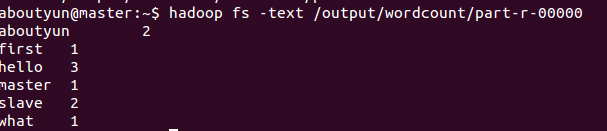
登录到Web控制台,访问链接http://master:8088/可以看到任务记录情况。
下一篇:hadoop2.2运行mapreduce(wordcount)问题总结
hadoop2.2使用手册2:如何运行自带wordcount的更多相关文章
- Hadoop 2.6.3运行自带WordCount程序笔记
运行平台:Hadoop 2.6.3 模式:完全分布模式 1.准备统计文本,以一段文字为例:eg.txt The Project Gutenberg EBook of War and Peace, by ...
- hadoop:如何运行自带wordcount
1.在linux系统创建文件 vi aa.txt --------i 进行编辑 输入 内容(多个单词例如:aa bb cc aa) 2.在HDFS上面创建文件夹 hdfs dfs -mkdir ...
- 指导手册04:运行MapReduce
指导手册04:运行MapReduce Part 1:运行单个MapReduce任务 情景描述: 本次任务要求对HDFS目录中的数据文件/user/root/email_log.txt进行计算处理, ...
- 伪分布式环境下命令行正确运行hadoop示例wordcount
首先确保hadoop已经正确安装.配置以及运行. 1. 首先将wordcount源代码从hadoop目录中拷贝出来. [root@cluster2 logs]# cp /usr/local/h ...
- VSCode 使用 Code Runner 插件无法编译运行文件名带空格的文件
本文同时在我的博客发布:VSCode 使用 Code Runner 插件无法编译运行文件名带空格的文件 - Skykguj 's Blog (sky390.cn) 使用 Visual Studio C ...
- 【hadoop2.6.0】安装+例子运行
由于下载的是hadoop的最新版,网上各种杂七杂八的东西都不适用.好在官网上说的也够清楚了.如果有人看这篇文章的话,最大的忠告就是看官网. 官网2.6.0的安装教程:http://hadoop.apa ...
- 【hadoop2.6.0】通过代码运行程序流程
之前跑了一下hadoop里面自带的例子,现在顺一下如何通过源代码来运行程序. 我懒得装eclipse,就全部用命令行了. 整体参考官网上的:http://hadoop.apache.org/docs/ ...
- hadoop2.X使用手册1:通过web端口查看主节点、slave1节点及集群运行状态
导读内容:1.如何通过web查看hdfs集群状态2.如何通过web查看运行在在主节点master上ResourceManager状态3.如何通过web查看运行在在slave节点NodeManager资 ...
- Ubuntu 12.04.5 LTS 上安装hadoop 2.6.0后运行自带的例程wordcount
注:我所有的操作均通过Xshell 5远程连接Ubuntu进行实施 第一步:启动hadoop,利用jps查看hadoop是否已经启动,如果没有启动用start-dfs.sh脚本启动(hadoop2.X ...
随机推荐
- 数据库的ACID特性详解
ACID是指在 数据库管理系统(DBMS)中事物所具有的四个特性:原子性.一致性.隔离性.持久性 事物:在数据库系统中,一个事务是指由一系列连续的数据库操作组成的一个完整的逻辑过程.这组操作执行前后, ...
- PostgreSQL pg_hba.conf 文件简析
作者:高张远瞩(HiLoveS) 博客:http://www.cnblogs.com/hiloves/ 转载请保留该信息 最近试用PostgreSQL 9.04,将pg_hba.conf配置的一些心得 ...
- FTRL 使用tensorflow的实现
import tensorflow as tfimport numpy as npfrom sklearn import metricsfrom sklearn.datasets import loa ...
- 【Demo】CSS3 过渡
CSS3 过渡transition 应用于宽度属性的过渡效果,时长为 2 秒: div { transition: width 2s; -webkit-transition: width 2s; /* ...
- Python 字典的一键多值,即一个键对应多个值
转自:http://blog.csdn.net/houyj1986/article/details/22624981 #encoding=utf-8 print '中国' #字典的一键多值 print ...
- ansible modules开发(一)
一 模块说明 官方是否有提供的类似功能模块? 可从下面两个连接确定官方提供的模块,以免重复造轮子 官方已发布的模块 http://docs.ansible.com/ansible/modules.ht ...
- vue请求本地json数据
1.下载vue-resource插件 cnpm install vue-resource 1.2全局引入vue-resource: 在main.js import VueResource from ' ...
- halcon中你不知道的标定板细节
本人文着重阐述以下问题: halcon是否只能使用halcon专用的标定板? halcon标定板如何生成? halcon标定板如何摆放,拍照数量有无限制? halcon是否只能使用halcon专用的标 ...
- Java基础学习-Collection体系结构和迭代测试
package Collection; import java.util.ArrayList; import java.util.Collection; import java.util.Iterat ...
- python3与python2中的string.join()函数
在python2中,string 模块中有一个join()函数,用于以特定的分隔符分隔源变量中的字符串,将其作为新的元素加入到一个列表中,例如: body=string.join(( "Fr ...