
Xamarin devexpress datagrid 样式
DevExpress的提供光与暗的内置,可以应用到主题GridControl改变其外观。
|
主题 |
iOS版 |
Android版 |
|
光 |
|
|
|
黑暗 |
|
|
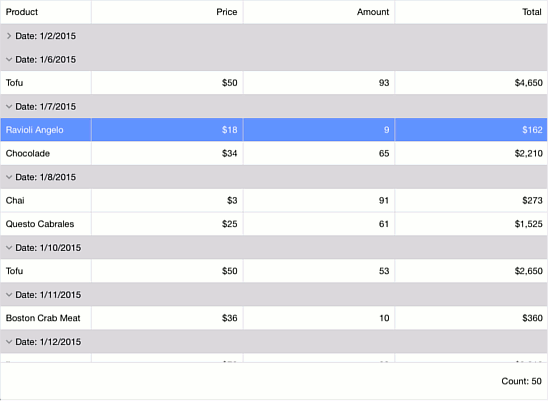

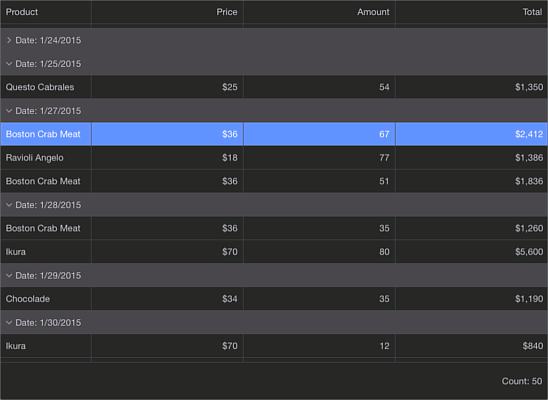
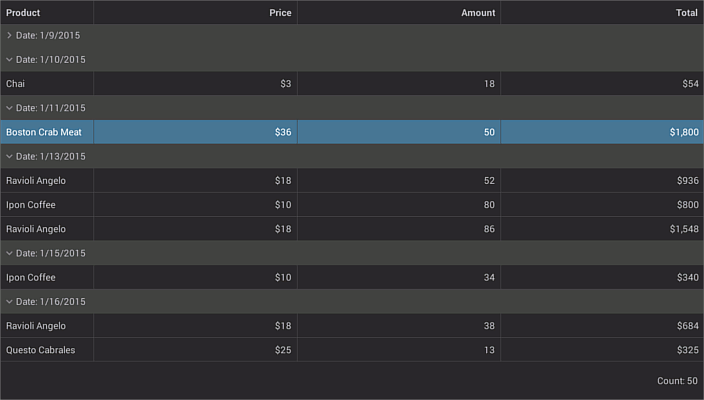
应用预定义的主题
该主题类存储提供的主题名称。要更改主题,分配主题类的相应字段的ThemeManager.ThemeName
|
|
||
|
using Xamarin.Forms; using DevExpress.Mobile.DataGrid.Theme; // ... ThemeManager.ThemeName = Themes.Dark; // ... |
自定义主题
要自定义应用的主题,使用ThemeBase类。它为您提供各种定制,使您可以更改主题的外观,并将其应用到电网。您可以使用这些定制来改变背景颜色,字体和所需的网格单元(头,属性组行等)
重要
要应用定制,调用ThemeManager.RefreshTheme方法。
该ThemeBase类的属性提供访问不同的定制,你可以调整来改变外观设置(例如,字体属性,边框和背景颜色等)网格的相应的视觉元素(如数据单元格,行分组,过滤器面板等)。在本实施例中,使用下面的定制。
为了跟踪时刻变化的主题,无论是处理ThemeManager.ThemeChanged事件或使用IThemeChangingHandler.OnThemeChanged方法。
这个例子定制光主题,因为它是在下面的图片中显示。

|
|
||
|
using System; using System.Collections.Generic; using Xamarin.Forms; using DevExpress.Mobile.DataGrid; using DevExpress.Mobile.DataGrid.Theme; namespace ThemeCustomizing { public int count = 0; public MainPage() { InitializeComponent(); TestOrdersRepository model = new TestOrdersRepository(); BindingContext = model; ThemeManager.ThemeName = Themes.Light; // Header customization. ThemeManager.Theme.HeaderCustomizer.BackgroundColor = Color.FromRgb(187, 228, 208); ThemeFontAttributes myFont = new ThemeFontAttributes("Verdana", ThemeFontAttributes.FontSizeFromNamedSize(NamedSize.Large), FontAttributes.None, Color.White); ThemeManager.Theme.HeaderCustomizer.Font = myFont; // Cell customization. ThemeManager.Theme.CellCustomizer.SelectionColor = Color.FromRgb(186, 220, 225); ThemeFontAttributes myFont1 = new ThemeFontAttributes("Verdana", ThemeFontAttributes.FontSizeFromNamedSize(NamedSize.Medium), FontAttributes.None, Color.Black); ThemeManager.Theme.CellCustomizer.Font = myFont1; // Various customization. ThemeManager.Theme.TotalSumaryCustomizer.BackgroundColor = Color.FromRgb(163, 162, 168); ThemeFontAttributes myFont2 = new ThemeFontAttributes("Verdana", ThemeFontAttributes.FontSizeFromNamedSize(NamedSize.Default), FontAttributes.None, Color.Black); ThemeManager.Theme.TotalSummaryCustomizer.Font = myFont2; ThemeManager.Theme.NewItemRowCustomizer.Font = myFont2; ThemeManager.RefreshTheme(); } void OnCalculateCustomSummary(object sender, CustomSummaryEventArgs e) { if (e.FieldName.ToString() == "Shipped") if (e.IsTotalSummary) { if (e.SummaryProcess == CustomSummaryProcess.Calculate) { if (!(bool)e.FieldValue) count++; e.TotalValue = count; } } } } } |
自定义模板列、滑动显示按钮
<dxGrid:GridControl
x:Name="grid"
ItemsSource="{Binding JDProduct}"
AllowResizeColumns="True"
AllowHorizontalScrollingVirtualization="True"
ColumnsAutoWidth="False"
SwipeButtonShowing="OnSwipeButtonShowing"
SwipeButtonClick="OnSwipeButtonClick"
>
<dxGrid:GridControl.Columns>
<dxGrid:TemplateColumn
FieldName="Name"
Caption ="112"
Width ="60"
IsReadOnly="true"
AllowGroup="False"
AllowSort="False" >
<dxGrid:TemplateColumn.DisplayTemplate>
<DataTemplate>
<Button
Text="{Binding Value}"
Clicked="nameClient"
BorderWidth="0"
BackgroundColor="Green"
TextColor="White"
></Button>
</DataTemplate>
</dxGrid:TemplateColumn.DisplayTemplate>
</dxGrid:TemplateColumn>
<dxGrid:TextColumn
FieldName="Name"
Caption = "名字"
Width = "100" />
<dxGrid:NumberColumn
FieldName="UnitPrice"
Caption = "价格"
DisplayFormat="C0"/>
<dxGrid:DateColumn
FieldName="Date"
DisplayFormat="d"/>
<dxGrid:SwitchColumn
FieldName="Shipped" />
<dxGrid:TextColumn
FieldName="Name"
Caption = "Product" />
<dxGrid:TextColumn
FieldName="Name"
Caption = "Product" />
<dxGrid:TextColumn
FieldName="Name"
Caption = "Product" />
<dxGrid:TextColumn
FieldName="Name"
Caption = "Product" />
<dxGrid:TextColumn
FieldName="Name"
Caption = "Product" />
<dxGrid:TextColumn
FieldName="Name"
Caption = "Product" />
</dxGrid:GridControl.Columns>
<dxGrid:GridControl.LeftSwipeButtons>
<dxGrid:SwipeButtonInfo
ButtonName="LeftButton"
Caption="打印"
BackgroundColor="Green"
Width="150"/>
</dxGrid:GridControl.LeftSwipeButtons>
</dxGrid:GridControl>
特殊说明:如果直接使用绑定的文本则使用 Value关键字,绑定对象则可以直接使用Value.XXX
后端.cs代码绑定事件
void OnSwipeButtonShowing(object sender, DevExpress.Mobile.DataGrid.SwipeButtonShowingEventArgs e)
{
if ((!(Boolean)grid.GetCellValue(e.RowHandle, "Shipped"))
&& (e.ButtonInfo.ButtonName == "RightButton"))
{
e.IsVisible = false;
}
}
void OnSwipeButtonClick(object sender, DevExpress.Mobile.DataGrid.SwipeButtonEventArgs e)
{
if (e.ButtonInfo.ButtonName == "LeftButton")
{
string orderDate = (string)grid.GetCellValue(e.RowHandle, " Name");
string orderDateDay = orderDate;
DisplayAlert("Alert from " + e.ButtonInfo.ButtonName, "Day: " + orderDateDay, "OK");
}
if (e.ButtonInfo.ButtonName == "RightButton")
{
grid.DeleteRow(e.RowHandle);
}
}
Xamarin devexpress datagrid 样式的更多相关文章
- WPF DataGrid 样式设置
隔行换色,鼠标单击,悬浮样式都有,其具体效果如图 1 所示. 图 1 WPF DataGrid 样式设置效果图 其中: 界面设计代码下所示 ? + 查看代码 1 2 3 4 5 6 7 8 9 10 ...
- DevExpress皮肤样式
[时间] 2016-02-15 11:41:11 天气晴 没有雾霾难得的好天气!!! [工具] (1)Visual Studio 2015 (2)DevExpress15.2.3 [感言] 一直以来都 ...
- WPF DataGrid 样式分享
原文:WPF DataGrid 样式分享 隔行换色,鼠标单击,悬浮样式都有 先看效果: 代码: <DataGrid AutoGenerateColumns="False" N ...
- Xamarin devexpress Grid
Devexpress 提供了datagrid 控件对于xamarin 进行支持.整个世界美好了,已经无法用语言来形容一个 被列表控件折磨的要死的人看到熟悉的图标时候的激动了.还有一点引用官网的原话: ...
- Xamarin.Forms DataGrid
控件出处 https://components.xamarin.com/ https://components.xamarin.com/gettingstarted/ZumeroDataGrid/tr ...
- WPF随手小记之二 ——改变DataGrid样式
大部分时候我们并不需要手动改变DataGrid的样式,因为用默认的其实也看得过去,而且在DataGrid中的数据也远比外观重要. 但总有时候,我们需要做点必要的UI修改来使DataGrid更美观. 一 ...
- Xamarin.Forms之样式
使用XAML样式设置Xamarin.Forms应用的样式Xamarin.Forms应用程序的样式传统上是通过使用Style类将一组属性值分组到一个对象中来完成的,然后可以将其应用于多个视觉元素实例. ...
- wpf 收集的不错的datagrid样式
<ResourceDictionary xmlns="http://schemas.microsoft.com/winfx/2006/xaml/presentation" x ...
- DataGrid样式
1.自定义列(DataGridTemplateColumn) <DataGridTemplateColumn Width="130"> <DataGridTemp ...
随机推荐
- mac上安装redis
1.从http://redis.io 下载redis包,这里选择了redis-3.2.3 2.将下载的 redis-3.2.3.tar.gz 包拷贝到 /user/local 目录 3.执行 sudo ...
- 双slave的server_uuid同样问题
早上做数据迁移,部署完slave2,发现3台机子的日志狂刷: 旧slave: 2014-05-29 14:35:35 996 [Note] Slave: received end packet fro ...
- ubuntu12.04软件中心打开错误和 ubuntu 包管理之“:E: 读错误 - read (5: 输入/输出错误) E: 无法解析或打开软件包的列表或是状态文件。”的解决
执行ubuntu软讲中心时打不开.老是崩溃,从终端也下载不了软件. 执行包管理的update或者search等等会报错: E: 读错误 - read (5: 输入/输出错误) E: 无法解析或打开软件 ...
- mysql 修复表和优化表
REPAIR TABLE `table_name` 修复表 OPTIMIZE TABLE `table_name` 优化表
- 阻塞机制下的recv小结
recv是socket编程中最常用的函数之一,在阻塞状态的recv有时候会返回不同的值,而对于错误值也有相应的错误码,分别对应不同的状态,下面是我针对常见的几种网络状态的简单总结. 首先阻塞 ...
- 单向链表JAVA代码
//单向链表类 publicclassLinkList{ //结点类 publicclassNode{ publicObject data; ...
- VNC-Server installation on CentOS 7
参考资料: https://www.howtoforge.com/vnc-server-installation-on-centos-7 https://linux.cn/article-5335-1 ...
- hdu 2189
//hdu2189 题意大概就是给n个人,分成多组,要求每组人数都是素数,求有多少种... 解法就是先把150以内的素数全部存入一个数组,然后利用a[j+b[i]]+=a[j];这道题一开始没理解 ...
- Myeclipse+Tomcat安装与配置
一: Myeclipse安装很简单,没什么可说的,下面说一下怎么把英文版的Myeclipse汉化的问题 1.把汉化包解压,将解压后的“language”文件夹,放入Myeclipse\common文件 ...
- no drawer view found with gravity RIGHT(Android实现侧滑菜单从右面滑出) 解决办法
代码如下: <android.support.v7.widget.Toolbar android:id="@+id/toolbar" android:layout_width ...