
gprof + kprof + gprof2dot (性能 与 函数调用图)-
http://www.cnblogs.com/rocketfan/archive/2009/11/15/1603465.html
http://blog.csdn.net/stanjiang2010/article/details/5655143
http://blog.csdn.net/stanjiang2010/article/details/5655143
三种方案:

1.程序编绎加 -PG:
   g++ -pg -g  -o test test.cc
./test //运行后生成gmon.out
gprof ./test > prof.log
2. KProf 是gprof 版本////注意已经按照前面的用gprof生成 gmont.out 了
kprof -f ./test
3. gprof2dot.py 与 xdot:生成图像清晰,相对于KProf
gprof ./test | gprof2dot.py | xdot
gprof:系统自带
https://sourceware.org/binutils/docs/gprof/
https://sourceware.org/binutils/
The GNU Binutils are a collection of binary tools. The main ones are:
- ld - the GNU linker.
- as - the GNU assembler.
But they also include:
- addr2line - Converts addresses into filenames and line numbers.
- ar - A utility for creating, modifying and extracting from archives.
- c++filt - Filter to demangle encoded C++ symbols.
- dlltool - Creates files for building and using DLLs.
- gold - A new, faster, ELF only linker, still in beta test.
- gprof - Displays profiling information.
- nlmconv - Converts object code into an NLM.
- nm - Lists symbols from object files.
- objcopy - Copies and translates object files.
- objdump - Displays information from object files.
- ranlib - Generates an index to the contents of an archive.
- readelf - Displays information from any ELF format object file.
- size - Lists the section sizes of an object or archive file.
- strings - Lists printable strings from files.
- strip - Discards symbols.
- windmc - A Windows compatible message compiler.
- windres - A compiler for Windows resource files.
kprof

http://kprof.sourceforge.net/

        % tar xvfz kprof-1.4.1.tar.gz

    	% cd kprof-1.4.1

    	% ./configure --prefix=(where KDE is installed, for example /opt/kde3)

    	% make

    	% su

    	enter your root password

    	# make install
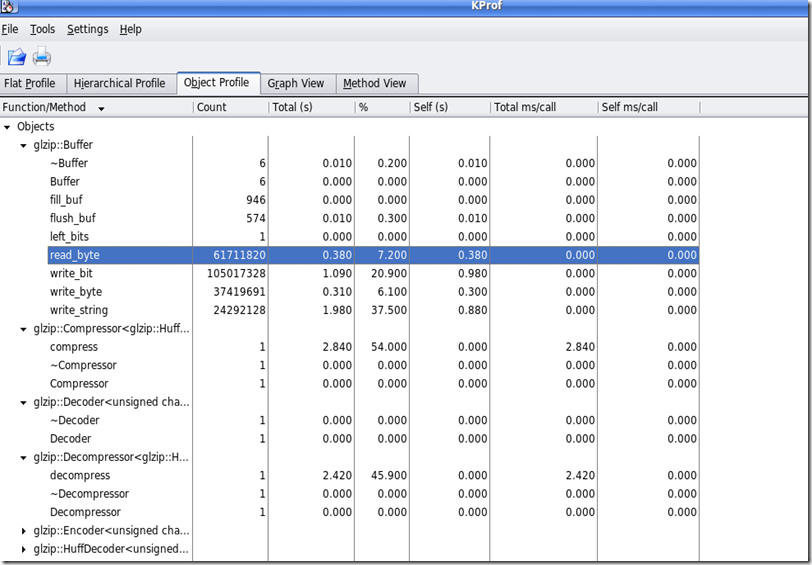
KProf is a visual tool for developers, which displays the execution profiling output generated by code profilers.
The output of profilers being usually difficult to read (beyond the flat profile information),
KProf presents the information in list- or tree-views that make the information very easy to understand.

KProf provides access to the following features:

    Flat profile view displays all function / methods and their profiling information.

    Hierarchical profile view displays a tree for each function / method with the other functions / methods it calls as subelements.

    Object profile view, for C++ developers, groups the methods in a tree view by object name.

    Graph view is a graphical representation of the call-tree, requires GraphViz to work.

    Method view is a more detailed look at an individual method - cross referenced.

    Recursive functions carry a special icon to clearly show that they are recursive.

    Right-clicking a function or method displays a pop-up with the list of callers and called functions.
You can directly go to one of these functions by selecting it in the pop-up menu.

    The flat profile view provides an additional filter edit box to filter the display and show only the functions or methods
 containing the text that you enter.

    Function parameters hiding if the function name is unique (i.e. no different signatures)

    C++ template abbreviation (template parameters can be hidden)

    Automatic generation of call-graph data for GraphViz and VCG, two popular graph image generators.

    Diff mode support to compare two profile results.
gprof2dot     (.txt----->.dot)

https://github.com/jrfonseca
xdot.py是 一个图形可交互查看器,采用Graphviz的 dot 语言开发      (DOT文件------>图像生成)

https://github.com/jrfonseca/xdot.py

gprof + kprof + gprof2dot (性能 与 函数调用图)-的更多相关文章
- linux环境下 C++性能测试工具 gprof + kprof + gprof2dot
1.gprof 很有名了,google下很多教程 g++ -pg -g -o test test.cc ./test //会生成gmon.out gprof ./test > prof.l ...
- 高级工具gprof、gprof2dot.py、dot
可以研究程序性能.函数调用堆栈等,而且能用图标查看. linux环境下 C++性能测试工具 gprof + kprof + gprof2dot - 阁子 - 博客园 gprof.gprof2dot.p ...
- 『MXNet』第六弹_Gluon性能提升 静态图 动态图 符号式编程 命令式编程
https://www.cnblogs.com/hellcat/p/9084894.html 目录 一.符号式编程 1.命令式编程和符号式编程 2.MXNet的符号式编程 二.惰性计算 用同步函数实际 ...
- 看开源代码利器—用Graphviz + CodeViz生成C/C++函数调用图(call graph)
一.Graphviz + CodeViz简单介绍 CodeViz是<Understanding The Linux Virtual Memory Manager>的作者 Mel Gorma ...
- WEB 性能优化导图
看了一下网上对于web性能优化的一些帖子,不是很直观,花了点时间画了一个思维导图. refers: https://segmentfault.com/a/1190000011936772 https: ...
- doxygen+graphviz轻松绘制函数调用图(call graph)
前言 之前的工作环境习惯了使用source insight查看函数分析代码,切换到mac下后改用vscode,发现缺少函数调用关系图生成.跨平台的understand可以很好的解决,但是公司没有购买, ...
- Core Data 和 sqlite3的性能对比【图】3gs,iPhone4,4s,5的性能测试。
demo 和源码再此下载 :http://download.csdn.net/detail/hherima/5603797
- 看开源代码利器—用Graphviz + CodeViz生成C/C++函数调用图(call graph) - 转
From http://www.linuxidc.com/Linux/2015-01/111501.htm 实际按照上文操作,主要是安装gcc-4.6.2出现一些问题,原先在cygwin下安装,结果提 ...
- [转] 2018年最新桌面CPU性能排行天梯图(含至强处理器)
[FROM] http://www.idn100.com/zuzhuangdiannaopeizhi-pc2849/ 排名 处理器 图例 分数 1 Intel Xeon Platinum 8173M ...
随机推荐
- Windows7のping応答の設定
2015年11月13日 18時09分 wanglinqiang整理 ping応答しない場合.ping応答させる.させない等の設定 1.スタート(左下のウィンドウズのロゴ)⇒コントロールパネルを選択. ...
- 修改weblogic11g的JDK版本
1:进入Weblogic域文件夹下面 [wzh@localhost bin]$ pwd/app/wzh/oracle/middleware/user_projects/domains/base_dom ...
- 14.6.8 Configuring the InnoDB Master Thread IO Rate 配置InnoDB 主线程IO 速率:
14.6.8 Configuring the InnoDB Master Thread IO Rate 配置InnoDB 主线程IO 速率: 主线程 在InnoDB 是一个线程 执行各种任务在后台. ...
- android屏幕适配详解
android屏幕适配详解 官方地址:http://developer.android.com/guide/practices/screens_support.html 一.关于布局适配建议 1.不要 ...
- 【HDOJ】4612 Warm up
双连通缩点+求树的直径,图论基础题目. /* 4612 */ #pragma comment(linker, "/STACK:1024000000,1024000000") #in ...
- HDU-1527 取石子游戏
http://acm.hdu.edu.cn/showproblem.php?pid=1527 交换 :可实现. if( n < m ) { n^=m; m^=n; n^=m; } (三)尼姆博 ...
- Unity3D学习笔记-------小地图制作
制作小地图首先需要两个贴图:第一个贴图是小地图的背景贴图,它应当是从y轴向下俯视截取的贴图:第二个贴图是主角位置贴图,它应当是在背景贴图之上的小型矩形. 1 using UnityEngine; 2 ...
- 定时器NSTimer的用法
//时间间隔 NSTimeInterval activeTimeInterval = NETWORK_SEND_ACTIVE_TIME; NSTimeInterval othe ...
- 折腾iPhone的生活——运营商信号显示数据化
iOS7以后iphone的信号都是用5个小圆圈显示的,像这样 但是还有种显示方法可以用数字信号显示信号量,比较适合很专注于生活品质的人和对数字有偏爱的人,像这样: 这样还有个好处是可以节约顶部状态栏的 ...
- cocos2d的安装
安装cocos2d其实就是在Xcode中安装几个模板,然后在Xcode里面就可以直接使用这些模板了. 其实说是模板,也就是封装了许许多多引擎的文件,相对于原生的程序,也许使用引擎模板更加方便. 下 ...