
android 22 启动带2个action值的预定义acticity
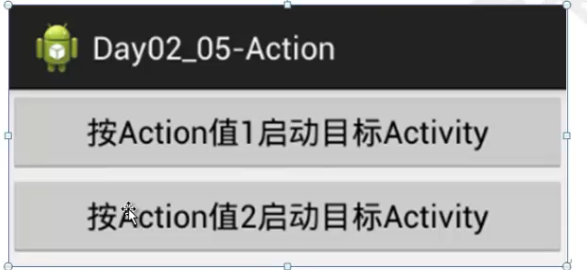
main.xml
<LinearLayout xmlns:android="http://schemas.android.com/apk/res/android"

    android:layout_width="match_parent"

    android:layout_height="match_parent"

    android:orientation="vertical">

    <Button

        android:id="@+id/btn1"

        android:layout_width="wrap_content"

        android:layout_height="wrap_content"

        android:text="按Action值1启动目标Activity" />

    <Button

        android:id="@+id/btn2"

        android:layout_width="wrap_content"

        android:layout_height="wrap_content"

        android:text="按Action值2启动目标Activity" />

</LinearLayout>
mainactivity.java
package com.sxt.day04_07_twoaction;

import android.os.Bundle;

import android.app.Activity;

import android.content.Intent;

import android.view.Menu;

import android.view.View;

import android.view.View.OnClickListener;

public class MainActivity extends Activity implements OnClickListener{

    @Override

    protected void onCreate(Bundle savedInstanceState) {

        super.onCreate(savedInstanceState);

        setContentView(R.layout.activity_main);

        setListener();

    }

    private void setListener() {

        findViewById(R.id.btn1).setOnClickListener(this);

        findViewById(R.id.btn2).setOnClickListener(this);

    }

    @Override

    public void onClick(View v) {

        Intent intent=new Intent();

        switch (v.getId()) {

        case R.id.btn1:

            intent.setAction("com.sxt.day04_07_twoaction.SecondActivity");

            break;

        case R.id.btn2:

            intent.setAction("com.sxt.day04_07_twoaction.SecondActivity2");

            break;

        }

        startActivity(intent);

    }

}
第二个.xml
<RelativeLayout xmlns:android="http://schemas.android.com/apk/res/android"

    xmlns:tools="http://schemas.android.com/tools"

    android:layout_width="match_parent"

    android:layout_height="match_parent"

    android:paddingBottom="@dimen/activity_vertical_margin"

    android:paddingLeft="@dimen/activity_horizontal_margin"

    android:paddingRight="@dimen/activity_horizontal_margin"

    android:paddingTop="@dimen/activity_vertical_margin"

    tools:context=".SecondActivity" >

    <TextView

        android:layout_width="wrap_content"

        android:layout_height="wrap_content"

        android:text="@string/hello_world" />

</RelativeLayout>
第二个.java
package com.sxt.day04_07_twoaction;

import android.os.Bundle;

import android.app.Activity;

import android.util.Log;

import android.view.Menu;

public class SecondActivity extends Activity {

    @Override

    protected void onCreate(Bundle savedInstanceState) {

        super.onCreate(savedInstanceState);

        setContentView(R.layout.activity_second);

        Log.i("main","SecondActivity");

    }

}
系统描述文件:
<?xml version="1.0" encoding="utf-8"?>

<manifest xmlns:android="http://schemas.android.com/apk/res/android"

    package="com.sxt.day04_07_twoaction"

    android:versionCode="1"

    android:versionName="1.0" >

    <uses-sdk

        android:minSdkVersion="8"

        android:targetSdkVersion="18" />

    <application

        android:allowBackup="true"

        android:icon="@drawable/ic_launcher"

        android:label="@string/app_name"

        android:theme="@style/AppTheme" >

        <activity

            android:name="com.sxt.day04_07_twoaction.MainActivity"

            android:label="@string/app_name" >

            <intent-filter>

                <action android:name="android.intent.action.MAIN" />

                <category android:name="android.intent.category.LAUNCHER" />

            </intent-filter>

        </activity>

        <activity

            android:name="com.sxt.day04_07_twoaction.SecondActivity"

            android:label="@string/title_activity_second" >

            <intent-filter>    给SecondActivity设置intent-filter

                <action android:name="com.sxt.day04_07_twoaction.SecondActivity"/>com.sxt.day04_07_twoaction.SecondActivity可以随便写

                <action android:name="com.sxt.day04_07_twoaction.SecondActivity2"/>

                <category android:name="android.intent.category.DEFAULT"/>

            </intent-filter>

        </activity>

    </application>

</manifest>
android 22 启动带2个action值的预定义acticity的更多相关文章
- android 23 启动带2个Categories值的预定义acticity和桌面activity
mainActivity.java package com.sxt.day04_07_twoaction; import android.os.Bundle; import android.app.A ...
- Android 外部启动activity,自定义action,action常量大全
从任意app,启动另外一个app的activity: 1. Intent i = new Intent(); ComponentName cn = new ComponentN ...
- Windows自带Android模拟器启动失败
Windows自带Android模拟器启动失败 错误信息:[Critical] XDE Exit Code: InvalidArguments (3)XDE执行的第三个参数为设置内存值,形式为/mem ...
- 使用预定义的action值启动系统应用
1.启动浏览器 Intent intent = new Intent(); intent.setAction(Intent.ACTION_WEB_SEARCH); //可以传一个搜索关键字,会直接显示 ...
- 066 01 Android 零基础入门 01 Java基础语法 08 Java方法 02 带参有返回值方法
066 01 Android 零基础入门 01 Java基础语法 08 Java方法 04 带参有返回值方法 本文知识点:带参有返回值方法 说明:因为时间紧张,本人写博客过程中只是对知识点的关键步骤进 ...
- 065 01 Android 零基础入门 01 Java基础语法 08 Java方法 02 带参无返回值方法
065 01 Android 零基础入门 01 Java基础语法 08 Java方法 03 带参无返回值方法 本文知识点:带参无返回值方法 说明:因为时间紧张,本人写博客过程中只是对知识点的关键步骤进 ...
- Android SurfaceView实战 带你玩转flabby bird (下)
转载请标明出处:http://blog.csdn.net/lmj623565791/article/details/43063331,本文出自:[张鸿洋的博客] 1.概述 在Android Surfa ...
- Android WIFI 启动流程(TIP^^)
前几天因为解决一堆Bug,没时间写.我不会每天都写,就是为了存档一些资料. 内容来源:工作中接触到的+高手博客+文档(Books)=自己理解 仅限参考^^ 此博客是上一个<<Android ...
- AndroidManifest.xml解释说明和android的启动过程
1.android清单文件:AndroidManifest.xml 说明如下: <?xml version="1.0" encoding="utf-8"? ...
随机推荐
- [Python笔记]第十六篇:web框架之Tornado
Tornado是一个基于python的web框架,xxxxx 安装 python -m pip install tornado 第一个Tornado程序 安装完毕我们就可以新建一个app.py文件,放 ...
- sql server 数据库基础学习心得 思维导图
- linux平台上面python调用c
不能免俗,先打印个helloworld出来,c代码的函数 hello.c #include <stdio.h> int helloworld() { printf("hello ...
- maven web项目不能创建src/main/java等文件夹的问题
eclipse创建maevn web项目,在选择maven_archetype_webapp原型后,默认只有src/main/resources这个Source Floder. 按照maven目录结 ...
- SpringMVC源码阅读(一)
DispatcherServlet是整个SpringMVC初始化和处理请求的重要类,作为一个servlet,拥有 public void init(ServletConfig config) thro ...
- Contest 高数题 樹的點分治 樹形DP
高数题 HJA最近在刷高数题,他遇到了这样一道高数题.这道高数题里面有一棵N个点的树,树上每个点有点权,每条边有颜色.一条路径的权值是这条路径上所有点的点权和,一条合法的路径需要满足该路径上任意相邻的 ...
- L1、L2范式及稀疏性约束
L1.L2范式及稀疏性约束 假设需要求解的目标函数为: E(x) = f(x) + r(x) 其中f(x)为损失函数,用来评价模型训练损失,必须是任意的可微凸函数,r(x)为规范化约束因子,用来对模型 ...
- utf8_to_utf16
17down voteaccepted Here's some code. Only lightly tested and there's probably a few improvements. C ...
- wpf 自定义依赖性属性 作用之一 对数据绑定的支持
依赖属性:定义,声明,注册 依赖属性,在数据绑定中,数据绑定,分为源对象(数据源)和目标对象(显示数据). 只有源对象为依赖对象,属性为依赖属性时,该属性才会在属性发生变化时,通知目标对象进行数据更改 ...
- 水题:HDU 5112 A Curious Matt
Description There is a curious man called Matt. One day, Matt's best friend Ted is wandering on the ...