
RedHat搭建IPA-Server
ipa-server是红帽身份验证的一个完整解决方案,上游的开源项目是freeIPA,它本身不提供具体功能,而是整合了389-ds、ipa-server-dns、krb5-server等核心软件包,形成一个以389-ds(ldap)为数据存储后端,krb5-server为验证前端,ipa-server-dns为主机识别,apache+tomcat提供的一个web管理界面,统一的命令行管理界面的身份识别系统。
存储的是主机名(域名)、IP地址、用户名、密码等,以读为主,因此非常适合ldap的特性。
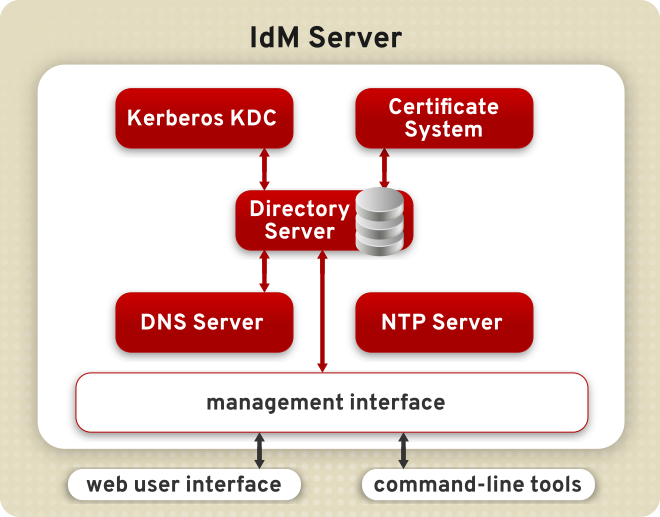
验证服务: Kerberos KDC
存储服务: Red Hat Directory Server
证书系统: Red Hat Certificate System
域名解析服务: DNS
安全管理服务: SSSD
时间同步服务: NTP
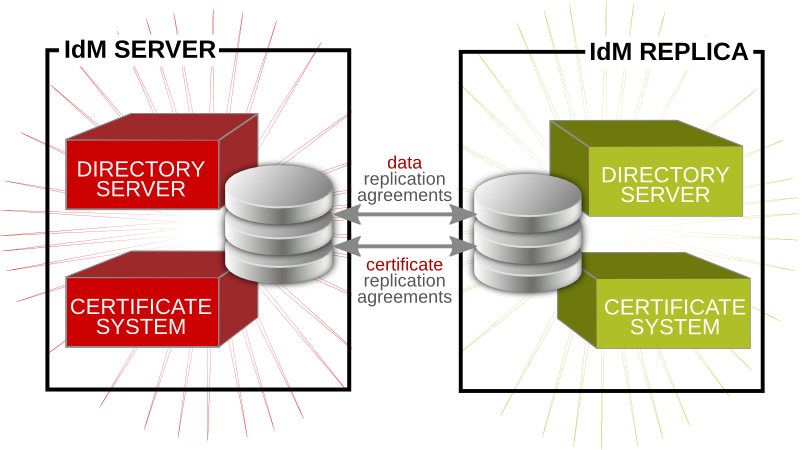
Servers Servers manage all of the services used by domain members.
Replicas Replica are copies of servers. Once a replica is installed, it is functionally identical to a server.
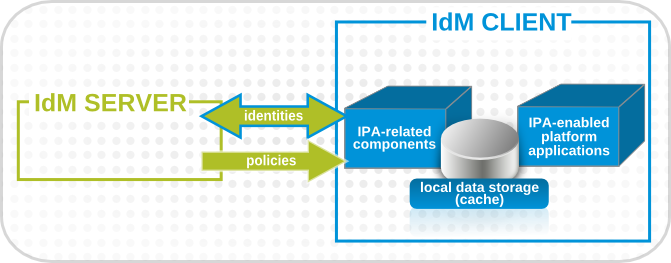
Clients Clients, which belong to the Kerberos domains, receive certificates and tickets issued by the servers, and use other centralized services for authentication and authorization.
IPA Server和Replica
IPA Client
相关服务端口
Service       Ports      Type

HTTP/HTTPS    ,     TCP

LDAP/LDAPS    ,    TCP

Kerberos      ,     TCP and UDP

DNS                    TCP and UDP

NTP                   UDP
环境概览
角色 主机名 IP地址 网关 DNS
IPA-Server ipa.example.com 192.168.136.251/24 192.168.136.2 192.168.136.2
IPA-Replica replica.example.com 192.268.136.252/24 192.168.136.2 192.168.136.251 192.168.136.2
IPA-Client client1.example.com 192.168.136.100/24 192.168.136.2 192.168.136.251 192.168.136.252 192.168.136.2
IPA-Server
设置机器名
# hostnamectl set-hostname ipa.example.com
开放防火墙端口
安装软件包
# yum install ipa-server ipa-server-dns
ipa-server-install参数
--hostname=host name

-r realm_name

-n domain_name

--subject=subject_DN

-a ipa_admin_password

-p directory_manager_password

-P kerberos_master_password

--idmax=number

--idstart=number

--ip-address

--setup-dns

--forwarder=forwarder

--no-forwarders

--no-reverse
安装IPA Server
This program will set up the IPA Server.

This includes:

  * Configure a stand-alone CA (dogtag) for certificate management

  * Configure the Network Time Daemon (ntpd)

  * Create and configure an instance of Directory Server

  * Create and configure a Kerberos Key Distribution Center (KDC)

  * Configure Apache (httpd)

  * Configure DNS (bind)
卸载IPA Server

# ipa-server-install --uninstall
IPA-Replica
设置机器名
# hostnamectl set-hostname replica.example.com
开放防火墙端口
安装软件包
# yum install ipa-server ipa-server-dns
生成gpg文件
在IPA Server上运行

# ipa-replica-prepare replica.example.com --ip-address 192.168.136.252

# scp /var/lib/ipa/replica-info-replica.example.com.gpg root@replica:/var/lib/ipa/
安装IPA Replica
# ipa-replica-install /var/lib/ipa/replica-info-replica.example.com.gpg \
--setup-dns --forwarder 192.168.136.2 \
-p DM_password -w admin_password
测试IPA Replica
# ipa user-add test_user --first=Test --last=User
# ipa user-show test_user
卸载IPA Replica

# ipa-replica-manage del replica.example.com

# ipa-server-install --uninstall
IPA-Client
设置机器名
# hostnamectl set-hostname client1.example.com
开放防火墙端口
安装软件包
# yum install ipa-client
安装IPA Client
# ipa-client-install --enable-dns-updates --domain EXAMPLE.COM --mkhomedir --no-ntp -p admin
IPA 管理
服务管理
# ipactl start|stop|restart|status (IPA服务启动,停止,重启,状态)
用户管理
添加用户

# ipa user-add jsmith

修改用户

# ipa user-mod jsmith --title="Editor III"

删除用户

# ipa user-del jsmith
查找用户
# ipa user-find smith
RedHat搭建IPA-Server的更多相关文章
- 从0开始搭建SQL Server AlwaysOn 第一篇(配置域控)
从0开始搭建SQL Server AlwaysOn 第一篇(配置域控) 第一篇http://www.cnblogs.com/lyhabc/p/4678330.html第二篇http://www.cnb ...
- 从0开始搭建SQL Server AlwaysOn 第二篇(配置故障转移集群)
从0开始搭建SQL Server AlwaysOn 第二篇(配置故障转移集群) 第一篇http://www.cnblogs.com/lyhabc/p/4678330.html第二篇http://www ...
- 从0开始搭建SQL Server AlwaysOn 第三篇(配置AlwaysOn)
从0开始搭建SQL Server AlwaysOn 第三篇(配置AlwaysOn) 第一篇http://www.cnblogs.com/lyhabc/p/4678330.html第二篇http://w ...
- 从0开始搭建SQL Server AlwaysOn 第四篇(配置异地机房节点)
从0开始搭建SQL Server AlwaysOn 第四篇(配置异地机房节点) 第一篇http://www.cnblogs.com/lyhabc/p/4678330.html第二篇http://www ...
- (转) 从0开始搭建SQL Server AlwaysOn 第三篇(配置AlwaysOn)
原文地址: http://www.cnblogs.com/lyhabc/p/4682986.html 这一篇是从0开始搭建SQL Server AlwaysOn 的第三篇,这一篇才真正开始搭建Alwa ...
- (转)从0开始搭建SQL Server AlwaysOn 第二篇(配置故障转移集群)
原文地址: http://www.cnblogs.com/lyhabc/p/4682028.html 这一篇是从0开始搭建SQL Server AlwaysOn 的第二篇,主要讲述如何搭建故障转移集 ...
- virtualbox搭建ubuntu server nginx+mysql+tomcat web服务器1 (未完待续)
virtualbox搭建ubuntu server nginx+mysql+tomcat web服务器1 (未完待续) 第一次接触到 linux,不知道linux的确很强大,然后用virtualbox ...
- 在Windows Server 2012 R2中搭建SQL Server 2012故障转移集群
需要说明的是我们搭建的SQL Server故障转移集群(SQL Server Failover Cluster)是可用性集群,而不是负载均衡集群,其目的是为了保证服务的连续性和可用性,而不是为了提高服 ...
- Ubuntu server 搭建Git server
Ubuntu server 搭建Git server,git相比svn,最主要就是分布式了,每个客户端用户的本地都是一个版本管理控制器. Ubuntu server 版本为12.04 搭建步骤如下: ...
- 搭建Git Server
windows上如何搭建Git Server Git在版本控制方面,相比与SVN有更多的灵活性,对于开源的项目,我们可以托管到Github上面,非常方便,但是闭源的项目就会收取昂贵的费用.那么私有 ...
随机推荐
- http://www.ibm.com/developerworks/cn/opensource/os-cn-cas/
http://www.ibm.com/developerworks/cn/opensource/os-cn-cas/
- MS SQL Server 如何得到执行最耗时的前N条T-SQL语句-
--得到最耗时的前N条T-SQL语句 --适用于SQL SERVER 2005及其以上版本 --给N赋初值为30 ;with maco as ( select top (@n) plan_handle ...
- Android——service重启
一.在application中注册消息监听 public class BackgroundServiceApplication extends Application { @Override publ ...
- WinPcap编程入门实践
转自:http://www.cnblogs.com/blacksword/archive/2012/03/19/2406098.html WinPcap可能对大多数人都很陌生,我在这里就先简单介绍一下 ...
- (转载)JavaScript中的原型和对象机制
(转载)http://www.cnblogs.com/FlyingCat/archive/2009/09/21/1570656.html 1 对象相关的一些语言特性 1.1 一切皆为对象JavaScr ...
- Devexpress 之gridControl
1.gridControl如何去掉主面板? 鼠标右键Run Designer=>OptionsView => ShowGroupPanel=False: 2.gridControl如何设置 ...
- Uninstall Tool 3.3.2.5315 简体中文注册版(彻底卸载软件)
Uninstall Tool Uninstall Tool是CrystalIdea Software出品的一款强大而灵活的Windows标准“添加/删除程序”工具的替代软件.它能快速,安全而方便的删除 ...
- Oracle由ID生成父ID的函数
/*表结构*/ CREATE TABLE ly_md ( bh BYTE), mc BYTE), pym BYTE), f_bh BYTE), ch NUMBER, ID NUMBER ); INSE ...
- Yii PHP 框架分析(三)
作者:wdy http://hi.baidu.com/delphiss/blog/item/357663d152c0aa85a1ec9c44.html Yii应用的入口脚本引用出了Yii类,Yii类的 ...
- linux-centos挂载新硬盘操作
类似的文章网上已经有很多,这里是记录重要操作的命令,精简流程 精简后的命令: fdisk -ldf -hfdisk /dev/vdbfdisk -l /dev/vdbmkfs -t ext4 /dev ...