
RocketMQ—RocketMQ集成SpringBoot
RocketMQ—RocketMQ集成SpringBoot
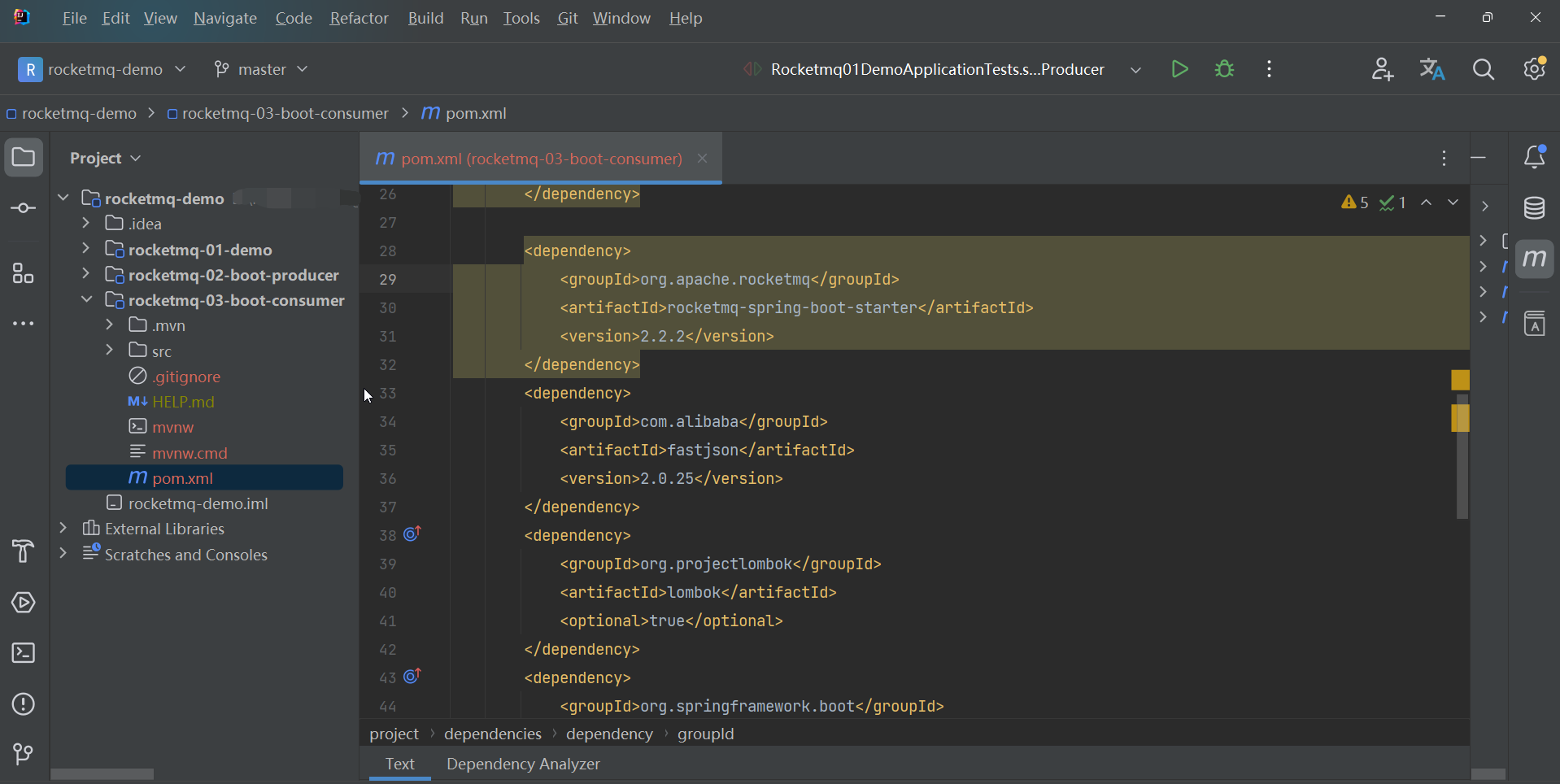
新建生产者的boot项目和消费者的boot项目,pom文件重点如下:
<dependencies>

    <dependency>

        <groupId>org.springframework.boot</groupId>

        <artifactId>spring-boot-starter-web</artifactId>

    </dependency>

    <dependency>

        <groupId>org.apache.rocketmq</groupId>

        <artifactId>rocketmq-spring-boot-starter</artifactId>

        <version>2.2.2</version>

    </dependency>

    <dependency>

        <groupId>com.alibaba</groupId>

        <artifactId>fastjson</artifactId>

        <version>2.0.25</version>

    </dependency>

    <dependency>

        <groupId>org.projectlombok</groupId>

        <artifactId>lombok</artifactId>

        <optional>true</optional>

    </dependency>

    <dependency>

        <groupId>org.springframework.boot</groupId>

        <artifactId>spring-boot-starter-test</artifactId>

        <scope>test</scope>

    </dependency>

</dependencies>

<build>

    <plugins>

        <plugin>

            <groupId>org.springframework.boot</groupId>

            <artifactId>spring-boot-maven-plugin</artifactId>

            <configuration>

                <excludes>

                    <exclude>

                        <groupId>org.projectlombok</groupId>

                        <artifactId>lombok</artifactId>

                    </exclude>

                </excludes>

            </configuration>

        </plugin>

    </plugins>

</build>
02-boot-producer和03-boot-consumer分别对应生产者和消费者。
生产者
生产者yml文件如下:
rocketmq:

    name-server: 地址:端口

    producer:

        group: boot-producer-group
同步发送消息
生产者同步发送消息的代码如下:
@SpringBootTest

class Rocketmq02BootProducerApplicationTests {

    //注入rocketMQTemplate

   	@Autowired

    private RocketMQTemplate rocketMQTemplate;

    @Test

    public void producer(){

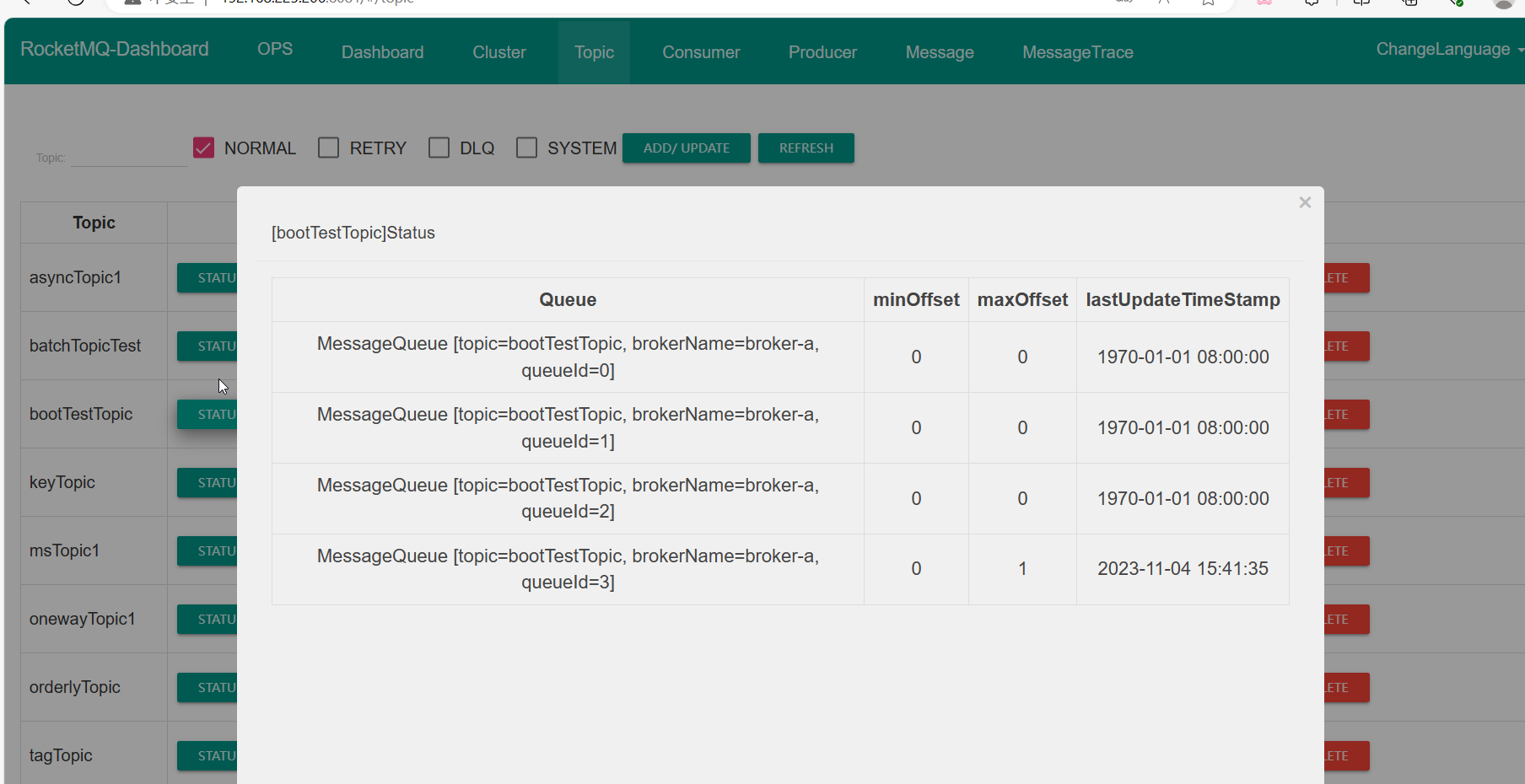
        rocketMQTemplate.syncSend("bootTestTopic","这是boot的一个消息");

    }

}
运行完毕看面板如下:
发送异步消息
// 异步

rocketMQTemplate.asyncSend("bootAsyncTestTopic", "我是boot的一个异步消息", new SendCallback() {

    @Override

    public void onSuccess(SendResult sendResult) {

        System.out.println("成功");

    }

    @Override

    public void onException(Throwable throwable) {

        System.out.println("失败" + throwable.getMessage());

    }

});
发送单向消息
rocketMQTemplate.sendOneWay("bootOnewayTopic", "单向消息");
延迟消息
// 延迟消息

Message<String> msg = MessageBuilder.withPayload("我是一个延迟消息").build();

rocketMQTemplate.syncSend("bootMsTopic", msg, 3000, 3); //第三个参数表示连接消息队列的超时时间,第四个参数表示延时等级
顺序消息
MSGModel类如下
@Data

@AllArgsConstructor

@NoArgsConstructor

public class MsgModel {

    private String orderSn;

    private Integer userId;

    private String desc; // 下单 短信 物流

}
发送顺序消息的生产者如下:
//发送者放 需要将一组消息 都发在同一个队列中去  消费者 需要单线程消费

List<MsgModel> msgModels = Arrays.asList(

    new MsgModel("qwer", 1, "下单"),

    new MsgModel("qwer", 1, "短信"),

    new MsgModel("qwer", 1, "物流"),

    new MsgModel("zxcv", 2, "下单"),

    new MsgModel("zxcv", 2, "短信"),

    new MsgModel("zxcv", 2, "物流")

);

msgModels.forEach(msgModel -> {

    // 发送  一般都是以json的方式进行处理

    rocketMQTemplate.syncSendOrderly("bootOrderlyTopic", JSON.toJSONString(msgModel), msgModel.getOrderSn());

    //第二个参数表示消息内容	第三个参数表示hashKey

});
带标签的消息
@Test

void tagKeyTest() throws Exception {

    rocketMQTemplate.syncSend("bootTagTopic:tagA", "我是一个带tag的消息");

}
带key的消息
@Test

void tagKeyTest() throws Exception {

   // key是写带在消息头的

    Message<String> message = MessageBuilder.withPayload("我是一个带key的消息")

        .setHeader(RocketMQHeaders.KEYS, "key-id-1")

        .build();

    rocketMQTemplate.syncSend("bootKeyTopic", message);

}
消费者
yml配置文件如下:
server:

  port: 8890

rocketmq:

  name-server: 地址:端口
简单消费者
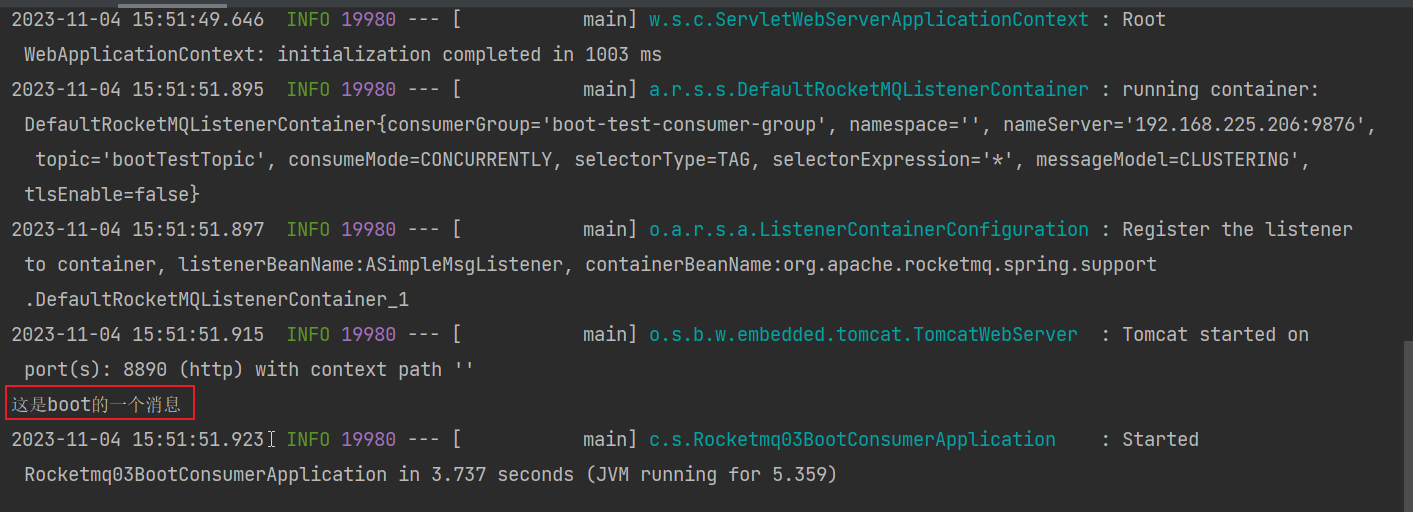
消费者代码如下
@Component

@RocketMQMessageListener(topic = "bootTestTopic",consumerGroup = "boot-test-consumer-group")

public class ASimpleMsgListener implements RocketMQListener<MessageExt> {

    //如果泛型指定固定类型,消息体就是我们的参数

    //MessageExt 是消息所有内容,可以拿到所有内容

    /**

     * 这个方法就是消费消息的方法

     * 只要没有报错,就签收了

     * 如果报错了,就是拒收,就会重试

     * @param message 是消息内容

     */

    @Override

    public void onMessage(MessageExt message) {

        System.out.println(new String(message.getBody()));

    }

}
顺序消息的消费者
@Component

@RocketMQMessageListener(topic = "bootOrderlyTopic",

        consumerGroup = "boot-orderly-consumer-group",

        consumeMode = ConsumeMode.ORDERLY, // 顺序消费模式 单线程

        maxReconsumeTimes = 5 // 消费重试的次数

)

public class BOrderlyMsgListener implements RocketMQListener<MessageExt> {

    @Override

    public void onMessage(MessageExt message) {

        MsgModel msgModel = JSON.parseObject(new String(message.getBody()), MsgModel.class);

        System.out.println(msgModel);

    }

}
带tag的消费者
@Component

@RocketMQMessageListener(topic = "bootTagTopic",

        consumerGroup = "boot-tag-consumer-group",

        selectorType = SelectorType.TAG,// tag过滤模式

        selectorExpression = "tagA || tagB"

//        selectorType = SelectorType.SQL92,// sql92过滤模式  这种一般不用,这种默认没有开启,需要在sql92

                         //需要在broker.conf配置文件中开启enbalePropertyFilter=true

//        selectorExpression = "a in (3,5,7)" // broker.conf中开启enbalePropertyFilter=true

)

public class CTagMsgListener implements RocketMQListener<MessageExt> {

    @Override

    public void onMessage(MessageExt message) {

        System.out.println(new String(message.getBody()));

    }

}
RocketMQ—RocketMQ集成SpringBoot的更多相关文章
- Spring Maven项目集成Springboot
Maven管理的Spring项目,准备集成Springboot做接口 1.Springboot对Spring有版本要求 我用的Springboot版本:1.4.5.RELEASE,对应Spring的版 ...
- 实战:docker搭建FastDFS文件系统并集成SpringBoot
实战:docker搭建FastDFS文件系统并集成SpringBoot 前言 15年的时候,那时候云存储还远远没有现在使用的这么广泛,归根结底就是成本和安全问题,记得那时候我待的公司是做建站开发的,前 ...
- 集成Springboot+MyBatis+JPA
1.前言 Springboot最近可谓是非常的火,本人也在项目中尝到了甜头.之前一直使用Springboot+JPA,用了一段时间发现JPA不是太灵活,也有可能是我不精通JPA,总之为了多学学Spri ...
- eclipse集成springboot 插件(离线安装,含解决Cannot complete the install because one or more required items could)
版权声明:本文为博主原创文章,未经博主允许不得转载. https://blog.csdn.net/li18310727696/article/details/81071002首先,确认eclipse的 ...
- fastdfs基本安装流程和集成springboot总结
FastDFS介绍 1.简介 FastDFS 是一个开源的高性能分布式文件系统(DFS). 它的主要功能包括:文件存储,文件同步和文件访问,以及高容量和负载平衡.主要解决了海量数据存储问题,特别适合以 ...
- netty集成springboot
一 前言 springboot 如何集成netty实现mapper调用不为null的问题让好多读者都头疼过,知识追寻者发了一点时间做了个基本入门集成应用给读者们指明条正确的集成方式,我相信,只要你有n ...
- Drools集成SpringBoot
1.说明 为了更好的在项目中使用Drools, 需要把Drools集成到Spring Boot, 下面介绍集成的方法, 并且开发简单的Demo和测试用例. 2.创建Maven工程 pom.xml工程信 ...
- Flowable实战(二)集成Springboot
1.创建Springboot项目 打开IDEA,通过File -> New -> Project- -> Spring Initializr 创建一个新的Springboot项目 ...
- ElasticSearch集成SpringBoot与常见使用方法
目录 一.导包 二.核对导入的ES版本 修改导入版本 三.写配置类 四.开始测试 索引操作 1.创建索引 2.查看索引是否存在 3.删除索引 文档操作 1.添加文档 2.查看文档是否存在 3.修改文档 ...
- Eclipse在线集成SpringBoot
在线集成下载地址:http://dist.springsource.com/release/TOOLS/update/e4.8/ 注意:需要更改后面的版本号,跟随自己eclipse版本号下载,只需要改 ...
随机推荐
- WebAssembly入门笔记[1]:与JavaScript的交互
前一阵子利用Balazor开发了一个NuGet站点,对WebAssembly进行了初步的了解,觉得挺有意思.在接下来的一系列文章中,我们将通过实例演示的方式介绍WebAssembly的一些基本概念和编 ...
- VScode中下载了插件但是无法找到SSH Target连接服务器的解决方法(CANNOT find SSH Target in remote explorer)
VSCode版本vscode version:(version 1.82) 已下载扩展installed extensions: Remote - SSH v0.106.4 Remote - SSH: ...
- C++ Qt开发:数据库与TableView多组件联动
Qt 是一个跨平台C++图形界面开发库,利用Qt可以快速开发跨平台窗体应用程序,在Qt中我们可以通过拖拽的方式将不同组件放到指定的位置,实现图形化开发极大的方便了开发效率,本章将重点介绍TableVi ...
- 9.2 Windows驱动开发:内核解析PE结构导出表
在笔者的上一篇文章<内核特征码扫描PE代码段>中LyShark带大家通过封装好的LySharkToolsUtilKernelBase函数实现了动态获取内核模块基址,并通过ntimage.h ...
- 1.7 完善自定位ShellCode
在之前的文章中,我们实现了一个正向的匿名管道ShellCode后门,为了保证文章的简洁易懂并没有增加针对调用函数的动态定位功能,此类方法在更换系统后则由于地址变化导致我们的后门无法正常使用,接下来将实 ...
- x64dbg 实现插件Socket反向通信
编写一个带有socket通信功能的插件,x64dbg运行后,用户点击链接按钮可直接连接到外部的python中,python作为服务端,当x64dbg内部出现某个事件后,自动将消息推送到外部python ...
- Spring一套全通3—AOP编程
百知教育 - Spring系列课程 - AOP编程 第一章.静态代理设计模式 1. 为什么需要代理设计模式 1.1 问题 在JavaEE分层开发开发中,那个层次对于我们来讲最重要 DAO ---> ...
- ABC311_g One More Grid Task 题解
题目链接:Atcoder 或者 洛谷 对于解决二维区间内的最值类型问题,我们常常有一类特别好用的方法,就是悬线法,它可以看做是单调栈的子集,但更加好理解和书写. 对于悬线法,我们有一个常见的模型,找出 ...
- yapi tag的问题,暂时只保留一个tag
yapi 的tag是需要先在网页上建立好,如:
- Pandas—read_csv()/read_table()文本文件的读取
对于CSV及txt后缀的文本文件,分别使用pandas模块中的read_csv函数和read_table函数 文件类型 函数名称 CSV read_csv() txt read_table() 1. ...