
C#OpenCvSharp YOLO v3 Demo
效果

项目
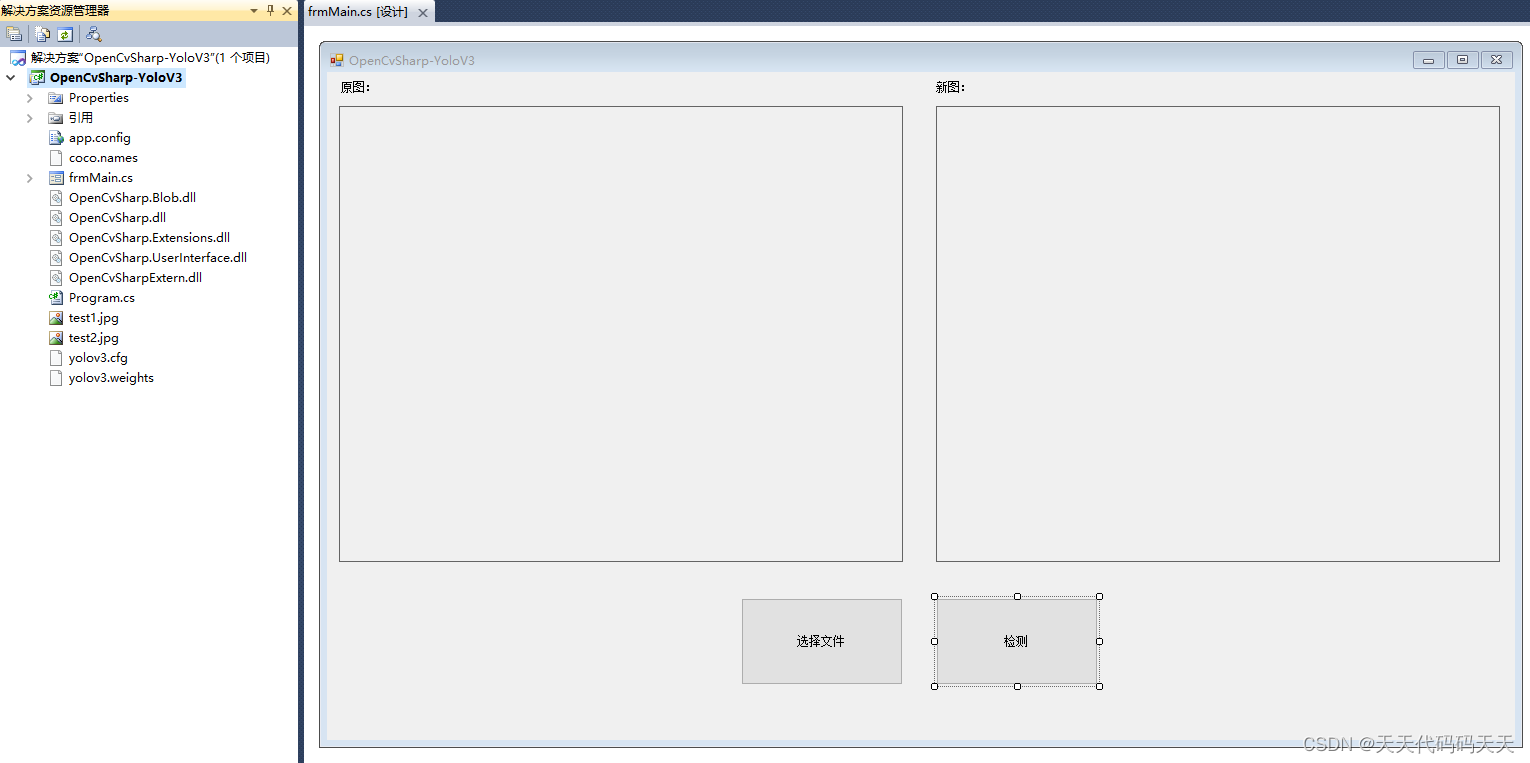
代码
using System;

using System.Collections.Generic;

using System.ComponentModel;

using System.Data;

using System.Drawing;

using System.Linq;

using System.Text;

using System.Windows.Forms;

using OpenCvSharp;

using System.IO;

using OpenCvSharp.Dnn;

using System.Diagnostics;

using OpenCvSharp.Extensions;

namespace OpenCvSharp_YoloV3

{

    public partial class frmMain : Form

    {

        public frmMain()

        {

            InitializeComponent();

        }

        //random assign color to each label

        private static readonly Scalar[] Colors = Enumerable.Repeat(false, 80).Select(x => Scalar.RandomColor()).ToArray();

        //get labels from coco.names

        private static readonly string[] Labels = File.ReadAllLines("coco.names").ToArray();

        string cfg = "yolov3.cfg";

        string model = "yolov3.weights";

        const float threshold = 0.5f;       //for confidence

        const float nmsThreshold = 0.3f;    //threshold for nms

        Net net;

        private void frmMain_Load(object sender, EventArgs e)

        {

            //load model and config, if you got error: "separator_index < line.size()", check your cfg file, must be something wrong.

            net = CvDnn.ReadNetFromDarknet(cfg, model);

            #region set preferable

            net.SetPreferableBackend(3);

            /*

            0:DNN_BACKEND_DEFAULT

            1:DNN_BACKEND_HALIDE

            2:DNN_BACKEND_INFERENCE_ENGINE

            3:DNN_BACKEND_OPENCV

             */

            net.SetPreferableTarget(0);

            /*

            0:DNN_TARGET_CPU

            1:DNN_TARGET_OPENCL

            2:DNN_TARGET_OPENCL_FP16

            3:DNN_TARGET_MYRIAD

            4:DNN_TARGET_FPGA

             */

            #endregion

        }

        private void button1_Click(object sender, EventArgs e)

        {

            if (bmp == null) return;

            //get image

            var org = OpenCvSharp.Extensions.BitmapConverter.ToMat(bmp);//bitmap转mat

            Cv2.CvtColor(org, org, ColorConversionCodes.RGBA2RGB);//mat转三通道mat

            //setting blob, size can be:320/416/608

            //opencv blob setting can check here https://github.com/opencv/opencv/tree/master/samples/dnn#object-detection

            var blob = CvDnn.BlobFromImage(org, 1.0 / 255, new OpenCvSharp.Size(416, 416), new Scalar(), true, false);

            //input data

            net.SetInput(blob);

            //get output layer name

            var outNames = net.GetUnconnectedOutLayersNames();

            //create mats for output layer

            var outs = outNames.Select(_ => new Mat()).ToArray();

            #region forward model

            Stopwatch sw = new Stopwatch();

            sw.Start();

            net.Forward(outs, outNames);

            sw.Stop();

            Console.WriteLine("Runtime:{" + sw.ElapsedMilliseconds + "} ms");

            #endregion

            //get result from all output

            GetResult(outs, org, threshold, nmsThreshold);

            Bitmap Bitmap1 = BitmapConverter.ToBitmap(org);

            pictureBox2.Image = Bitmap1;

        }

        /// <summary>

        /// Get result form all output

        /// </summary>

        /// <param name="output"></param>

        /// <param name="image"></param>

        /// <param name="threshold"></param>

        /// <param name="nmsThreshold">threshold for nms</param>

        /// <param name="nms">Enable Non-maximum suppression or not</param>

        private static void GetResult(IEnumerable<Mat> output, Mat image, float threshold, float nmsThreshold, bool nms = true)

        {

            //for nms

            var classIds = new List<int>();

            var confidences = new List<float>();

            var probabilities = new List<float>();

            var boxes = new List<Rect2d>();

            var w = image.Width;

            var h = image.Height;

            /*

             YOLO3 COCO trainval output

             0 1 : center                    2 3 : w/h

             4 : confidence                  5 ~ 84 : class probability

            */

            const int prefix = 5;   //skip 0~4

            foreach (var prob in output)

            {

                for (var i = 0; i < prob.Rows; i++)

                {

                    var confidence = prob.At<float>(i, 4);

                    if (confidence > threshold)

                    {

                        //get classes probability

                        OpenCvSharp.Point max;

                        OpenCvSharp.Point minLoc;

                        Cv2.MinMaxLoc(prob.Row[i].ColRange(prefix, prob.Cols), out minLoc, out  max);

                        var classes = max.X;

                        var probability = prob.At<float>(i, classes + prefix);

                        if (probability > threshold) //more accuracy, you can cancel it

                        {

                            //get center and width/height

                            var centerX = prob.At<float>(i, 0) * w;

                            var centerY = prob.At<float>(i, 1) * h;

                            var width = prob.At<float>(i, 2) * w;

                            var height = prob.At<float>(i, 3) * h;

                            if (!nms)

                            {

                                // draw result (if don't use NMSBoxes)

                                Draw(image, classes, confidence, probability, centerX, centerY, width, height);

                                continue;

                            }

                            //put data to list for NMSBoxes

                            classIds.Add(classes);

                            confidences.Add(confidence);

                            probabilities.Add(probability);

                            boxes.Add(new Rect2d(centerX, centerY, width, height));

                        }

                    }

                }

            }

            if (!nms) return;

            //using non-maximum suppression to reduce overlapping low confidence box

            int[] indices;

            CvDnn.NMSBoxes(boxes, confidences, threshold, nmsThreshold, out indices);

            Console.WriteLine("NMSBoxes drop {" + (confidences.Count - indices.Length) + "} overlapping result.");

            foreach (var i in indices)

            {

                var box = boxes[i];

                Draw(image, classIds[i], confidences[i], probabilities[i], box.X, box.Y, box.Width, box.Height);

            }

        }

        /// <summary>

        /// Draw result to image

        /// </summary>

        /// <param name="image"></param>

        /// <param name="classes"></param>

        /// <param name="confidence"></param>

        /// <param name="probability"></param>

        /// <param name="centerX"></param>

        /// <param name="centerY"></param>

        /// <param name="width"></param>

        /// <param name="height"></param>

        private static void Draw(Mat image, int classes, float confidence, float probability, double centerX, double centerY, double width, double height)

        {

            //label formating

            var label = Labels[classes] + " " + (probability * 100).ToString("0.00") + "%";

            Console.WriteLine("confidence " + (confidence * 100).ToString("0.00") + "%  " + label);

            var x1 = (centerX - width / 2) < 0 ? 0 : centerX - width / 2; //avoid left side over edge

            //draw result

            image.Rectangle(new OpenCvSharp.Point(x1, centerY - height / 2), new OpenCvSharp.Point(centerX + width / 2, centerY + height / 2), Colors[classes], 2);

            int baseline;

            var textSize = Cv2.GetTextSize(label, HersheyFonts.HersheyTriplex, 0.5, 1, out  baseline);

            Cv2.Rectangle(image, new Rect(new OpenCvSharp.Point(x1, centerY - height / 2 - textSize.Height - baseline),

                new OpenCvSharp.Size(textSize.Width, textSize.Height + baseline)), Colors[classes], Cv2.FILLED);

            var textColor = Cv2.Mean(Colors[classes]).Val0 < 70 ? Scalar.White : Scalar.Black;

            Cv2.PutText(image, label, new OpenCvSharp.Point(x1, centerY - height / 2 - baseline), HersheyFonts.HersheyTriplex, 0.5, textColor);

        }

        private string fileFilter = "*.*|*.bmp;*.jpg;*.jpeg;*.tiff;*.tiff;*.png";

        Bitmap bmp;

        private void button2_Click(object sender, EventArgs e)

        {

            OpenFileDialog ofd = new OpenFileDialog();

            ofd.Filter = fileFilter;

            if (ofd.ShowDialog() != DialogResult.OK) return;

            var imagebyte = File.ReadAllBytes(ofd.FileName);

            bmp = new Bitmap(new MemoryStream(imagebyte));

            pictureBox1.Image = bmp;

        }

    }

}
C#OpenCvSharp YOLO v3 Demo的更多相关文章
- 深度学习笔记(十三)YOLO V3 (Tensorflow)
[代码剖析] 推荐阅读! SSD 学习笔记 之前看了一遍 YOLO V3 的论文,写的挺有意思的,尴尬的是,我这鱼的记忆,看完就忘了 于是只能借助于代码,再看一遍细节了. 源码目录总览 tens ...
- YOLO v3
yolo为you only look once. 是一个全卷积神经网络(FCN),它有75层卷积层,包含跳跃式传递和降采样,没有池化层,当stide=2时用做降采样. yolo的输出是一个特征映射(f ...
- YOLO系列:YOLO v3解析
本文好多内容转载自 https://blog.csdn.net/leviopku/article/details/82660381 yolo_v3 提供替换backbone.要想性能牛叉,backbo ...
- Yolo V3整体思路流程详解!
结合开源项目tensorflow-yolov3(https://link.zhihu.com/?target=https%3A//github.com/YunYang1994/tensorflow-y ...
- YOLO v3算法介绍
图片来自https://towardsdatascience.com/yolo-v3-object-detection-with-keras-461d2cfccef6 数据前处理 输入的图片维数:(4 ...
- 一文看懂YOLO v3
论文地址:https://pjreddie.com/media/files/papers/YOLOv3.pdf论文:YOLOv3: An Incremental Improvement YOLO系列的 ...
- YOLO V3 原理
基本思想V1: 将输入图像分成S*S个格子,每隔格子负责预测中心在此格子中的物体. 每个格子预测B个bounding box及其置信度(confidence score),以及C个类别概率. bbox ...
- Pytorch从0开始实现YOLO V3指南 part5——设计输入和输出的流程
本节翻译自:https://blog.paperspace.com/how-to-implement-a-yolo-v3-object-detector-from-scratch-in-pytorch ...
- Pytorch从0开始实现YOLO V3指南 part1——理解YOLO的工作
本教程翻译自https://blog.paperspace.com/how-to-implement-a-yolo-object-detector-in-pytorch/ 视频展示:https://w ...
- yolo类检测算法解析——yolo v3
每当听到有人问“如何入门计算机视觉”这个问题时,其实我内心是拒绝的,为什么呢?因为我们说的计算机视觉的发展史可谓很长了,它的分支很多,而且理论那是错综复杂交相辉映,就好像数学一样,如何学习数学?这问题 ...
随机推荐
- Google搜索操作符:让你秒变搜索专家
搜索引擎对互联网的重要性不言而喻,不过,随着ChatGPT及其类似AI工具的推出,对搜索引擎带来了前所未有的挑战. 因为ChatGPT具有自然语言处理能力,能够更好地理解用户的搜索意图,提供更准确.更 ...
- Git Conventional Commits (Git代码提交说明规范)
Conventional Commits (代码提交说明规范) Conventional Commits 是关于Git Commit 提交代码时, 填写的说明文字的一个规范. 这个规范提供了一套易于理 ...
- junit运行Parameterized参擞化测试
Parameterized (参数化)的测试运行器允许你使用不同的参数多次运行同一个侧试. 运行此测试的必备条件: 1.必须使用@RunWith(Parameterized.class) 2.必须声明 ...
- 《深入理解Java虚拟机》(四) 调优工具、指令
目录 JVM 调优的概念 jps 1.options 功能选项 2.hostid jstat 1.vmid格式 2.interval 和 count 3.option jinfo jmap jhat ...
- 关于char * 和 char [] 的一点理解
截取一段有用的信息: c++的char[]和char*的区别 char str1[] = "abc": 这里的"abc"是一个常量,首先会在常量存储区里存储&q ...
- 记录级别索引:Hudi 针对大型数据集的超快索引
介绍 索引是一个关键组件,有助于 Hudi 写入端快速更新和删除,并且它在提高查询执行方面也发挥着关键作用. Hudi提供了多种索引类型,包括全局变化的Bloom索引和Simple索引.利用HBase ...
- 构建SatelliteRpc:基于Kestrel的RPC框架(整体设计篇)
背景 之前在.NET 性能优化群内交流时,我们发现很多朋友对于高性能网络框架有需求,需要创建自己的消息服务器.游戏服务器或者物联网网关.但是大多数小伙伴只知道 DotNetty,虽然 DotNetty ...
- RK3568开发笔记(二):入手RK3568开发板的套件介绍、底板介绍和外设测试
前言 本篇主要介绍RK3568芯片和入手开发板的底板介绍以及开发板的外设. 开发板 笔者的开发板是全套+10.1寸屏. 开发板实物 开发板资源 开发版本提供资料 开发 ...
- 内置方法,序列化模块pickle和json---day15
1.内置方法 ads 绝对值函数 val = -16 res = abs(val) print(res) #16 round 四舍五入(n.5 n为偶数则舍去,n.5 n为奇数 则进一) 奇进偶不进 ...
- 微信小程序:接手项目,修bug
好家伙, 问题描述如下: 小程序主界面,选择快速上传会议记录 选择快速 其中,没有2022-2023第二学期,所以,新的会议记录无法上传 于是,我自愿修复这个bug 由于我们没有产品文档 我只能由 ...