
操作系统复习 MITS6.1810 lab util 记录
lab util
sleep
介绍:主要用来熟悉下环境以及代码结构。
- See
kernel/sysproc.cfor the xv6 kernel code that implements thesleepsystem call (look forsys_sleep),user/user.hfor the C definition ofsleepcallable from a user program, anduser/usys.Sfor the assembler code that jumps from user code into the kernel forsleep.
- See
代码:
#include "kernel/types.h"

#include "user/user.h"

int main(int argc, char *argv[])

{

  if (argc <= 1) {

    fprintf(2, "usage: sleep `time`...\n");

  }

  int tick_num = atoi(argv[1]);

  sleep(tick_num);

  exit(0);

}
pingpong
单个管道一般用于单向通信,父子进程可通过两个管道进行双向通信。(管道详细行为参考
primes实验部分)代码:
#include "kernel/types.h"

#include "user/user.h"

#define BUFFSIZE 128

void perror_exit(char* err_msg) {

  fprintf(2, "%s\n", err_msg);

  exit(-1);

}

int main(int argc, char *argv[])

{

  int toson_fd[2];

  int toparent_fd[2];

  int ret1 = pipe(toson_fd);

  int ret2 = pipe(toparent_fd);

  if (ret1 == -1 || ret2 == -1) {

    perror_exit("pipe error");

  }

  int pid = fork();

  if (pid == -1) { //

    perror_exit("fork error");

  } else if (pid == 0) { // child process

    close(toson_fd[1]);

    close(toparent_fd[0]);

    // read from the pipe1

    char buf[BUFFSIZE];

    int rbytes = read(toson_fd[0], buf, sizeof(buf));

    if (rbytes == -1) {

      perror_exit("read error");

    }

    buf[rbytes] = '\0';

    // print the msg from parent

    fprintf(1, "%d: received %s\n", getpid(), buf);

    // write response to parent (to pipe2)

    char resp[4] = "pong";

    int ret = write(toparent_fd[1], resp, sizeof(resp));

    if (ret == -1) {

      perror_exit("write error");

    }

  } else { // parent process

    close(toson_fd[0]);

    close(toparent_fd[1]);

    // write to son

    char msg[4] = "ping";

    int ret = write(toson_fd[1], msg, sizeof(msg));

    if (ret == -1) {

      perror_exit("write error");

    }

    // read from son

    char buf[BUFFSIZE];

    int rbytes = read(toparent_fd[0], buf, sizeof(buf));

    if (rbytes == -1) {

      perror_exit("read");

    }

    buf[rbytes] = '\0';

    // print the resp from son

    fprintf(1, "%d: received %s\n", getpid(), buf);

  }

  exit(0);

}
primes
介绍
实验要求通过 fork 和 pipe 系统调用建立起如下素数筛的 pipeline.
p = get a number from left neighbor

print p

loop:

    n = get a number from left neighbor

    if (p does not divide n)

        send n to right neighbor
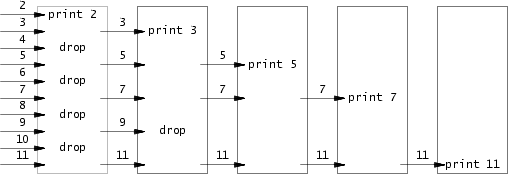
思路
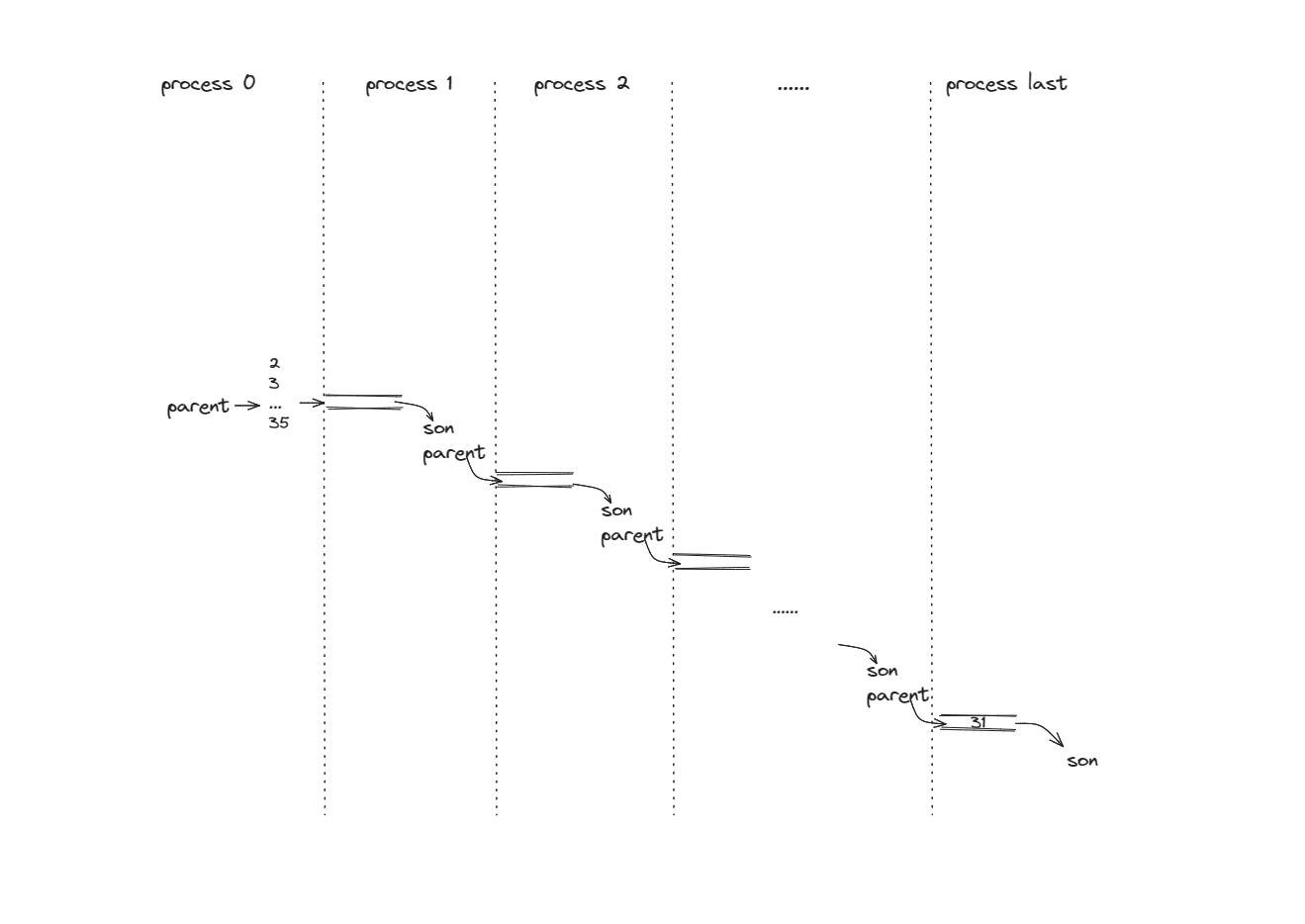
CSP 的关键点在于:单个步骤内部操作是串行的,所有步骤之间是并发的。步骤之间的通信通过特定的 channel 完成,这里通过 pipe 完成。
如上图,除去第一个进程和最后一个进程,每个进程有两种身份(父/子)。
分析上述 pipeline, 每个进程需做如下事情:
从 left-side-pipe 中读取数据,尝试打印素数 prime。
- 如果 left-side-pipe 的写端关闭且没读到数据,代表没有数据到达。本进程任务结束,正常 exit.
建立一个新的 right-side-pipe, fork 出一个子进程, 自身即作为“父身份”根据第一步得出的 prime 进行 filter, 将过滤后的数据传入 right-side-pipe. wait 子进程,等待子进程打印结束。
- 进程 p0 由 shell fork 创建,如果 p0 不 wait 子进程,父进程 p0 可能在所有子进程打印完成前结束,此时 shell 会向终端输出提示符
$,造成$穿插在打印结果中的现象。 - 不 wait:
- 子进程还在运行,父进程结束 -> 孤儿进程 -> 由 init 收养。缺点:原父进程得不到子进程的状态。
- 父进程还在运行,子进程结束 -> 僵尸进程。缺点:占用资源得不到释放 (
task_struct)。
- 进程 p0 由 shell fork 创建,如果 p0 不 wait 子进程,父进程 p0 可能在所有子进程打印完成前结束,此时 shell 会向终端输出提示符
notes: fork 出来的子进程重复上述操作。
注意点
- 注意 close(pipe) 的时机,最保险的做法是尽可能早关闭不需要的读写端。
- wait 操作。
- 错误处理。
代码
#include "kernel/types.h"

#include "user/user.h"

#define NULL 0

void perror_exit(char* err_msg) {

  fprintf(2, "%s\n", err_msg);

  exit(-1);

}

void child_processing(int left_pipe[2]) {

  // every process do things below:

  // 0. read from left-side pipe, and try to print a prime.

  // 1. create a new right-side pipe, do fork, pass the filtered data to right-side pipe.

  // notes: The new child processes forked will recursively do the above tasks.

  close(left_pipe[1]);

  int prime;

  int rbytes = read(left_pipe[0], &prime, sizeof(prime));

  if (rbytes == -1) {

    close(left_pipe[0]);

    perror_exit("read error");

  } else if (rbytes == 0) {

    // No more data reaches here

    close(left_pipe[0]);

    exit(0);

  } else {

    fprintf(1, "prime %d\n", prime);

  }

  int right_pipe[2];

  int ret = pipe(right_pipe);

  if (ret == -1) {

    perror_exit("pipe error");

  }

  ret = fork();

  if (ret == -1) {

    perror_exit("fork error");

  } else if (ret > 0) { // parent/current process

    close(right_pipe[0]);

    // do filtering, write data into the right-side pipe

    int num;

    while ((rbytes = read(left_pipe[0], &num, sizeof(num))) != 0) {

      if (rbytes == -1) {

        perror_exit("read error");

      }

      if (num % prime != 0) {

        write(right_pipe[1], &num, sizeof(num));

      }

    }

    // if rbytes == 0, no more data reaches. the job of this process is done

    close(left_pipe[0]);

    close(right_pipe[1]);

    wait(NULL);

    exit(0);

  } else if (ret == 0) { // child process

    child_processing(right_pipe);

  }

}

int main(int argc, char* argv[])

{

  int pipe_fds[2];

  int ret = pipe(pipe_fds);

  if (ret == -1) {

    perror_exit("pipe error");

  }

  // create child process

  int pid = fork();

  if (pid == -1) {

    perror_exit("fork error");

  } else if (pid == 0) {  // child process

    // read from pipe, do filtering and pass the data to next stage

    child_processing(pipe_fds);

  } else {  // parent process

    close(pipe_fds[0]);

    const int MAX = 35;

    for (uint32 i = 2; i <= MAX; ++ i) {

      write(pipe_fds[1], &i, sizeof(i));

    }

    close(pipe_fds[1]);

    wait(NULL);

  }

  exit(0);

}
知识点
- 多个写者向同一管道写数据时,可以确保写入不超过 PIPE_BUF 字节的操作是原子的。
- 即假设 A 写入数据 aa; B 写入数据 bb. 可以保证管道内数据必是 aabb 或者 bbaa,不会出现 abab 此类交叉的情况。
- 如果写入数据量超过限制,内核会将其切分成若干个片段进行传输,
write()调用会阻塞直到所有数据都被写入管道位置(此时便可能出现数据交叉的情况)。
- 如果管道的写端被关闭,从读端读数据的进程读完所有剩余数据后,将会看到文件结束,
read()返回 0. - 管道容量是有限的,非特权进程可以通过
fctnl(fd, F_SETPIPE_SIZE, size)进行修改,修改范围为 pagesize 和 /proc/sys/fs/pipe-max-size 之间。- 更大的管道容量意味着更少的上下文切换。
- 管道用于单向通信,即某进程在一端读,另一进程在一端写。
- 如果允许父子进程都能够读/写同一管道,那么会发生竞争,需要额外的同步机制。
- 如果需要双向通信,分别在两个方向上各设立一个管道即可。
- 关闭未使用管道 fd.
- 如果读进程没有关闭管道的写端,那么在其他进程关闭了写入文件描述符后,读者也不会看到文件结束,因为内核知道至少还存在一个管道的写入描述符打开着,即读取进程自己。
- 如果写进程没有关闭管道的读端,那么即使其他进程已经关闭了读端文件描述符,写进程仍然能够向管道中写入数据,最后管道被写满,后续的写入请求会被永远阻塞。
- 当进程尝试向一个管道写入数据,但是没有进程占用该管道读端时,内核会向进程发送
SIGPIPE信号,默认处理会杀死进程。
find
思路:查找待查找目录下所有条目:
- 如果是目录,递归查找
- 如果是普通文件,比对文件名,输出
实现:参考
ls.c实现。目录文件本质也是一个文件,不过文件内容是一个个 directory entry. 因此对于目录,读取其文件内容至 dir_entry 中,判断其类型,进行相应处理。代码:
#include "kernel/types.h"

#include "kernel/stat.h"

#include "kernel/fs.h"

#include "user/user.h"

char* fmtname(char *path) {

  static char buf[DIRSIZ+1];

  char *p;

  // Find first character after last slash.

  for (p = path + strlen(path); p >= path && *p != '/'; p--)

    ;

  p++;

  // Return blank-padded name.

  if (strlen(p) >= DIRSIZ)

    return p;

  memmove(buf, p, strlen(p));

  memset(buf+strlen(p), ' ', DIRSIZ-strlen(p));

  return buf;

}

void find(char* path, char* file_name) {

  int fd = open(path, 0);

  if (fd < 0) {

    fprintf(2, "find: cannot open %s\n", path);

    goto clean;

  }

  int ret;

  struct stat st;

  ret = fstat(fd, &st);

  if (ret < 0) {

    fprintf(2, "find: cannot stat %s\n", path);

    goto clean;

  }

  if (st.type != T_DIR) {

    fprintf(2, "find: the first param should be directory\n");

    goto clean;

  }

  char buf[512];

  if (strlen(path) + 1 + DIRSIZ + 1 > sizeof buf) {

    fprintf(2, "find: path too long\n");

    goto clean;

  }

  strcpy(buf, path);

  char* p = buf + strlen(buf);

  *p++ = '/';

  struct dirent de;

  while (read(fd, &de, sizeof(de)) == sizeof(de)){

    if (de.inum == 0)

      continue;

    memmove(p, de.name, DIRSIZ);

    p[DIRSIZ] = '\0';

    if (stat(buf, &st) < 0) {

      printf("find: cannot stat %s\n", buf);

      continue;

    }

    switch (st.type) {

      case T_FILE:

        if (strcmp(file_name, de.name) == 0) {

          fprintf(1, "%s\n", buf);

        }

        break;

      case T_DIR:

        if (strcmp(".", de.name) != 0 && strcmp("..", de.name) != 0) {

          find(buf, file_name);

        }

        break;

      case T_DEVICE:

        break;

    }

  }

clean:

  close(fd);

  return;

}

int main(int argc, char *argv[])

{

  if (argc != 3) {

    fprintf(2, "Usage: %s <directory> <filename>\n", argv[0]);

    exit(1);

  }

  find(argv[1], argv[2]);

  exit(0);

}
操作系统复习 MITS6.1810 lab util 记录的更多相关文章
- 我的操作系统复习——I/O控制和系统调用
上篇博客介绍了存储器管理的相关知识——我的操作系统复习——存储器管理,本篇讲设备管理中的I/O控制方式和操作系统中的系统调用. 一.I/O控制方式 I/O就是输入输出,I/O设备指的是输入输出设备和存 ...
- XV6学习(1) Lab util
正在学习MIT的6.S081,把做的实验写一写吧. 实验的代码放在了Github上. 第一个实验是Lab util,算是一个热身的实验,没有涉及到系统的底层,就是使用系统调用来完成几个用户模式的小程序 ...
- 操作系统复习(updating)
操作系统复习(updating) 1.进程和线程的区别是什么? 1)调度:进程是操作系统资源分配的基本单位,而线程是处理器任务调度和执行的基本单位 2)拥有资源:不论是传统操作系统还是设有线程的操作系 ...
- 操作系统复习——如何查看一个进程的详细信息,如何追踪一个进程的执行过程 ,如何在 Linux 系统下查看 CPU、内存、磁盘、IO、网卡情况?epoll和select区别?
1. 如何查看一个进程的详细信息,如何追踪一个进程的执行过程 通过pstree命令(根据pid)进行查询进程内部当前运行了多少线程:# pstree -p 19135(进程号) 使用top命令查看(可 ...
- Jupyter lab 配置记录,xpython + R 语言
install.packages(c("repr", "IRdisplay", "evaluate", "crayon" ...
- 操作系统:进程管理和IO控制
一.进程管理 进程管理包括进程控制,进程调度,进程同步与通信,死锁控制四个内容. (一)进程控制 进程是操作系统中运行的基本单位,包括程序段,数据段和进程控制段.操作系统通过进程控制块(PCB)管理进 ...
- [No000038]操作系统Operating Systems -CPU
管理CPU ,先要使用CPU… CPU 的工作原理 CPU上电以后发生了什么? 自动的取指 — 执行 CPU 怎么工作? CPU怎么管理? 管理CPU 的最直观方法 设好PC 初值就完事! 看看这样做 ...
- java 复习001
java 复习001 比较随意的记录下我的java复习笔记 ArrayList 内存扩展方法 分配一片更大的内存空间,复制原有的数据到新的内存中,让引用指向新的内存地址 ArrayList在内存不够时 ...
- 操作系统--进程管理(Processing management)
一.进程的组成 进程通常由程序.数据和进程控制块(Process Control Block,PCB)组成. 二. 进程的状态以及状态切换 进程执行时的间断性决定了进程可能具有多种状态,最基本的三种状 ...
- JavaSE复习(七)Stream流和方法引用
Stream流 全新的Stream概念,用于解决已有集合类库既有的弊端. 传统集合的多步遍历代码 几乎所有的集合(如 Collection 接口或 Map 接口等)都支持直接或间接的遍历操作.而当我们 ...
随机推荐
- Irwin-Hall 分布学习笔记
定理:Irwin-Hall 分布 对于 \(n\) 个在 \([0,1]\) 内均匀分布的实数随机变量,它们的和不超过一个实数 \(z\) 的概率为: \[F(z)=\sum\limits_{k=0} ...
- Redis缓存穿透、击穿、雪崩
文章目录 缓存穿透 缓存雪崩 缓存击穿 代码实战部分 缓存击穿实战代码封装 缓存穿透解决 Redis目前是非常流行的缓存数据库,缓存穿透.缓存击穿.缓存雪崩是常见的面试题,也是非常重要的问题. 缓存穿 ...
- TCP/IP网络模型
在网络模型中有分为7层模型(OSI模型)和5层模型和TCP/IP模型 OSI模型将应用层和表示层作为独立的两层,而TCP/IP模型将它们合并为一个应用层. 两种对比来说,TCP/IP模型更符合实际开发 ...
- 2022-08-18:每一个序列都是[a,b]的形式,a < b 序列连接的方式为,前一个序列的b,要等于后一个序列的a 比如 : [3, 7]、[7, 13]、[13, 26]这三个序列就可以依次连
2022-08-18:每一个序列都是[a,b]的形式,a < b 序列连接的方式为,前一个序列的b,要等于后一个序列的a 比如 : [3, 7].[7, 13].[13, 26]这三个序列就可以 ...
- 2022-01-21:完美矩形。 给你一个数组 rectangles ,其中 rectangles[i] = [xi, yi, ai, bi] 表示一个坐标轴平行的矩形。这个矩形的左下顶点是 (xi,
2022-01-21:完美矩形. 给你一个数组 rectangles ,其中 rectangles[i] = [xi, yi, ai, bi] 表示一个坐标轴平行的矩形.这个矩形的左下顶点是 (xi, ...
- Selenium - 元素操作(4) - alert弹窗处理
Selenium - 元素操作 alert弹窗 Alert弹出框由于不是html的页面元素,而是JavaScript的控件:所以不能右键检查,用传统的方法去操作. 例如这种弹窗: # 获取告警弹框的文 ...
- springboot 静态资源导入
1.根据源码可以看到需要去webjars官网下载jquery的依赖 <dependency> <groupId>org.webjars</groupId> < ...
- IntelliJ IDEA 最新激活码:2023、2022及以下版本通用(亲测有效)
分享一下 IntelliJ IDEA 2023.1 最新激活注册码,破解教程如下,可免费永久激活,亲测有效,下面是详细文档哦~ 申明:本教程 IntelliJ IDEA 破解补丁.激活码均收集于网络, ...
- 区间数k大数查询
题目 问题描述 给定一个序列,每次询问序列中第 l 个数到第 r 个数中第 K 大的数是哪个. 输入格式 第一行包含一个数 n,表示序列长度. 第二行包含 n 个正整数,表示给定的序列. 第三个包含一 ...
- 使用默认pypi源出现连接超时
背景信息 安装 dataworks sdk 时报错,原因是连接默认的 pypi 仓库超时 pip install aliyun-python-sdk-dataworks-public==4.2.1 报 ...