
pc 移动端 双端切换
实现一个项目匹配多个端,使用vue.config自带的page 实现多个页面切换。官网介绍:https://cli.vuejs.org/zh/config/#pages
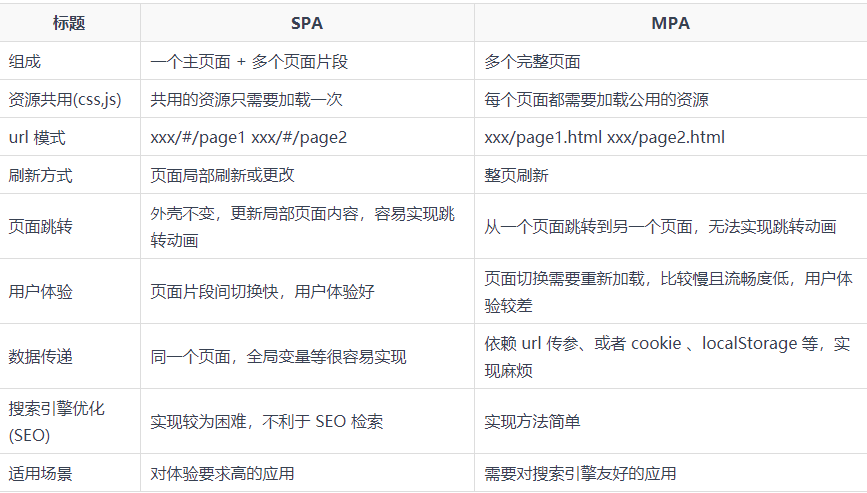
在创建的vue项目中找到 vue.config.js中 添加page
没有就在根目录下创建vue.config.js


const { defineConfig } = require('@vue/cli-service')

module.exports = defineConfig({

  transpileDependencies: true,

  //多页面配置

  pages: {

    // 多个页面

    mobile: {

      // 模板来源

      template: 'public/mobile.html',

      // page 的入口

      entry: 'src/mobile.main.ts',

      // 在 dist/index.html 的输出

      filename: 'mobile.html',

      // 页面标题

      title: '移动适配',

    },

    index: {

      template: 'public/index.html',

      entry: 'src/main.ts',

      filename: 'index.html',

      title: 'pc适配',

    }

  },

})
vue.config.js
分别在 public, router ,views ,src下添加修改文件

public 中复制一个html 修改名字为 mobile(可以更具需求自己修改)。
router 与 view 中创建2套路由文件,分别对应pc 与 mobile
找到src 文件下的 App.vue 与 main.ts 复制一套并改名 为 mobileApp.vue 与 mobile.main.ts
router 多端路由配置

index.ts 代码
pc与mobile 下的index.ts 内容都一样,只有component 对应的页面地址 更具不同的端 ,对应不同的地址。
注:pc 与 mobile 内容,唯一要注意的是页面地址 分别对应不同的路径
import { createRouter, createWebHashHistory, RouteRecordRaw } from 'vue-router'

const routes: Array<RouteRecordRaw> = [

  {

    path: "/",

    name: "home",

    //pc 或mobile 路径

    component: () => import('@/views/PC/HomeView/HomeView.vue'),

    meta: {

      title: "首页",

      //是否需要登录

      requireAuth: false

    }

  }

]

const router = createRouter({

  history: createWebHashHistory(process.env.BASE_URL),

  //整合路由

  routes: routes,

})

/*

  前置 路由守卫

*/

/* eslint-disable */

router.beforeEach((to, from, next) => {

  /* -----通过本地缓存进行判断,获取指定key本地存储的值进行判断----- */

  if (to.meta.requireAuth) {

    // 获取指定key本地存储的值

    const token = localStorage.getItem('Authorization')

    if (token === null || token === '') {

      //登录弹窗

      console.log("去登录")

    } else {

      next()

    }

  } else {

    next()

  }

})

/* eslint-disable no-new */

/*

  后置 路由守卫

*/

router.afterEach((to: any) => {

  // console.log("后置 路由守卫", to, from)

  //更改每个页面的标题

  document.title = to.meta.title;

})

export default router
router
Views 文件配置
在views 文件下分别创建 PC 与 Moblie 文件,对应为 pc端与移动端的页面地址。
复制一套app.vue 与main.ts ,修改复制的名字为 mobileApp.vue 与 mobile.main.ts
app.vue 与 mobileApp.vue
<template>

  <router-view />

</template>

<style lang="scss">

</style>
app.vue
main.ts 与 mobile.main.ts
import { createApp } from 'vue'

import App from './App.vue'

// main 导入 pc 端路由

import router from './router/pc/index'

// mobile.main 导入 mobile 端路由

// import router from './router/mobile/index'

import store from './store'

const app = createApp(App)

// 浏览器视口小于900px时,使用mobile路由

// 浏览器视口大于900px时,使用pc路由

import '@/utils/convert/autoSwitch'

import '@/utils/convert/rem'

app.use(store).use(router).mount('#app')
main.ts
创建utils文件,在创建convert 文件

在convert文件内部创建:autoSwitch.ts ,functions.ts ,rem.ts
autoSwitch 根据页面大小, 切换显示的端口
import { debounce } from './functions'

window.addEventListener('resize', debounce(() => {

  if (document.documentElement.clientWidth < 900) {

    if (window.location.href === '/mobile.html#/') return

    window.location.href = './mobile.html#/'

  } else {

    if (window.location.href === '/index.html#/') return

    window.location.href = './index.html#/'

  }

}, 100))
autoSwitch.ts
rem 设置默认字体 等元素
import { debounce } from './functions'

function setRem() {

  // 320 默认大小16px; 320px = 20rem ;每个元素px基础上/16

  const htmlWidth = document.documentElement.clientWidth || document.body.clientWidth

  // 得到html的Dom元素

  const htmlDom = document.getElementsByTagName('html')[0]

  // 设置根元素字体大小

  const clientWidth = document.documentElement.clientWidth

  // 1920设计稿一套样式,750设计稿一套样式

  htmlDom.style.fontSize = clientWidth < 900 ? htmlWidth / 46.875 + 'px' : htmlWidth / 120 + 'px'

}

// 初始化

setRem()

window.addEventListener('resize', debounce(setRem, 100))
rem.ts
functions 防抖与节流函数
注:注释的为js版本使用的 ,没注释的为ts版本
// 防抖函数

type CallbackFn = (item?: any) => void

export function debounce(fn: CallbackFn, delay: number) {

  let timer: number | null = null;

  return (...args: any[]) => {

    if (timer) {

      clearTimeout(timer);

    }

    timer = setTimeout(() => {

      fn(...args);

    }, delay);

  }

}

// 节流函数

export function throttle(fn: CallbackFn, delay: number) {

  let timer: number | null = null;

  return (...args: any[]) => {

    if (timer) {

      return;

    }

    timer = setTimeout(() => {

      fn(...args);

      timer = null

    }, delay);

  }

}

/*

js 原始版本

// 防抖函数

export function debounce(fn, delay) {

  let timer = null

  return function () {

    const _this = this

    const args = arguments

    if (timer) {

      clearTimeout(timer)

    }

    timer = setTimeout(function () {

      fn.apply(_this, args)

    }, delay)

  }

}

// 节流函数

export function throttle(fn, delay) {

  let timer = null

  return function () {

    const _this = this

    const args = arguments

    if (timer) {

      return

    }

    timer = setTimeout(function () {

      fn.apply(_this, args)

      timer = null

    }, delay)

  }

}

*/
functions.ts
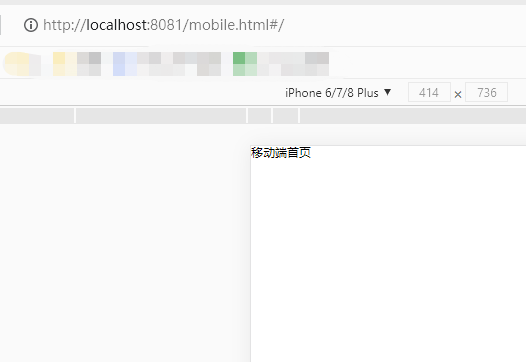
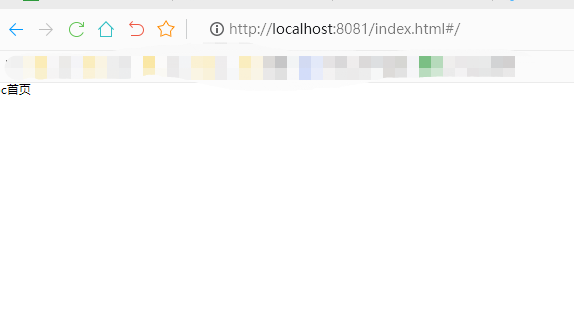
运行路由展示
项目地址:https://github.com/jielov/doubleEnd-switch
pc 移动端 双端切换的更多相关文章
- 在thinkPHP3.2.3框架下实现手机和PC端浏览器的切换
查看thinkphp版本号方法 打开文件“根目录\ThinkPHP\ThinkPHP.php”下的文件ThinkPHP.php,在22--23行可以看到版本信息THINK_VERSION,如下图: 说 ...
- 10天学会phpWeChat——第七天:创建一个自适应PC网站+H5移动端的模块
本教程基于phpWeChat核心框架1.1.0+版本.下载地址:http://s.phpwechat.com/app_38026ed22fc1a91d92b5d2ef93540f20 通过前面六讲的系 ...
- 在PC上测试移动端网站和模拟手机浏览器的5大方法
在PC上测试移动端网站和模拟手机浏览器的5大方法 来源:互联网 作者:佚名 时间:03-19 10:14:54 [大 中 小] 最近公司要开发网站的移动版,让我准备准备知 ...
- bootstrap导航栏PC端移动端之不同样式
在此之前,我先说我之所以要改变网站PC移动双端不同样式的原因. 首先我的网站用到了bootstrap响应式布局,这是我网站的PC端导航栏: 这是我网站的移动端导航栏,看着就难受: 我用谷歌浏览器F12 ...
- lintcode二叉树的锯齿形层次遍历 (双端队列)
题目链接: http://www.lintcode.com/zh-cn/problem/binary-tree-zigzag-level-order-traversal/ 二叉树的锯齿形层次遍历 给出 ...
- lintcode 滑动窗口的最大值(双端队列)
题目链接:http://www.lintcode.com/zh-cn/problem/sliding-window-maximum/# 滑动窗口的最大值 给出一个可能包含重复的整数数组,和一个大小为 ...
- HTML5移动端图片左右切换动画
插件描述:HTML5移动端图片左右切换动画 小海今天要给大家分享一款很不错的图片左右切换焦点图动画,并且支持移动端触摸滑动.功能上,这款HTML5图片播放器支持鼠标滑动.手机端触摸滑动以及自动播放.外 ...
- Java数据结构——用双端链表实现队列
//================================================= // File Name : LinkQueue_demo //---------------- ...
- STL---deque(双端队列)
Deque是一种优化了的.对序列两端元素进行添加和删除操作的基本序列容器.它允许较为快速地随机访问,但它不像vector 把所有的对象保存在一块连续的内存块,而是采用多个连续的存储块,并且在一个映射结 ...
- hdu-5929 Basic Data Structure(双端队列+模拟)
题目链接: Basic Data Structure Time Limit: 7000/3500 MS (Java/Others) Memory Limit: 65536/65536 K (Ja ...
随机推荐
- 2022-04-22:给你两个正整数数组 nums 和 target ,两个数组长度相等。 在一次操作中,你可以选择两个 不同 的下标 i 和 j , 其中 0 <= i, j < nums.leng
2022-04-22:给你两个正整数数组 nums 和 target ,两个数组长度相等. 在一次操作中,你可以选择两个 不同 的下标 i 和 j , 其中 0 <= i, j < num ...
- 2020-03-01:给定一个非负数组arr,代表直方图。返回直方图的最大长方形面积。
2020-03-01:给定一个非负数组arr,代表直方图.返回直方图的最大长方形面积. 福哥答案2020-03-01: 单调栈,大压小.有代码. 代码用golang编写,代码如下: package m ...
- Springboot通过谷歌Kaptcha 组件,生成图形验证码
图形验证码属于老生常谈了,具体细节这里就不说了.生成图形验证码的办法非常多,今天讲解一种通过Kaptcha组件快速生成图形验证码的方法.Kaptcha是谷歌开源的一款简单实用的图形验证码组件.我个人推 ...
- 公众号接入 ChatGPT 了!
虽迟但到,用了一段时间的chatgpt,功能确实令人惊叹,也是第一次体验到了交互式编程.不得不说,未来已来,花了一些时间,终于把chatgpt接入到了公众号! 使用方法 打开公众号的对话框,直接提问! ...
- GPUImage框架使用
GPUImage框架简介 GPUImage框架是一个基于OpenGL ES 2.0的iOS图像和视频处理框架.它充分利用GPU并行计算能力可以实时处理图像和视频,可以让开发者轻松地实现各种滤镜效果. ...
- C#识别文字内容并分类输出0和1
这个代码最开始是为了处理在调查问卷的结果,问卷星等调查问卷有一部分是用汉字描述的多选题,问卷系统在输出问卷的时候直接就是将汉字进行输出,而我们在进行数据分析(二元logistic或多项logistic ...
- RStuido Server 选择不同的 R 版本(conda 中的不同 R 版本)
自从上一次服务器重装系统之后,总感觉缺少了一些东西,安装R包很多依赖库报错,也可以解决,但总是存在,烦. 一天,一个同事问我说ggpubr包安装不成功,我就自己试了一下,真的是--安装不成功. 当你到 ...
- 浙大Jarvisoj [XMAN]level6 Writeup
分析代码 初始化 0x0804A2EC:保存malloc(0xC10)返回的指针 malloc(0xC10) 0 1 ... ... value note 总数:256 已使用 note 数 0 一. ...
- 【WebServer】项目总体流程
1. 项目总体流程: 事件处理模式:采用Epoll边沿触发的IO多路复用技术,模拟Proactor模式: 主线程使用epoll监听与客户端连接的socket,并在主线程中对这些socket执行数据读写 ...
- SpringBoot 多环境切换
日常开发中一般都会有三个不同的环境,分别是开发环境(dev),测试环境(test)和生产环境(prod),不同的环境各种配置都不相同,比如数据库配置,服务器端口等等. Spring Boot 多环境配 ...