
R 语言柱状图示例笔记
由于微信不允许外部链接,你需要点击文章尾部左下角的 "阅读原文",才能访问文章中链接。
一、基础柱状图
1. barplot 命令
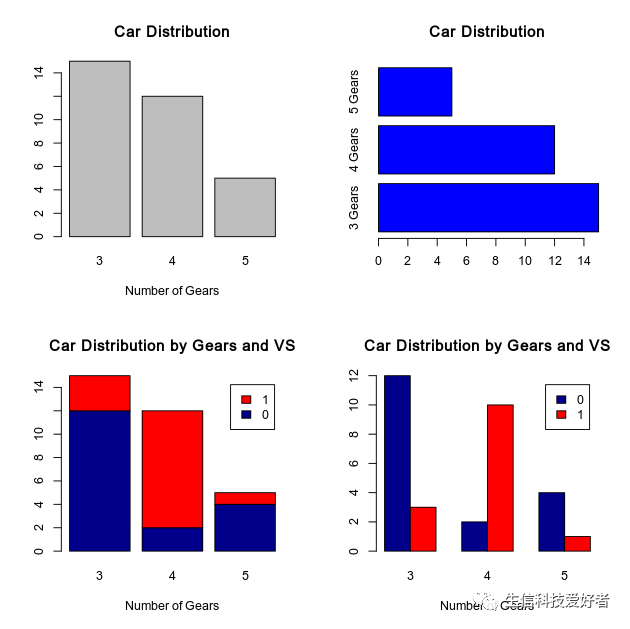
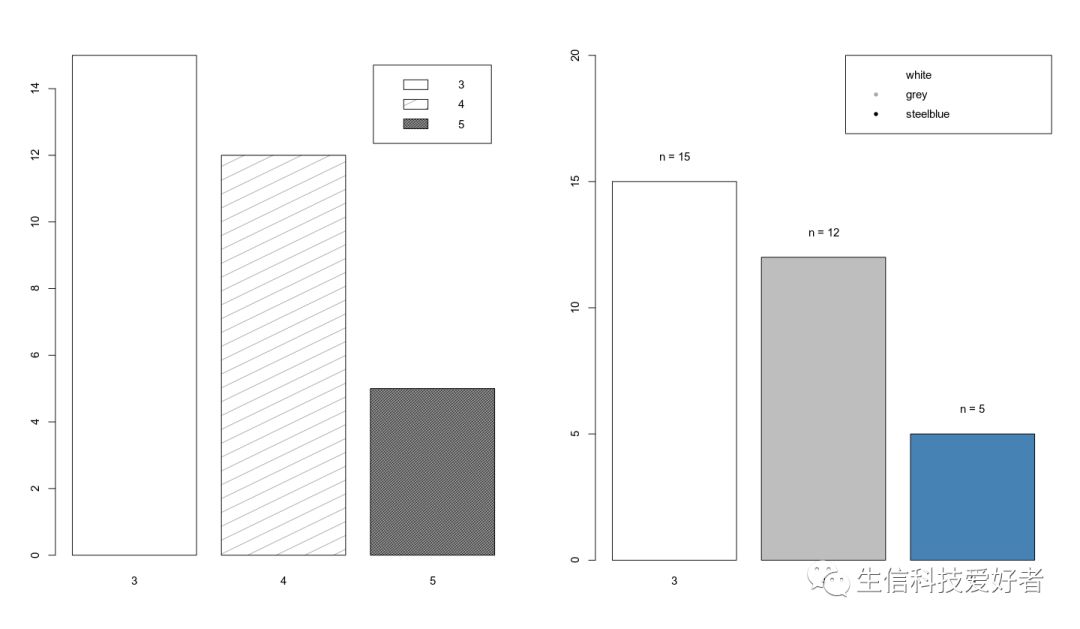
基于barplot基础柱状图颜色、方向及分组的绘图示例。
par(mfrow=c(2,2))
counts <- table(mtcars$gear)
barplot(counts, main="Car Distribution", xlab="Number of Gears")
barplot(counts, main="Car Distribution", horiz=TRUE,names.arg=c("3 Gears", "4 Gears", "5 Gears"),col="blue")
counts2 <- table(mtcars$vs, mtcars$gear)
barplot(counts2, main="Car Distribution by Gears and VS",xlab="Number of Gears", col=c("darkblue","red"),legend = rownames(counts2))
barplot(counts2, main="Car Distribution by Gears and VS",xlab="Number of Gears", col=c("darkblue","red"),legend = rownames(counts2),beside=TRUE)
2. ggplot2 包绘制柱状图
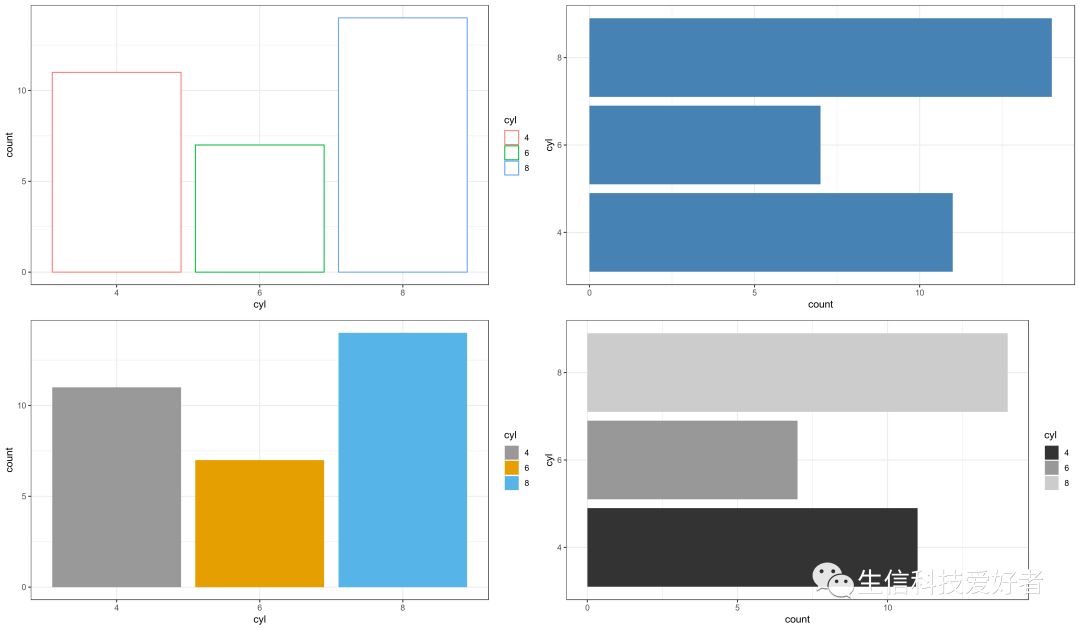
使用ggplot2包的柱状图颜色、方向及分组的绘图示例。
library('ggplot2')
p1<-ggplot(data=mtcars,aes(x=cyl,col=cyl)) + geom_bar(stat="count",fill="white") + theme_bw()
p2<-ggplot(data=mtcars,aes(x=cyl)) + geom_bar(stat="count",fill="steelblue") + theme_bw()  + coord_flip()
p3<-ggplot(data=mtcars,aes(x=cyl,fill=cyl)) + geom_bar(stat="count") + theme_bw() +scale_fill_manual(values=c("#999999", "#E69F00", "#56B4E9"))
p4<-ggplot(data=mtcars,aes(x=cyl,fill=cyl)) + geom_bar(stat="count") + theme_bw() +scale_fill_grey() + coord_flip()
gridExtra::grid.arrange(p1, p2,p3,p4,nrow=2)
2.1 柱状图添加标签
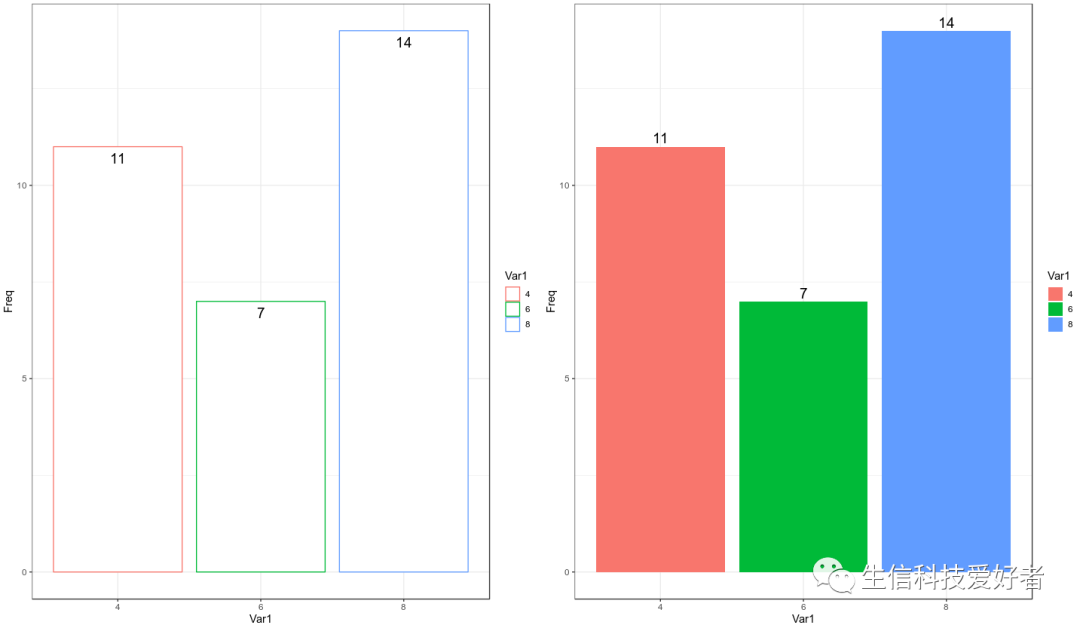
data <- data.frame(table(mtcars$cyl))

p1 <- ggplot(data=newmatrix,aes(x=Var1,y=Freq,col=Var1)) +
    geom_bar(stat="identity",fill="white") +
    theme_bw() +
    geom_text(aes(label=Freq), vjust=1.6, color="black", size=5)

p2 <- ggplot(data=newmatrix,aes(x=Var1,y=Freq,fill=Var1)) +
    geom_bar(stat="identity") +
    theme_bw()+ geom_text(aes(label=Freq),vjust=-0.3, color="black", size=5)

gridExtra::grid.arrange(p1,p2,nrow=1)
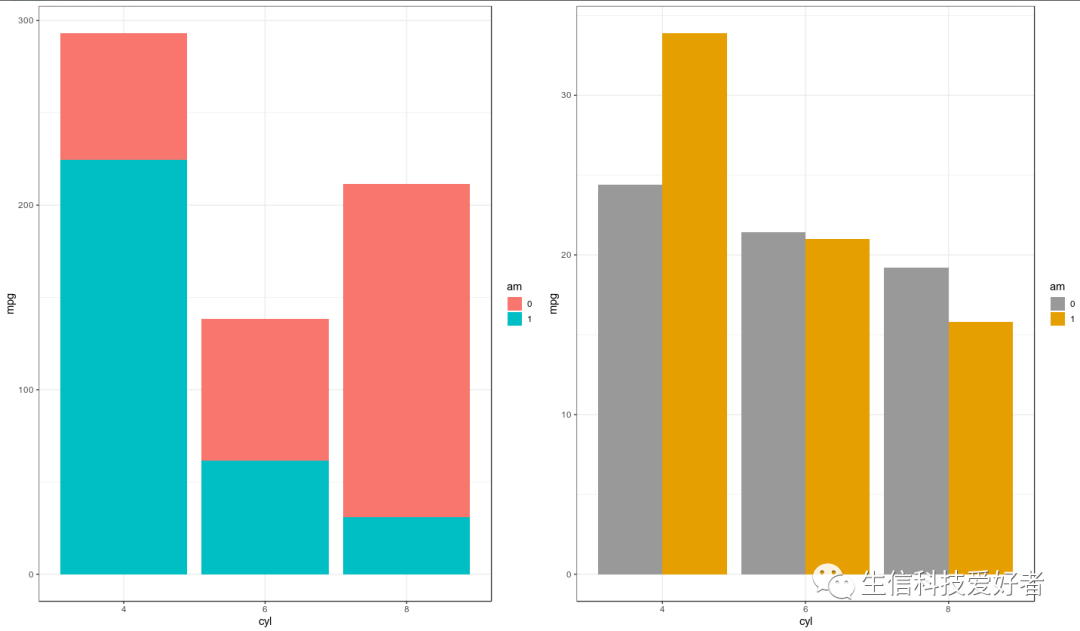
2.2 按组绘制柱状图
mtcars$am <- as.factor(mtcars$am)

p1 <- ggplot(data=mtcars,aes(x=cyl,y=mpg,fill=am)) +
    geom_bar(stat="identity") +
    theme_bw()
p2 <- ggplot(data=mtcars,aes(x=cyl,y=mpg,fill=am)) +
    geom_bar(stat="identity",position=position_dodge()) +
    theme_bw() +
    scale_fill_manual(values=c('#999999','#E69F00'))

gridExtra::grid.arrange(p1,p2,nrow=1)
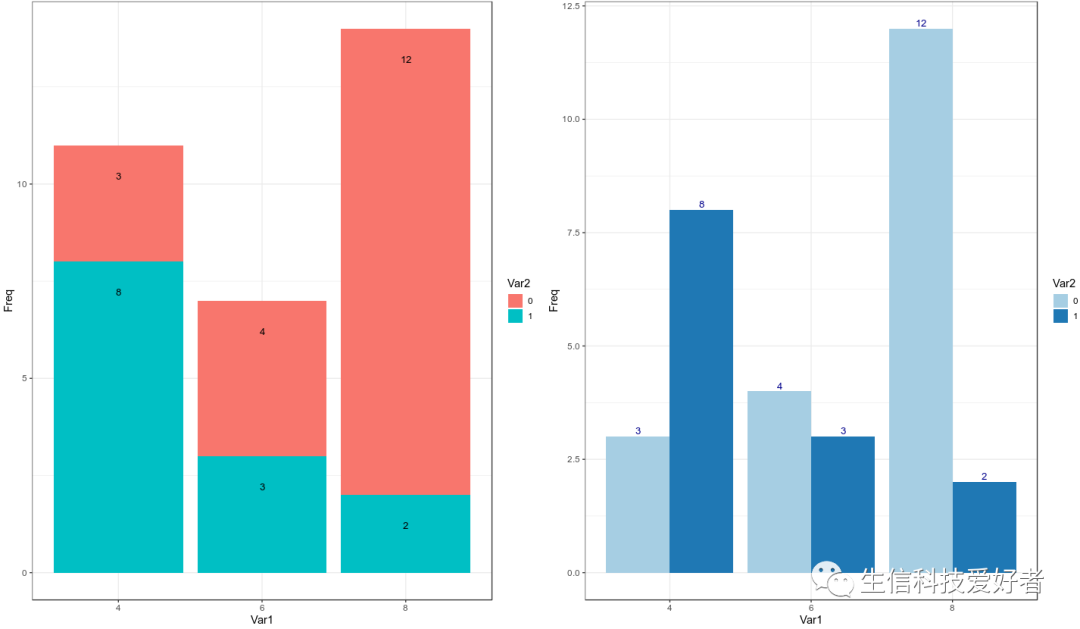
2.3 柱状图添加标签
counts2 <- data.frame(table(mtcars$cyl,mtcars$am))
p1 <- ggplot(data=counts2,aes(x=Var1,y=Freq,fill=Var2)) +
    geom_bar(stat="identity") +
    theme_bw() +
    geom_text(aes(label=Freq), vjust=5,position='stack', color="black",size=3.5)

p2 <- ggplot(data=counts2,aes(x=Var1,y=Freq,fill=Var2)) +
    geom_bar(stat="identity",position=position_dodge()) +
    theme_bw() +
    scale_fill_brewer(palette="Paired") +
    geom_text(aes(label=Freq),vjust=-0.3, color="darkblue",
            position=position_dodge(0.9), size=3.5)

gridExtra::grid.arrange(p1,p2,nrow=1)
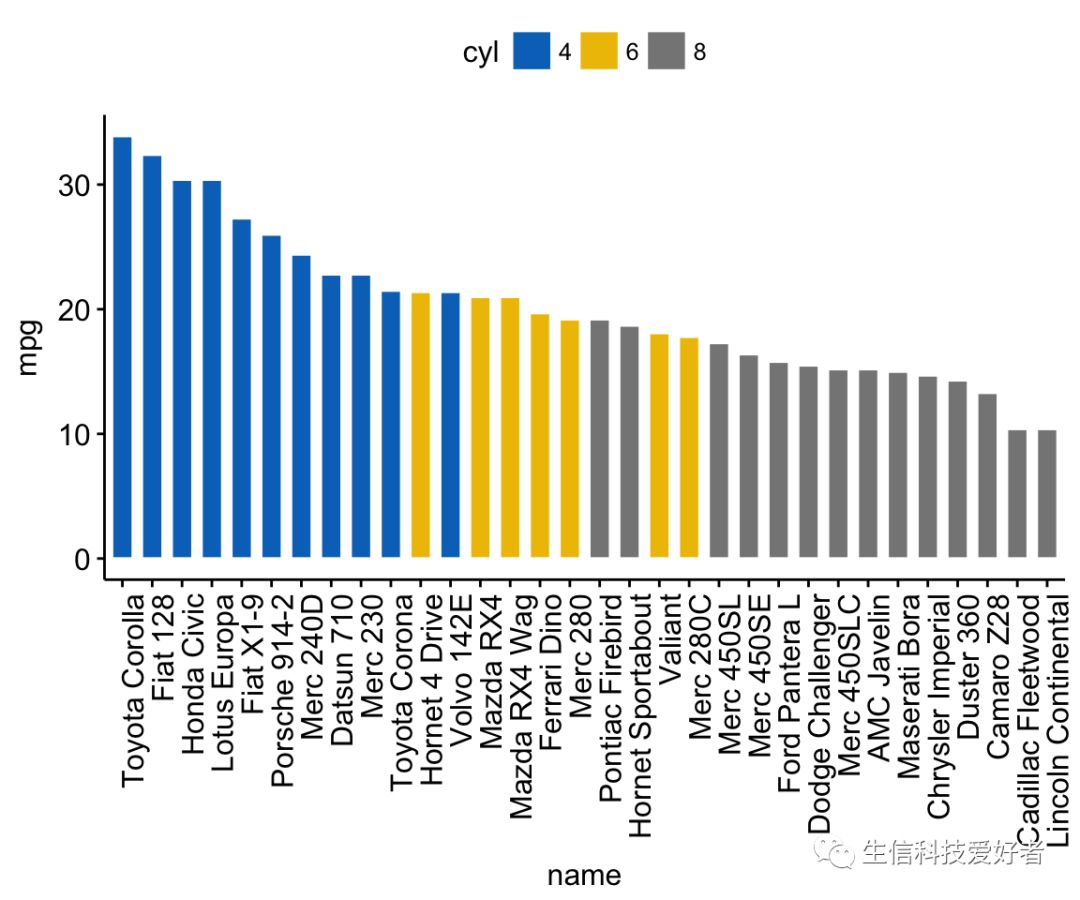
3. ggpubr 包绘制柱状图
library(ggpubr)
dfm <- mtcars
dfm$cyl <- as.factor(dfm$cyl)
dfm$name <- rownames(dfm)
ggbarplot(dfm, x="name", y="mpg",fill="cyl",color="white",palette="jco",
          sort.val="desc",sort.by.groups=FALSE,x.text.angle=90)
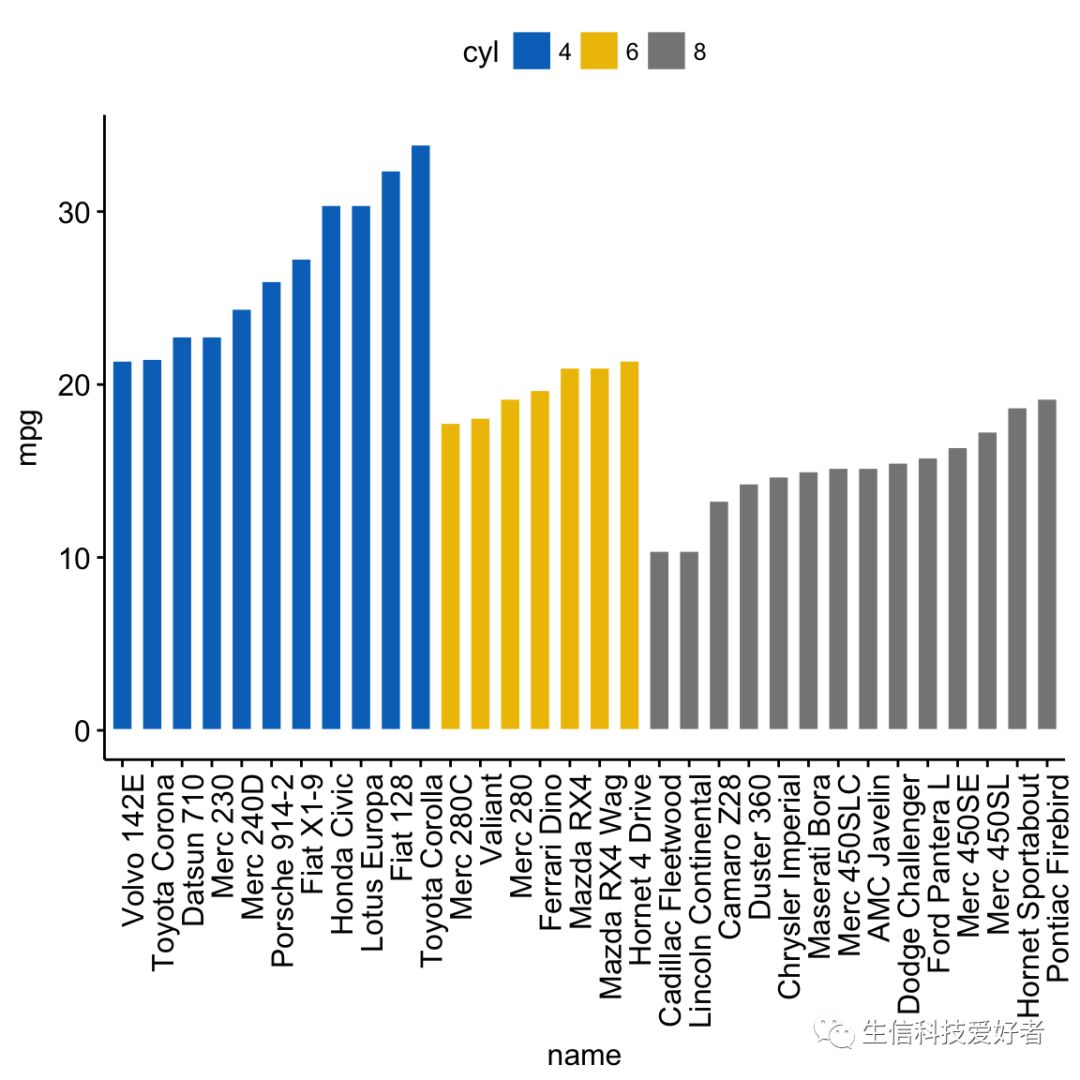
3.1 分组绘制柱状图
ggbarplot(dfm, x="name", y ="mpg", fill="cyl", color="white", palette="jco",
          sort.val="asc", sort.by.groups=TRUE, x.text.angle=90)
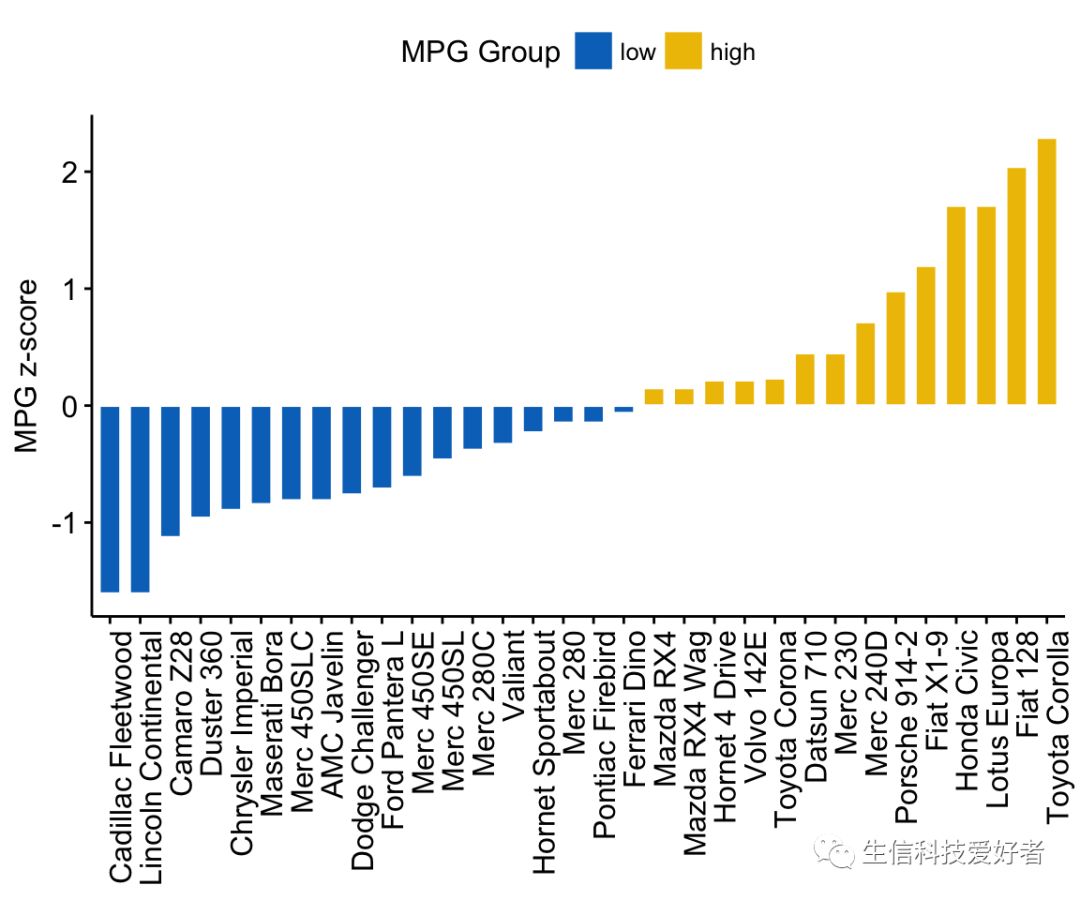
3.2 zsore 校正及分组
dfm$mpg_z <- (dfm$mpg -mean(dfm$mpg))/sd(dfm$mpg)
dfm$mpg_grp <- factor(ifelse(dfm$mpg_z < 0, "low", "high"),levels = c("low", "high"))
ggbarplot(dfm, x = "name", y = "mpg_z",fill = "mpg_grp", color = "white",
          palette = "jco", sort.val = "asc",sort.by.groups = FALSE,x.text.angle = 90,
          ylab = "MPG z-score",xlab = FALSE,legend.title = "MPG Group")
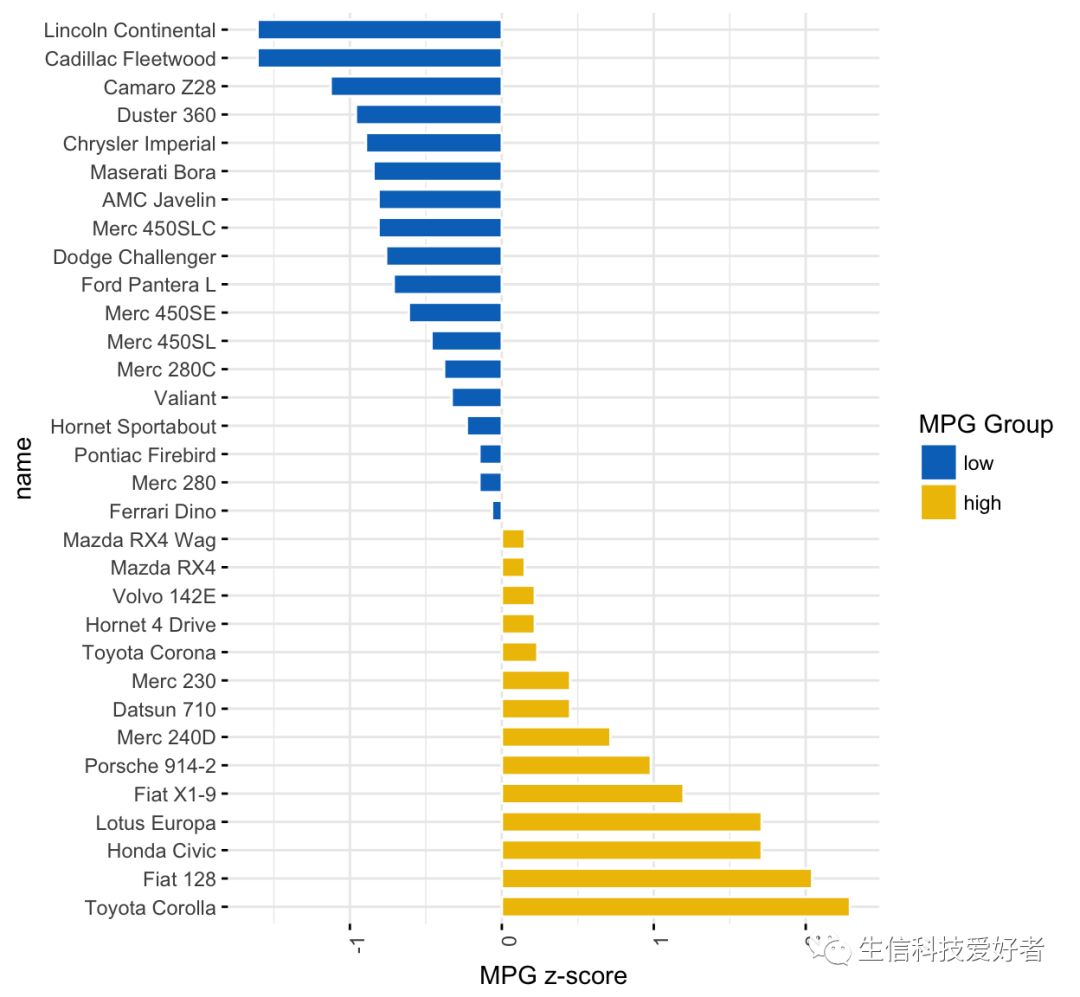
3.3 图像旋转
ggbarplot(dfm, x = "name", y = "mpg_z",fill = "mpg_grp",color = "white",
          palette = "jco",sort.val = "desc",sort.by.groups = FALSE,
          x.text.angle = 90,ylab = "MPG z-score",legend.title = "MPG Group",
          rotate = TRUE,ggtheme = theme_minimal())
二、添加误差线(Error bar)
1. barplot+segments+arrows 绘制误差线
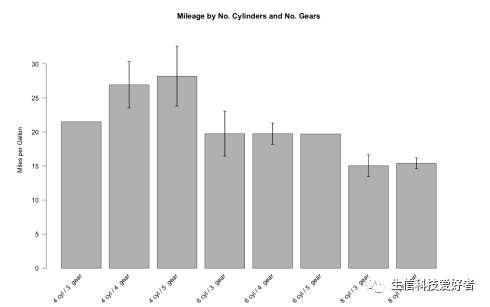
1.1 绘制普通柱状图
构建数据集
myData <- aggregate(mtcars$mpg,by = list(cyl = mtcars$cyl, gears = mtcars$gear), FUN = function(x) c(mean = mean(x), sd = sd(x),n = length(x)))
myData <- do.call(data.frame, myData)
myData
  cyl gears x.mean      x.sd x.n
1   4     3 21.500        NA   1
2   6     3 19.750 2.3334524   2
3   8     3 15.050 2.7743959  12
4   4     4 26.925 4.8073604   8
5   6     4 19.750 1.5524175   4
6   4     5 28.200 3.1112698   2
7   6     5 19.700        NA   1
8   8     5 15.400 0.5656854   2
- 计算标准差
myData$se <- myData$x.sd / sqrt(myData$x.n)
colnames(myData) <- c("cyl", "gears", "mean", "sd", "n", "se")
myData$names <- c(paste(myData$cyl, "cyl /", myData$gears, " gear"))
- 定义作图范围
par(mar = c(5, 6, 4, 5) + 0.1)
plotTop <- max(myData$mean) +myData[myData$mean == max(myData$mean), 6] * 3
barCenters <- barplot(height = myData$mean, names.arg = myData$names,
                      beside = true, las = 2, ylim = c(0, plotTop),
                      cex.names = 0.75, xaxt = "n",
                      main = "Mileage by No. Cylinders and No. Gears",
                      ylab = "Miles per Gallon",  border = "black", axes = TRUE)
- 横坐标
text(x = barCenters, y = par("usr")[3] - 1, srt = 45,
     adj = 1, labels = myData$names, xpd = TRUE)
- Error bar
segments(barCenters, myData$mean - myData$se  2, barCenters,
         myData$mean + myData$se  2, lwd = 1.5)
arrows(barCenters, myData$mean - myData$se  2, barCenters,
       myData$mean + myData$se  2, lwd = 1.5, angle = 90,code = 3, length = 0.05)
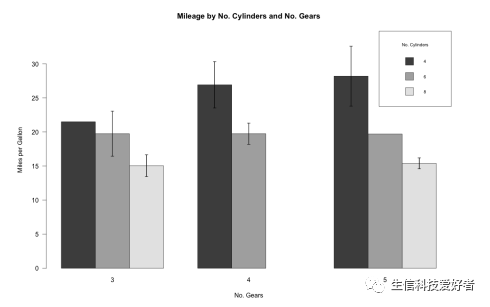
1.2 按照分组绘制柱状图
tabbedMeans <- tapply(myData$mean,list(myData$cyl,myData$gears),function(x) c(x = x))
tabbedSE <- tapply(myData$se, list(myData$cyl, myData$gears),function(x) c(x = x))
barCenters <- barplot(height = tabbedMeans,beside = TRUE, las = 1,ylim = c(0, plotTop),
                      cex.names = 0.75,main = "Mileage by No. Cylinders and No. Gears",
                      ylab = "Miles per Gallon",xlab = "No. Gears",border = "black",
                      axes = TRUE,legend.text = TRUE,
                      args.legend = list(title = "No.Cylinders",x = "topright",cex = .7))
segments(barCenters, tabbedMeans-tabbedSE*2, barCenters,tabbedMeans+tabbedSE*2, lwd = 1.5)
arrows(barCenters, tabbedMeans-tabbedSE * 2, barCenters,tabbedMeans+tabbedSE*2,
       lwd = 1.5, angle = 90,code = 3, length = 0.05)
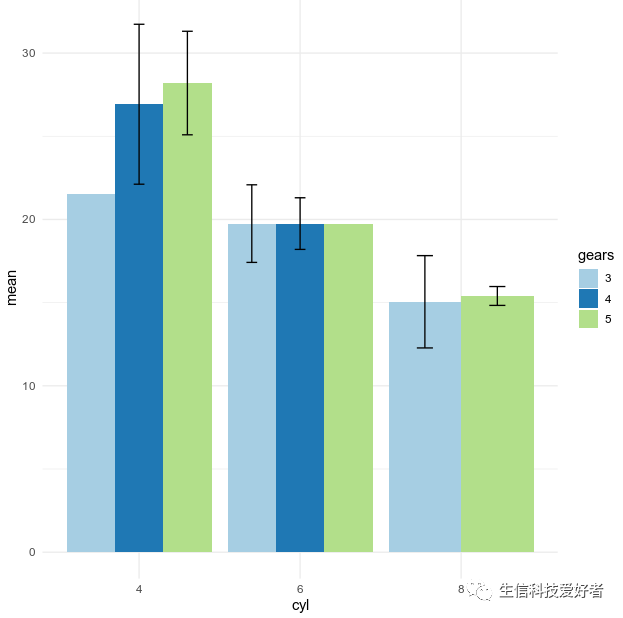
2. ggplot2 包绘带误差线的制柱状图
myData$gears <- as.factor(myData$gears)
ggplot(myData,aes(x=cyl,y=mean,fill=gears)) +
    geom_bar(stat="identity",position=position_dodge()) +
    geom_errorbar(aes(ymin=mean-sd,ymax=mean+sd),width=.2,position=position_dodge(.9)) +
    scale_fill_brewer(palette="Paired") +
    theme_minimal()
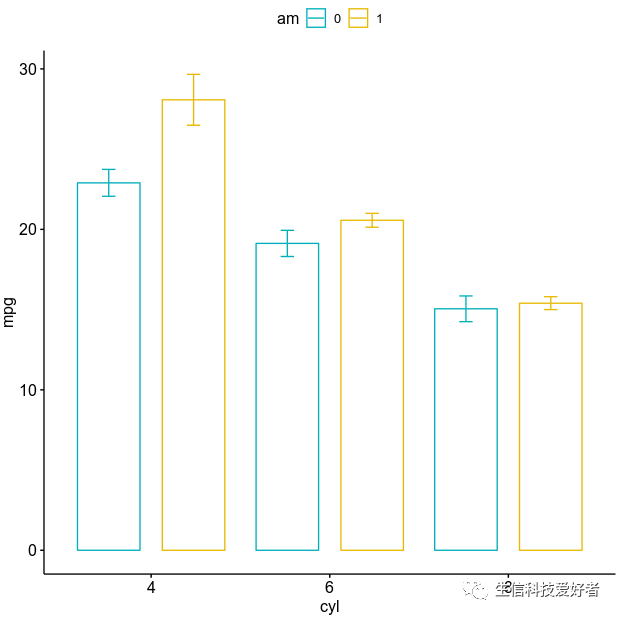
3. ggbarplot 绘制绘带误差线的制柱状图
ggbarplot(mtcars,x="cyl",y="mpg",color="am",add="mean_se",
          palette=c("#00AFBB","#E7B800"), position=position_dodge())
柱状图的介绍就先到这里,其他可替代柱状图的图形包含棒棒糖图(Lollipop)、环形柱状图等未在本文中展开介绍,有兴趣的小伙伴可参考文章最后的参考资料。
三、参考资料
Alboukadel Kassambara,《Bar Plots -R base Graphs》,STHDA
Selva Prabhakaran,《Top 50 ggplot2 Visualizations》,r-statistics.co
Alboukadel Kassambara,《ggpubr: Publication Ready Plots》,STHDA
Alboukadel Kassambara,《Plot Means/Medians and Error Bars》,STHDA
Alboukadel Kassambara,《ggplot2- barplot1》》,STHDA
Winston Chang,《ggplot2- barplot2》,Cookbook for R
Chris Wetherill,《Building Barplots with errorbars》,datascience+
SWD team,《bring on the bar charts — storytelling with data》,storytellingwithdata.com


本文分享自微信公众号 - 生信科技爱好者(bioitee)。
如有侵权,请联系 support@oschina.cn 删除。
本文参与“OSC源创计划”,欢迎正在阅读的你也加入,一起分享。
R 语言柱状图示例笔记的更多相关文章
- R语言可视化学习笔记之添加p-value和显著性标记
R语言可视化学习笔记之添加p-value和显著性标记 http://www.jianshu.com/p/b7274afff14f?from=timeline 上篇文章中提了一下如何通过ggpubr ...
- [R语言] ggplot2入门笔记1—ggplot2简要教程
文章目录 1 ggplot2入门笔记1-ggplot2简要教程 1. 设置 The Setup 2. 图层 The Layers 3. 标签 The Labels 4. 主题 The Theme 5. ...
- 从零开始系列-R语言基础学习笔记之二 数据结构(二)
在上一篇中我们一起学习了R语言的数据结构第一部分:向量.数组和矩阵,这次我们开始学习R语言的数据结构第二部分:数据框.因子和列表. 一.数据框 类似于二维数组,但不同的列可以有不同的数据类型(每一列内 ...
- 从零开始系列--R语言基础学习笔记之一 环境搭建
R是免费开源的软件,具有强大的数据处理和绘图等功能.下面是R开发环境的搭建过程. 一.点击网址 https://www.r-project.org/ ,进入"The R Project fo ...
- R语言实战读书笔记(三)图形初阶
这篇简直是白写了,写到后面发现ggplot明显更好用 3.1 使用图形 attach(mtcars)plot(wt, mpg) #x轴wt,y轴pgabline(lm(mpg ~ wt)) #画线拟合 ...
- R语言实战读书笔记(二)创建数据集
2.2.2 矩阵 matrix(vector,nrow,ncol,byrow,dimnames,char_vector_rownames,char_vector_colnames) 其中: byrow ...
- R语言的学习笔记 (持续更新.....)
1. DATE 处理 1.1 日期格式一个是as.Date(XXX) 和strptime(XXX),前者为Date格式,后者为POSIXlt格式 1.2 用法:as.Date(XXX,"%Y ...
- [R语言] ggplot2入门笔记4—前50个ggplot2可视化效果
文章目录 通用教程简介(Introduction To ggplot2) 4 ggplot2入门笔记4-前50个ggplot2可视化效果 1 相关性(Correlation) 1.1 散点图(Scat ...
- [R语言] ggplot2入门笔记3—通用教程如何自定义ggplot2
通用教程简介(Introduction To ggplot2) 代码下载地址 以前,我们看到了使用ggplot2软件包制作图表的简短教程.它很快涉及制作ggplot的各个方面.现在,这是一个完整而完整 ...
- [R语言] ggplot2入门笔记2—通用教程ggplot2简介
文章目录 通用教程简介(Introduction To ggplot2) 2 ggplot2入门笔记2-通用教程ggplot2简介 1. 了解ggplot语法(Understanding the gg ...
随机推荐
- 基于DPDK抓包的Suricata安装部署
一.背景 Suricata支持网卡在线抓包和离线读取PCAP包两种形式的抓包: 离线抓包天然具有速度慢.非实时的特点 在线捕获数据包又包括常规网卡抓包.PF_RING和DPDK的方式 由于项目分光的流 ...
- Django笔记九之model查询filter、exclude、annotate、order_by
在接下来四五篇笔记中,将介绍 model 查询方法的各个细节,为我们的查询操作提供各种便利. 本篇笔记将介绍惰性查找.filter.exclude.annotate等方法,目录如下: 惰性查找 fil ...
- Redis分布式Session和普通的cookie session有什么区别?
Redis 是一种高性能的缓存和 key-value 存储系统,常被用来实现分布式 Session 的方案.在这种方案中,用户的登录信息存储在 Redis 中,而不是存储在本地的 cookie 或 s ...
- Thanos工作原理及组件简介
Thanos 简介 Thanos 是一个「开源的,高可用的 Prometheus 系统,具有长期存储能力」.很多知名公司都在使用 Thanos,也是 CNCF 孵化项目的一部分. Thanos 的一个 ...
- 联想拯救者Y9000P 2023版 双系统ubuntu安装nvidia显卡驱动、cuda及cudnn简明教程
前言 对于从事机器学习.深度学习.图像处理.自然语言处理等科研与工作的小伙伴们,ubuntu系统是一个不错的选择,本人前几天入手拯救者y9000p 2023版本,配置为:RTX4060 16G 13代 ...
- R语言网络数据爬取
现在大家对爬虫的兴趣不断高涨,R和PYTHON是两个非常有力的爬虫工具.Python倾向于做大型爬虫,与R相比,语法相对复杂,因此Python爬虫的学习曲线会相对陡峭.对于那些时间宝贵,又想从网上获取 ...
- Docker入门实践笔记-Dockerfile
镜像是一个打包文件,其中包含了应用程序及其运行所依赖的环境,例如文件系统.环境变量.配置参数等等 联合文件系统 容器镜像内部并不是一个平坦的结构,而是由许多的镜像层组成,每层都是只读不可修改修改的一组 ...
- .Net 6.0 部署Linux+Nginx +PM2教程
今天带大家将本地.Net6.0项目部署到Linux系统中,其中有用到Nginx反向代理和PM2进程管理工具,希望本偏文章能对你有所帮助,成为你成功路上的垫脚石! 背景: 在.Net 5.0横空出世之后 ...
- Simulation-计算统计——Monte Carlo
Monte Carlo Integration 找到原函数,再计算 无法找到原函数,MC积分 Assume that we can generate \(U_1, . . . , U_n \sim U ...
- 任务系统之Jenkins子任务
今天下班即开启五一假期,早上临时定了行程去山东日照,原本计划下班就出发,但下班看了看导航,这一路红得发黑,于是决定还是晚点再走,现在有时间了,写篇简单的技术文章来提升下Blog逐渐降低的技术内容含量吧 ...