
spring boot2.0集成mybatis-plus实战
说明:
本例演示spring boot2.0如何集成mybatis-plus
如何使用代码生成器
1.配置pom.xml
<!--mybatis-plus-->

        <dependency>

            <groupId>com.baomidou</groupId>

            <artifactId>mybatis-plus-boot-starter</artifactId>

            <version>3.0.5</version>

        </dependency>

        <!-- mybatis plus 代码生成器依赖 -->

        <dependency>

            <groupId>com.baomidou</groupId>

            <artifactId>mybatis-plus-generator</artifactId>

            <version>3.0.5</version>

        </dependency>

        <!-- velocity 模板引擎, Mybatis Plus 代码生成器需要 -->

        <dependency>

            <groupId>org.apache.velocity</groupId>

            <artifactId>velocity-engine-core</artifactId>

            <version>2.0</version>

        </dependency>

        <!--mysql-->

        <dependency>

            <groupId>mysql</groupId>

            <artifactId>mysql-connector-java</artifactId>

        </dependency>
2.配置application.properties
spring.datasource.driver-class-name=com.mysql.jdbc.Driver

spring.datasource.url=jdbc:mysql://localhost:3306/mybatis_plus?useSSL=false

spring.datasource.username=root

spring.datasource.password=root123

#mybatis日志

mybatis-plus.configuration.log-impl=org.apache.ibatis.logging.stdout.StdOutImpl

#全局设置主键生成策略

mybatis-plus.global-config.db-config.id-type=auto

mybatis-plus.global-config.db-config.logic-delete-value=1

mybatis-plus.global-config.db-config.logic-not-delete-value=0
3.创建数据库
创建数据库: mybatis_plus,创建表tb_user
详细请看项目源码。
4.添加mysqlplus配置
@EnableTransactionManagement

@Configuration

@MapperScan("com.laoxu.java.mybatisplus.mapper")

public class MybatisPlusConfig {

    /**

     * 乐观锁插件

     */

    @Bean

    public OptimisticLockerInterceptor optimisticLockerInterceptor() {

        return new OptimisticLockerInterceptor();

    }

    /**

     * 分页插件

     */

    @Bean

    public PaginationInterceptor paginationInterceptor() {

        return new PaginationInterceptor();

    }

    @Bean

    public ISqlInjector sqlInjector() {

        return new LogicSqlInjector();

    }

    /**

     * SQL 执行性能分析插件

     * 开发环境使用,线上不推荐。 maxTime 指的是 sql 最大执行时长

     */

    @Bean

    @Profile({"dev","test"})// 设置 dev test 环境开启

    public PerformanceInterceptor performanceInterceptor() {

        PerformanceInterceptor performanceInterceptor = new PerformanceInterceptor();

        performanceInterceptor.setMaxTime(5000);//ms,超过此处设置的ms则sql不执行

        performanceInterceptor.setFormat(true);

        return performanceInterceptor;

    }
5.创建代码生成器
public class CodeGenerator {

    public static void main(String[] args) {

        String moduleName = "mybatisplus";

        // 1、创建代码生成器

        AutoGenerator mpg = new AutoGenerator();

        // 2、全局配置

        GlobalConfig gc = new GlobalConfig();

        String projectPath = System.getProperty("user.dir");

        gc.setOutputDir(projectPath + "/src/main/java");

        gc.setAuthor("laoxu");

        gc.setOpen(false); //生成后是否打开资源管理器

        gc.setFileOverride(false); //重新生成时文件是否覆盖

        gc.setServiceName("%sService");	//去掉Service接口的首字母I

        gc.setIdType(IdType.AUTO); //主键策略

        gc.setDateType(DateType.ONLY_DATE);//定义生成的实体类中日期类型

        //gc.setSwagger2(true);//开启Swagger2模式

        mpg.setGlobalConfig(gc);

        // 3、数据源配置

        DataSourceConfig dsc = new DataSourceConfig();

        dsc.setUrl("jdbc:mysql://localhost:3306/mybatis_plus");

        dsc.setDriverName("com.mysql.jdbc.Driver");

        dsc.setUsername("root");

        dsc.setPassword("root123");

        dsc.setDbType(DbType.MYSQL);

        mpg.setDataSource(dsc);

        // 4、包配置

        PackageConfig pc = new PackageConfig();

        pc.setModuleName(moduleName); //模块名

        pc.setParent("com.laoxu.java");

        pc.setController("controller");

        pc.setEntity("entity");

        pc.setService("service");

        pc.setMapper("mapper");

        mpg.setPackageInfo(pc);

        // 5、策略配置

        StrategyConfig strategy = new StrategyConfig();

        strategy.setInclude("tb" + "_\\w*");//设置要映射的表名

        strategy.setNaming(NamingStrategy.underline_to_camel);//数据库表映射到实体的命名策略

        strategy.setTablePrefix("tb_");//设置表前缀不生成

        strategy.setColumnNaming(NamingStrategy.underline_to_camel);//数据库表字段映射到实体的命名策略

        strategy.setEntityLombokModel(true); // lombok 模型 @Accessors(chain = true) setter链式操作

        // strategy.setLogicDeleteFieldName("is_deleted");//逻辑删除字段名

        strategy.setEntityBooleanColumnRemoveIsPrefix(true);//去掉布尔值的is_前缀

        //自动填充

        TableFill gmtCreate = new TableFill("create_time", FieldFill.INSERT);

        TableFill gmtModified = new TableFill("update_time", FieldFill.INSERT_UPDATE);

        ArrayList<TableFill> tableFills = new ArrayList<>();

        tableFills.add(gmtCreate);

        tableFills.add(gmtModified);

        strategy.setTableFillList(tableFills);

        // strategy.setVersionFieldName("version");//乐观锁列

        strategy.setRestControllerStyle(true); //restful api风格控制器

        strategy.setControllerMappingHyphenStyle(true); //url中驼峰转连字符

        mpg.setStrategy(strategy);

        // 6、执行

        mpg.execute();

    }

}
6.运行代码生成器
程序会按配置生成entity、mapper、service和impl、controller
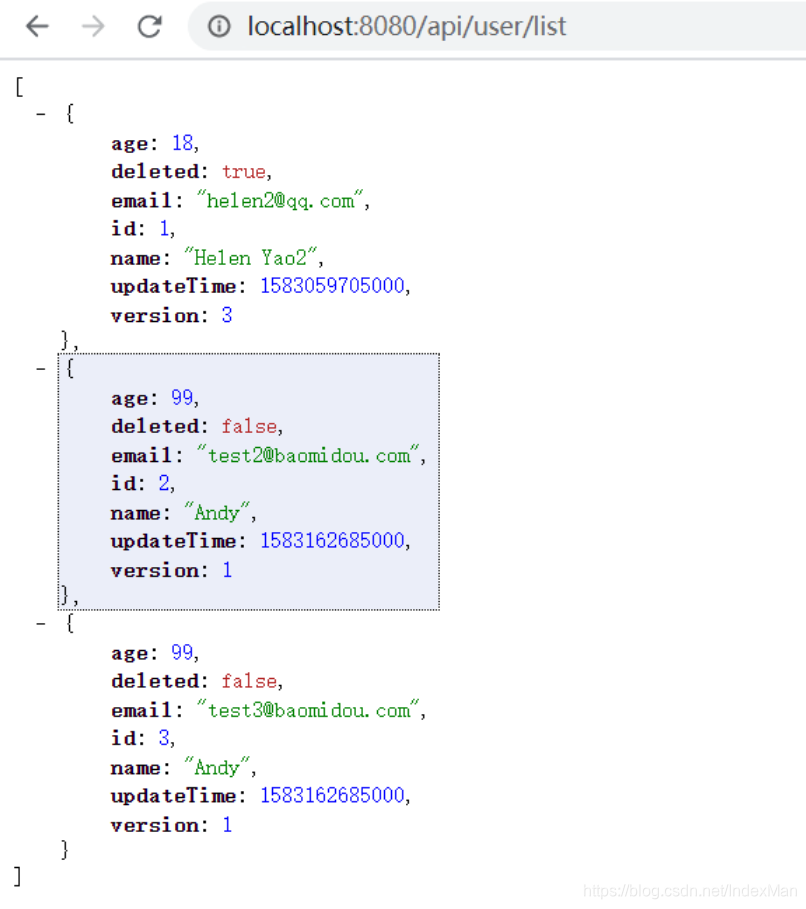
7.运行项目,测试
地址:http://localhost:8080/api/user/list
效果:
spring boot2.0集成mybatis-plus实战的更多相关文章
- 【spring cloud】spring cloud2.X spring boot2.0.4调用feign配置Hystrix Dashboard 和 集成Turbine 【解决:Hystrix仪表盘Unable to connect to Command Metric Stream】【解决:Hystrix仪表盘Loading...】
环境: <java.version>1.8</java.version><spring-boot.version>2.0.4.RELEASE</spring- ...
- Spring Boot2.0使用Spring Security
一.Spring Secutity简介 Spring 是一个非常流行和成功的 Java 应用开发框架.Spring Security 基于 Spring 框架,提供了一套 Web 应用安全性 ...
- spring boot 2.0(一)权威发布spring boot2.0
Spring Boot2.0.0.RELEASE正式发布,在发布Spring Boot2.0的时候还出现一个小插曲,将Spring Boot2.0同步到Maven仓库的时候出现了错误,然后Spring ...
- Spring Boot2.0之整合事物管理
首先Spring 事务分类 1.声明事务 原理:基于编程事务的 2.编程事务 指定范围 扫包去解决 3.事务原理:AOP技术 通过环绕通知进行了拦截 使用Spring 事务注意事项: 不要tr ...
- 快速搭建spring boot2.0 项目
快速搭建spring boot2.0+mybatis+thymeleaf 项目 使用工具STS 3.9.7(eclipse) 首先创建一个spring boot2.0项目(具体创建方法就不写了) 然后 ...
- 基于spring boot2.0+spring security +oauth2.0+ jwt微服务架构
github地址:https://github.com/hankuikuide/microservice-spring-security-oauth2 项目介绍 该项目是一个演示项目,主要演示了,基于 ...
- Spring Boot2.0 设置拦截器
所有功能完成 配置登录认证 配置拦截器 在spring boot2.0 之后 通过继承这个WebMvcConfigurer类 就可以完成拦截 新建包com.example.interceptor; 创 ...
- Spring Boot2.0 静态资源被拦截问题
在Spring Boot2.0+的版本中,只要用户自定义了拦截器,则静态资源会被拦截.但是在spring1.0+的版本中,是不会拦截静态资源的. 因此,在使用Spring Boot2.0+时,配置拦截 ...
- spring boot2.0(一 ) 基础环境搭建
1.基础配置 开发环境:window jdk版本:1.8(spring boot2.0最低要求1.8) 开发工具:eclipse 构建方式:maven3 2.POM配置文件 <project x ...
- Spring Boot2.0 整合 Kafka
Kafka 概述 Apache Kafka 是一个分布式流处理平台,用于构建实时的数据管道和流式的应用.它可以让你发布和订阅流式的记录,可以储存流式的记录,并且有较好的容错性,可以在流式记录产生时就进 ...
随机推荐
- cri-docker的学习和了解-番外
cri-docker的学习和了解-番外 前言 因为已经有足足两年多没再详细接触K8S了. 然后利用两个晚上搭建了IPV6 SingleStack的K8S单机版 中间一直使用的docker的方式学习和工 ...
- [转帖]pod容器开启pid限制
https://zhdya.gitee.io/zhdya/archives/ cgroup中对pid进行了隔离,通过更改docker/kubelet配置,可以限制pid总数,从而达到限制线程总数的 ...
- [转帖]CentOS7安装笔记:minio分布式集群搭建
文章目录 准备机器 部署(所有机器均执行) 创建挂载磁盘路径 挂载磁盘路径到文件系统 创建minio目录 下载minio安装包 创建启动脚本 创建启动服务 启动测试(所有机器执行) 重新加载服务的配置 ...
- [转帖]阿里发布自研ARM服务器芯片倚天710,不对外出售
https://www.modb.pro/db/139440 10月19日,阿里巴巴旗下半导体公司平头哥发布自研云芯片倚天710,并宣称该芯片是业界性能最强的ARM服务器芯片,性能超过业界标杆20%, ...
- 【转帖】使用 LuaRocks 安装 Apache APISIX 依赖项时,为什么会导致超时、安装缓慢或安装失败?
使用 LuaRocks 安装 Apache APISIX 依赖项时,为什么会导致超时.安装缓慢或安装失败?# http://apisix.incubator.apache.org/zh/docs/ap ...
- [转帖]如何理解 iowait
Linux中,%iowait 过高可能是个问题,严重的时候,它能使服务停止, 但问题是,多高才算高? 什么时候应该担心呢? 本文将讨论 iowait 的含义.相关的统计数据.原理以及 iowait的瓶 ...
- 从源码中解析fabric区块数据结构(一)
从源码中解析fabric区块数据结构(一) 前言 最近打算基于fabric-sdk-go实现hyperledger fabric浏览器,其中最重要的一步就是解析fabric的上链区块.虽说fabric ...
- windwos10任务栏居中
如下操作 新建一个文件夹如图 然后出现这个重右往左一直拖然后拉出来就行了如图 拖不动或者没有的把这个关了-锁定任务栏 文字如何隐藏? 在这个文字旁边右击关闭标题即可 然后锁定任务栏就OK了
- TienChin 渠道管理-渠道导入
ChannelController @PostMapping("/importTemplate") void importTemplate(HttpServletResponse ...
- 17.3 实现无管道反向CMD
WSASocket无管道反向CMD,与无管道正向CMD相反,这种方式是在远程主机上创建一个TCP套接字,并绑定到一个本地地址和端口上.然后在本地主机上,使用WSASocket函数连接到远程主机的套接字 ...