
[原]零基础学习SDL开发之在Android使用SDL2.0显示BMP叠加图
关于如何移植在android上使用SDL,可以参考[原]零基础学习SDL开发之移植SDL2.0到Android 和 [原]零基础学习SDL开发之在Android使用SDL2.0显示BMP图 。
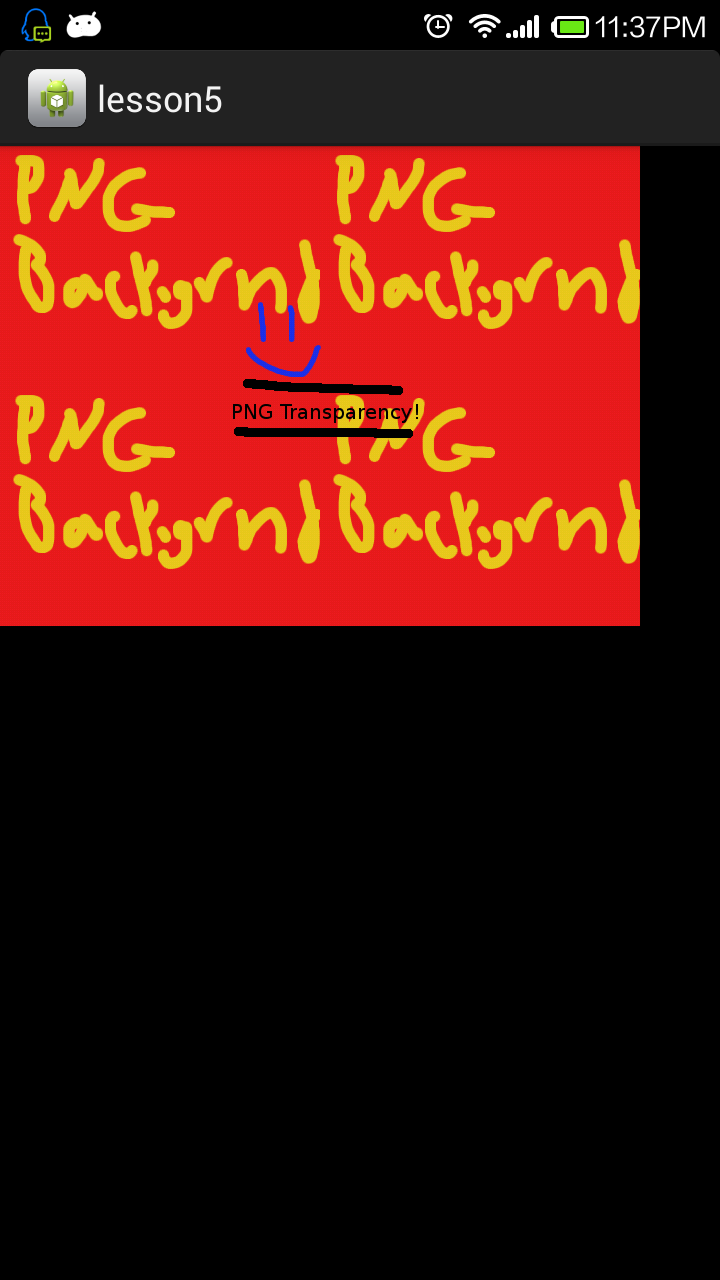
在一篇文章我们主要使用SDL2.0来加载一张BMP图来渲染显示,同时叠加一张图作为背景图。
博主的开发环境:Ubuntu 14.04 64位,Eclipse + CDT + ADT+NDK
在前面两篇文章我们知道了如何移植SDL2.0到android上面来,并且可以在Android上面来显示一张图片,这篇文章就是在前两篇文章的基础上来进行继续开发。
一、将功能模块化,将加载BMP的功能封装到一个函数中:
/*

 * SDL_Lesson.c

 *

 *  Created on: Aug 12, 2014

 *      Author: clarck

 */

#include <jni.h>

#include "SDL.h"

#include "SDL_logger.h"

#include "SDL_main.h"

#include "SDL_cleanup.h"

//The attributes of the screen

const int SCREEN_WIDTH = ;

const int SCREEN_HEIGHT = ;

struct SDL_Window *window = NULL;

struct SDL_Renderer *render = NULL;

struct SDL_Texture *background = NULL;

struct SDL_Texture *image = NULL;

struct SDL_Surface *bmp = NULL;

/*

 * Loads a BMP image into a texture on the rendering device

 * @param file The BMP image file to load

 * @param ren The renderer to load the texture onto

 * @return the loaded texture, or NULL if something went wrong.

 */

SDL_Texture* loadTexture(const char *file, SDL_Renderer *render) {

    struct SDL_Texture *texture = NULL;

    //Load the image

    bmp = SDL_LoadBMP(file);

    if (bmp == NULL) {

        LOGE("SDL_LoadBMP failed %s", SDL_GetError());

    }

    //If the loading went ok, convert to texture and return the texture

    texture = SDL_CreateTextureFromSurface(render, bmp);

    SDL_FreeSurface(bmp);

    if (texture == NULL) {

        LOGE("SDL_CreateTextureFromSurface failed %s", SDL_GetError());

    }

    return texture;

}
二、将渲染功能封装到renderTexture函数中:
/*

 * SDL_Lesson.c

 *

 *  Created on: Aug 12, 2014

 *      Author: clarck

 */

#include <jni.h>

#include "SDL.h"

#include "SDL_logger.h"

#include "SDL_main.h"

#include "SDL_cleanup.h"

//The attributes of the screen

const int SCREEN_WIDTH = ;

const int SCREEN_HEIGHT = ;

struct SDL_Window *window = NULL;

struct SDL_Renderer *render = NULL;

struct SDL_Texture *background = NULL;

struct SDL_Texture *image = NULL;

struct SDL_Surface *bmp = NULL;

/*

 * Loads a BMP image into a texture on the rendering device

 * @param file The BMP image file to load

 * @param ren The renderer to load the texture onto

 * @return the loaded texture, or NULL if something went wrong.

 */

SDL_Texture* loadTexture(const char *file, SDL_Renderer *render) {

    struct SDL_Texture *texture = NULL;

    //Load the image

    bmp = SDL_LoadBMP(file);

    if (bmp == NULL) {

        LOGE("SDL_LoadBMP failed %s", SDL_GetError());

    }

    //If the loading went ok, convert to texture and return the texture

    texture = SDL_CreateTextureFromSurface(render, bmp);

    SDL_FreeSurface(bmp);

    if (texture == NULL) {

        LOGE("SDL_CreateTextureFromSurface failed %s", SDL_GetError());

    }

    return texture;

}

/*

 * Draw an SDL_Texture to an SDL_Renderer at position x, y, preserving

 * the texture's width and height

 * @param tex The source texture we want to draw

 * @param ren The renderer we want to draw too

 * @param x The x coordinate to draw too

 * @param y The y coordinate to draw too

 */

void renderTexture(SDL_Texture *tex, SDL_Renderer *ren, int x, int y) {

    //Setup the destination rectangle to be at the position we want

    SDL_Rect dst;

    dst.x = x;

    dst.y = y;

    //Query the texture to get its width and height to use

    SDL_QueryTexture(tex, NULL, NULL, &dst.w, &dst.h);

    SDL_RenderCopy(ren, tex, NULL, &dst);

}
三、编写主函数功能:
/*

 * SDL_Lesson.c

 *

 *  Created on: Aug 12, 2014

 *      Author: clarck

 */

#include <jni.h>

#include "SDL.h"

#include "SDL_logger.h"

#include "SDL_main.h"

#include "SDL_cleanup.h"

//The attributes of the screen

const int SCREEN_WIDTH = ;

const int SCREEN_HEIGHT = ;

struct SDL_Window *window = NULL;

struct SDL_Renderer *render = NULL;

struct SDL_Texture *background = NULL;

struct SDL_Texture *image = NULL;

struct SDL_Surface *bmp = NULL;

/*

 * Loads a BMP image into a texture on the rendering device

 * @param file The BMP image file to load

 * @param ren The renderer to load the texture onto

 * @return the loaded texture, or NULL if something went wrong.

 */

SDL_Texture* loadTexture(const char *file, SDL_Renderer *render) {

    struct SDL_Texture *texture = NULL;

    //Load the image

    bmp = SDL_LoadBMP(file);

    if (bmp == NULL) {

        LOGE("SDL_LoadBMP failed %s", SDL_GetError());

    }

    //If the loading went ok, convert to texture and return the texture

    texture = SDL_CreateTextureFromSurface(render, bmp);

    SDL_FreeSurface(bmp);

    if (texture == NULL) {

        LOGE("SDL_CreateTextureFromSurface failed %s", SDL_GetError());

    }

    return texture;

}

/*

 * Draw an SDL_Texture to an SDL_Renderer at position x, y, preserving

 * the texture's width and height

 * @param tex The source texture we want to draw

 * @param ren The renderer we want to draw too

 * @param x The x coordinate to draw too

 * @param y The y coordinate to draw too

 */

void renderTexture(SDL_Texture *tex, SDL_Renderer *ren, int x, int y) {

    //Setup the destination rectangle to be at the position we want

    SDL_Rect dst;

    dst.x = x;

    dst.y = y;

    //Query the texture to get its width and height to use

    SDL_QueryTexture(tex, NULL, NULL, &dst.w, &dst.h);

    SDL_RenderCopy(ren, tex, NULL, &dst);

}

int main(int argc, char *argv[]) {

    char *filefolder = argv[];

    char *background_temp = "background.bmp";

    char *image_temp = "image.bmp";

    LOGI("natvie_SDL %s", filefolder);

    //char *background_file = "/storage/sdcard0/background.bmp";

    char *background_file = (char*) malloc(

            strlen(filefolder) + strlen(background_temp) + );

    strcpy(background_file, filefolder);

    strcat(background_file, background_temp);

    //char *image_file = "/storage/sdcard0/image.bmp";

    char *image_file = (char*) malloc(

            strlen(filefolder) + strlen(image_temp) + );

    strcpy(image_file, filefolder);

    strcat(image_file, image_temp);

    if (SDL_Init(SDL_INIT_EVERYTHING) != ) {

        LOGE("SDL_Init failed %s", SDL_GetError());

    }

    window = SDL_CreateWindow("lesson2", , , SCREEN_WIDTH, SCREEN_HEIGHT,

            SDL_WINDOW_SHOWN);

    if (window == NULL) {

        LOGE("SDL_CreateWindow failed %s", SDL_GetError());

    }

    render = SDL_CreateRenderer(window, -,

            SDL_RENDERER_ACCELERATED | SDL_RENDERER_PRESENTVSYNC);

    if (render == NULL) {

        LOGE("SDL_CreateRenderer failed %s", SDL_GetError());

    }

    background = loadTexture(background_file, render);

    image = loadTexture(image_file, render);

    //Clear the window

    SDL_RenderClear(render);

    //Get the width and height from the texture so we know how much to move x,y by

    //to tile it correctly

    int bW, bH;

    SDL_QueryTexture(background, NULL, NULL, &bW, &bH);

    //We want to tile our background so draw it 4 times

    renderTexture(background, render, , );

    renderTexture(background, render, bW, );

    renderTexture(background, render, , bH);

    renderTexture(background, render, bW, bH);

    //Draw our image in the center of the window

    //We need the foreground image's width to properly compute the position

    //of it's top left corner so that the image will be centered

    int iW, iH;

    SDL_QueryTexture(image, NULL, NULL, &iW, &iH);

    int x = SCREEN_WIDTH /  - iW / ;

    int y = SCREEN_HEIGHT /  - iH / ;

    renderTexture(image, render, x, y);

    //Update the screen

    SDL_RenderPresent(render);

    SDL_Delay();

    cleanup_texture(background);

    cleanup_texture(image);

    cleanup_render(render);

    cleanup_window(window);

    SDL_Quit();

    return ;

}
四、修改SDLActivity中的 SDLMain类,传入参数为sdcard的路径,其余修改参考上一篇文章,修改内容如下:
/**

    Simple nativeInit() runnable

*/

class SDLMain implements Runnable {

    @Override

    public void run() {

        // Runs SDL_main()

        String sdcard = Environment.getExternalStorageDirectory().getAbsolutePath();

        SDLActivity.nativeInit(sdcard);

        //Log.v("SDL", "SDL thread terminated");

    }

}
五、运行效果截图
[原]零基础学习SDL开发之在Android使用SDL2.0显示BMP叠加图的更多相关文章
- [原]零基础学习SDL开发之在Android使用SDL2.0显示BMP图
关于如何移植SDL2.0到安卓上面来参考我的上一篇文章:[原]零基础学习SDL开发之移植SDL2.0到Android 在一篇文章我们主要使用SDL2.0来加载一张BMP图来渲染显示. 博主的开发环境: ...
- [原]零基础学习SDL开发之在Android使用SDL2.0渲染PNG图片
在上一篇文章我们知道了如何在android使用SDL2.0来渲染显示一张bmp图,但是如果是一张png或者一张jpg的图,那么还能显示成功么?答案是否定的 我们需要移植SDL_image库来支持除bm ...
- [原]零基础学习SDL开发之在Android使用SDL2.0加载字体
在上一篇文章我们知道了如何在android使用SDL2.0来渲染显示一张png图,而且在上上一篇我们知道如何使用sdl来渲染输出bmp图,那么sdl是否可以渲染输出自己喜爱的字体库的字体呢?答案是当然 ...
- [原]零基础学习在Android进行SDL开发系列文章
[原]零基础学习SDL开发之移植SDL2.0到Android [原]零基础学习SDL开发之在Android使用SDL2.0显示BMP图 [原]零基础学习SDL开发之在Android使用SDL2.0显示 ...
- [原]零基础学习SDL开发之移植SDL2.0到Android
在[原]SDL开发教程我们知道了如何在pc下使用SDL进行开发,在android上面是否一样可以使用呢?答案是肯定的. 下面我们进行移植SDL到Android,这里都是基于SDL最新版进行移植的,在E ...
- [原]零基础学习视频解码之android篇系列文章
截止今天,<零基础学习视频解码系列文章>.<零基础学习在Android进行SDL开发系列文章>以及<零基础学习视频解码之android篇>系列文章基本算是告一段落了 ...
- [原]零基础学习视频解码之安装ffmpeg
写在文章前面:ffmpeg是一个开源的编解码框架,拥有很强大的功能.但是对于如果使用其来做开发呈现着严重两极分化,大神们讨论着高深的问题,大多数像我这样的小白连门都进不去.最近无意间领会了如何入门,现 ...
- [原]零基础学习在Android进行SDL开发后记
本着学习交流记录的目的编写了这个系列文章,主要用来记录如何从零开始学习SDL开发的过程,在这个过程中遇到了很多问题,差点就放弃了.首先是SDL的Android移植的时候遇到了比较坑的是SDL移植到An ...
- [原]零基础学习视频解码之seek
现在,我们要添加一些功能,当你看不能倒带的电影,是不是很烦? 那么函数av_seek_frame功能看起来是多么赏心悦目. 我们将让左,右箭头来回走在影片中通过一个小的向上和向下箭头很多,其中“三多一 ...
随机推荐
- ugui的优化
参考文章 https://www.jianshu.com/p/061e67308e5f https://www.jianshu.com/p/8a9ccf34860e http://blog.jobbo ...
- PLC编程逻辑思路
PLC编程逻辑思路 在整个执行过程的流程中,都是在不断地找启动条件,停止条件以及输出结果.当条件不够时,就得想办法如果添加标志位,根据已有条件去构造条件:当结果开发耦合时,就制造中间继电器去除耦合. ...
- axios发送post请求后台接受不到问题
axios发送post请求后台接受不到问题 1.首先这是前端的问题 2.解决方案不唯一,但这招肯定行 <!DOCTYPE html> <html> <head> & ...
- mybatis学习之CLOB、BLOB处理及多参数方法映射
CLOB数据mysql对应数据类型为longtext.BLOB类型为longblob: model实体: ... private Integer id; private String name; pr ...
- 《MySQL 基础课程》笔记整理(基础篇)
一.尝试MySQL 1.打开MySQL # 启动MySQL服务 sudo service mysql start # 使用 root 用户登录,这里密码为空,直接回车登录 mysql -u root ...
- Vue-resource和Axios对比以及Vue-axios
vue更新到2.0之后,作者就宣告不再对vue-resource更新,而是推荐的axios. vue-resource特点 vue-resource插件具有以下特点: 1,体积小 vue-resour ...
- 解决vue移动端适配问题
1,先看看网上关于移动端适配讲解 再聊移动端页面适配,rem和vw适配方案! 基础点:rem相对根节点字体的大小.所以不用px; 根字体:字体的大小px; px:你就当成cm(厘米)这样的东西吧: 基 ...
- 关于iframe中使用fixed定位的一些问题
先来看看position: fixed:的定义:生成绝对定位的元素,相对于浏览器窗口进行定位: 但是在iframe中使用fixed定位,实际上是相对于iframe窗口进行定位,原因在于iframe类似 ...
- IntelliJ IDEA 16创建Web项目
首先要理解一个概念:在IntelliJ IDEA中“new Project”相当于eclipse中的工作空间(Workspace),而“new Module”相当于eclipse中的工程(Projec ...
- JavaScript有限状态机实现方式
阮一峰博客 http://www.ruanyifeng.com/blog/2013/09/finite-state_machine_for_javascript.html 开源实现库(javascri ...