
Linux基础之-利用shell脚本实现自动监控系统服务
目的:监控集群内nginx及nfs服务运行是否正常,如任一服务异常,则发送邮件通知用户
条件: 1. 主机及子机IP地址,hostname已确定;
2. 主机与子机能够免密通讯,即基于密匙通讯(相关命令:ssh-keygen;ssh-copy-id -i web1);
需要的文件:
1. python邮件发送工具;
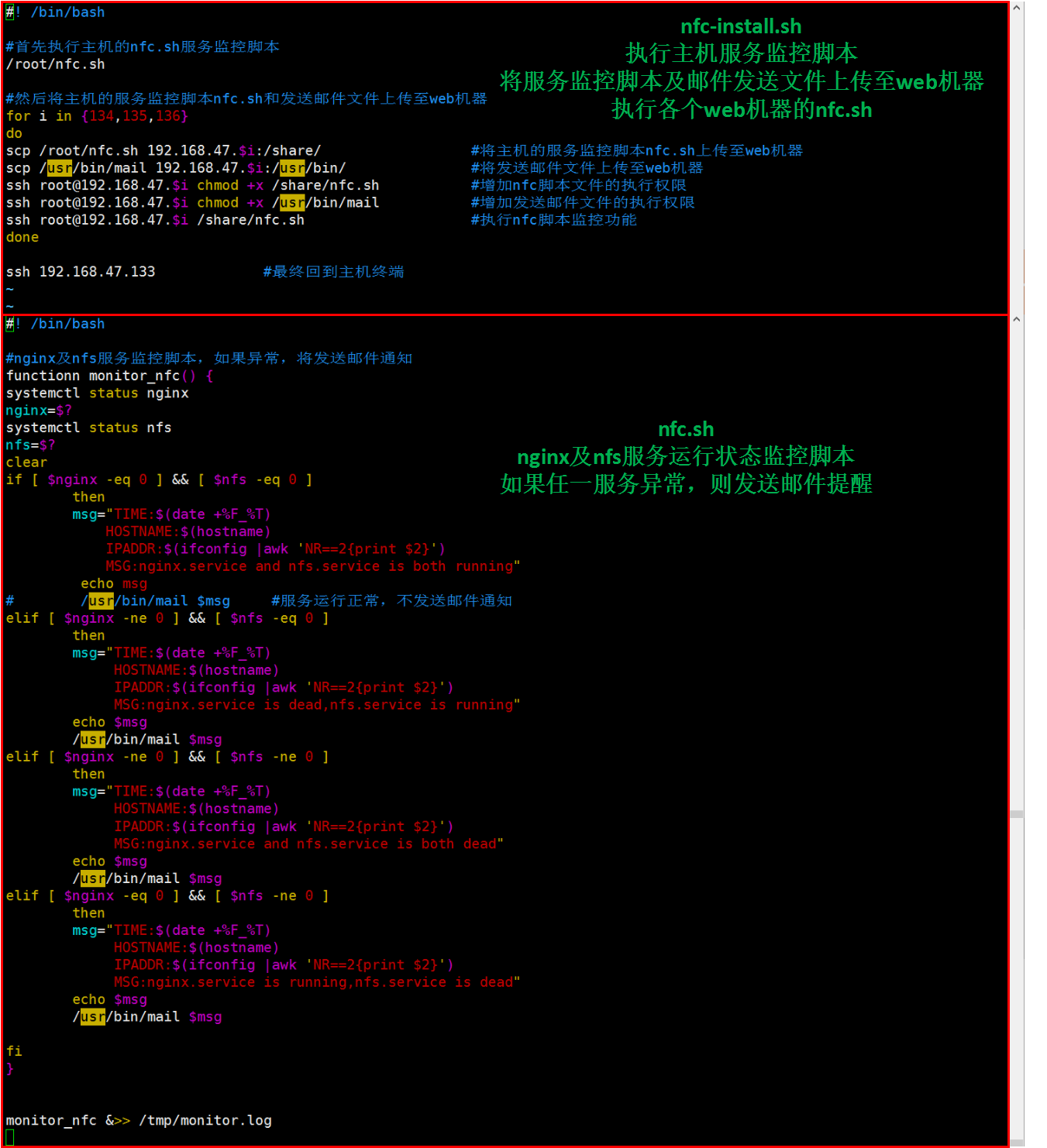
2. nfc.sh监控脚本,监控nginx及nfs服务状态,并调用mail发送工具通知用户;
3. nfc-install.sh监控部署脚本,运行在主机,为子机配置文件,执行命令;
详细代码:
1. 邮件发送工具
将以下代码创建到“/usr/bin/mail”文件内,并赋予执行权限(chmod +x /usr/bin/mail)
#!/usr/bin/python

# -*- coding: UTF-8 -*-

import sys

import smtplib

import email.mime.multipart

import email.mime.text

server = 'smtp.163.com'

port = ''

def sendmail(server,port,user,pwd,msg):

    smtp = smtplib.SMTP()

    smtp.connect(server,port)

    smtp.login(user, pwd)

    smtp.sendmail(msg['from'], msg['to'], msg.as_string())

    smtp.quit()

    print('邮件发送成功email has send out !')

if __name__ == '__main__':

    msg = email.mime.multipart.MIMEMultipart()

    msg['Subject'] = 'check your service of nginx and nfs'

    msg['From'] = 'python4_mail@163.com'

    msg['To'] = 'python4_recvmail@163.com'

    user = 'python4_mail'

    pwd = ''

    content='%s\n%s' %('\n'.join(sys.argv[1:4]),' '.join(sys.argv[4:])) #格式处理,专门针对我们的邮件格式

    txt = email.mime.text.MIMEText(content, _charset='utf-8')

    msg.attach(txt)

    sendmail(server,port,user,pwd,msg)
python通过SMTP发送邮件失败:
错误1:smtplib.SMTPAuthenticationError: (550, b‘User has no permission‘)
我们使用python发送邮件时相当于自定义客户端根据用户名和密码登录,然后使用SMTP服务发送邮件,新注册的163邮箱是默认不开启客户端授权的(对指定的邮箱大师客户端默认开启),因此登录总是被拒绝,解决办法(以163邮箱为例):进入163邮箱-设置-客户端授权密码-开启(授权码是用于登录第三方邮件客户端的专用密码)
错误2:smtplib.SMTPAuthenticationError: (535, b‘Error: authentication failed‘)
以163邮箱为例,在开启POP3/SMTP服务,并开启客户端授权密码时会设置授权码,将这个授权码代替smtplib.SMTP().login(user,password)方法中的password即可。
2. nfc.sh监控脚本
#! /bin/bash

#nginx及nfs服务监控脚本,如果异常,将发送邮件通知

function monitor_nfc() {

systemctl status nginx

nginx=$?

systemctl status nfs

nfs=$?

clear

if [ $nginx -eq  ] && [ $nfs -eq  ]

        then

        msg="TIME:$(date +%F_%T)

            HOSTNAME:$(hostname)

            IPADDR:$(ifconfig |awk 'NR==2{print $2}')

            MSG:nginx.service and nfs.service is both running"

         echo msg

#        /usr/bin/mail $msg    #服务运行正常,不发送邮件通知

elif [ $nginx -ne  ] && [ $nfs -eq  ]

        then

        msg="TIME:$(date +%F_%T)

             HOSTNAME:$(hostname)

             IPADDR:$(ifconfig |awk 'NR==2{print $2}')

             MSG:nginx.service is dead,nfs.service is running"

        echo $msg

        /usr/bin/mail $msg

elif [ $nginx -ne  ] && [ $nfs -ne  ]

        then

        msg="TIME:$(date +%F_%T)

             HOSTNAME:$(hostname)

             IPADDR:$(ifconfig |awk 'NR==2{print $2}')

             MSG:nginx.service and nfs.service is both dead"

        echo $msg

        /usr/bin/mail $msg

elif [ $nginx -eq  ] && [ $nfs -ne  ]

        then

        msg="TIME:$(date +%F_%T)

             HOSTNAME:$(hostname)

             IPADDR:$(ifconfig |awk 'NR==2{print $2}')

             MSG:nginx.service is running,nfs.service is dead"

        echo $msg

        /usr/bin/mail $msg

fi

}

monitor_nfc &>> /tmp/monitor.log
3. nfc-install监控部署脚本
#! /bin/bash

#首先执行主机的nfc.sh服务监控脚本

/root/nfc.sh

#然后将主机的服务监控脚本nfc.sh和发送邮件文件上传至web机器

for i in {,,}

do

scp /root/nfc.sh 192.168..$i:/share/            #将主机的服务监控脚本nfc.sh上传至web机器

scp /usr/bin/mail 192.168..$i:/usr/bin/        #将发送邮件文件上传至web机器

ssh root@192.168..$i chmod +x /share/nfc.sh        #增加nfc脚本文件的执行权限

ssh root@192.168..$i chmod +x /usr/bin/mail        #增加发送邮件文件的执行权限

ssh root@192.168..$i /share/nfc.sh            #执行nfc脚本监控功能

done

ssh 192.168.47.133           #最终回到主机终端
详见图片
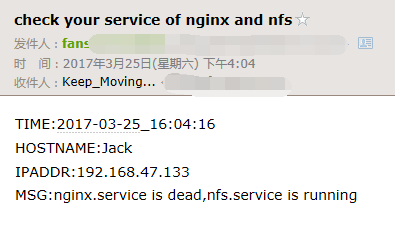
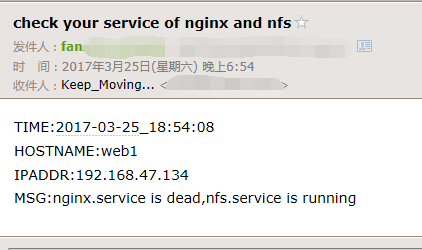
结果:
主机
子机1
参考资料
1. http://www.cnblogs.com/linhaifeng/p/6602149.html
Linux基础之-利用shell脚本实现自动监控系统服务的更多相关文章
- 【shell脚本】自动监控tomcat服务===autoCheck.sh
自动监控tomcat服务,当tommcat服务挂掉时自动重启 一.脚本内容 [root@localhost ]# cat /root/autoCheck.sh #!/bin/bash startTom ...
- Shell 脚本来自动监控 Linux 系统的内存
# vim /scripts/swap-warning.sh #!/bin/bash #提取本服务器的IP地址信息 IP=`ifconfig eth0 | grep "inet addr&q ...
- linux的基本操作(shell 脚本的基础知识)
shell 脚本的基础知识 日常的linux系统管理工作中必不可少的就是shell脚本,如果不会写shell脚本,那么你就不算一个合格的管理员.目前很多单位在招聘linux系统管理员时,shell脚本 ...
- 《Linux命令行与shell脚本编程大全 第3版》Shell脚本编程基础---57
以下为阅读<Linux命令行与shell脚本编程大全 第3版>的读书笔记,为了方便记录,特地与书的内容保持同步,特意做成一节一次随笔,特记录如下:
- 利用shell脚本实现计划任务功能 V1.2
2013.05.10 mytask 1.2 主程序休眠时间分成若干小的时间片断分段休眠,避免长时间的休眠不能及时响应系统信号. 2013.05.07 mytask 1.1 昨天发布了mytask1. ...
- Centos7下crontab+shell脚本定期自动删除文件
问题描述: 最近有个需求,就是rsync每次同步的数据量很多,但是需要保留的数据库bak文件 保留7天就够了,所以需要自动清理文件夹内的bak文件 解决方案: 利用shell脚本来定期删除文件夹内的任 ...
- 自学Linux命令行与Shell脚本之路
自学Linux命令行与Shell脚本之路[第一回]:初识Linux 1.1 自学Linux Shell1.1-Linux初识 1.2 自学Linux Shell1.2-Linux目录结构 1.3 ...
- 《Linux命令行与shell脚本编程大全》第十一章 构建基本脚本
11.1使用多个命令 $date;who // 命令列表,加入分号就可以,这样会依次执行.参见5.2.1节 注意区分$(date;who),这个是进程列表,会生成一个子shell来执行 Shel ...
- Linux命令行与Shell脚本编程大全
快来参加<Linux命令行与Shell脚本编程大全>学习吧,提升技能,展示自我. 点击链接即可进入学习:https://s.imooc.com/WTmCO6H 课程亮点适合零基础读者,从零 ...
随机推荐
- eclipse项目目录展示结构设置
我因为前后端都搞过, 解除过很多的开发IDE,说真的,很多的项目目录结构都是一级一级分开,然后我可以通过展开等操作来查看文件等资源信息,结果呢?java的开发IDE eclipse默认的项目目录展示简 ...
- LTE
LTE (telecommunication), Long Term Evolution, a telephone and mobile broadband communication standar ...
- R 安装包遇到问题(一) loadNamespace()里算'rJava'时.onLoad失败了 rJava 包的安装与载入
> library(xlsx) Error: package or namespace load failed for ‘xlsx’: loadNamespace()里算'rJava'时.onL ...
- docker jenkins使用(二)
jenkins的安装很简单,但是jenkins的初次使用却很头疼.对于小白来说有点不太明白 背景: 开发更新app需要很多步骤,生成jar包.上传服务器.更新启动程序,如果有很多服务器,那么需要做好多 ...
- java 的继承
1 为什么要使用继承? 为了提取两个类中公共的代码,可以使用继承抽取重复性的代码到一个公共类中,这个公共的类称为父类(super class).继承于父类的类称为子类(sub class). java ...
- Springboot集成WebSocket通信全部代码,即扣即用。
websocket通信主要来自两个类以及一个测试的html页面. MyHandler 和 WebSocketH5Config,下面全部代码 MyHandler类全部代码: package com.un ...
- python+selenium打开浏览器报错问题
报关键字,升级selenium版本 若打开IE浏览器,停在IE界面,无法跳转对应的地址,设置一下IE的页面缩放,设置为100%
- 用js实现匹配文本中的电话号、固定电话号
思路: 1.用正则取出所有数字串 说起来容易,做起来难,开始只是简单的/D+/,后边发现这样做会将固定电话分成两段数字串,后经百度找到解决办法 /[^0-9/-]/ 意思是非数字不包括-作为分割 2. ...
- day2-模块初识之路径问题
sys需要调用my_test,但是不在同一目录 会出现如下错误 具体办法:1.将my_test.py放到文件夹下 附:sys.py 和my-test.py具体代码 enumerate 重点:浅复制(用 ...
- Bugfree安装与使用
第一步:下载XAMPP和bugfree http://www.bugfree.org.cn/ http://www.apachefriends.org/zh_cn/xampp.html 第二步:安装 ...