
点滴积累【C#】---将Excel数据导入到数据库
本文修改来源:http://www.cnblogs.com/chenyuming507950417/p/3169267.html
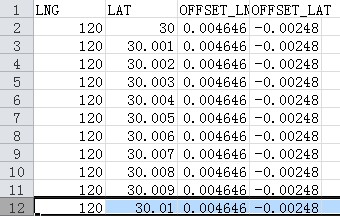
假如Excel中的数据如下:
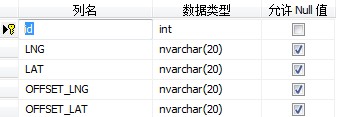
数据库建表如下:
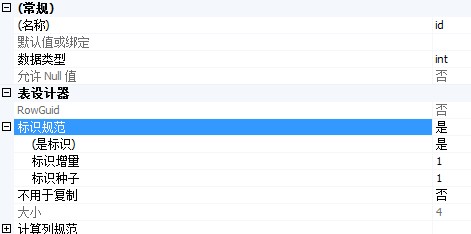
其中Id为自增字段:
代码:
 using System;

 using System.Collections.Generic;

 using System.Linq;

 using System.Web;

 using System.Web.UI;

 using System.Web.UI.WebControls;

 using System.Data;

 using System.Data.OleDb;

 using System.Configuration;

 using System.Data.SqlClient;

 namespace InExcelOutExcel

 {

     public partial class ExcelToDB : System.Web.UI.Page

     {

         protected void Page_Load(object sender, EventArgs e)

         {

             FileSvr fileSvr = new FileSvr();

             System.Data.DataTable dt = fileSvr.GetExcelDatatable("C:\\Users\\NewSpring\\Desktop\\Demo\\InExcelOutExcel\\InExcelOutExcel\\excel\\ExcelToDB.xlsx", "mapTable");

             fileSvr.InsetData(dt);

         }

     }

     class FileSvr

     {

         /// <summary>

         /// Excel数据导入Datable

         /// </summary>

         /// <param name="fileUrl"></param>

         /// <param name="table"></param>

         /// <returns></returns>

         public System.Data.DataTable GetExcelDatatable(string fileUrl, string table)

         {

             //office2007之前 仅支持.xls

             //const string cmdText = "Provider=Microsoft.Jet.OLEDB.4.0;Data Source={0};Extended Properties='Excel 8.0;IMEX=1';";

             //支持.xls和.xlsx,即包括office2010等版本的   HDR=Yes代表第一行是标题,不是数据;

             const string cmdText = "Provider=Microsoft.Ace.OleDb.12.0;Data Source={0};Extended Properties='Excel 12.0; HDR=Yes; IMEX=1'";

             System.Data.DataTable dt = null;

             //建立连接

             OleDbConnection conn = new OleDbConnection(string.Format(cmdText, fileUrl));

             try

             {

                 //打开连接

                 if (conn.State == ConnectionState.Broken || conn.State == ConnectionState.Closed)

                 {

                     conn.Open();

                 }

                 System.Data.DataTable schemaTable = conn.GetOleDbSchemaTable(OleDbSchemaGuid.Tables, null);

                 //获取Excel的第一个Sheet名称

                 string sheetName = schemaTable.Rows[]["TABLE_NAME"].ToString().Trim();

                 //查询sheet中的数据

                 string strSql = "select * from [" + sheetName + "]";

                 OleDbDataAdapter da = new OleDbDataAdapter(strSql, conn);

                 DataSet ds = new DataSet();

                 da.Fill(ds, table);

                 dt = ds.Tables[];

                 return dt;

             }

             catch (Exception exc)

             {

                 throw exc;

             }

             finally

             {

                 conn.Close();

                 conn.Dispose();

             }

         }

         /// <summary>

         /// 从System.Data.DataTable导入数据到数据库

         /// </summary>

         /// <param name="dt"></param>

         /// <returns></returns>

         public int InsetData(System.Data.DataTable dt)

         {

             int i = ;

             string lng = "";

             string lat = "";

             string offsetLNG = "";

             string offsetLAT = "";

             foreach (DataRow dr in dt.Rows)

             {

                 lng = dr["LNG"].ToString().Trim();

                 lat = dr["LAT"].ToString().Trim();

                 offsetLNG = dr["OFFSET_LNG"].ToString().Trim();

                 offsetLAT = dr["OFFSET_LAT"].ToString().Trim();

                 //sw = string.IsNullOrEmpty(sw) ? "null" : sw;

                 //kr = string.IsNullOrEmpty(kr) ? "null" : kr;

                 string strSql = string.Format("Insert into DBToExcel (LNG,LAT,OFFSET_LNG,OFFSET_LAT) Values ('{0}','{1}',{2},{3})", lng, lat, offsetLNG, offsetLAT);

                 string strConnection = ConfigurationManager.ConnectionStrings["ConnectionStr"].ToString();

                 SqlConnection sqlConnection = new SqlConnection(strConnection);

                 try

                 {

                     // SqlConnection sqlConnection = new SqlConnection(strConnection);

                     sqlConnection.Open();

                     SqlCommand sqlCmd = new SqlCommand();

                     sqlCmd.CommandText = strSql;

                     sqlCmd.Connection = sqlConnection;

                     SqlDataReader sqlDataReader = sqlCmd.ExecuteReader();

                     i++;

                     sqlDataReader.Close();

                 }

                 catch (Exception ex)

                 {

                     throw ex;

                 }

                 finally

                 {

                     sqlConnection.Close();

                 }

                 //if (opdb.ExcSQL(strSql))

                 //    i++;

             }

             return i;

         }

     }

 }
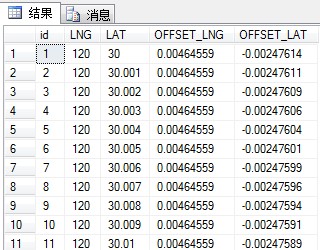
运行结果:
点滴积累【C#】---将Excel数据导入到数据库的更多相关文章
- 将Excel数据导入mysql数据库的几种方法
将Excel数据导入mysql数据库的几种方法 “我的面试感悟”有奖征文大赛结果揭晓! 前几天需要将Excel表格中的数据导入到mysql数据库中,在网上查了半天,研究了半天,总结出以下几种方法,下面 ...
- 利用TOAD实现把EXCEL数据导入oracle数据库
利用TOAD实现把EXCEL数据导入oracle数据库 工具: Toad11.7z(百度搜索,直接下载) 1.将Excel文件中某些字段导入到Oracle数据库的对应表 连接想要导入的数据库 ,然 ...
- c#将Excel数据导入到数据库的实现代码
这篇文章主要介绍了c#将Excel数据导入到数据库的实现代码,有需要的朋友可以参考一下 假如Excel中的数据如下: 数据库建表如下: 其中Id为自增字段: 代码: 代码如下: using Syste ...
- java实现EXCEL数据导入到数据库中的格式问题的解决
之前作为项目甲方,加之java接触不多,在java web开发方面都是打下手的份. 对于EXCEL数据导入到数据库这个问题一直老是出现格式原因而导入失败也是未免惆怅,开发团队也是只说回去检查一下格式. ...
- NOPI Excel 数据导入到数据库
/// <summary> /// 上传excel文件 并将文件数据导入到数据库 /// </summary> /// <param name="file&qu ...
- 把Excel数据导入到数据库
引入命名空间 using System.IO; using System.Data; using System.Data.OleDb; 引入命名空间 首先要把Excel上传到服务器 //上传Excel ...
- c#将Excel数据导入到数据库的实现代码(OleDb)
sing System; using System.Collections.Generic; using System.Linq; using System.Web; using System.Web ...
- c#将Excel数据导入到数据库的实现代码(转载)
假如Excel中的数据如下: 数据库建表如下: 其中Id为自增字段: 代码如下: using System; using System.Collections.Generic ...
- C# Excel数据导入到数据库
http://www.jb51.net/article/44743.htm 假如Excel中的数据如下: 数据库建表如下: 其中Id为自增字段: 代码: 复制代码 代码如下: using System ...
随机推荐
- Ubuntu下查看APT安装的软件安装路径和版本
1.查询安装路径 dpkg -L 软件名 例如:dpkg -L gedit dpkg -L gedit /. /usr /usr/bin /usr/bin/gedit /usr/share /usr/ ...
- 移动应用安全开发指南(Android)--数据传输
概述 移动应用很多时候并非孤立存在,在多数场景下存在前.后台以及第三方服务之间进行数据交互,因此,在网络中传输敏感数据在所难免,如果不使用正确安全的传输方式,有可能存在敏感信息泄漏的风险. 安全准则 ...
- NSLog 输出格式集合
• %@ 对象 • %d, %i 整数 • %u 无符整形 • %f 浮点/双字 • %x, %X 二进制整数 • %o 八进制整数 • %zu size_t • %p 指针 • %e 浮 ...
- jquery动态添加表单数据
动态添加用户 实现代码 <!DOCTYPE HTML PUBLIC "-//W3C//DTD HTML 4.01 Transitional//EN"> <html ...
- 永远不要去B网(Bittrex.com)
永远不要去Bittrex.com,没见过这么垃圾的服务! 注册之后基本资料就不能修改了,结果不能提现,充值却是可以充值,就跟今年初禁比特币时的垃圾火币网一样,只进不出,去他奶奶的! 随后网站提示可以高 ...
- Idea 创建spring mvc项目时,在add framework support中找不到spring选项
每次创建spring项目最头疼就是spring的配置文件,尤其是配置头信息.通过IDEA工具可以很好辅助完整这些工作. 先说下这个选项的作用:其作用就是利用IDEA自身提供的功能帮你完成一些sprin ...
- iOS:UIView、UIControl、UIButton、UILabel简单的属性和方法常识
常见属性和方法 一 .UIVIew 常见属性 1.frame 位置和尺寸(以父控件的左上角为原点(0,0)) 2.center 中点 (以父控件的左上角为原点(0,0)) 3.bounds 位置和尺寸 ...
- 利用PMKID破解PSK的实际测试与影响评估
在2018年8月4日,一位研究员在hashcat论坛中发布了一篇帖子,表示他研究WPA3协议密码破解方法的过程中,发现了一个针对WPA/WPA2协议密码破解的新方法,使用PMKID(the Pairw ...
- delphi 查看编译版本
对照表: http://docwiki.embarcadero.com/RADStudio/Tokyo/en/Compiler_Versions procedure TForm1.Button1Cli ...
- mysql有关问题之:the security settings could not be applied to
mysql问题之:the security settings could not be applied to 转自:http://www.myexception.cn/mysql/503556.htm ...