
第61天:json遍历和封装运动框架(多个属性)
一、json 遍历
for in 关键字
for ( 变量 in 对象)
{ 执行语句; }
例如:
var json = {width:200,height:300,left:50}
console.log(json.width);
for(var k in json)
{
console.log(k); // k 遍历的是json 可以得到的是 属性
console.log(json[k]); // json[k] 得到 是属性的 值
}
二、回调函数
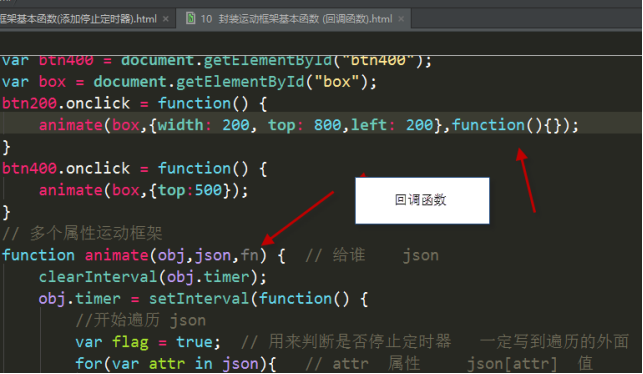
等动画执行完毕再去执行的函数 回调函数
很简单 当定时器停止了。 动画就结束了
三、 in 运算符
in运算符也是一个二元运算符。in运算符要求第1个(左边的)操作数必须是字符串类型或可以转换为字符串类型的其他类型,而第2个(右边的)操作数必须是数组或对象。只有第1个操作数的值是第2个操作数的属性名,才会返回true,否则返回false
// in 可以用用来判断 json 里面有没有某个属性
var json = {name: "刘德华",age : 55};
// in 可以用用来判断 json 里面有没有某个属性
if("andy" in json)
{
console.log("yes"); // 返回的是 yes
}
else
{
console.log("no");
}
四、案例
1、返回当前样式的函数
 <!DOCTYPE html>

 <html lang="en">

 <head>

     <meta charset="UTF-8">

     <title>Title</title>

     <style>

         div{

             width: 100px;

             height: 200px;

             position: absolute;

             top:10px;

             left:20px;

             background-color: yellow;

             z-index: 2;

             opacity: 0.4;

         }

     </style>

 </head>

 <body>

 <div id="demo"></div>

 </body>

 </html>

 <script>

     var demo=document.getElementById("demo");

     function getStyle(obj,attr){//谁的   属性

         if(obj.currentStyle){

             return obj.currentStyle[attr];//ie

         }else{

         return window.getComputedStyle(obj,null)[attr];//w3c

         }

     }

     console.log(getStyle(demo,"width"));// 调用 width必须加引号

 </script>
2、封装运动框架单个属性
 <!DOCTYPE html>

 <html>

 <head lang="en">

     <meta charset="UTF-8">

     <title></title>

     <style>

         div {

             width: 100px;

             height: 100px;

             background-color: green;

             position: absolute;

             top: 50px;

             left:0;

             opacity: 0.5;

         }

     </style>

 </head>

 <body>

 <button id="btn200">200</button>

 <button id="btn400">400</button>

 <div id="box"></div>

 </body>

 </html>

 <script>

     //获取CSS属性函数

     function getStyle(obj,attr){//谁的   属性

         if(obj.currentStyle){

             return obj.currentStyle[attr];//ie

         }else{

             return window.getComputedStyle(obj,null)[attr];//w3c

         }

     }

     var btn200 = document.getElementById("btn200");

     var btn400 = document.getElementById("btn400");

     var box = document.getElementById("box");

     btn200.onclick = function() {

         animate(box,"width",500);

     }

     btn400.onclick = function() {

         animate(box,"top",400);

     }

     //封装单个属性运动框架

     function animate(obj,attr,target){

         clearInterval(obj.timer);

         obj.timer=setInterval(function(){

             //计算步长 盒子本身的样式+步长

             var current=parseInt(getStyle(obj,attr));//获取当前样式 调用getStyle 去掉px

             var step=(target-current)/10;

             step=step>0?Math.ceil(step):Math.floor(step);

             //开始动画

             obj.style[attr]=current+step+"px";

             if(current==target){

                 clearInterval(obj.timer);

             }

         },30)

     }

</script>
3、封装运动框架多个属性
 <!DOCTYPE html>

 <html>

 <head lang="en">

     <meta charset="UTF-8">

     <title></title>

     <style>

         div {

             width: 100px;

             height: 100px;

             background-color: green;

             position: absolute;

             top: 50px;

             left:0;

             opacity: 0.5;

             border-radius: 50%;

         }

     </style>

 </head>

 <body>

 <button id="btn200">200</button>

 <button id="btn400">400</button>

 <div id="box"></div>

 </body>

 </html>

 <script>

     var btn200 = document.getElementById("btn200");

     var btn400 = document.getElementById("btn400");

     var box = document.getElementById("box");

     btn200.onclick = function() {

         animate(box,{width:500,top:200,left:400,opacity:40,zIndex:3},function(){alert("我来了")});//function()回调函数

     }

     btn400.onclick = function() {

         animate(box,{top:200,left:200});

     }

     //封装多个属性运动框架

     function animate(obj,json,fn){

         clearInterval(obj.timer);

         obj.timer=setInterval(function(){

             //开始遍历json

             var flag=true;//判断是否停止定时器 一定写到遍历外面

             for(var attr in json){//attr属性  json[attr]属性值

                 var current=0;

                 if(attr=="opacity"){

                      current=parseInt(getStyle(obj,attr)*100)||0;//数值

                     }else{

                      current=parseInt(getStyle(obj,attr));//数值

                     //console.log(current);

                 }

                 //console.log(current);

                 //目标位置就是属性值

                 var step=(json[attr]-current)/10;//步长=目标位置-当前位置/10

                 step=step>0?Math.ceil(step):Math.floor(step);

                 //判断透明度

                 if(attr=="opacity"){//判断用户有没有输入opacity

                     if("opacity" in obj.style){//判断浏览器是否支持opacity

                         obj.style.opacity=(current+step)/100;//W3C

                     }else{

                         obj.style.filter="alpha(opacity="+(current+step)+")";//IE

                     }

                 }else if(attr=="zIndex"){//判断层级

                         obj.style.zIndex=json[attr];

                 }

                 else{

                     obj.style[attr]=current+step+"px";

                 }

                 //判断什么时候停止定时器

                 if(current!=json[attr]){//只要其中一个不满足条件 就不应该停止定时器

                     flag=false;

                 }

             }

             if(flag){//用于判断定时器的条件

                 clearInterval(obj.timer);

                 if(fn){//定时器停止就是动画结束了 再执行fn

                     fn();//调用函数

                 }

             }

         },30)

     }

     //获取CSS属性函数

     function getStyle(obj,attr){//谁的   属性

         if(obj.currentStyle){

             return obj.currentStyle[attr];//ie

         }else{

             return window.getComputedStyle(obj,null)[attr];//w3c

         }

     }

 </script>
3、仿360开机效果
 <!DOCTYPE html>

 <html>

 <head lang="en">

     <meta charset="UTF-8">

     <title>仿360开机效果</title>

     <style>

         .box{

             width: 322px;

             position: fixed;

             bottom:0;

             right:0;

         }

         span{

             position: absolute;

             top:0;

             right:0;

             width:30px;

             height: 20px;

             cursor: pointer;

         }

     </style>

 </head>

 <body>

 <div class="box" id="box">

     <span></span>

     <div class="hd" id="t">

         <img src="data:images/t.jpg" alt=""/>

     </div>

     <div class="bd" id="b">

         <img src="data:images/b.jpg" alt=""/>

     </div>

 </div>

 </body>

 </html>

 <script>

     var b=document.getElementById('b');

     var closeAd=document.getElementsByTagName("span")[0];

     closeAd.onclick=function(){

         animate(b,{height:0},function(){

             animate(b.parentNode,{width:0},function(){alert(11)})

         })

     }

     //封装多个属性运动框架

     function animate(obj,json,fn){

         clearInterval(obj.timer);

         obj.timer=setInterval(function(){

             //开始遍历json

             var flag=true;//判断是否停止定时器 一定写到遍历外面

             for(var attr in json){//attr属性  json[attr]属性值

                 var current=parseInt(getStyle(obj,attr));//数值

                 //目标位置就是属性值

                 var step=(json[attr]-current)/10;//步长=目标位置-当前位置/10

                 step=step>0?Math.ceil(step):Math.floor(step);

                 obj.style[attr]=current+step+"px";

                 //console.log(current);

                 if(current!=json[attr]){//只要其中一个不满足条件 就不应该停止定时器

                     flag=false;

                 }

             }

             if(flag){//用于判断定时器的条件

                 clearInterval(obj.timer);

                 if(fn){//定时器停止就是动画结束了 再执行fn

                     fn();//调用函数

                 }

             }

         },30)

     }

     //获取CSS属性函数

     function getStyle(obj,attr){//谁的   属性

         if(obj.currentStyle){

             return obj.currentStyle[attr];//ie

         }else{

             return window.getComputedStyle(obj,null)[attr];//w3c

         }

     }

 </script>

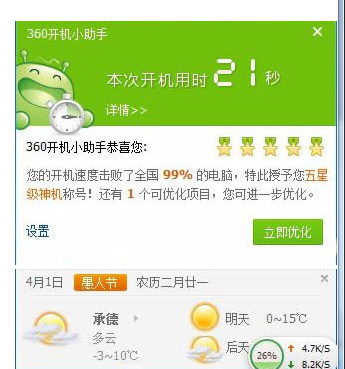
运行效果:
第61天:json遍历和封装运动框架(多个属性)的更多相关文章
- [js高手之路]封装运动框架实战左右与上下滑动的焦点轮播图
在这篇文章[js高手之路]打造通用的匀速运动框架中,封装了一个匀速运动框架,我们在这个框架的基础之上,加上缓冲运动效果,然后用运动框架来做幻灯片(上下,左右),效果如下: 1 2 3 4 5 // 0 ...
- 封装运动框架基本函数(多个属性包括透明度和zIndex)
<!DOCTYPE html PUBLIC "-//W3C//DTD XHTML 1.0 Transitional//EN" "http://www.w3.org/ ...
- JS封装运动框架(另一种写法)
function animate(obj, json, interval, sp, fn) { clearInterval(obj.timer); //var k = 0; //var j = 0; ...
- JS封装动画框架,网易轮播图,旋转轮播图
JS封装动画框架,网易轮播图,旋转轮播图 1. JS封装运动框架 // 多个属性运动框架 添加回调函数 function animate(obj,json,fn) { clearInterval(ob ...
- 【repost】JavaScript完美运动框架的进阶之旅
运动框架的实现思路 运动,其实就是在一段时间内改变left.right.width.height.opactiy的值,到达目的地之后停止. 现在按照以下步骤来进行我们的运动框架的封装: 匀速运动. 缓 ...
- js运动框架逐渐递进版
运动,其实就是在一段时间内改变left.right.width.height.opactiy的值,到达目的地之后停止. 现在按照以下步骤来进行我们的运动框架的封装: 匀速运动. 缓冲运动. 多物体运动 ...
- 无限循环轮播图之运动框架(原生JS)
封装运动框架 function getStyle(obj,name){ if(obj.currentStyle){ return obj.currentStyle[name]; }else{ retu ...
- javascript常用函数封装——运动、cookie、ajax、获取行内样式兼容写法、拖拽
运动.cookie.ajax.获取行内样式兼容写法.拖拽封装大合集. //url,data,type,timeout,success,error function ajax(options){ //- ...
- .NET3.5中JSON用法以及封装JsonUtils工具类
.NET3.5中JSON用法以及封装JsonUtils工具类 我们讲到JSON的简单使用,现在我们来研究如何进行封装微软提供的JSON基类,达到更加方便.简单.强大且重用性高的效果. 首先创建一个类 ...
随机推荐
- mac+win10:UEFI分区方式下安装windows 10
小编,最近通过在远景论坛上寻找教程--安装双系统(win10+mac os).经过一天努力,成功安装win10.为此,特地分享给各位正在需求教程的朋友,我在UEFI分区方式下安装windows 10的 ...
- Ajax跨域请求怎么解决?
前言 项目中需要将第三方系统中,对应用户的代办消息集成到系统中.对方提供了获取对应用户的接口url,但是由于两边的系统是部署到客户现场不同IP的虚机上的,所以进行ajax请求的时候是属于跨域请求的.之 ...
- orm4sqlite
//-------------------------------------------------------------------------- // // Copyright (c) BUS ...
- WPF DataGridRow Event
CM(Caliburn.Micro)框架绑定DataGridRow事件 <DataGrid.ItemContainerStyle> <Style TargetType="D ...
- unity3d 角色头顶信息3D&2D遮挡解决方案(二)
在阅读本文之前请先阅读上一篇文章:http://www.cnblogs.com/shenggege/p/4179012.html 本来一篇文章就可以说完了,但是上次只是实现了已知的一些功能 后来在实际 ...
- 「日常训练」 Longest Run on a Snowboard (UVA-10285)
题意 其实就是一条二维的LIS,但是还是做的一愣一愣的,多努力. 考虑$dp[i][j]$为从(i,j)出发的二维LIS的最大值,那么$dp[i][j]=max\{dp[i−di[k]][j−dj[k ...
- Jenkis 无法下载插件问题解决
在新机器上安装jenkins后,安装插件报如下错误 sun.security.provider.certpath.SunCertPathBuilderException: unable to find ...
- Qt Creator 下启动vim模式后,运行快捷键Ctrl+R失效解决方案
首先开启vim后,Ctrl+R无法用 解决: 工具 -> 选项->FakeVim 转到Ex Command Mapping 搜索Run 底栏Regular expression 输入run ...
- Java开发工程师(Web方向) - 04.Spring框架 - 第5章.Web框架
第5章--Web框架 Web框架概述 Web框架单元测验 本次得分为:13.50/15.00, 本次测试的提交时间为:2017-09-25 1单选(2分) 关于Spring MVC中Dispatche ...
- 学习笔记,99乘法表,嵌套while循环
line = 0 #定义外循环初变量 while line < 9: #外循环判断语句 line += 1 #改变外循环初变量,避免陷入死循环 row = 0 #定义内循环初变量 while r ...