
原生js验证简洁美观注册登录页面
序
一个以js验证表单的简洁的注册登录页面,不多说直接上图
效果
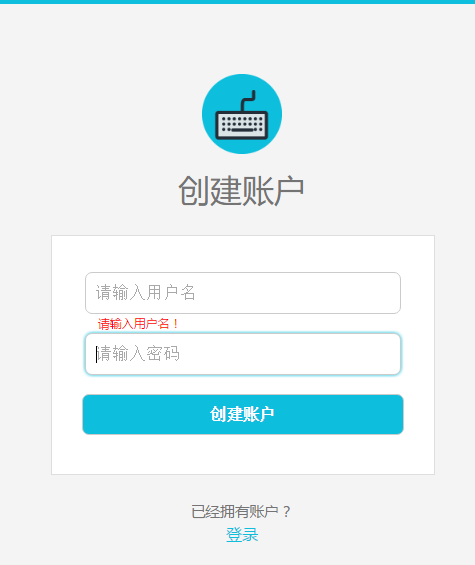

主要文件

完整代码
sign_up.html 注册表单
<!DOCTYPE html>

<html lang="en">

<head>

    <meta charset="UTF-8">

    <title>sign-up</title>

    <link rel="stylesheet" href="css/common_form.css">

</head>

<body>

    <header>

        <div class="header-line"></div>

    </header>

    <div class="content">

        <img class="content-logo" src="img/form_logo.png" alt="logo">

        <h1 class="content-title">创建账户</h1>

        <div class="content-form">

            <form method="post" action="" onsubmit="return submitTest()">

                <div id="change_margin_1">

                    <input class="user" type="text" name="user" placeholder="请输入用户名" onblur="oBlur_1()" onfocus="oFocus_1()">

                </div>

                <!-- input的value为空时弹出提醒 -->

                <p id="remind_1"></p>

                <div id="change_margin_2">

                    <input class="password" type="password" name="password" placeholder="请输入密码" onblur="oBlur_2()" onfocus="oFocus_2()">

                </div>

                <!-- input的value为空时弹出提醒 -->

                <p id="remind_2"></p>

                <div id="change_margin_3">

                    <input class="content-form-signup" type="submit" value="创建账户">

                </div>

            </form>

        </div>

        <div class="content-login-description">已经拥有账户?</div>

        <div><a class="content-login-link" href="log_in.html">登录</a></div>

    </div>

<script src="js/common_form_test.js"></script>

</body>

</html>
log_in.html 登录表单
<!DOCTYPE html>

<html lang="en">

<head>

    <meta charset="UTF-8">

    <title>log-in</title>

    <link rel="stylesheet" href="css/common_form.css">

</head>

<body>

    <header>

        <div class="header-line"></div>

    </header>

    <div class="content">

        <img class="content-logo" src="img/form_logo.png" alt="logo">

        <h1 class="content-title">登录</h1>

        <div class="content-form">

            <form method="post" action="" onsubmit="return submitTest()">

                <div id="change_margin_1">

                    <input class="user" type="text" name="user" placeholder="请输入用户名" onblur="oBlur_1()" onfocus="oFocus_1()">

                </div>

                <!-- input的value为空时弹出提醒 -->

                <p id="remind_1"></p>

                <div id="change_margin_2">

                    <input class="password" type="password" name="password" placeholder="请输入密码" onblur="oBlur_2()" onfocus="oFocus_2()">

                </div>

                <!-- input的value为空时弹出提醒 -->

                <p id="remind_2"></p>

                <div id="change_margin_3">

                    <input class="content-form-signup" type="submit" value="登录">

                </div>

            </form>

        </div>

        <div class="content-login-description">没有账户?</div>

        <div><a class="content-login-link" href="sign_up.html">注册</a></div>

    </div>

<script src="js/common_form_test.js"></script>

</body>

</html>
common_form.css 表单css样式
/*重置样式*/

html, body, div, span, applet, object, iframe, h1, h2, h3, h4, h5, h6, p, blockquote, pre, a, abbr,

acronym, address, big, cite, code, del, dfn, em, img, ins, kbd, q, s, samp, small, strike, strong, sub

, sup, tt, var, b, u, i, dl, dt, dd, ol, ul, li, fieldset, form, label, legend, table, caption, tbody,

tfoot, thead, tr, th, td, article, aside, canvas, details, embed, figure, figcaption, footer, header,

hgroup, menu, nav, output, section, summary, time, mark, audio, video {

    margin:;

    padding:;

    border: 0

}

body {

    font-family: "微软雅黑";

    background: #f4f4f4;

}

/*header*/

.header-line {

    width: 100%;

    height: 4px;

    background: #0dbfdd;

}

/*content*/

.content {

    width: 28%;

    margin: 70px auto 0;

    text-align: center;

}

.content-logo {

    width: 80px;

    height: 80px;

}

.content-title {

    margin: 10px 0 25px 0;

    font-size: 2em;

    color: #747474;

    font-weight: normal;

}

.content-form {

    width: 100%;

    padding: 36px 0 20px;

    border: 1px solid  #dedede;

    text-align: center;

    background: #fff;

}

.content-form form div {

    margin-bottom: 19px;

}

.content-form form .user,

.content-form form .password {

    width: 77%;

    height: 20px;

    padding: 10px;

    font-size: 1em;

    border: 1px solid  #cccbcb;

    border-radius: 7px;

    letter-spacing: 1px;

}

.content-form form input:focus {

    outline: none;

    -webkit-box-shadow: 0 0 5px #0dbfdd;

            box-shadow: 0 0 5px #0dbfdd;

}

.content-form-signup {

    width: 84%;

    margin: 0 auto;

    padding: 10px;

    border: 1px solid  #cccbcb;

    border-radius: 7px;

    font-size: 1em;

    font-weight: bold;

    color: #fff;

    background: #0dbfdd;

    cursor: pointer;

}

.content-form-signup:hover {

    background: #0cb3d0;

}

.content-form-signup:focus {

    outline: none;

    border: 1px solid  #0cb3d0;

}

.content-login-description {

    margin-top: 25px;

    line-height: 1.63636364;

    color: #747474;

    font-size: .91666667rem;

}

.content-login-link {

    font-size: 16px;

    color: #0dbfdd;

    text-decoration: none;

}

/*输入框无内容便提示*/

#remind_1,

#remind_2 {

    width: 76%;

    margin: 0 auto 2px;

    text-align: left;

    font-size: .2em;

    color: #f00;

}
common_form_test.js 注册登录脚本
// 全局变量a和b,分别获取用户框和密码框的value值

var a = document.getElementsByTagName("input")[0].value;

var b = document.getElementsByTagName("input")[1].value;

//用户框失去焦点后验证value值

function oBlur_1() {

    if (!a) { //用户框value值为空

        document.getElementById("remind_1").innerHTML = "请输入用户名!";

        document.getElementById("change_margin_1").style.marginBottom = 1 + "px";

    } else { //用户框value值不为空

        document.getElementById("remind_1").innerHTML = "";

        document.getElementById("change_margin_1").style.marginBottom = 19 + "px";

    }

}

//密码框失去焦点后验证value值

function oBlur_2() {

    if (!b) { //密码框value值为空

        document.getElementById("remind_2").innerHTML = "请输入密码!";

        document.getElementById("change_margin_2").style.marginBottom = 1 + "px";

        document.getElementById("change_margin_3").style.marginTop = 2 + "px";

    } else { //密码框value值不为空

        document.getElementById("remind_2").innerHTML = "";

        document.getElementById("change_margin_2").style.marginBottom = 19 + "px";

        document.getElementById("change_margin_3").style.marginTop = 19 + "px";

    }

}

//用户框获得焦点的隐藏提醒

function oFocus_1() {

    document.getElementById("remind_1").innerHTML = "";

    document.getElementById("change_margin_1").style.marginBottom = 19 + "px";

}

//密码框获得焦点的隐藏提醒

function oFocus_2() {

    document.getElementById("remind_2").innerHTML = "";

    document.getElementById("change_margin_2").style.marginBottom = 19 + "px";

    document.getElementById("change_margin_3").style.marginTop = 19 + "px";

}

//若输入框为空,阻止表单的提交

function submitTest() {

    if (!a && !b) { //用户框value值和密码框value值都为空

        document.getElementById("remind_1").innerHTML = "请输入用户名!";

        document.getElementById("change_margin_1").style.marginBottom = 1 + "px";

        document.getElementById("remind_2").innerHTML = "请输入密码!";

        document.getElementById("change_margin_2").style.marginBottom = 1 + "px";

        document.getElementById("change_margin_3").style.marginTop = 2 + "px";

        return false; //只有返回true表单才会提交

    } else if (!a) { //用户框value值为空

        document.getElementById("remind_1").innerHTML = "请输入用户名!";

        document.getElementById("change_margin_1").style.marginBottom = 1 + "px";

        return false;

    } else if (!b) { //密码框value值为空

        document.getElementById("remind_2").innerHTML = "请输入密码!";

        document.getElementById("change_margin_2").style.marginBottom = 1 + "px";

        document.getElementById("change_margin_3").style.marginTop = 2 + "px";

        return false;

    }

}
form_logo.png Logo照片

到这里,一个简单的注册登录页面就完成了,后面会持续更新,使之更强大
原生js验证简洁美观注册登录页面的更多相关文章
- PHP实现一个简陋的注册登录页面
PHP实现一个简陋的注册登录页面 今天来水一篇没有**用的 /滑稽脸,代码简陋臃肿考虑不全,各位大佬轻喷,还望不吝赐教. 首先考虑了一下需要至少四个页面:register.html.register. ...
- Node.js原生及Express方法实现注册登录原理
由于本文只是实现其原理,所以没有使用数据库,只是在js里面模拟数据库,当然是种中还是需要用数据库的. 1.node.js原生方法 ①html页面,非常简单,没有一丝美化~我们叫它user.html & ...
- 注册登录页面修订-Python使用redis-手机验证接口-发送短信验证
登录页面修订 views.Login.vue <template> <div class="login box"> <img src="@/ ...
- PHP实践项目【1】:注册登录页面
在我们这个项目里面,一共用到了5个php文件,他们分别是: login.php 登录页面 logincheck.php 登录检测php文件 register.php 新用户注册页面 regcheck. ...
- jQuery跳转到另一个页面以及原生js跳转到另一个页面
1.原生js我们可以利用http的重定向来跳转 window.location.replace("https://www.cnblogs.com/pythonywy/"); 2.原 ...
- node.js+mysql用户的注册登录验证
下面代码实现的功能是:用node.js连接mysql实现用户的注册和登录,这里主要实现的是后端的验证代码,前端显示部分没具体写出. 整个程序的流程是这样的: 1.首先建立数据库reji,数据表user ...
- 原生js实现简洁的返回顶部组件
本文内容相当简单,所以没有发布到博客园首页,如果你不幸看到,那只能是我这篇文章的荣幸,谢谢你的大驾光临~(本博客返回顶部的功能就使用的是这个组件) 返回顶部组件是一种极其常见的网页功能,需求简单:页面 ...
- koa2+redis+jwt token验证,简单注册登录
首先新建文件夹命名koa-server,npm init,相关包的安装就不说了,这是我的package.json 新建index.js文件,编码如下,config全局配置不用管,redis是一个简单的 ...
- js实现一个简单的登录页面
<!DOCTYPE html><html lang="en"><head> <meta charset="UTF-8" ...
随机推荐
- caffe上使用hdf5格式文件以及回归(regression)问题
最近用caffe做了一下regression问题,先用data layer中的data,float_data试了一下,data用来存放图片,float_data存放regression的values, ...
- lxde桌面默认快捷键
ctrl+alt+左右 选择左右桌面shift+alt+左右 当前窗口送至左右桌面房子键+F1~F4 切换桌面1-4房子键+d 显示桌面alt+esc ...
- IBM X3650 M4服务器安装centos找不到硬盘的解决方法
IBM X3650 M4是IBM新的2U的服务器,IBM服务器以高稳定性和卓越的性能一直领先其他的服务器品牌成为全球第一.但是我们在用IBM的最新版9.4引导盘引导的时候,里面选项只有windows ...
- 【转载】S2SH
说说最多人用的SSH或SSI吧,现在用的比较多的应该就是struts2.x+spring3.X+hibernate4.X或hibernate3.X了吧,mybatis用的人也有,方便有DBA的公司. ...
- mvc4.0添加EF4.0时发生编译时错误
解决此问题是因为MVC4.0默认未添加EF4.0的引用,EF4.0引用的是System.Data.Entity.dll, Version=4.0.0.0, 解决办法: 在web.config文件sys ...
- Windows7下的Java运行环境搭建过程图解
第一步:下载JDK 地址:http://www.oracle.com/technetwork/java/javase/downloads/index-jsp-138363.html,(由于Sun于20 ...
- Flatic – 超齐全的 Web 元素界面素材库免费下载
Flatic 是一个庞大的用户界面工具包,包含数以百计的网页元素,这将有助于你在 Photoshop 中轻松设计整个网站.成套的图标和动作都已包含在套件中.该素材包包括超过100个 PSD 元素.您可 ...
- Direct3D11学习:(五)演示程序框架
转载请注明出处:http://www.cnblogs.com/Ray1024 一.概述 在此系列最开始的文章Direct3D11学习:(一)开发环境配置中,我们运行了一个例子BoxDemo,看过这个例 ...
- sqlserver查找表在哪个数据库脚本
EXEC sp_MSforeachdb @command1='IF object_id(''?'' + ''..table_name'') IS NOT NULL PRINT ''?'''
- 浅谈Mysql的MyIsam存储类型
前两年的工作,用NoSql多一些!最近进入了传统的软件开发公司,开始使用Mysql多了!不过对于我这种ABC级别的人来说,还是好好看书吧! 我常常觉得,如果我们不是明白原理,而只是知道一些概念,或者说 ...