
原生js验证简洁美观注册登录页面
序
一个以js验证表单的简洁的注册登录页面,不多说直接上图
效果
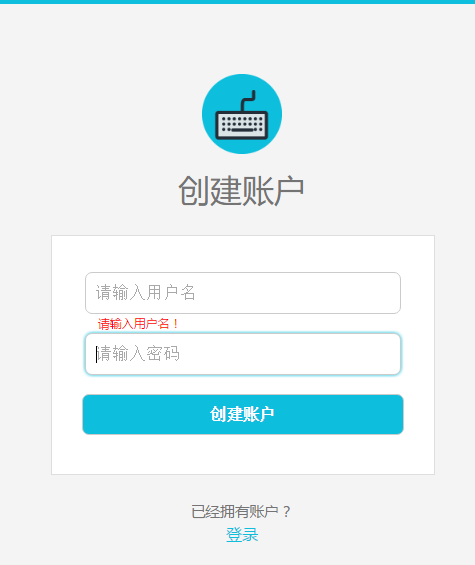

主要文件

完整代码
sign_up.html 注册表单
<!DOCTYPE html>

<html lang="en">

<head>

    <meta charset="UTF-8">

    <title>sign-up</title>

    <link rel="stylesheet" href="css/common_form.css">

</head>

<body>

    <header>

        <div class="header-line"></div>

    </header>

    <div class="content">

        <img class="content-logo" src="img/form_logo.png" alt="logo">

        <h1 class="content-title">创建账户</h1>

        <div class="content-form">

            <form method="post" action="" onsubmit="return submitTest()">

                <div id="change_margin_1">

                    <input class="user" type="text" name="user" placeholder="请输入用户名" onblur="oBlur_1()" onfocus="oFocus_1()">

                </div>

                <!-- input的value为空时弹出提醒 -->

                <p id="remind_1"></p>

                <div id="change_margin_2">

                    <input class="password" type="password" name="password" placeholder="请输入密码" onblur="oBlur_2()" onfocus="oFocus_2()">

                </div>

                <!-- input的value为空时弹出提醒 -->

                <p id="remind_2"></p>

                <div id="change_margin_3">

                    <input class="content-form-signup" type="submit" value="创建账户">

                </div>

            </form>

        </div>

        <div class="content-login-description">已经拥有账户?</div>

        <div><a class="content-login-link" href="log_in.html">登录</a></div>

    </div>

<script src="js/common_form_test.js"></script>

</body>

</html>
log_in.html 登录表单
<!DOCTYPE html>

<html lang="en">

<head>

    <meta charset="UTF-8">

    <title>log-in</title>

    <link rel="stylesheet" href="css/common_form.css">

</head>

<body>

    <header>

        <div class="header-line"></div>

    </header>

    <div class="content">

        <img class="content-logo" src="img/form_logo.png" alt="logo">

        <h1 class="content-title">登录</h1>

        <div class="content-form">

            <form method="post" action="" onsubmit="return submitTest()">

                <div id="change_margin_1">

                    <input class="user" type="text" name="user" placeholder="请输入用户名" onblur="oBlur_1()" onfocus="oFocus_1()">

                </div>

                <!-- input的value为空时弹出提醒 -->

                <p id="remind_1"></p>

                <div id="change_margin_2">

                    <input class="password" type="password" name="password" placeholder="请输入密码" onblur="oBlur_2()" onfocus="oFocus_2()">

                </div>

                <!-- input的value为空时弹出提醒 -->

                <p id="remind_2"></p>

                <div id="change_margin_3">

                    <input class="content-form-signup" type="submit" value="登录">

                </div>

            </form>

        </div>

        <div class="content-login-description">没有账户?</div>

        <div><a class="content-login-link" href="sign_up.html">注册</a></div>

    </div>

<script src="js/common_form_test.js"></script>

</body>

</html>
common_form.css 表单css样式
/*重置样式*/

html, body, div, span, applet, object, iframe, h1, h2, h3, h4, h5, h6, p, blockquote, pre, a, abbr,

acronym, address, big, cite, code, del, dfn, em, img, ins, kbd, q, s, samp, small, strike, strong, sub

, sup, tt, var, b, u, i, dl, dt, dd, ol, ul, li, fieldset, form, label, legend, table, caption, tbody,

tfoot, thead, tr, th, td, article, aside, canvas, details, embed, figure, figcaption, footer, header,

hgroup, menu, nav, output, section, summary, time, mark, audio, video {

    margin:;

    padding:;

    border: 0

}

body {

    font-family: "微软雅黑";

    background: #f4f4f4;

}

/*header*/

.header-line {

    width: 100%;

    height: 4px;

    background: #0dbfdd;

}

/*content*/

.content {

    width: 28%;

    margin: 70px auto 0;

    text-align: center;

}

.content-logo {

    width: 80px;

    height: 80px;

}

.content-title {

    margin: 10px 0 25px 0;

    font-size: 2em;

    color: #747474;

    font-weight: normal;

}

.content-form {

    width: 100%;

    padding: 36px 0 20px;

    border: 1px solid  #dedede;

    text-align: center;

    background: #fff;

}

.content-form form div {

    margin-bottom: 19px;

}

.content-form form .user,

.content-form form .password {

    width: 77%;

    height: 20px;

    padding: 10px;

    font-size: 1em;

    border: 1px solid  #cccbcb;

    border-radius: 7px;

    letter-spacing: 1px;

}

.content-form form input:focus {

    outline: none;

    -webkit-box-shadow: 0 0 5px #0dbfdd;

            box-shadow: 0 0 5px #0dbfdd;

}

.content-form-signup {

    width: 84%;

    margin: 0 auto;

    padding: 10px;

    border: 1px solid  #cccbcb;

    border-radius: 7px;

    font-size: 1em;

    font-weight: bold;

    color: #fff;

    background: #0dbfdd;

    cursor: pointer;

}

.content-form-signup:hover {

    background: #0cb3d0;

}

.content-form-signup:focus {

    outline: none;

    border: 1px solid  #0cb3d0;

}

.content-login-description {

    margin-top: 25px;

    line-height: 1.63636364;

    color: #747474;

    font-size: .91666667rem;

}

.content-login-link {

    font-size: 16px;

    color: #0dbfdd;

    text-decoration: none;

}

/*输入框无内容便提示*/

#remind_1,

#remind_2 {

    width: 76%;

    margin: 0 auto 2px;

    text-align: left;

    font-size: .2em;

    color: #f00;

}
common_form_test.js 注册登录脚本
// 全局变量a和b,分别获取用户框和密码框的value值

var a = document.getElementsByTagName("input")[0].value;

var b = document.getElementsByTagName("input")[1].value;

//用户框失去焦点后验证value值

function oBlur_1() {

    if (!a) { //用户框value值为空

        document.getElementById("remind_1").innerHTML = "请输入用户名!";

        document.getElementById("change_margin_1").style.marginBottom = 1 + "px";

    } else { //用户框value值不为空

        document.getElementById("remind_1").innerHTML = "";

        document.getElementById("change_margin_1").style.marginBottom = 19 + "px";

    }

}

//密码框失去焦点后验证value值

function oBlur_2() {

    if (!b) { //密码框value值为空

        document.getElementById("remind_2").innerHTML = "请输入密码!";

        document.getElementById("change_margin_2").style.marginBottom = 1 + "px";

        document.getElementById("change_margin_3").style.marginTop = 2 + "px";

    } else { //密码框value值不为空

        document.getElementById("remind_2").innerHTML = "";

        document.getElementById("change_margin_2").style.marginBottom = 19 + "px";

        document.getElementById("change_margin_3").style.marginTop = 19 + "px";

    }

}

//用户框获得焦点的隐藏提醒

function oFocus_1() {

    document.getElementById("remind_1").innerHTML = "";

    document.getElementById("change_margin_1").style.marginBottom = 19 + "px";

}

//密码框获得焦点的隐藏提醒

function oFocus_2() {

    document.getElementById("remind_2").innerHTML = "";

    document.getElementById("change_margin_2").style.marginBottom = 19 + "px";

    document.getElementById("change_margin_3").style.marginTop = 19 + "px";

}

//若输入框为空,阻止表单的提交

function submitTest() {

    if (!a && !b) { //用户框value值和密码框value值都为空

        document.getElementById("remind_1").innerHTML = "请输入用户名!";

        document.getElementById("change_margin_1").style.marginBottom = 1 + "px";

        document.getElementById("remind_2").innerHTML = "请输入密码!";

        document.getElementById("change_margin_2").style.marginBottom = 1 + "px";

        document.getElementById("change_margin_3").style.marginTop = 2 + "px";

        return false; //只有返回true表单才会提交

    } else if (!a) { //用户框value值为空

        document.getElementById("remind_1").innerHTML = "请输入用户名!";

        document.getElementById("change_margin_1").style.marginBottom = 1 + "px";

        return false;

    } else if (!b) { //密码框value值为空

        document.getElementById("remind_2").innerHTML = "请输入密码!";

        document.getElementById("change_margin_2").style.marginBottom = 1 + "px";

        document.getElementById("change_margin_3").style.marginTop = 2 + "px";

        return false;

    }

}
form_logo.png Logo照片

到这里,一个简单的注册登录页面就完成了,后面会持续更新,使之更强大
原生js验证简洁美观注册登录页面的更多相关文章
- PHP实现一个简陋的注册登录页面
PHP实现一个简陋的注册登录页面 今天来水一篇没有**用的 /滑稽脸,代码简陋臃肿考虑不全,各位大佬轻喷,还望不吝赐教. 首先考虑了一下需要至少四个页面:register.html.register. ...
- Node.js原生及Express方法实现注册登录原理
由于本文只是实现其原理,所以没有使用数据库,只是在js里面模拟数据库,当然是种中还是需要用数据库的. 1.node.js原生方法 ①html页面,非常简单,没有一丝美化~我们叫它user.html & ...
- 注册登录页面修订-Python使用redis-手机验证接口-发送短信验证
登录页面修订 views.Login.vue <template> <div class="login box"> <img src="@/ ...
- PHP实践项目【1】:注册登录页面
在我们这个项目里面,一共用到了5个php文件,他们分别是: login.php 登录页面 logincheck.php 登录检测php文件 register.php 新用户注册页面 regcheck. ...
- jQuery跳转到另一个页面以及原生js跳转到另一个页面
1.原生js我们可以利用http的重定向来跳转 window.location.replace("https://www.cnblogs.com/pythonywy/"); 2.原 ...
- node.js+mysql用户的注册登录验证
下面代码实现的功能是:用node.js连接mysql实现用户的注册和登录,这里主要实现的是后端的验证代码,前端显示部分没具体写出. 整个程序的流程是这样的: 1.首先建立数据库reji,数据表user ...
- 原生js实现简洁的返回顶部组件
本文内容相当简单,所以没有发布到博客园首页,如果你不幸看到,那只能是我这篇文章的荣幸,谢谢你的大驾光临~(本博客返回顶部的功能就使用的是这个组件) 返回顶部组件是一种极其常见的网页功能,需求简单:页面 ...
- koa2+redis+jwt token验证,简单注册登录
首先新建文件夹命名koa-server,npm init,相关包的安装就不说了,这是我的package.json 新建index.js文件,编码如下,config全局配置不用管,redis是一个简单的 ...
- js实现一个简单的登录页面
<!DOCTYPE html><html lang="en"><head> <meta charset="UTF-8" ...
随机推荐
- Day One studying english
I start study english lately,but the is no basis for english.Only i use baidu translation,google tra ...
- linux下mysql的root密码忘记解决方法
1.首先确认服务器出于安全的状态,也就是没有人能够任意地连接MySQL数据库. 因为在重新设置MySQL的root密码的期间,MySQL数据库完全出于没有密码保护的 状态下,其他的用户也可以任意地登录 ...
- jquery $.proxy使用
在某些情况下,我们调用Javascript函数时候,this指针并不一定是我们所期望的那个.例如: //正常的this使用 $('#myElement').click(function() { // ...
- SkipList 跳表
1.定义描述 跳跃列表(也称跳表)是一种随机化数据结构,基于并联的链表,其效率可比拟于二叉查找树(对于大多数操作需要O(log n)平均时间). 基本上,跳跃列表是对有序的链表增加 ...
- libevent源码深度剖析
原文地址: http://blog.csdn.net/sparkliang/article/details/4957667 第一章 1,前言 Libevent是一个轻量级的开源高性能网络库,使用者众多 ...
- jQuery手机端上拉刷新下拉加载更多页面
基于jQuery手机端上拉下拉刷新页面代码.这是一款类似QQ空间客户端或者微信下拉刷新页面特效代码.效果图如下: 在线预览 源码下载 实现的代码. html代码: <div id=" ...
- ionic 添加地图定位功能
由于项目需求,需要一个定位功能,通过google或百度,搜到一个cordova-plugin-geolocation的插件,在ios上可以用,但是在android就呵呵了,原因就不说了,大家都知道.所 ...
- [IR] Information Extraction
阶段性总结 Boolean retrieval 单词搜索 [Qword1 and Qword2] O(x+y) [Qword1 and Qword2]- 改进: Gallo ...
- SQL Server里的自旋锁介绍
在上一篇文章里我讨论了SQL Server里的闩锁.在文章的最后我给你简单介绍了下自旋锁(Spinlock).基于那个基础,今天我会继续讨论SQL Server中的自旋锁,还有给你展示下如何对它们进行 ...
- servlet中的细节
Get方法有大小限制:1024个字符.这些信息使用 Query_String头传递,并通过Query_String环境变量访问.Post方法:请求体信息使用FromData头传递.读取所有表单参数:g ...