
Jquery Data Table插件
<%@ page language="java" contentType="text/html; charset=UTF-8"

    pageEncoding="UTF-8"%>

<html>

<head>

    <meta charset="utf-8">

    <meta http-equiv="X-UA-Compatible" content="IE=edge,chrome=1">

<title>肿瘤联盟科研平台</title>

<!-- For all browsers -->

<link rel="stylesheet" href="css/reset.css?v=1">

<link rel="stylesheet" href="css/style.css?v=1">

<link rel="stylesheet" href="css/colors.css?v=1">

<link rel="stylesheet" media="print" href="css/print.css?v=1">

<!-- For progressively larger displays -->

<link rel="stylesheet" media="only all and (min-width: 480px)" href="css/480.css?v=1">

<link rel="stylesheet" media="only all and (min-width: 768px)" href="css/768.css?v=1">

<link rel="stylesheet" media="only all and (min-width: 992px)" href="css/992.css?v=1">

<link rel="stylesheet" media="only all and (min-width: 1200px)" href="css/1200.css?v=1">

<!-- For Retina displays -->

<link rel="stylesheet" media="only all and (-webkit-min-device-pixel-ratio: 1.5), only screen and (-o-min-device-pixel-ratio: 3/2), only screen and (min-device-pixel-ratio: 1.5)" href="css/2x.css?v=1">

<!-- Additional styles -->

<link rel="stylesheet" href="css/styles/form.css?v=1">

<link rel="stylesheet" href="css/styles/switches.css?v=1">

<link rel="stylesheet" href="css/styles/table.css?v=1">

<link rel="stylesheet" href="css/styles/new.css">

<link rel="stylesheet" href="css/pikaday.css">

<!-- DataTables -->

<link rel="stylesheet" href="js/libs/DataTables/jquery.dataTables.css?v=1">

<!-- JavaScript at bottom except for Modernizr -->

<script src="js/libs/modernizr.custom.js"></script>

<script src="resource/js/jquery-1.10.2.min.js"></script>

<script src="resource/js/jquery.dataTables.min.js"></script>

<script src="js/setup.js"></script>

<script src="js/developr.input.js"></script>

<script src="js/developr.navigable.js"></script>

<script src="js/developr.notify.js"></script>

<script src="js/developr.scroll.js"></script>

<script src="js/developr.tooltip.js"></script>

<script src="js/developr.table.js"></script>

<link rel="stylesheet" href="css/jquery.dataTables.css">

<link rel="stylesheet" href="css/jquery.dataTables.default.css">

<link rel="stylesheet" href="css/jquery.dataTables-simple.css">

<link rel="stylesheet" href="css/table.css">

<script type="text/javascript">

function dada()

{

    alert("点击事件!");

}

var dataSet = [

    [ "Tiger Nixon", "System Architect", "Edinburgh", "5421", "2011/04/25", "$320,800" ],

    [ "Garrett Winters", "Accountant", "Tokyo", "8422", "2011/07/25", "$170,750" ],

    [ "Ashton Cox", "Junior Technical Author", "San Francisco", "1562", "2009/01/12", "$86,000" ],

    [ "Cedric Kelly", "Senior Javascript Developer", "Edinburgh", "6224", "2012/03/29", "$433,060" ],

    [ "Airi Satou", "Accountant", "Tokyo", "5407", "2008/11/28", "<a class=\"button compact icon-pencil edit\">ssd</a>"],

    [ "Brielle Williamson", "Integration Specialist", "New York", "4804", "2012/12/02", "$372,000" ],

    [ "Herrod Chandler", "Sales Assistant", "San Francisco", "9608", "2012/08/06", "$137,500" ],

    [ "Rhona Davidson", "Integration Specialist", "Tokyo", "6200", "2010/10/14", "$327,900" ],

    [ "Colleen Hurst", "Javascript Developer", "San Francisco", "2360", "2009/09/15", "$205,500" ],

    [ "Sonya Frost", "Software Engineer", "Edinburgh", "1667", "2008/12/13", "$103,600" ],

    [ "Jena Gaines", "Office Manager", "London", "3814", "2008/12/19", "$90,560" ],

    [ "Quinn Flynn", "Support Lead", "Edinburgh", "9497", "2013/03/03", "$342,000" ],

    [ "Charde Marshall", "Regional Director", "San Francisco", "6741", "2008/10/16", "$470,600" ],

    [ "Haley Kennedy", "Senior Marketing Designer", "London", "3597", "2012/12/18", "$313,500" ],

    [ "Tatyana Fitzpatrick", "Regional Director", "London", "1965", "2010/03/17", "$385,750" ],

    [ "Michael Silva", "Marketing Designer", "London", "1581", "2012/11/27", "$198,500" ],

    [ "Paul Byrd", "Chief Financial Officer (CFO)", "New York", "3059", "2010/06/09", "$725,000" ]

];

function dodatatable1(){

    // Table sort - DataTables

    var table = $('#memberTable');

    table.dataTable( {

         data: dataSet,

         'bSort':false,

            'bAutoWidth':false,

            dom: 'Bfrtip',

            'sPaginationType': 'full_numbers',

            'sDom': '<"dataTables_header"lfr>t<"dataTables_footer"ip>',

            'fnInitComplete': function( oSettings )

            {

                // Style length select

                table.closest('.dataTables_wrapper').find('.dataTables_length select').addClass('select blue-gradient glossy').styleSelect();

                tableStyled = true;

                //$(".dataTables_length").append('<span class="blue-gradient glossy ssx " data-toggle="modal" data-target="#myModal">添加</span>');

                $('#memberTable').siblings('.dataTables_header').children('.dataTables_length').append('<span class="blue-gradient glossy ssx " data-toggle="modal" data-target="#myModal" onclick="dada()">添加</span>');

            },

         "bRetrieve": true,

         'oLanguage':{

                'sSearch':'搜索',

                'sLengthMenu':'每页显示 _MENU_ 条记录',

                'sZeroRecords':'抱歉,没有检索到数据',

                'sInfo':'从_START_到_END_ / 共_TOTAL_条数据',

                'sInfoEmpty':'没有数据',

                'sInforFiltered':'(从_MAX_条数据中检索)',

                'oPaginate':{

                    'sFirst':'首页',

                    'sPrevious':'前一页',

                    'sNext':'下一页',

                    'sLast':'尾页'

                }

      },

      buttons: [

            'colvis',

            'excel',

            'print'

        ],

     columns: [

        { title: "姓名"},

        { title: "性别" },

        { title: "职务/职称" },

        { title: "学历" },

        { title: "在项目中承担的任务" },

        { title: "所在单位" }

     ]

    ,

    } );

};

</script>

</head>

<body>

<input  type="button"  name='1111'  value='ShowTable' onclick="dodatatable1()"/>

<table id="memberTable" class="table responsive-table">

</table>

</body>

</html>
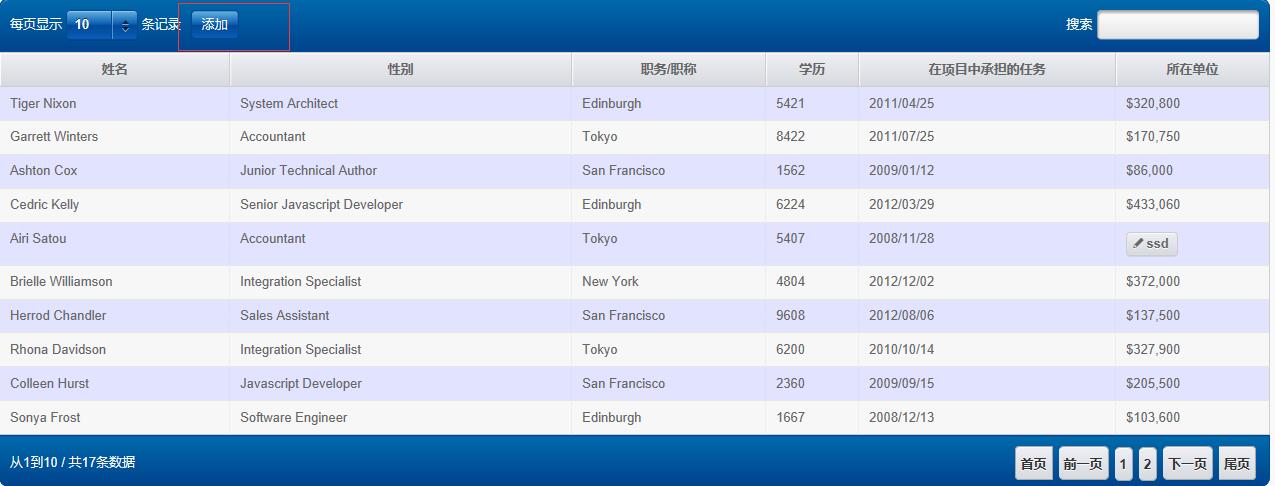
效果图如下
Jquery Data Table插件的更多相关文章
- 基于jquery的json转table插件jsontotable
分享一款基于jquery的json转table插件jsontotable.效果图如下: 在线预览 源码下载 实现的代码. html代码: <div class="container ...
- jQuery Pagination分页插件
<!DOCTYPE html PUBLIC "-//W3C//DTD XHTML 1.0 Transitional//EN" "http://www.w3.org/ ...
- jQuery动态表格插件 AppendGrid
AppendGrid是一个jQuery动态表格插件,提供像填写电子表格数据一样在页面去输入结构化数据. 它允许用户在表格里增加/删除/插入/删除行,控制input/select/textarea 提交 ...
- jQuery Pagination分页插件--无刷新
源码:https://github.com/SeaLee02/FunctionModule/blob/master/UploadFiles/WebDemo/FenYE/FenYeAjax.aspx 代 ...
- 几款jQuery右键菜单插件介绍
在网页中使用自定义右键菜单,实现上皆为使用javascript禁用浏览器默认的右键菜单,然后在网页中响应鼠标右键事件,弹出自定义的菜单. 类似右键菜单的组件网上很多.一般而言,改变浏览器的默认菜单应当 ...
- C#结合Jquery LigerUI Tree插件构造树
Jquery LigerUI Tree是Jquery LigerUI()的插件之一,使用它可以快速的构建树形菜单.呵呵 废话不说了,直入正题,下面介绍C#结合ligerui 构造树形菜单的两种方法 1 ...
- 【PC端】jQuery+PHP实现浏览更多内容(jquery.more.js插件)
参数说明: 'amount' : '10', //每次显示记录数 'address' : 'comments.php', //请求后台的地址 'format' : 'json', //数据传输格式 ' ...
- 基于MVC4+EasyUI的Web开发框架经验总结(1)-利用jQuery Tags Input 插件显示选择记录
最近花了不少时间在重构和进一步提炼我的Web开发框架上,力求在用户体验和界面设计方面,和Winform开发框架保持一致,而在Web上,我主要采用EasyUI的前端界面处理技术,走MVC的技术路线,在重 ...
- 20款美化网站的 jQuery Lightbox 灯箱插件
jQuery Lightbox 灯箱插件可以让你为您的网站和应用程序展示优雅的图像,视频 和其它内容(使用模式窗口).如果你是一个开发人员,你必须拥有 jQuery 灯箱插件集合,因为有一部分的客户会 ...
随机推荐
- jquery checkbox选中、改变状态、change和click事件
jquery判断checked的三种方法:.attr('checked); //看版本1.6+返回:”checked”或”undefined” ;1.5-返回:true或false.prop('che ...
- 两个不等式(Nopier)
- java最全的验证类封装
package com.tongrong.utils; import java.util.Collection; import java.util.Map; import java.util.rege ...
- 使用MyBatis Generator自动创建代码
SSM框架--使用MyBatis Generator自动创建代码 1. 目录说明 使用自动生成有很多方式,可以在eclipse中安装插件,但是以下将要介绍的这种方式我认为很轻松,最简单,不需要装插件, ...
- Winform 中的KeyDown
using System; using System.Collections.Generic; using System.ComponentModel; using System.Data; usin ...
- Makecert.exe(证书创建工具)
Makecert.exe(证书创建工具) .NET Framework 4.5 其他版本 2(共 3)对本文的评价是有帮助 - 评价此主题 证书创建工具生成仅用于测试目的的 X.509 证 ...
- 体验CoreCLR的stack unwinding特性在Linux/Mac上的初步实现
有了stack unwinding特性,才能在.NET程序中获取调用堆栈(call stack)信息,才能在异常时显示调用堆栈信息.这个特性之前只在Windows上有实现,Linux/Mac上的实现最 ...
- [游戏模版11] Win32 动画 时间消息
>_<:This time we will study a new way to operate your picture.That is running your picture by ...
- C# 通过SerialPort简单调用串口
问题 最近比较经常使用串口进行发送以及传输数据,但是笔者在刚开始接触SerialPort类时,对于Write之后去Read数据的时候,由于设备上面还没有返回数据,读取到的只能是空值.然而,再进行下一次 ...
- 浅谈压缩感知(二十五):压缩感知重构算法之分段正交匹配追踪(StOMP)
主要内容: StOMP的算法流程 StOMP的MATLAB实现 一维信号的实验与结果 门限参数Ts.测量数M与重构成功概率关系的实验与结果 一.StOMP的算法流程 分段正交匹配追踪(Stagewis ...