
window.location.href和window.open的几种用法和区别
使用js的同学一定知道js的location.href的作用是什么,但是在js中关于location.href的用法究竟有哪几种,究竟有哪些区别,估计很多人都不知道了。
一、location.href常见的几种形式
目前在开发中经常要用到的几种形式有:
|
1
2
3
4
5
6
|
self.location.href;//当前页面打开URL页面window.location.href;//当前页面打开URL页面this.location.href;//当前页面打开URL页面location.href;// 当前页面打开URL页面parent.location.href;//在父页面打开新页面top.location.href;//在顶层页面打开新页面 |
经常见到的大概有以上几种形式。
|
注:①如果页面中自定义了frame,那么可将parent、self、top换为自定义frame的名称,效果是在frame窗口打开url地址。 ②此外,window.location.href=window.location.href;和window.location.Reload();都是刷新当前页面。区别在于是否有提交数据。当有提交数据时,window.location.Reload()会提示是否提交,window.location.href=window.location.href;则是向指定的url提交数据. ③用window.open()打开新页面 |
二、location.href不同形式之间的区别
那么,这几种形式的跳转究竟有什么区别呢?
直接讲定义,你肯定不会理解透彻,下面我来贴四个html代码,用实际的例子讲解。
a.html:
|
1
2
3
4
5
|
<form id="form1" action=""><div><strong>这是a.html页面<strong><iframe src="b.html" width="500px" height="300px"></iframe> </strong></strong></div></form><pre> |
b.html:
|
1
2
|
<span>这是b.html</span><span id="span1"></span><br /><iframe src="c.html" width="500px" height="300px"></iframe> |
c.html:
|
1
2
|
<span><strong>这是c.html:<strong></span><span id="span1"></span><br /><iframe src="d.html" width="500px" height="300px"></iframe> |
d.html:
|
1
2
3
|
<span>这是d.html:</span><span id="span1"></span><br /><input type='button' onclick='jump();' value='跳转'><iframe src="d.html" width="500px" height="300px"></iframe> |
a.html,b.html,c.html,d.html通过iframe给联系到了一起,那么它们有什么的联系呢?
观察代码,我们可以看出:
a.html里面嵌着b.html;
b.html里面嵌着c.html;
c.html里面嵌着d.html
运行a.html,贴图一如下:

下面来测试上述几种写法.
在d.html里面head部分写js:
|
1
2
3
4
5
6
7
8
9
10
|
<strong>function jump(){//经测试:window.location.href与location.href,self.location.href,location.href都是本页面跳转//作用一样window.location.href="http://www.baidu.com";//location.href="http://www.baidu.com";//self.location.href="http://www.baidu.com";//this.location.href="http://www.baidu.com";//location.href="http://www.baidu.com";} </strong> |
再次运行a.html,点击那个"跳转" 按钮,运行结果贴图二如下:

对比图一和图二的变化,你会发现d.html部分已经跳转到了百度的首页,而其它地方没有发生变化。这也就解释了"本页跳转"是什么意思。
好,再来修改d.html里面的js部分为:
|
1
2
3
4
|
function jump(){parent.location.href='http://www.baidu.com';} |
运行a.html后,再次点击"跳转" 按钮,运行结果贴图三如下: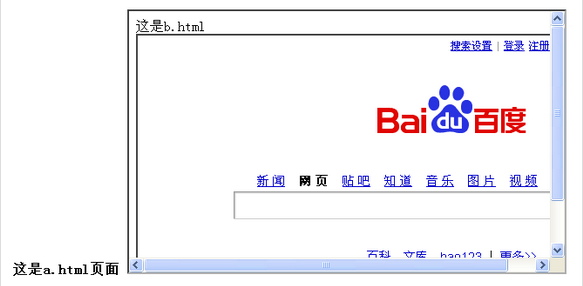
对比图一和图三,你会发现a.html中嵌套的c.html部分已经跳转到了百度首页。
分析:我点击的是a.html中嵌套的d.html部分的跳转按钮,结果是a.html中嵌套的c.html部分跳转到了百度首页,这就解释了"parent.location.href是上一层页面跳转"的意思。
再次修改d.html里面的js部分为:
|
1
2
3
4
|
function jump(){top.location.href='http://www.baidu.com';} |
运行a.html后,再次点击"跳转" 按钮,
你会发现,a.html已经跳转到了百度首页。
分析:我点击的是a.html中嵌套的d.html部分的跳转按钮,结果是a.html中跳转到了百度首页,这就解释了"top.location.href是最外层的页面跳转"的意思。
三、location.href总结
看完上面的讲解之后,在来看看下面的定义你就会非常明白了:
"top.location.href"是最外层的页面跳转
"window.location.href"、"location.href"是本页面跳转
"parent.location.href"是上一层页面跳转.
location是window对象的属性,而所有的网页下的对象都是属于window作用域链中(这是顶级作用域),所以使用时是可以省略window。而top是指向顶级窗口对象,parent是指向父级窗口对象。
四、window.location.href和window.open的区别
|
1. window.location是window对象的属性,而window.open是window对象的方法 |
|
2. window.open不一定是打开一个新窗口!!!!!!!! |
| 3. 在给按钮、表格、单元格、下拉列表和DIV等做链接时一般都要用Javascript来完成,和做普通链接一样,可能我们需要让链接页面在当前窗口打开,也可能需要在新窗口打开,这时我们就可以使用下面两项之一来完成: window.open 用来打开新窗口 window.location 用来替换当前页,也就是重新定位当前页 可以用以下来个实例来测试一下。 <input type="button" value="新窗口打开" onclick="window.open('http://www.google.com')"> <input type="button" value="当前页打开" onclick="window.location='http://www.google.com/'"> |
| 4. window.location或window.open如何指定target? 这是一个经常遇到的问题,特别是在用frame框架的时候 解决办法: window.location 改为 top.location 即可在顶部链接到指定页 或 window.open("你的网址","_top"); |
| 5. window.open 用来打开新窗口 window.location 用来替换当前页,也就是重新定位当前页 用户不能改变document.location(因为这是当前显示文档的位置)。 但是,可以用window.location改变当前文档 (用其它文档取代当前文档),而document.location不是对象。 |
|
6. window.open()是可以在一个网站上打开另外的一个网站的地址 |
window.location.href和window.open的几种用法和区别的更多相关文章
- window.location.href 和 window.location.replace 的区别
window.location.href 和 window.location.replace 的区别 1.window.location.href=“url”:改变url地址: 2.window. ...
- window.location.href 与 window.loaction.replace区别
window.location.href和window.location.replace的区别 1.window.location.href=“url”:改变url地址: 2.window.locat ...
- window.location.href.substr(window.location.href.length - 6)
if (window.location.href.substr(window.location.href.length - 6) == "flag=1") { var tOptio ...
- window.location.href和window.location.replace的区别
有3个html页面(.html, .html, .html). 进系统默认的是1.html ,当我进入2.html的时候, .html里面用window.location.replace(" ...
- window.location.href和window.top.location.href的区别
if (window.location.href == window.top.location.href) { window.top.location.href = "/index. ...
- Js中window.location.href和window.location.replace的区别
href相当于打开一个新页面,replace相当于替换当前页面:这里打开页面都是针对历史记录来说,在页面上看完全相同,只是浏览器的history表现不同如果在1.html中点击链接到2.html,然后 ...
- react页面跳转 window.location.href和window.open的几种用法和区别
https://www.cnblogs.com/Qian123/p/5345298.html
- window.location.href 与 window.location.href 的区别
- window.location.Reload()和window.location.href 区别
首先介绍两个方法的语法: reload 方法,该方法强迫浏览器刷新当前页面.语法:location.reload([bForceGet])参数: bForceGet, 可选参数, 默认为 false, ...
随机推荐
- 下载站中的下载连接其实是php脚本文件控制
什么是php文件,PHP是一种服务器端HTML-嵌入式脚本描述语言. 其最强大和最重要的特征是其数据库集成层,使用它完成一个含有数据库功能的网页是不可置信的简单.在HTML文件中, PHP脚本程序(语 ...
- [Admin]CCTV文件分类
#建立远程服务器的文件夹映射 $pw = ConvertTo-SecureString '密码' -AsPlainText -Force $Creds = New-Object -Typename S ...
- 【液晶模块系列基础视频】5.1X-GUI字体驱动1
============================= 技术论坛:http://www.eeschool.org 博客地址:http://xiaomagee.cnblogs.com 官方网店:ht ...
- 如何搭建redis扩展-Yii中文网
原文链接: 如何搭建redis扩展http://www.yii-china.com/post/detail/43.html 安装redis扩展: 1.通过composer进行安装,到项目根目录cmd运 ...
- ERROR com.opensymphony.xwork2.interceptor.ParametersInterceptor.error:34 - Developer Notification
We are trying to migrate from Struts 2.2 to Struts 2.3, after getting to run the project I am seeing ...
- 详解linux运维工程师入门级必备技能
详解linux运维工程师入门级必备技能 | 浏览:659 | 更新:2013-12-24 23:23 | 标签:linux it自动化运维就是要很方便的运用各种工具进行管理维护,有效的实施服务器保护 ...
- Rails--export csv
--controller def export_agent_impressions export_start_time = Time.parse(params[:es_time]) + 7.hours ...
- Rails--default_scope
Example: default_scope where("agents.deleted = ?", false)
- 10.PHP内核探索:Apache运行与钩子函数
Apache是目前世界上使用最为广泛的一种Web Server,它以跨平台.高效和稳定而闻名.按照去年官方统计的数据,Apache服务器的装机量占该市场60%以上的份额.尤其是在 X(Unix/Lin ...
- Python For Data Analysis -- Pandas
首先pandas的作者就是这本书的作者 对于Numpy,我们处理的对象是矩阵 pandas是基于numpy进行封装的,pandas的处理对象是二维表(tabular, spreadsheet-like ...