
windows下Android利用ant自动编译、修改配置文件、批量多渠道,打包生成apk文件
原创文章,转载请注明:http://www.cnblogs.com/ycxyyzw/p/4535459.html
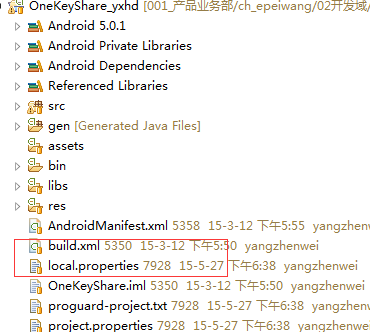
android 程序打包成apk,如果在是命令行方式,一般都要经过如下步骤:

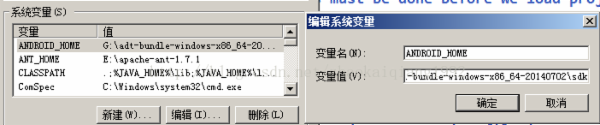


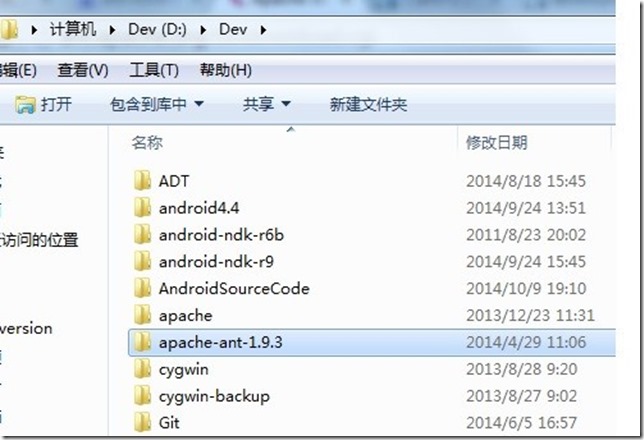
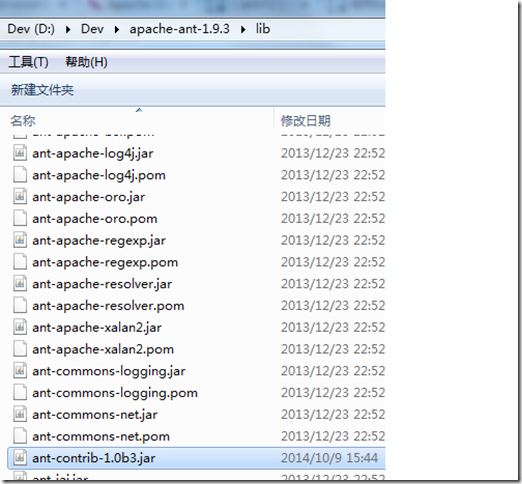
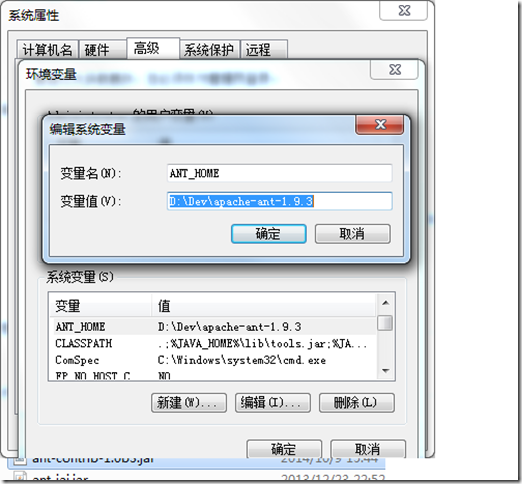

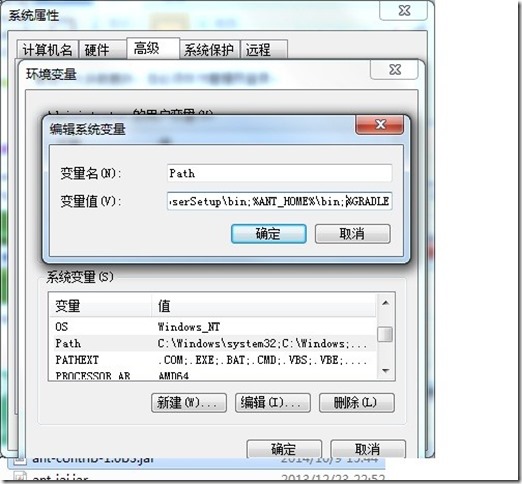



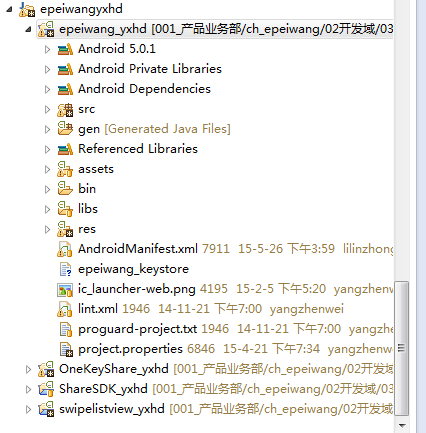


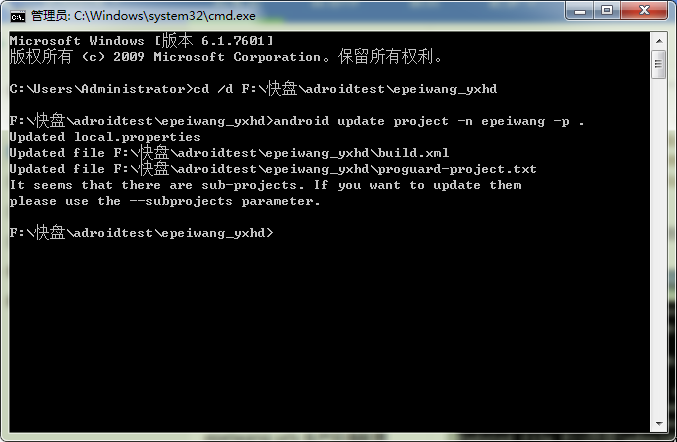
<?xml version="1.0" encoding="UTF-8"?>

<project name="epeiwang" default="help">

<!-- The local.properties file is created and updated by the 'android' tool.

It contains the path to the SDK. It should *NOT* be checked into

Version Control Systems. -->

<property file="local.properties" />

<!-- The ant.properties file can be created by you. It is only edited by the

'android' tool to add properties to it.

This is the place to change some Ant specific build properties.

Here are some properties you may want to change/update:

source.dir

The name of the source directory. Default is 'src'.

out.dir

The name of the output directory. Default is 'bin'.

For other overridable properties, look at the beginning of the rules

files in the SDK, at tools/ant/build.xml

Properties related to the SDK location or the project target should

be updated using the 'android' tool with the 'update' action.

This file is an integral part of the build system for your

application and should be checked into Version Control Systems.

-->

<!-- 此文件需要我们自己创建-->

<property file="ant.properties" />

<!-- if sdk.dir was not set from one of the property file, then

get it from the ANDROID_HOME env var.

This must be done before we load project.properties since

the proguard config can use sdk.dir -->

<property environment="env" />

<condition property="sdk.dir" value="${env.ANDROID_HOME}">

<isset property="env.ANDROID_HOME" />

</condition>

<!-- The project.properties file is created and updated by the 'android'

tool, as well as ADT.

This contains project specific properties such as project target, and library

dependencies. Lower level build properties are stored in ant.properties

(or in .classpath for Eclipse projects).

This file is an integral part of the build system for your

application and should be checked into Version Control Systems. -->

<loadproperties srcFile="project.properties" />

<!-- quick check on sdk.dir -->

<fail

message="sdk.dir is missing. Make sure to generate local.properties using 'android update project' or to inject it through the ANDROID_HOME environment variable."

unless="sdk.dir"

/>

<!--

Import per project custom build rules if present at the root of the project.

This is the place to put custom intermediary targets such as:

-pre-build

-pre-compile

-post-compile (This is typically used for code obfuscation.

Compiled code location: ${out.classes.absolute.dir}

If this is not done in place, override ${out.dex.input.absolute.dir})

-post-package

-post-build

-pre-clean

-->

<!-- 此文件需要我们自己创建-->

<import file="custom_rules.xml" optional="true" />

<!-- Import the actual build file.

To customize existing targets, there are two options:

- Customize only one target:

- copy/paste the target into this file, *before* the

<import> task.

- customize it to your needs.

- Customize the whole content of build.xml

- copy/paste the content of the rules files (minus the top node)

into this file, replacing the <import> task.

- customize to your needs.

***********************

****** IMPORTANT ******

***********************

In all cases you must update the value of version-tag below to read 'custom' instead of an integer,

in order to avoid having your file be overridden by tools such as "android update project"

-->

<!-- version-tag: 1 -->

<!-- 表示我们引用了sdk的ant的build文件-->

<import file="${sdk.dir}/tools/ant/build.xml" />

</project>
#keystore文件存放目录

key.store=./epeiwang_keystore

#keystore别名

key.alias=epeiwang_keystore

#keystore密码

key.store.password=xxxxxxx

#组织密码

key.alias.password=xxxxxxxx

#如果还没有生成keystore证书,可以使用下面命令在项目目录下生成一个test.keystore证书文件

#generate test.keystore

#keytool -genkey -alias test.keystore -keyalg RSA -validity 20000 -keystore test.keystore

#apk.dir表示存放最终生成apk的目录

apk.dir=./apk

#定义项目名称

app.name=epeiwang

#渠道号,多个渠道号用逗号分隔,每个渠道号不要使用违规字符例如/:等,因为渠道号会在打包的时候放在apk的文件名中,所以包含#违规字符将无法生成最终的apk,哥就是被这个细节给坑了一个下午。这里定义了两个渠道号myapp-12345和BAI-3s322d

market_channels=epeiwang,baidu,91

#测试环境服务器配置

test.server.url=192.168.1.10/epeiwang

test.server.image.url=192.168.1.9

test.epeiwang.url=192.168.1.10

#生产环境服务器配置

rel.server.url=111.111.111.222/epeiwang

rel.server.image.url=111.111.111.229

rel.epeiwang.url=www.epeiwang.com

#测试环境标识 给apk命名的时候用

test.tag.name=test

#生产环境标识 给apk命名的时候用

release.tag.name=release
<?xml version="1.0" encoding="UTF-8"?>
<project name="custom_rules" >
<!-- 引用ant-contlib这个扩展包,声明一下 -->
<taskdef resource="net/sf/antcontrib/antcontrib.properties" >
<classpath>
<pathelement location="${ant.ANT_HOME}/lib/ant-contrib-1.0b3.jar" />
</classpath>
</taskdef>
<!-- 定义一个时间变量,打完包后跟渠道号一起命名apk -->
<tstamp>
<format
pattern="yyyyMMddhhmm"
property="pktime"
unit="hour" />
</tstamp>
<!-- 创建apk存放目录 -->
<mkdir dir="${apk.dir}" >
</mkdir>
<!-- 替换参数 然后打包APK -->
<target name="replace_parameter" >
<!-- 替换服务器配置 -->
<replaceregexp
byline="false"
encoding="UTF-8"
flags="g" >
<!-- 这个是正则表达式匹配hostconfig中epeiwang_server的值 -->
<regexp pattern="epeiwang_server>(.*)</epeiwang_server" />
<substitution expression="epeiwang_server>${server_url}</epeiwang_server" />
<fileset
dir=""
includes="res/xml/hostconfig.xml" />
</replaceregexp>
<replaceregexp
byline="false"
encoding="UTF-8"
flags="g" >
<!-- 这个是正则表达式匹配hostconfig中epeiwang_img_server的值 -->
<regexp pattern="epeiwang_img_server>(.*)</epeiwang_img_server" />
<substitution expression="epeiwang_img_server>${server_image_url}</epeiwang_img_server" />
<fileset
dir=""
includes="res/xml/hostconfig.xml" />
</replaceregexp>
<replaceregexp
byline="false"
encoding="UTF-8"
flags="g" >
<!-- 这个是正则表达式匹配hostconfig中epeiwang_url的值 -->
<regexp pattern="epeiwang_url>(.*)</epeiwang_url" />
<substitution expression="epeiwang_url>${epeiwang_url}</epeiwang_url" />
<fileset
dir=""
includes="res/xml/hostconfig.xml" />
</replaceregexp>
</target>
<!-- 打包测试环境命令就用这个 -->
<target name="deploytest" >
<!-- 传服务器配置参数到 replace_parameter这个打包target -->
<antcall target="replace_parameter" >
<param
name="server_url"
value="${test.server.url}" />
<param
name="server_image_url"
value="${test.server.image.url}" />
<param
name="epeiwang_url"
value="${test.epeiwang.url}" />
</antcall>
<!-- 执行循环打包target foreach_replacechannel -->
<antcall target="foreach_replacechannel" >
<!-- apk命名时候用到的参数 -->
<param
name="deploy_environment"
value="${test.tag.name}" />
</antcall>
</target>
<!-- 打包生产环境命令就用这个 -->
<target name="deployrel" >
<!-- 传服务器配置参数到 replace_parameter这个打包target -->
<antcall target="replace_parameter" >
<param
name="server_url"
value="${rel.server.url}" />
<param
name="server_image_url"
value="${rel.server.image.url}" />
<param
name="epeiwang_url"
value="${rel.epeiwang.url}" />
</antcall>
<!-- 执行循环打包target foreach_replacechannel -->
<antcall target="foreach_replacechannel" >
<!-- apk命名时候用到的参数 -->
<param
name="deploy_environment"
value="${release.tag.name}" />
</antcall>
</target>
<!-- 循环打包的target -->
<target name="foreach_replacechannel" >
<!-- 开始循环打包,从market_channels参数中取出一个渠道号用channel标识,然后通过正则修改manifest文件 -->
<foreach
delimiter=","
list="${market_channels}"
param="channel"
target="modify_manifest" >
</foreach>
</target>
<target name="modify_manifest" >
<replaceregexp
byline="false"
encoding="UTF-8"
flags="g" >
<!--
这个是正则表达式匹配manifest中meta,我用的友盟的统计,我 AndroidManifest中的配置为:
<meta-data android:value="360shichang" android:name="UMENG_CHANNEL"
-->
<regexp pattern="android:value="(.*)" android:name="UMENG_CHANNEL"" />
<substitution expression="android:value="${channel}" android:name="UMENG_CHANNEL"" />
<fileset
dir=""
includes="AndroidManifest.xml" />
</replaceregexp>
<!-- 这里设置最终生成包的存放目录以及apk的名称,注意这里是文件名称,所以变量中不允许出现违规字符,否则将无法生成最终的apk(会出现output is not valid 的错误) -->
<property
name="out.final.file"
location="${apk.dir}/${app.name}_${channel}_${deploy_environment}_${pktime}.apk" />
<antcall target="clean" />
<antcall target="release" />
</target>
</project>
<?xml version="1.0" encoding="UTF-8"?>

<!-- 为了ant打包时候正则匹配,请不要格式化该文件 -->

<hostconfig>

<epeiwang_server>1111.1111.1111.1/epeiwang</epeiwang_server>

<epeiwang_img_server>1111.1111.1111.1</epeiwang_img_server>

<epeiwang_url>www.epeiwang.com</epeiwang_url>

</hostconfig>







windows下Android利用ant自动编译、修改配置文件、批量多渠道,打包生成apk文件的更多相关文章
- linux(以ubuntu为例)下Android利用ant自动编译、修改配置文件、批量多渠道,打包生成apk文件
原创,转载请注明:http://www.cnblogs.com/ycxyyzw/p/4555328.html 之前写过一篇<windows下Android利用ant自动编译.修改配置文件.批量 ...
- Android 自动编译、打包生成apk文件 3 - 使用SDK Ant方式
相关文章列表: < Android 自动编译.打包生成apk文件 1 - 命令行方式> < Android 自动编译.打包生成apk文件 2 - 使用原生Ant方式> &l ...
- Android 自动编译、打包生成apk文件 2 - 使用原生Ant方式
from://http://blog.csdn.net/androiddevelop/article/details/11100109 相关文章列表: <Android 自动编译.打包生成apk ...
- Android 自动编译、打包生成apk文件 4 - 多渠道批量打包
相关文章列表: < Android 自动编译.打包生成apk文件 1 - 命令行方式> < Android 自动编译.打包生成apk文件 2 - 使用原生Ant方式 > < ...
- 使用ant自动编译、打包生成apk文件
上次使用命令行生成apk文件<Android 命令行编译.打包生成apk文件>,学习命令行生成的目的是为了编写ant打下基础. 一. ant环境 下载ant包,配置环境变量 二.ant编译 ...
- 在eclipse中将android工程打包生成apk文件
1.)生成keystore 按照下面的命令行 在C:\Program Files\Java\jdk1.6.0_10\bin>目录下,输入keytool -genkey -alias androi ...
- Android 命令行编译、打包生成apk文件
一.搭建搭建环境 1. 安装JDK 和 Android SDK 2. 配置环境变量 D:\android-sdk-windows\tools C:\Program Files\Java\jdk1. ...
- Ant自动编译打包&发布 android项目
Eclipse用起来虽然方便,但是编译打包android项目还是比较慢,尤其将应用打包发布到各个渠道时,用Eclipse手动打包各种渠道包就有点不切实际了,这时候我们用到Ant帮我们自动编译打包了. ...
- Android - Ant自动编译打包android项目 -- 1(转)
1. 背景: Eclipse用起来虽然方便,但是编译打包android项目还是比较慢,尤其当要将应用打包发布到各个渠道时,用Eclipse手动打包各种渠道包就有点不切实际了,这时候我们用到Ant帮我 ...
随机推荐
- bookshelf
nodejs mysql ORM 比node-mysql好用多了. bookshelf 支持restful功能,用到的时候研究下:https://www.sitepoint.com/getting-s ...
- python chardet简单应用
python的字符串编码识别模块(第三方库): 官方地址: http://pypi.python.org/pypi/chardet import chardet import urllib # ...
- 某些版本的IIS可能有SessionID混淆的Bug
某公司为我服务的甲方公司开发一个挺重要的应用.已经上线了一年多了,不停的修修改改.也算正常使用.正所谓,秀恩爱,死得快.No 作就No Die.也少知道是那个Smarty Pants闲的蛋疼说新修改的 ...
- GCC选项
-g: Debugging Option. 提供给GDB的debugging信息的选项: -fno-omit-frame-pointer: Optimization Option: -Wstrict- ...
- [计算机图形学] OpenGL读取obj文件并显示其3D效果
读取三维网格模型(Wavefront OBJ文件) 无法向立方体:cube.obj 有法向兔子模型:bunny.obj 有法向有纹理八字模型:Eight.obj OBJ文件的格式可参考:http: ...
- [51单片机] EEPROM 24c02 [读取存储多字节]
先将数据存进去,然后再读出来显示在数码管上. 除了代码里定义的连线外还要把p0连接到8位数码管的8针上. /*--------------------------------------------- ...
- paip.提升效率--数据绑定到table原理和流程Angular js jquery实现
paip.提升效率--数据绑定到table原理和流程Angular js jquery实现 html #--keyword 1 #---原理和流程 1 #----jq实现的代码 1 #-----An ...
- 微信商城系统与手机APP的优势对比!
随着移动互联网的大势到来,手机移动应用已经成为未来的主流市场,很多企业也在投入精力和财力进行研发自己的手机APP,以便更好的迎合市场的需求. 然而当微信公众平台开放以后,新的机会出现了! 很多企业已经 ...
- 销傲销售过程GSP管理系统功能概述
1 公司介绍 西安海思威软件有限公司于2009年2月注册成立,海思威软件公司隶属于海思威集团,位于交通十分便利的西安经济技术开发区.公司致力于中国本土式销售管理的研究与管理软件产品的开发,是 ...
- .svn批量删除
c.bat @echo on @rem 删除SVN版本控制目录 @rem for /r . %%a in (.) do @if exist "%%a\.svn" @echo &qu ...