
VMware12 安装 CentOS 6.5 64位
前言:本人在配置Hadoop的过程中,需要搭建Cent OS 64 环境,借此,顺便将Cent OS 64 的安装在此记录,方便自己,也方便大家学习。本次是在VM12虚拟机中实现Cent OS 64 的安装以及配置,后续还会有Hadoop的安装配置教程,我们先来进行第一步。
一、VMware 12 Install CentOS 64(Linux)OS
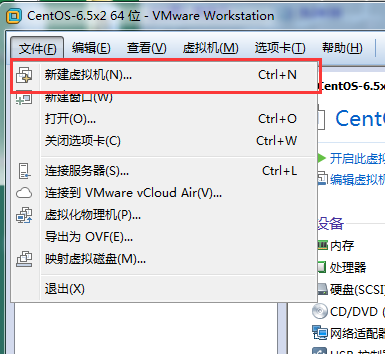
create a new vm->there I screenshot my settings in the next steps->

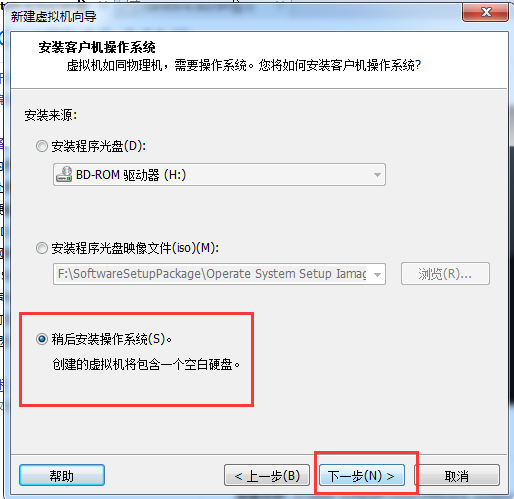
keep next step->

the os name at will,if you understand it->the position choose a folder that you like->next->

next as deault,my computer`s RAM is 8G so i choose 1G that default>next
the net mode choose NAT,then we set IP address to connect the internet->

steps the default->
there I remove the audio card and the printer that impossible use them->accomplish!

the the vm will apper in the left list->

click the centOS 64 hadoop-master,we set the os install cd/DVD Path->
in the position we set the install cd/DVD ,choose the install source that we have upload CentOS64(CentOS6.5)
you can get the centos in the internet->

then we power start the vm cent os 64->
choose the first option install or upgrade an existing system->

OK

default ok that can show the step of check disks->

if check complete choose OK->

OK->Continue

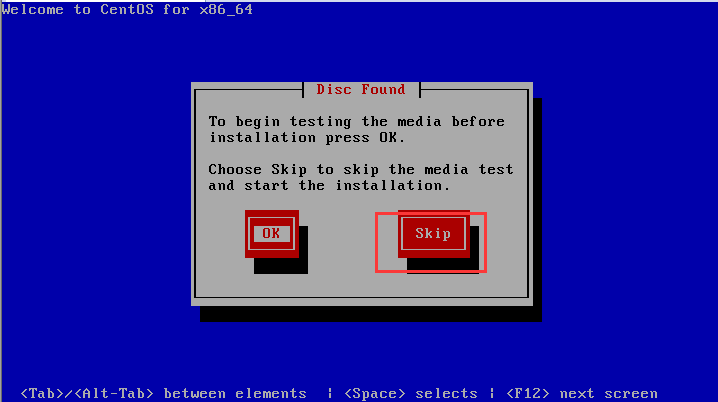
if have a problem below we can learn from internet that we should reboot the vm , then choose skip->

next we reboot the system->
wait a minute show a confirm we choose skip;then it`s can found the install resource,auto install !->
into the view settings->

Choose language, there we choose English(English)->next


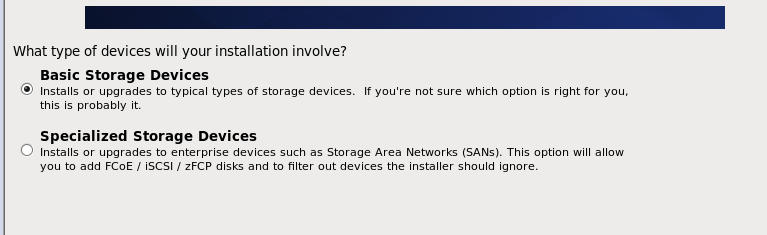
choose much next step we get there->
we choose Yes,discard any data->next->

input HostName,i set the master as HostName->next->

next->
The position we choose ShangHai->next

there we must confirm the window that tell us input the password and confirm(Don`t forget that pwd)->next->
there we choose Replace Existing Linux System->next

then choose Write Changes to disk->

next->

The System will progress the install progress->
OK->we Reboot the system

oh welcom view->forward

Yes,I agree to the license Agreement(you known)->
then input your Username and password as will you like and dont`t forget them->

forward

if you get error in the Kdump step neglect it and click finish->

Then Reboot -> wait a minute we can input the password into the system CentOS->

OK The CentOS64`s Install is complete ! Congratulation To you !
Then we set the net to the VM ->
choose the vpn connections -> Configure VPN->
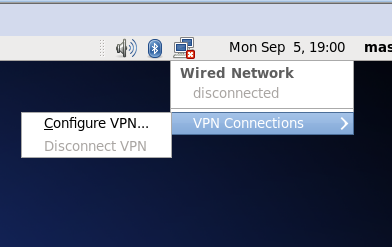
Add->

Create->

RName the connection name we named master ->

let find the settings options there->

Then choose VMnet8->'NAT设置'->
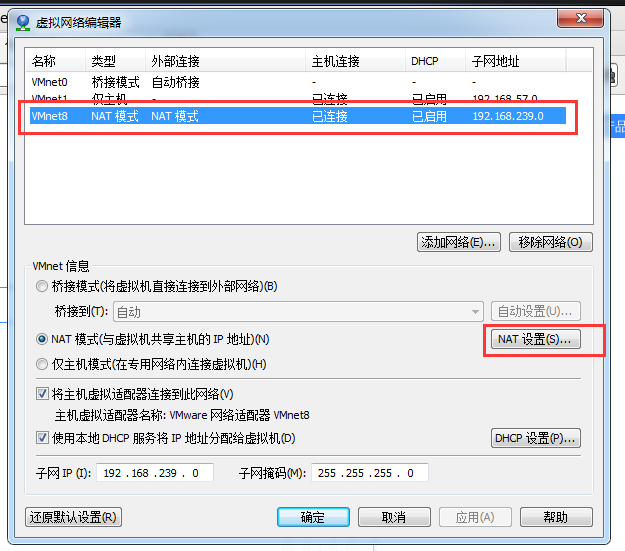

We can get the Net GateWay and NetMask etc...
then we set the net work->

The Address input as will but cant repeat with other !
if we don`t known the DNS servers we input the chorm`s DNS 8.8.8.8;
then we into the vm-> set the IPv4 Settings:
Method:Manual(static address);
Address:192.168.239.128;
NetMask:255.255.255.0;
GateWay:192.168.239.2;
DNS server:8.8.8.8
Apply ->
You should start your VMware NAT Service if you want VM to connection the internet via conputer !

Then we find the network ico is have not the error ico ;

We can ping the host 192.168.239.1

you can see it`s successful !
let we test->start the Firfox explorer->input the url www.baidu.com->enter->

That you can see the vm CentOS can surf the internet !
Then let we configurate the Hadoop install and configuration !
VMware12 安装 CentOS 6.5 64位的更多相关文章
- 安装CentOS 6.4 64 位操作系统
1.安装 CentOS 6.4 64位操作系统的一些困境: 1.1 CentOS 6.4 64位操作系统的ISO文件有4G多,通过U盘安装的方式已经不可取(FAT32 只支持最大4G文件); 1.2 ...
- CentOS 6.3 64位下MySQL5.1.54源码安装配置详解
安装环境:CentOS 6.3 64位 一:先安装依赖包(不然配置的时候会报错的!) yum -y install ncurses* libtermcap* 新建mysql用户 [root@clien ...
- CentOS 6.5 64位下安装Redis3.0.2的具体流程
系统环境:CentOS 6.5 64位 安装方式:编译安装 防火墙:开启 Redis版本:Redis 3.0.2 一.环境准备 1.安装 gcc gcc-c++ [root@iZ94ebgv853Z ...
- 使用centos 5.x 64位系统安装astgo 2014 v7.3教程(含全套安装文件)
版本特色: 全自动安装 安装过程中不用频繁输入yes或回车 自带完整号码归属地数据库 自带触屏版WAP ·首先确定你需要使用astgo 2014 7.0还是7.3: astgo 2014 v 7.0 ...
- linux CentOs 7.4 64位 系统下 nuxt部署 、nginx 安装、node环境及软连接,pm2软连接
一.nginx安装 1.安装依赖包 //一键安装上面四个依赖 yum -y install gcc zlib zlib-devel pcre-devel openssl openssl-devel 2 ...
- 在 CentOS 7.5 64位上使用 yum 安装 MySQL 8.0
前段时间在 CentOS 7.5 64位上安装 MySQL 8.0.查了些资料,在这里记录一下详细的安装和设置步骤. 一.安装 使用yum安装MySQL之前需要先下载对应的.rpm文件,下载方法: 去 ...
- sqlServer2014安装说明(windows7 64位)
SqlServer2014安装说明(windows7 64位) 地址:https://www.microsoft.com/zh-cn/download/details.aspx?id=42299 1, ...
- CentOS X64上64位Oracle 11gR2 静默安装
CentOS 6.2 X64上64位Oracle 11gR2 静默安装 www.linuxidc.com/Linux/2012-03/56606p4.htm HP-UX静默安装oracle11g过程 ...
- Centos 6.5(64位) vim 8.0 安装
转自:https://blog.csdn.net/sdoyuxuan/article/details/78825912 1 先得安装nurses库 yum list | grep "ncur ...
随机推荐
- 使用php添加定时任务
1. php执行外部命令的函数: system(),exec(),passthru() 注意点: 1.调用的路径,相对路径有时候不是很靠谱. sys ...
- 使用opencv设置图像的格式以及帧率
最近楼主正在写一个关于图像存储的程序,LZ有一颗求知心,想要了解保存的图像的格式以及获取摄像头帧率.晚些时候会写一篇关于opencv获取摄像头并且保存每帧图像信息方法. 1.修改图像的像素显示: 首先 ...
- Multiverse in Doctor Strange // Multiverse在《神秘博士》
关于<神秘博士>的制作内容 https://www.fxguide.com/quicktakes/bonus-luma-pictures-new-tools-for-doctor-stra ...
- CSS中的相对定位和绝对定位
1.元素的position属性的值默认为static 就是没有定位,元素出现在正常的文档流中,,这个时候你给这个元素设置的left,right,bottom,top这些偏移属性都是没有效果的, 使用相 ...
- Asp.net 怎样去除表单多行文本框滚动条
<textarea style="overflow:hidden;border-width:0px;">永远没有滚动条</textarea><text ...
- C++ 删除字符串的两种实现方式
C++实现删除给定字符串的给定字符串思路主要有这么几种实现方式: 1.KMP算法2.用STL的string的 find,然后用erase3.用C的strstr找到字串位置,然后用strncpy写到新串 ...
- web form 控件
webform的简单控件1.Label:文本显示,编译后是span属性:颜色,样式,边线宽度2.Literal:纯文本显示,编译后是text 3.TextBox:文本框TextMode-密码框.文本域 ...
- nginx_tomcat负载均衡环境
Nginx+Tomcat搭建 版本 操作系统版本 Centos 6.4 Nginx版本 nginx-1.3.15.tar.gz JDK版本 jdk-7u71-linux-i586 //jdk1.7 T ...
- 初识Memcached
一,什么是memcached? Memcached是一个高性能的分布式内存对象缓存系统,用于动态web应用以减轻数据库负载..它通过在内存中缓存数据和对象来减少读取数据库的次数,从而提高动态.数据库驱 ...
- Variant OLE automation
The Variant data type is the data type for all variables. can contain any kind of data except fixed- ...