
Spring MVC中使用POI导出Word
内容绝大部分来源于网络
准备工作
- 准备【XwpfTUtil】工具类(来源于网络)
- 准备word模版
下载【XwpfTUtil】工具类
import org.apache.poi.xwpf.usermodel.*;

import java.io.IOException;

import java.io.InputStream;

import java.io.OutputStream;

import java.util.Iterator;

import java.util.List;

import java.util.Map;

import java.util.regex.Matcher;

import java.util.regex.Pattern;

public class XwpfTUtil {

    /**

     * 替换段落里面的变量

     *

     * @param doc    要替换的文档

     * @param params 参数

     */

    public void replaceInPara(XWPFDocument doc, Map<String, Object> params) {

        Iterator<XWPFParagraph> iterator = doc.getParagraphsIterator();

        XWPFParagraph para;

        while (iterator.hasNext()) {

            para = iterator.next();

            this.replaceInPara(para, params);

        }

    }

    /**

     * 替换段落里面的变量

     *

     * @param para   要替换的段落

     * @param params 参数

     */

    public void replaceInPara(XWPFParagraph para, Map<String, Object> params) {

        List<XWPFRun> runs;

        Matcher matcher;

        if (this.matcher(para.getParagraphText()).find()) {

            runs = para.getRuns();

            int start = -1;

            int end = -1;

            String str = "";

            for (int i = 0; i < runs.size(); i++) {

                XWPFRun run = runs.get(i);

                String runText = run.toString();

                System.out.println("------>>>>>>>>>" + runText);

                if ('$' == runText.charAt(0)&&'{' == runText.charAt(1)) {

                    start = i;

                }

                if ((start != -1)) {

                    str += runText;

                }

                if ('}' == runText.charAt(runText.length() - 1)) {

                    if (start != -1) {

                        end = i;

                        break;

                    }

                }

            }

            System.out.println("start--->"+start);

            System.out.println("end--->"+end);

            System.out.println("str---->>>" + str);

            for (int i = start; i <= end; i++) {

                para.removeRun(i);

                i--;

                end--;

                System.out.println("remove i="+i);

            }

            for (String key : params.keySet()) {

                if (str.equals(key)) {

                    para.createRun().setText((String) params.get(key));

                    break;

                }

            }

        }

    }

    /**

     * 替换表格里面的变量

     *

     * @param doc    要替换的文档

     * @param params 参数

     */

    public void replaceInTable(XWPFDocument doc, Map<String, Object> params) {

        Iterator<XWPFTable> iterator = doc.getTablesIterator();

        XWPFTable table;

        List<XWPFTableRow> rows;

        List<XWPFTableCell> cells;

        List<XWPFParagraph> paras;

        while (iterator.hasNext()) {

            table = iterator.next();

            rows = table.getRows();

            for (XWPFTableRow row : rows) {

                cells = row.getTableCells();

                for (XWPFTableCell cell : cells) {

                    paras = cell.getParagraphs();

                    for (XWPFParagraph para : paras) {

                        this.replaceInPara(para, params);

                    }

                }

            }

        }

    }

    /**

     * 正则匹配字符串

     *

     * @param str

     * @return

     */

    private Matcher matcher(String str) {

        Pattern pattern = Pattern.compile("\\$\\{(.+?)\\}", Pattern.CASE_INSENSITIVE);

        Matcher matcher = pattern.matcher(str);

        return matcher;

    }

    /**

     * 关闭输入流

     *

     * @param is

     */

    public void close(InputStream is) {

        if (is != null) {

            try {

                is.close();

            } catch (IOException e) {

                e.printStackTrace();

            }

        }

    }

    /**

     * 关闭输出流

     *

     * @param os

     */

    public void close(OutputStream os) {

        if (os != null) {

            try {

                os.close();

            } catch (IOException e) {

                e.printStackTrace();

            }

        }

    }

}
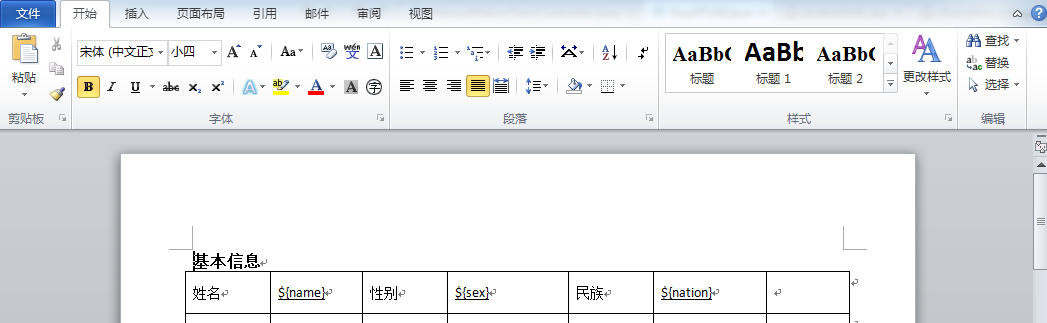
Word模版
需要填充的内容已${xxx}代替
完整步骤
一:页面中点击导出word按钮
//导出word

 $("#导出按钮的ID").click(function () {

    //请使用  window.location.href 发送请求。

     window.location.href = "/exportfoWord"

 });
二: 后台Controller
@RequestMapping("exportWord")

    @ResponseBody

    public String exportWord(HttpServletRequest request, HttpServletResponse response){

        Service.exportWord(request,response);

        return "success";

    }
三:后台service
    public void exportWord(HttpServletRequest request, HttpServletResponse response) {

        XWPFDocument doc = null;

        InputStream is=null;

        OutputStream os = null;

        XwpfTUtil xwpfTUtil = new XwpfTUtil();

        try{

            Map<String, Object> params = new HashMap<String, Object>();

            params.put("${name}", "张三");

                String fileNameInResource="temp.docx";//word模版的名字

            is = getClass().getClassLoader().getResourceAsStream(fileNameInResource);//会在跟路径下面查看temp.doc文件。(web项目中为classes文件下面)

            doc = new XWPFDocument(is);

            xwpfTUtil.replaceInPara(doc, params);

            //替换表格里面的变量

            xwpfTUtil.replaceInTable(doc, params);

            os = response.getOutputStream();

            response.setContentType("application/vnd.ms-excel");

            response.setHeader("Content-disposition","attachment;filename=export-Word-name.docx");//filename为导出的word的名字

            doc.write(os);

        }catch (Exception e){

            logger.debug(e.getMessage());

        }finally {

            xwpfTUtil.close(os);

            xwpfTUtil.close(is);

            try {

                os.flush();

                os.close();

            } catch (IOException e) {

                e.printStackTrace();

            }

        }

    }
导出效果

Spring MVC中使用POI导出Word的更多相关文章
- Http请求中Content-Type讲解以及在Spring MVC中的应用
引言: 在Http请求中,我们每天都在使用Content-type来指定不同格式的请求信息,但是却很少有人去全面了解content-type中允许的值有多少,这里将讲解Content-Type的可用值 ...
- Spring mvc 中使用 kaptcha 验证码
生成验证码的方式有很多,个人认为较为灵活方便的是Kaptcha ,他是基于SimpleCaptcha的开源项目.使用Kaptcha 生成验证码十分简单并且参数可以进行自定义.只需添加jar包配置下就可 ...
- Http请求中Content-Type讲解以及在Spring MVC中的应用【转】
完全引用自: http://blog.csdn.net/blueheart20/article/details/45174399#t1 此文讲得很清晰,赞! 引言: 在Http请求中,我们每天都在 ...
- java工具类POI导出word
1.新建一个word,里面填写内容,如: 2.导出wordjava类 /** * POI导出word测试 * @throws Exception */ @RequestMapping(value=&q ...
- Http请求中Content-Type和Accept讲解以及在Spring MVC中的应用
在Http请求中,我们每天都在使用Content-type来指定不同格式的请求信息,但是却很少有人去全面了解content-type中允许的值有多少,这里将讲解Content-Type的可用值,以及在 ...
- [转]Http请求中Content-Type讲解以及在Spring MVC中的应用
本文转自:http://blog.csdn.net/blueheart20/article/details/45174399 引言: 在Http请求中,我们每天都在使用Content-type来指定不 ...
- 使用POI导出Word(含表格)的实现方式及操作Word的工具类
.personSunflowerP { background: rgba(51, 153, 0, 0.66); border-bottom: 1px solid rgba(0, 102, 0, 1); ...
- Spring mvc中@RequestMapping 6个基本用法
Spring mvc中@RequestMapping 6个基本用法 spring mvc中的@RequestMapping的用法. 1)最基本的,方法级别上应用,例如: Java代码 @Reques ...
- spring mvc中使用freemark的一点心得
参考文档: FreeMarker标签与使用 连接http://blog.csdn.net/nengyu/article/details/6829244 freemarker学习笔记--指令参考: ht ...
随机推荐
- 深入剖析MSAA
本文打算对MSAA(Multisample anti aliasing)做一个深入的讲解,包括基本的原理.以及不同平台上的实现对比(主要是PC与Mobile).为了对MSAA有个更好的理解,所以写下了 ...
- Java异常的正确使用姿势
最近在项目代码中,遇见异常滥用的情形,会带来什么样的后果呢? 1. 代码可读性变差,业务逻辑难以理解 异常流与业务状态流混在一起,无法从接口协议层面理解业务代码,只能深入到方法(Method)内部才能 ...
- 页面刷新vuex数据消失问题解决方案 之 vuex中间件
之前我写了一篇用ES6 Proxy方案解决数据同步的文章 页面刷新vuex数据消失问题解决方案. 今天和同事沟通这个vuex数据还原问题,我说我的方法很奇异.聊着聊着,同事咋不用 store.sub ...
- QQ音乐API-借他人之力实现我的音乐盒
好久没有写博客了,最近升级做爸爸了,很开心的事情.内心又很忧郁,怎么能给媳妇和儿子一个相对好的物质经济条件.现在什么都没有的我,至少还有你们. 话不多说了,这篇博客还是和自己用vue做web app相 ...
- Redis学习笔记(一)关于在windows64位环境下的安装学习使用
前言 由于工作需要,目前我正在学习使用Redis.我当时学习Redis就从网上下载了点资料就开始学习了.入门看的是<REDIS入门指南>,这本书个人觉得很适合新手用来学习接触.根据书上的引 ...
- select模型
在Windows中所有的socket函数都是阻塞类型的,也就是说只有网络中有特定的事件发生时才会返回,在没有发生事件时会一直等待,虽说我们将它们设置为非阻塞状态,但是在对于服务器段而言,肯定会一直等待 ...
- 《JAVA程序设计与实例》记录与归纳--继承与多态
继承与多态 概念贴士: 1. 继承,即是在已经存在的类的基础上再进行扩展,从而产生新的类.已经存在的类成为父类.超类和基类,而新产生的类成为子类或派生类. 2. Java继承是使用已存在的类的定义作为 ...
- C++雾中风景6:拷贝构造函数与赋值函数
在进行C++类编写的过程之中,通常会涉及到类的拷贝构造函数与类的赋值函数.初涉类编写的代码,对于两类函数的用法一直是挺让人困惑的内容.这篇文章我们会详细来梳理拷贝构造函数与赋值函数的区别. 1.调用了 ...
- flask-日料网站搭建-数据库操作
引言:想使用python的flask框架搭建一个日料网站,主要包含web架构,静态页面,后台系统,交互,目前已经copy完主页,不是前端太慢太慢. 本节知识:数据库的操作,模型建表,更新数据库. py ...
- JAVA基础-File类
一.File类概述 File类是文件和目录路径名的抽象表示形式.File类可以理解为一个文件路径或者文件夹路径的JAVA表现形式,而路径又可以分为绝对路径(是一个固定路径,从盘符开始),相对路径(相对 ...