
Spring MVC中使用POI导出Word
内容绝大部分来源于网络
准备工作
- 准备【XwpfTUtil】工具类(来源于网络)
- 准备word模版
下载【XwpfTUtil】工具类
import org.apache.poi.xwpf.usermodel.*;

import java.io.IOException;

import java.io.InputStream;

import java.io.OutputStream;

import java.util.Iterator;

import java.util.List;

import java.util.Map;

import java.util.regex.Matcher;

import java.util.regex.Pattern;

public class XwpfTUtil {

    /**

     * 替换段落里面的变量

     *

     * @param doc    要替换的文档

     * @param params 参数

     */

    public void replaceInPara(XWPFDocument doc, Map<String, Object> params) {

        Iterator<XWPFParagraph> iterator = doc.getParagraphsIterator();

        XWPFParagraph para;

        while (iterator.hasNext()) {

            para = iterator.next();

            this.replaceInPara(para, params);

        }

    }

    /**

     * 替换段落里面的变量

     *

     * @param para   要替换的段落

     * @param params 参数

     */

    public void replaceInPara(XWPFParagraph para, Map<String, Object> params) {

        List<XWPFRun> runs;

        Matcher matcher;

        if (this.matcher(para.getParagraphText()).find()) {

            runs = para.getRuns();

            int start = -1;

            int end = -1;

            String str = "";

            for (int i = 0; i < runs.size(); i++) {

                XWPFRun run = runs.get(i);

                String runText = run.toString();

                System.out.println("------>>>>>>>>>" + runText);

                if ('$' == runText.charAt(0)&&'{' == runText.charAt(1)) {

                    start = i;

                }

                if ((start != -1)) {

                    str += runText;

                }

                if ('}' == runText.charAt(runText.length() - 1)) {

                    if (start != -1) {

                        end = i;

                        break;

                    }

                }

            }

            System.out.println("start--->"+start);

            System.out.println("end--->"+end);

            System.out.println("str---->>>" + str);

            for (int i = start; i <= end; i++) {

                para.removeRun(i);

                i--;

                end--;

                System.out.println("remove i="+i);

            }

            for (String key : params.keySet()) {

                if (str.equals(key)) {

                    para.createRun().setText((String) params.get(key));

                    break;

                }

            }

        }

    }

    /**

     * 替换表格里面的变量

     *

     * @param doc    要替换的文档

     * @param params 参数

     */

    public void replaceInTable(XWPFDocument doc, Map<String, Object> params) {

        Iterator<XWPFTable> iterator = doc.getTablesIterator();

        XWPFTable table;

        List<XWPFTableRow> rows;

        List<XWPFTableCell> cells;

        List<XWPFParagraph> paras;

        while (iterator.hasNext()) {

            table = iterator.next();

            rows = table.getRows();

            for (XWPFTableRow row : rows) {

                cells = row.getTableCells();

                for (XWPFTableCell cell : cells) {

                    paras = cell.getParagraphs();

                    for (XWPFParagraph para : paras) {

                        this.replaceInPara(para, params);

                    }

                }

            }

        }

    }

    /**

     * 正则匹配字符串

     *

     * @param str

     * @return

     */

    private Matcher matcher(String str) {

        Pattern pattern = Pattern.compile("\\$\\{(.+?)\\}", Pattern.CASE_INSENSITIVE);

        Matcher matcher = pattern.matcher(str);

        return matcher;

    }

    /**

     * 关闭输入流

     *

     * @param is

     */

    public void close(InputStream is) {

        if (is != null) {

            try {

                is.close();

            } catch (IOException e) {

                e.printStackTrace();

            }

        }

    }

    /**

     * 关闭输出流

     *

     * @param os

     */

    public void close(OutputStream os) {

        if (os != null) {

            try {

                os.close();

            } catch (IOException e) {

                e.printStackTrace();

            }

        }

    }

}
Word模版
需要填充的内容已${xxx}代替
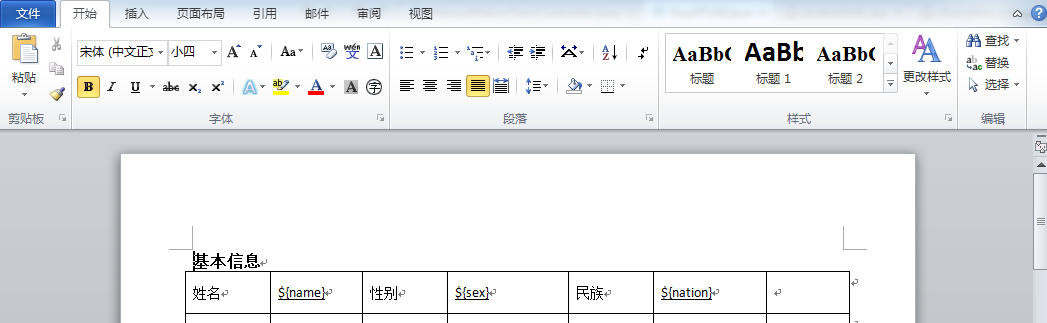
完整步骤
一:页面中点击导出word按钮
//导出word

 $("#导出按钮的ID").click(function () {

    //请使用  window.location.href 发送请求。

     window.location.href = "/exportfoWord"

 });
二: 后台Controller
@RequestMapping("exportWord")

    @ResponseBody

    public String exportWord(HttpServletRequest request, HttpServletResponse response){

        Service.exportWord(request,response);

        return "success";

    }
三:后台service
    public void exportWord(HttpServletRequest request, HttpServletResponse response) {

        XWPFDocument doc = null;

        InputStream is=null;

        OutputStream os = null;

        XwpfTUtil xwpfTUtil = new XwpfTUtil();

        try{

            Map<String, Object> params = new HashMap<String, Object>();

            params.put("${name}", "张三");

                String fileNameInResource="temp.docx";//word模版的名字

            is = getClass().getClassLoader().getResourceAsStream(fileNameInResource);//会在跟路径下面查看temp.doc文件。(web项目中为classes文件下面)

            doc = new XWPFDocument(is);

            xwpfTUtil.replaceInPara(doc, params);

            //替换表格里面的变量

            xwpfTUtil.replaceInTable(doc, params);

            os = response.getOutputStream();

            response.setContentType("application/vnd.ms-excel");

            response.setHeader("Content-disposition","attachment;filename=export-Word-name.docx");//filename为导出的word的名字

            doc.write(os);

        }catch (Exception e){

            logger.debug(e.getMessage());

        }finally {

            xwpfTUtil.close(os);

            xwpfTUtil.close(is);

            try {

                os.flush();

                os.close();

            } catch (IOException e) {

                e.printStackTrace();

            }

        }

    }
导出效果

Spring MVC中使用POI导出Word的更多相关文章
- Http请求中Content-Type讲解以及在Spring MVC中的应用
引言: 在Http请求中,我们每天都在使用Content-type来指定不同格式的请求信息,但是却很少有人去全面了解content-type中允许的值有多少,这里将讲解Content-Type的可用值 ...
- Spring mvc 中使用 kaptcha 验证码
生成验证码的方式有很多,个人认为较为灵活方便的是Kaptcha ,他是基于SimpleCaptcha的开源项目.使用Kaptcha 生成验证码十分简单并且参数可以进行自定义.只需添加jar包配置下就可 ...
- Http请求中Content-Type讲解以及在Spring MVC中的应用【转】
完全引用自: http://blog.csdn.net/blueheart20/article/details/45174399#t1 此文讲得很清晰,赞! 引言: 在Http请求中,我们每天都在 ...
- java工具类POI导出word
1.新建一个word,里面填写内容,如: 2.导出wordjava类 /** * POI导出word测试 * @throws Exception */ @RequestMapping(value=&q ...
- Http请求中Content-Type和Accept讲解以及在Spring MVC中的应用
在Http请求中,我们每天都在使用Content-type来指定不同格式的请求信息,但是却很少有人去全面了解content-type中允许的值有多少,这里将讲解Content-Type的可用值,以及在 ...
- [转]Http请求中Content-Type讲解以及在Spring MVC中的应用
本文转自:http://blog.csdn.net/blueheart20/article/details/45174399 引言: 在Http请求中,我们每天都在使用Content-type来指定不 ...
- 使用POI导出Word(含表格)的实现方式及操作Word的工具类
.personSunflowerP { background: rgba(51, 153, 0, 0.66); border-bottom: 1px solid rgba(0, 102, 0, 1); ...
- Spring mvc中@RequestMapping 6个基本用法
Spring mvc中@RequestMapping 6个基本用法 spring mvc中的@RequestMapping的用法. 1)最基本的,方法级别上应用,例如: Java代码 @Reques ...
- spring mvc中使用freemark的一点心得
参考文档: FreeMarker标签与使用 连接http://blog.csdn.net/nengyu/article/details/6829244 freemarker学习笔记--指令参考: ht ...
随机推荐
- iOS libyuv
libyuv是Google开源库,可用作图像数据格式的转换,比如视频流编解码时格式的转换,YUV数据转化RGB等 libyuv静态库 为了方便使用,已经将libyuv源代码打包成了iOS静态库,lib ...
- 在eclipse上安装Scala插件
1.官网下载地址 http://scala-ide.org/download/current.html 目前最新的版本 http://download.scala-ide.org/sdk/lithiu ...
- Repair MySQL 5.6 GTID replication by injecting empty transactions
Since SQL_SLAVE_SKIP_COUNTER doesn’t work with GTID we need to find a way to ignore that transaction ...
- 3.If statements
if 语句 电脑程序不只是执行命令.时常会需要做出选择.例如基于一个条件的选择.Python有这样几种条件运算: > greater than < smaller than ...
- [转]Python的3种格式化字符串方法
本文转自: 夏日微风Python笔记 传统C语言式 命名参数 位置参数 1. 传统C语言式 和c语言里面的 sprintf 类似,参数格式也一样 title = "world" y ...
- js最常用正则表达式集合
常用正则表达式合集:验证数字:^[0-9]*$验证n位的数字:^\d{n}$验证至少n位数字:^\d{n,}$验证m-n位的数字:^\d{m,n}$验证零和非零开头的数字:^(0|[1-9][0-9] ...
- bzoj:1457: 棋盘游戏
原题链接:http://www.lydsy.com/JudgeOnline/problem.php?id=1457 看了网上dalao的题解,好像解释得并不是很清楚,就按照那种思路,自己YY了一个想法 ...
- poj1830:开关问题
链接:http://poj.org/problem?id=1830 某天“佐理慧学姐”突然来问了我这道题. 诶,窝只会线性基,但是好像搞不了方案数啊…… 啃题解吧. woc!线性代数哦,就是那种我不会 ...
- CodeForces839-B. Game of the Rows-水题(贪心)
最近太zz了,老是忘记带脑子... 补的以前的cf,发现脑子不好使... B. Game of the Rows time limit per test 1 second memory limit ...
- JAVA爬虫实践(实践一:知乎)
爬虫顺序 1.分析网站网络请求 通过浏览器F12开发者工具查看网站的内容获取方式. 2.模拟HTTP请求,获取网页内容. 可以采用HttpClient,利用JAVA HttpClient工具可以模拟H ...