
Java是如何解析xml文件的(DOM)
Java解析xml文件
- 获取 节点名和节点值
- 获取 属性名、属性值。
- DOM
- SAX
- DOM4J
- JDOM
例:DOM方式解析books.xml文件
<?xml version="1.0" encoding="UTF-8" ?>

<bookstore>

        <book type="fiction" id="1">

                <name>冰与火之歌</name>

                <author>乔治马丁</author>

                <year>2014</year>

                <price>89</price>

        </book>

        <book id="2">

                <name>安徒生童话</name>

                <year>2004</year>

                <price>77</price>

                <language>English</language>

        </book>

</bookstore><?xml version="1.0" encoding="UTF-8" ?>
<bookstore>
<book type="fiction" id="1">
<name>冰与火之歌</name>
<author>乔治马丁</author>
<year>2014</year>
<price>89</price>
</book>
<book id="2">
<name>安徒生童话</name>
<year>2004</year>
<price>77</price>
<language>English</language>
</book>
</bookstore>
准备工作
- (1)创建一个DocumentBuilderFactory对象
- (2)创建一个DocumentBuilder对象
- (3)通过DocumentBuilder对象的parse(String fileName)方法解析xml文件
public class DomTest {

    public static void main(String[] args) {

        //(1)创建DocumentBuilderFactory对象

        DocumentBuilderFactory dbf = DocumentBuilderFactory.newInstance();

        try {

            //(2)创建DocumentBuilder对象

            DocumentBuilder db = dbf.newDocumentBuilder();

            //(3)通过DocumentBuilder对象的parse方法加载book.xml

            Document document = db.parse("books.xml");

        } catch (ParserConfigurationException e) {

            e.printStackTrace();

        } catch (SAXException e) {

            e.printStackTrace();

        } catch (IOException e) {

            e.printStackTrace();

        }

    }

}public class DomTest {
public static void main(String[] args) {
//(1)创建DocumentBuilderFactory对象
DocumentBuilderFactory dbf = DocumentBuilderFactory.newInstance();
try {
//(2)创建DocumentBuilder对象
DocumentBuilder db = dbf.newDocumentBuilder();
//(3)通过DocumentBuilder对象的parse方法加载book.xml
Document document = db.parse("books.xml");
} catch (ParserConfigurationException e) {
e.printStackTrace();
} catch (SAXException e) {
e.printStackTrace();
} catch (IOException e) {
e.printStackTrace();
}
}
}
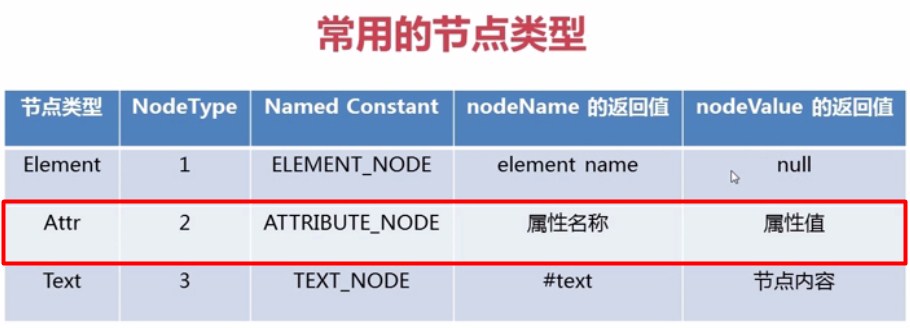
解析xml文件属性
- (1)Document类来获取节点集合
- (2)遍历节点集合
- (3)通过item(i)获取节点Node
- (4)通过Node的getAttributes获取节点的属性集合
- (5)遍历属性
- (6)获取属性和属性名
public class DomTest {

    public static void main(String[] args) {

        //创建DocumentBuilderFactory对象

        DocumentBuilderFactory dbf = DocumentBuilderFactory.newInstance();

        try {

            //创建DocumentBuilder对象

            DocumentBuilder db = dbf.newDocumentBuilder();

            //通过DocumentBuilder对象的parse方法加载book.xml

            Document document = db.parse("books.xml");

            //(1)获取所有book节点的集合

            NodeList booklist = document.getElementsByTagName("book");

            System.out.println("共有" + booklist.getLength() + "本书");

            System.out.println("-------------------------------------");

            //(2)遍历每个book节点

            for (int i = 0; i < booklist.getLength(); i++) {

                //(3)通过item(i)获取book节点,nodelist索引从0开始

                Node book = booklist.item(i);

                //(4)获取book节点的所有属性集合

                NamedNodeMap attrs = book.getAttributes();

                //获取属性的数量

                System.out.println("第" + (i + 1) + "本书有" + attrs.getLength() + "个属性");

                System.out.print("分别是:");

                //(5)遍历book的属性

                for (int j = 0; j < attrs.getLength(); j++) {

                    //(6)获取属性

                    Node att = attrs.item(j);

                    //(6)获取属性的名称

                    String attName = att.getNodeName();

                    System.out.print(attName + ", ");

                }

                System.out.println();

                System.out.println("-------------------------------------");

            }

        } catch (ParserConfigurationException e) {

            e.printStackTrace();

        } catch (SAXException e) {

            e.printStackTrace();

        } catch (IOException e) {

            e.printStackTrace();

        }

    }

}public class DomTest {
public static void main(String[] args) {
//创建DocumentBuilderFactory对象
DocumentBuilderFactory dbf = DocumentBuilderFactory.newInstance();
try {
//创建DocumentBuilder对象
DocumentBuilder db = dbf.newDocumentBuilder();
//通过DocumentBuilder对象的parse方法加载book.xml
Document document = db.parse("books.xml");
//(1)获取所有book节点的集合
NodeList booklist = document.getElementsByTagName("book");
System.out.println("共有" + booklist.getLength() + "本书");
System.out.println("-------------------------------------");
//(2)遍历每个book节点
for (int i = 0; i < booklist.getLength(); i++) {
//(3)通过item(i)获取book节点,nodelist索引从0开始
Node book = booklist.item(i);
//(4)获取book节点的所有属性集合
NamedNodeMap attrs = book.getAttributes();
//获取属性的数量
System.out.println("第" + (i + 1) + "本书有" + attrs.getLength() + "个属性");
System.out.print("分别是:");
//(5)遍历book的属性
for (int j = 0; j < attrs.getLength(); j++) {
//(6)获取属性
Node att = attrs.item(j);
//(6)获取属性的名称
String attName = att.getNodeName();
System.out.print(attName + ", ");
}
System.out.println();
System.out.println("-------------------------------------");
}
} catch (ParserConfigurationException e) {
e.printStackTrace();
} catch (SAXException e) {
e.printStackTrace();
} catch (IOException e) {
e.printStackTrace();
}
}
}
共有2本书

-------------------------------------

第1本书有2个属性

分别是:id, type,

-------------------------------------

第2本书有1个属性

分别是:id,

-------------------------------------共有2本书
-------------------------------------
第1本书有2个属性
分别是:id, type,
-------------------------------------
第2本书有1个属性
分别是:id,
-------------------------------------
解析xml文件属性的子节点
- (1)使用getChildNodes()获取子节点集合
- (2)遍历子节点
- (3)获取子节点
- (4)输出子节点名称和内容
public class DomTest {

    public static void main(String[] args) {

        //创建DocumentBuilderFactory对象

        DocumentBuilderFactory dbf = DocumentBuilderFactory.newInstance();

        try {

            //创建DocumentBuilder对象

            DocumentBuilder db = dbf.newDocumentBuilder();

            //通过DocumentBuilder对象的parse方法加载book.xml

            Document document = db.parse("books.xml");

            //获取所有book节点的集合

            NodeList booklist = document.getElementsByTagName("book");

            System.out.println("共有" + booklist.getLength() + "本书");

            System.out.println("-------------------------------------");

            //遍历每个book节点

            for (int i = 0; i < booklist.getLength(); i++) {

                //通过item(i)获取book节点,nodelist索引从0开始

                Node book = booklist.item(i);

                //获取book节点的所有属性集合

                NamedNodeMap attrs = book.getAttributes();

                //获取属性的数量

                System.out.println("第" + (i + 1) + "本书有" + attrs.getLength() + "个属性");

                System.out.print("分别是:");

                //遍历book的属性

                for (int j = 0; j < attrs.getLength(); j++) {

                    //获取属性

                    Node att = attrs.item(j);

                    //获取属性的名称

                    String attName = att.getNodeName();

                    System.out.print(attName + ", ");

                }

                System.out.println();

                System.out.println("子节点:");

                //(1)解析book节点的子节点

                NodeList bookChildNodes = book.getChildNodes();

                //(2)遍历bookChildNodes获取每个子节点

                for (int k = 0; k < bookChildNodes.getLength(); k++) {

                    //(3)获取子节点

                    Node bookChild = bookChildNodes.item(k);

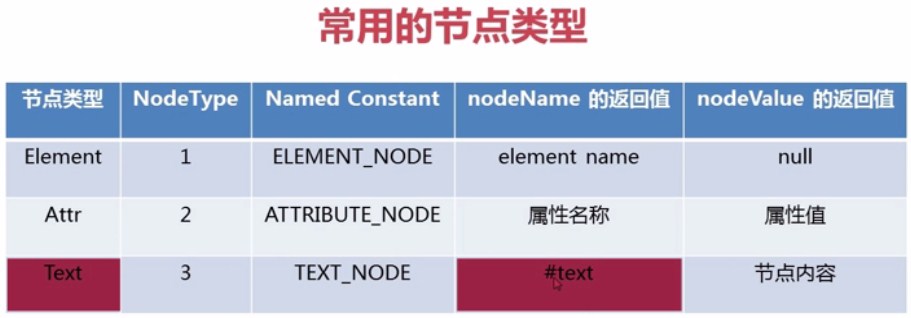
                    //注(a)

                    //区分text类型的node以及element类型的node(子节点含我们不需要的文本型,所以我们要筛选)

                    if (bookChild.getNodeType() == Node.ELEMENT_NODE) {

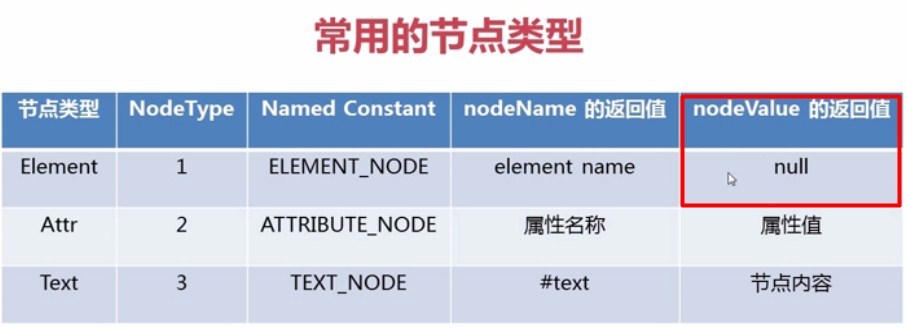
                        //注(b)

                        //(4)获取和输出节点名和节点内容

                        //方法1:

                        System.out.println(bookChild.getNodeName() + ",  " + bookChild.getTextContent());

                        //方法2:

                        //System.out.println(bookChild.getNodeName() + ",  " + bookChild.getFirstChild().getNodeValue());

                    }

                }

                System.out.println("-------------------------------------");

            }

        } catch (ParserConfigurationException e) {

            e.printStackTrace();

        } catch (SAXException e) {

            e.printStackTrace();

        } catch (IOException e) {

            e.printStackTrace();

        }

    }

}public class DomTest {
public static void main(String[] args) {
//创建DocumentBuilderFactory对象
DocumentBuilderFactory dbf = DocumentBuilderFactory.newInstance();
try {
//创建DocumentBuilder对象
DocumentBuilder db = dbf.newDocumentBuilder();
//通过DocumentBuilder对象的parse方法加载book.xml
Document document = db.parse("books.xml");
//获取所有book节点的集合
NodeList booklist = document.getElementsByTagName("book");
System.out.println("共有" + booklist.getLength() + "本书");
System.out.println("-------------------------------------");
//遍历每个book节点
for (int i = 0; i < booklist.getLength(); i++) {
//通过item(i)获取book节点,nodelist索引从0开始
Node book = booklist.item(i);
//获取book节点的所有属性集合
NamedNodeMap attrs = book.getAttributes();
//获取属性的数量
System.out.println("第" + (i + 1) + "本书有" + attrs.getLength() + "个属性");
System.out.print("分别是:");
//遍历book的属性
for (int j = 0; j < attrs.getLength(); j++) {
//获取属性
Node att = attrs.item(j);
//获取属性的名称
String attName = att.getNodeName();
System.out.print(attName + ", ");
}
System.out.println();
System.out.println("子节点:");
//(1)解析book节点的子节点
NodeList bookChildNodes = book.getChildNodes();
//(2)遍历bookChildNodes获取每个子节点
for (int k = 0; k < bookChildNodes.getLength(); k++) {
//(3)获取子节点
Node bookChild = bookChildNodes.item(k);
//注(a)
//区分text类型的node以及element类型的node(子节点含我们不需要的文本型,所以我们要筛选)
if (bookChild.getNodeType() == Node.ELEMENT_NODE) {
//注(b)
//(4)获取和输出节点名和节点内容
//方法1:
System.out.println(bookChild.getNodeName() + ", " + bookChild.getTextContent());
//方法2:
//System.out.println(bookChild.getNodeName() + ", " + bookChild.getFirstChild().getNodeValue());
}
}
System.out.println("-------------------------------------");
}
} catch (ParserConfigurationException e) {
e.printStackTrace();
} catch (SAXException e) {
e.printStackTrace();
} catch (IOException e) {
e.printStackTrace();
}
}
}
共有2本书

-------------------------------------

第1本书有2个属性

分别是:id, type,

子节点:

name,  test冰与火之歌

author,  乔治马丁

year,  2014

price,  89

-------------------------------------

第2本书有1个属性

分别是:id,

子节点:

name,  安徒生童话

year,  2004

price,  77

language,  English

-------------------------------------共有2本书
-------------------------------------
第1本书有2个属性
分别是:id, type,
子节点:
name, test冰与火之歌
author, 乔治马丁
year, 2014
price, 89
-------------------------------------
第2本书有1个属性
分别是:id,
子节点:
name, 安徒生童话
year, 2004
price, 77
language, English
-------------------------------------
<bookstroe>

  <book id="1">

      <name>冰与火之歌</name>

      <author>乔治马丁</author>

      <year>2014</year>

      <price>89</price>

  </book>

</bookstroe<bookstroe>
<book id="1">
<name>冰与火之歌</name>
<author>乔治马丁</author>
<year>2014</year>
<price>89</price>
</book>
</bookstroe
<bookstroe>

  <book id="1">

      <name>冰与火之歌</name>

      <author>乔治马丁</author>

      <year>2014</year>

      <price>89</price>

  </book>

</bookstroe><bookstroe>
<book id="1">
<name>冰与火之歌</name>
<author>乔治马丁</author>
<year>2014</year>
<price>89</price>
</book>
</bookstroe>
如何在Java中保留xml数据的结构?
附件列表
Java是如何解析xml文件的(DOM)的更多相关文章
- JAVA使用SAX解析XML文件
在我的另一篇文章(http://www.cnblogs.com/anivia/p/5849712.html)中,通过一个例子介绍了使用DOM来解析XML文件,那么本篇文章通过相同的XML文件介绍如何使 ...
- Java 创建过滤器 解析xml文件
今天写了一个过滤器demo,现在是解析actions.xml文件,得到action中的业务规则:不需要导入任何jar包 ActionFilter过滤器类: package accp.com.xh.ut ...
- 用JDK自带的包来解析XML文件(DOM+xpath)
DOM编程不要其它的依赖包,因为JDK里自带的JDK里含有的上面提到的org.w3c.dom.org.xml.sax 和javax.xml.parsers包就可以满意条件了.(1)org.w3c.do ...
- java使用dom4j解析xml文件
关于xml的知识,及作用什么的就不说了,直接解释如何使用dom4j解析.假如有如下xml: dom4j解析xml其实很简单,只要你有点java基础,知道xml文件.结合下面的xml文件和java代码, ...
- Android解析xml文件-采用DOM,PULL,SAX三种方法解析
解析如下xml文件 <?xml version="1.0" encoding="UTF-8"?> <persons> <perso ...
- java使用document解析xml文件
准备工作: 1创建java工程 2创建xml文档. 完成后看下面代码: import org.w3c.dom.*; import javax.xml.parsers.DocumentBuilder; ...
- java 使用SAX解析xml 文件
http://www.cnblogs.com/allenzheng/archive/2012/12/01/2797196.html 为了学习方便,忘博主勿究
- JAVA中使用DOM解析XML文件
XML是一种方便快捷高效的数据保存传输的格式,在JSON广泛使用之前,XML是服务器和客户端之间数据传输的主要方式.因此,需要使用各种方式,解析服务器传送过来的信息,以供使用者查看. JAVA作为一种 ...
- JAVA解析XML文件(DOM,SAX,JDOM,DOM4j附代码实现)
1.解析XML主要有四种方式 1.DOM方式解析XML(与平台无关,JAVA提供,一次性加载XML文件内容,形成树结构,不适用于大文件) 2.SAX方式解析XML(基于事件驱动,逐条解析,适用于只处理 ...
随机推荐
- destoon源码分析一
#0x01 先记录一些之前模糊的小知识点,补充一下 set_magic_quotes_runtime() -- 设置magic_quotes_runtime配置激活状态(php 5.3 被弃用,php ...
- MySQL GROUP BY多个字段分组用法详解
mysql语句中group by 很容易理解 是分组查询.比如 select sum(score) from user group by name 意思是查询每个人的分数总和但是, select su ...
- windows管理命令
执行msi程序 msiexec /package mysql-installer-community-5.7.18.0.msi rem 管理员DOS窗口执行这个命令,开始卸载mysql 杀死进程 ta ...
- 80C51学习 蜂鸣器
/* 蜂鸣器分为有源和无源 其中有源是指有振荡源 ULN2003 达林顿管 输入输出反向放大 */ #include "reg52.h" typedef unsigned int ...
- 关于如何在highchart上获取后台返回的值一些问题。
项目开发过程中有用到highchart图表进行项目的开发.一个比较常规的需求就是通过点击图表上的模块进行明细的查看. 1.比如坐标一月.二月.三月.四月.....有对应的值01,02,03,04... ...
- ie启动不了的解决办法,win7,win8都可以
今天我的IE也无法打开了,我装的是win7的系统,ie升级到了IE11,无法打开了,看到下面这篇文章,借鉴试试,没想到也成功了. 按以上步骤,打开注册表, 第一步.按下Win+R组合键,在出现的运行命 ...
- 欠了好久的CRM帖子,双11来读。
又一年双11了,觉得天猫双11越来越没特色了. 从折扣,音符旋律到红包,今年15年却找不出往年的热度,只是商家还是一样的急,备着活动目标计划,做着库存价格打标视觉设计这种苦逼的日子. 欠了好久的CRM ...
- [js高手之路]深入浅出webpack教程系列3-配置文件webpack.config.js详解(下)
本文继续接着上文,继续写下webpack.config.js的其他配置用法. 一.把两个文件打包成一个,entry怎么配置? 在上文中的webpack.dev.config.js中,用数组配置entr ...
- 利用Java调用OpenCV进行人脸识别
详见:http://blog.yemou.net/article/query/info/tytfjhfascvhzxcyt409 今天我准备学习如何用Java来进行人脸检测.人脸检测有助于在任何数字图 ...
- string和double之间的相互转换(C++)
很多人都写过这个标题的文章,但本文要解决的是确保负数的string和double也可以进行转换. 代码如下: string转double double stringToDouble(string nu ...